
- What to Record Each Day on the Jobsite
- How to Document Delays, Schedule Changes, and Labor Impact
- How to Track Cost Impact and Keep Records Aligned
- Building a Repeatable Weather Tracking Workflow With Software
- Conclusion: Core Practices for Accurate Construction Weather Tracking
- FAQs
- Related Blog Posts
For most of us, checking the weather is low stakes.
Rain? Fine. Maybe you’ll just stay home and make onion soup then. No biggie.
In construction, though, weather is extremely important because it’s tied to schedule and money. Weather affects up to 60% of construction projects in the U.S. It can slow concrete curing at 40°F or lower, stop crane work in high winds, and clear exposed areas during lightning.
Bad weather can stop work, cut productive hours, push the schedule back, or make certain work unsafe altogether.
And once that happens, you need more than a spreadsheet that says “It rained today.” You need Construction daily log software that that records the weather conditions, when work stopped and resumed, labor hours lost, and the impact on schedule and cost.
To get the full value out of your construction weather tracking app, it has to be set up right.
How to Use Construction Weather Tracking:
- Log actual site weather, not just the forecast
- Record affected work and lost hours
- Mark full, partial, or no-impact days
- Link delay events to schedule activity IDs
- Tag labor, equipment, and material costs to weather-only codes
- Store logs, photos, notices, and cost records under one event
A weather record holds up better when it shows one clear chain: site condition → work impact → schedule effect → cost impact.
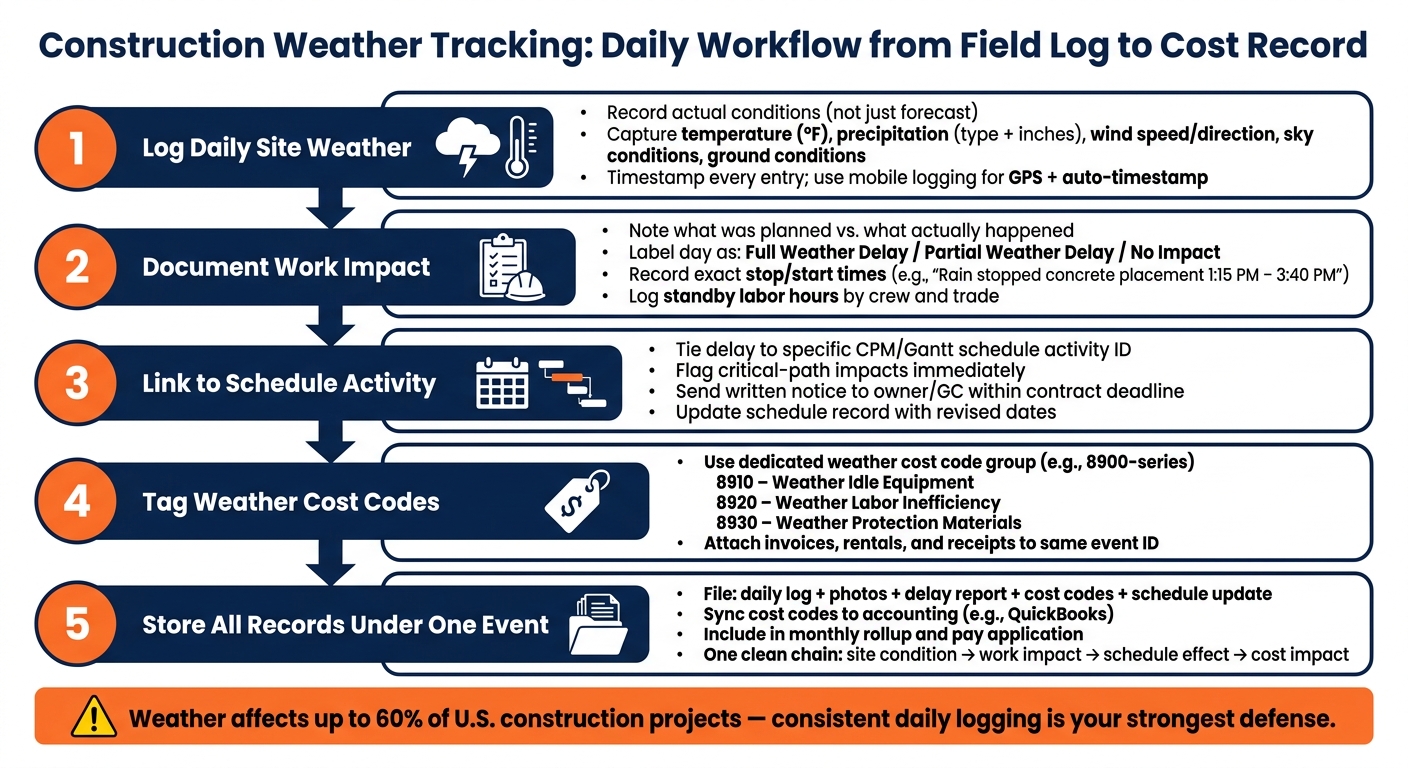
Construction Weather Tracking: Daily Workflow from Field Log to Cost Record
What to Record Each Day on the Jobsite
Once your weather-day definitions are set, the next step is simple: record the same field data every day. That consistency turns weather from a vague excuse into clear jobsite proof. The goal is to show what happened on site, on that day, with details someone can review months later.
Start with the same core data every day.
Daily Weather Data Points to Capture
A weather log only helps if you keep it consistent. Build a record that a PM, attorney, or auditor can review later and still understand without guessing. At minimum, each daily log should include the date in MM/DD/YYYY format, like 07/22/2026, plus morning and afternoon temperature readings in °F, sky conditions, wind speed and direction, and precipitation type and amount in inches.
You should also record site conditions. Mud, standing water, frozen soil, and blocked access roads can slow work down just as much as the weather itself.
| Weather Data Point | What to Capture | Why It Matters |
|---|---|---|
| Temperature | Morning and afternoon readings in °F | Concrete curing limits, OSHA heat safety thresholds |
| Precipitation | Type (rain, snow, sleet) and amount in inches | Delay justification, site access, erosion |
| Wind Conditions | Speed, direction, sustained vs. gusts | Crane shutdowns, roofing and exterior work stoppages |
| Ground Conditions | Mud, ice, standing water, frozen ground | Equipment mobility, excavation safety |
| Sky Conditions | Cloud cover, visibility, lightning present | Safety stoppages, exterior coating or painting limits |
If work stops, log the exact start and end times, along with the cause. Vague notes don’t hold up well. “Bad weather” says almost nothing. A note like “Rain stopped concrete placement from 1:15 PM to 3:40 PM” is much stronger.
These daily entries become the base record for photos, delay notes, and schedule changes.
Field Evidence That Strengthens the Record
Written notes help, but they shouldn’t stand alone. Timestamped photos and videos of site conditions – flooded excavations, idle equipment, mud-covered access roads – add proof that’s much harder to argue with. Label each photo with the location, date, and the condition shown.
It’s also smart to match field notes with data from official sources like NOAA, the National Weather Service (NWS), or nearby weather stations. Together, those records tell a fuller story than either one on its own. That can support delay records and labor documentation later.
Mobile Logging From the Field
Log conditions when they happen, not at the end of the day when details start to blur. Mobile entries can capture timestamps and GPS on their own, which gives the office instant visibility into what’s happening in the field.
Keep the template short enough to finish in 10 minutes or less. If it’s a hassle, people won’t keep up with it.
Use these daily records to support delay logs, schedule updates, and labor notes.
sbb-itb-5eea312
How to Document Delays, Schedule Changes, and Labor Impact
Once you’ve logged the daily weather, the next step is to tie it to delays, schedule changes, and labor output. That’s where the record starts to matter.
Daily Logs That Connect Weather to Work Delays
Your daily log should show three things: what was planned, what actually got done, and why there was a gap. Skip vague notes like “rain – no work.” They don’t say much. A better entry looks like this: wind sustained at 30 mph with gusts to 40 mph from 10:00 AM to 2:00 PM; crane operations shut down per manufacturer limits; only 4 of 12 planned picks completed.
Each day should also be labeled clearly.
- A full weather delay means planned critical-path work stopped all the way. In that case, note the exact safety rule or contract trigger that caused the shutdown.
- A partial weather delay means work continued, but at a lower rate, with shorter hours, or on noncritical tasks instead. Record the lost productive hours and what the crew moved to.
If the delay hits the critical path, send it up the chain that same day.
Schedule Updates and Delay Records
When weather affects a critical path activity, flag it immediately. Note the scheduled activity involved, how long it was delayed, and whether the impact rolls into the next day.
Under many U.S. contracts, contractors must give prompt written notice within the timeframe set by the contract. That means you should send a preliminary notice as soon as it’s clear the weather is affecting the schedule, even if you can’t yet measure the full effect. Include the project name and number, the date(s) affected, the weather event, the specific activities and crews involved, an initial time estimate, and any mitigation steps already taken.
After that, prepare a monthly rollup. That record should tally full and partial weather delay days, compare them against any contractual weather contingency days built into the baseline schedule, and show how many of those days affected the critical path.
Then spell out whether crews were redeployed or left standing by.
Labor Notes and Productivity Losses
Labor needs its own tracking so weather impact can be measured crew by crew. For each trade on site, log the crew count, planned hours, and actual hours worked. Standby time should be tracked on its own. That means hours spent on site but unable to work because of weather, such as 10 electricians idle from 9:30 AM to 12:00 PM due to lightning within 10 miles.
Output should be tracked in units you can measure, like square feet of roofing installed, cubic yards of concrete placed, or linear feet of pipe laid. Then compare planned quantities to actual quantities so the productivity loss tied to weather is plain to see.
If crews are moved to backup tasks, record that too. That kind of note shows mitigation took place, which matters when sorting out excusable delay, lost productivity, and possible cost impact.
How to Track Cost Impact and Keep Records Aligned
Weather-Related Costs to Tag in Job Costing
Once you’ve documented the labor impact, the next step is simple: put those hours and materials into weather-only cost codes. Use the labor notes your team already collected to tag those costs before they disappear into general overruns.
The main cost items to track are equipment idle time, standby labor or labor inefficiency, temporary protection materials, heating and curing support, demobilization/remobilization, damaged materials and rework, and overtime or recovery work.
A solid setup is to create a dedicated weather cost code group, like an 8900-series, with subcodes such as 8910 – Weather Idle Equipment, 8920 – Weather Labor Inefficiency, and 8930 – Weather Protection Materials. Add those codes to the company template and make sure foremen use them the same way every time. For example, crane standby should always go under 8910. That kind of consistency makes the data useful later, whether you’re doing an internal review or building a formal claim.
Linking Delay Records With Accounting and Project Files
Tagging costs is only half the job. Those entries also need to stay tied to the delay records, schedule updates, and project files that show why the costs happened.
Say concrete work stops for three days because of freezing temperatures. The labor, equipment, and protection costs from those same days should all point back to that one delay event. In practice, that means adding the schedule activity ID to cost code entries and purchase orders, then storing the delay report with the updated schedule in the project folder. Use the delay form to track monthly weather days, name the affected critical-path activity, and attach it to the next pay application.
It also helps to map weather-related job cost codes to matching expense accounts so you can filter weather costs on reports without digging around. If you’re using QuickBooks Online, a two-way sync between your construction management platform and QuickBooks keeps project-level cost codes, bills, and time cards lined up without duplicate entry. The goal is one clean chain: daily log to delay record to cost code entry to accounting, with receipts, rental extensions, and invoices all filed under the same event.
When that cost trail matches the delay record, the whole process gets much easier to repeat in software.
| Record Type | What It Should Reference | Where It Should Be Stored |
|---|---|---|
| Daily log | Weather conditions, affected work, cost codes used | Project folder, linked to delay record |
| Delay report | Schedule activity, critical-path impact, date range | Project folder, submitted with pay app |
| Cost code entries | Delay event ID, date range, trade or equipment | Job cost ledger, synced to accounting |
| Invoices and receipts | Same event ID and date range | Filed under the delay event in project folder |
| Change order or pay app | Cost summary by category, supporting documents cited | Sent with delay report and supporting records |
Building a Repeatable Weather Tracking Workflow With Software
Communication Steps for Weather Events
Once weather costs are tied to records, the next move is simple: make the process the same every time. When jobsite conditions shift, the team should follow one set path – log the event, link the affected work, notify the owner or GC, update the schedule, and keep every related record in one project file.
Written notice should go out fast and within the contract deadline. Put the daily log, photos, and weather record in that same event file so nothing gets split across email threads or folders.
After the notice is sent, the scheduler updates the CPM or Gantt schedule record and adds weather delays or any other affected activities. The revised schedule, the original notice, and all support documents should stay together in the project file. That way, anyone can track the event from the first field note to the final record.
That workflow gets even smoother when crews look at the next day’s weather before work begins.
Using Forecasts and Historical Data for Planning
A 24-hour forecast checked during afternoon planning helps superintendents decide whether to pour, lift, roof, or move work for the next day. The main things to watch are precipitation chance, wind speed in mph, temperature in °F, and lightning risk. Concrete pours, crane lifts, and roofing are usually the first tasks worth screening in that afternoon review.
The 3–5 day outlook is where sequencing starts to take shape. If a storm system looks likely later in the week, exterior work can move earlier, while interior tasks fill the riskier days. Deliveries and large equipment moves can shift into lower-risk windows too. That cuts down on last-minute chaos and helps stop subs from arriving at a site that can’t use them.
NOAA monthly averages for rainfall days, snowfall, and temperature ranges by region can be turned into planned weather-day allowances for future schedules. Internal project records make that even tighter. If several recent projects in the same metro area lost similar time to wind and rain in March, that pattern should show up in the next schedule narrative and bid assumptions.
Software ties those forecast calls, field logs, notices, and schedule updates together in one place.
How Contractor Foreman Supports Weather Tracking
Weather tracking works best when logs, photos, notices, schedules, and cost codes all connect to the same event. If those items live in separate systems, the field and office end up playing catch-up all day.
With Contractor Foreman, field teams can record weather logs, affected work, and photos in one mobile record. That record is timestamped and tied to the project, which gives project managers a same-day view of delay risk and lets them respond without digging through scattered files.
On the cost side, weather-related expenses tagged in Contractor Foreman’s job costing features can sync with QuickBooks, keeping project-level cost codes, bills, and time cards lined up without duplicate entry. Schedule changes, delay notices, change orders, and support documents can also stay in the same project folder and be shared with owners through the client portal, so everyone is working from the same record.
Conclusion: Core Practices for Accurate Construction Weather Tracking
Once your workflow is set, the last piece is consistency. Accurate weather tracking comes down to a few daily habits. Log conditions every day, not just when a storm rolls in. Tie each entry to the work affected, the crews on site, and the schedule activity in play. Write down what was planned, what happened, and why the weather caused the gap. That connection makes the record easier to defend.
Detailed weather logs also help support labor and cost claims. They show who was affected, for how long, and what the weather changed. Tag weather-related costs with the right cost codes so the financial impact stays visible and easy to trace. And stick to the contract’s notice deadline. Miss that window, and you can weaken – or lose – your delay rights.
The key is traceability from start to finish. Keep each weather event tied to the same date, activity ID, and cost code so the record stays clear across the whole project. Set thresholds up front, assign one person to handle daily weather logging, and check that the field records, schedule records, and cost records match each day.
FAQs
Who should own daily weather logging on a project?
Daily weather logging should be done by someone on the jobsite. That matters because they can record conditions as they happen, not hours later from memory.
In most cases, that person is the site supervisor or project manager. Assistant superintendents and project engineers can handle it too if they’re the ones keeping a close eye on site activity.
With mobile tools and construction management software like Contractor Foreman, teams can enter the data right from the field and auto-fill weather details in daily logs.
What counts as enough proof for a weather delay claim?
What matters most is a clear, real-time record that links a specific weather event to what happened on the project.
That usually means keeping timestamped daily logs that note the weather, which crews were affected, and which activities had to stop. It also helps to keep timestamped, GPS-tagged photos showing actual site conditions at the time.
Updated project schedules that show the disruption can also strengthen time extension claims and cut down on disputes.
How do I separate weather costs from normal job overruns?
Keep your documentation tight and easy to trace. If weather affects the job, connect the site conditions to the exact cost impact. Daily logs should track weather data, labor hours, equipment use, and the tasks that were hit. Then, when weather leads to a change, link those records to a formal change order instead of burying the cost in the base budget.
It also helps to use cost codes so weather-related expenses sit in their own bucket, separate from normal labor and material costs. That paper trail makes it much easier to support time extensions or added compensation with clear field records.
Related Blog Posts
- Construction Scheduling Mistakes That Cost Contractors Time and Money
- The Workflow Habits That Separate Good Contractors From Great Ones
- Historical Weather Data for Construction Claims
- Best Practices for Construction Daily Logs







