
Manual estimating is basically a lot of tiny opportunities to lose money.
Miss one line item. Use one bad formula. Work with pricing that’s 5% to 15% out of date…
Congrats! Your bid is now too expensive to win—or cheap enough to win (and regret later).
Labor gets you too. Use wage rates instead of fully loaded labor costs, and that healthy-looking margin can quietly disappear once payroll, taxes, insurance, and benefits hit.
Construction Estimating Software fixes this.
Instead of spending hours manually measuring quantities, looking up prices, calculating labor, and applying markups, the software does most of that in one place using your cost data and rules.
Fewer manual steps. Fewer mistakes. Faster estimates.
And apparently, people enjoy being less wrong: 42% of small business respondents said better cost-estimate accuracy was a top benefit.
Contractor Foreman does this well by using your data. It connects estimates to job costing, scheduling, time tracking, change orders, and QuickBooks. So after the job, you can compare what you thought it would cost with what it actually cost.
Then make the next estimate better…and the next one even better…until “unexpected costs” become a thing of the past.
Quick comparison
| Area | Manual estimating | Software-based estimating |
|---|---|---|
| Quantity takeoffs | Hand-measured and re-entered | Measured on digital plans |
| Pricing | Old spreadsheet data | Shared cost database |
| Overhead and markup | Often uneven | Set by rules and templates |
| Revisions | Manual updates in many places | Changes update across the estimate |
| Margin visibility | Often seen late | Seen during estimate build |
The Problem: Why Manual Estimating Produces Inaccurate Bids
Manual estimating built on spreadsheets and handwritten notes doesn’t remove risk. It often hides it.
On the surface, the numbers may look neat and buttoned up.
But behind that, there are still too many chances for missed scope, quantity mistakes, stale pricing, and forgotten overhead to slip in. The hard part is that many of these problems don’t stand out during bidding. Contractors often find them later, when the job is already in motion and margin is starting to disappear.
Underbidding, Overbidding, and Inconsistent Quotes
When a manual estimate misses labor, materials, or overhead, the result usually goes one of two ways: the contractor wins the job and loses money, or prices the job too high and loses the work.
It gets messier when estimates aren’t consistent. If similar jobs are priced from different spreadsheet versions or old assumptions, clients notice. They compare quotes, see the gaps, and start asking hard questions. That pushback can slow the sale, strain trust, and set up scope disputes or change orders once work begins.
Over time, that kind of inconsistency wears down proposal credibility.
Where Manual Errors Most Often Occur
Manual estimating usually breaks down through small mistakes that stack up fast. A scope item gets skipped. A quantity is counted wrong. Someone measures drawings by hand, then types those numbers into a spreadsheet. That opens the door to data-entry mistakes and formula issues. And once estimates get more detailed, broken formulas, wrong links, and version conflicts can throw off totals without anyone noticing right away.
Outdated pricing is another stubborn problem. Material costs can shift 5% to 15% between updates, and labor rates can drift too. So a bid might look sharp on paper while quietly eating away at margin once the project starts. Labor also gets undercounted when estimates use wage rates instead of fully burdened labor costs.
Overhead is often the part people miss most. Indirect costs like permits, insurance, office staff, vehicles, and technology are easy to leave out. Sometimes they’re covered with a rough percentage that hasn’t been updated in years. That can make an estimate look complete even when it still doesn’t recover the actual cost of doing business.
These gaps can leave a bid incomplete before the first nail is driven. That’s the problem estimating software is built to solve.
sbb-itb-5eea312
The Solution: How Construction Estimating Software Improves Bid Accuracy
Construction estimating software fixes the same problem areas where manual estimating tends to break down: quantities, pricing, and overhead.
Instead of juggling spreadsheets, paper plans, and manual re-entry, teams can handle takeoffs, pricing, and markup in one workflow. That cuts down on data-entry mistakes and helps produce bids based on current numbers, not outdated files sitting on someone’s laptop.
Digital Takeoffs Cut Quantity and Scope Errors
With digital takeoff tools, estimators can measure linear feet, square feet, counts, and cubic yards right on the plan files. That helps remove handwritten transfer mistakes, transposed numbers, and missed items.
The scope side matters just as much as the math. Software gives estimators a more organized way to move through plan sheets, with zoom tools and color-coded markups that make it easier to track what’s already been measured. Features like assemblies also help. If an estimator measures a wall section, the software can pull in studs, drywall, fasteners, and the related labor automatically instead of leaving that to memory.
Once the quantities are right, the next step is keeping pricing in line with current costs.
Cost Databases and Real-Time Pricing Keep Numbers Current
A centralized cost database gives everyone on the team the same material, labor, and equipment unit prices. That helps avoid a common mess: two estimators pricing the same work two different ways because they’re each using different saved numbers.
It also makes price updates easier when the market moves. Construction material costs fell 2.8% in 2023 after two years of significant increases. If the database reflects current rates instead of last quarter’s numbers, the bid lines up more closely with what the job is likely to cost now, not what it cost six months ago.
After pricing is up to date, contractors still need a steady way to handle overhead and markup.
Overhead Rules, Markups, and Templates Produce Consistent Quotes
Software lets contractors apply overhead, contingency, and profit through repeatable rules instead of one-off judgment calls. A contractor may use one markup structure for small residential remodels and another for commercial tenant improvements. The software helps keep both approaches consistent and easy to review across every bid.
Templates push that even further. They give estimators a tested starting point for common project types, so the team doesn’t have to build every estimate from scratch. A good template already includes standard line items, scope sections, and formatting, which makes review easier and keeps proposals consistent.
That saves time on setup and gives estimators more room to check scope, review subcontractor quotes, and fine-tune pricing before the bid goes out.
Those differences stand out most in a side-by-side look at manual estimating and software-based estimating.
Manual Estimating vs. Software-Based Estimating
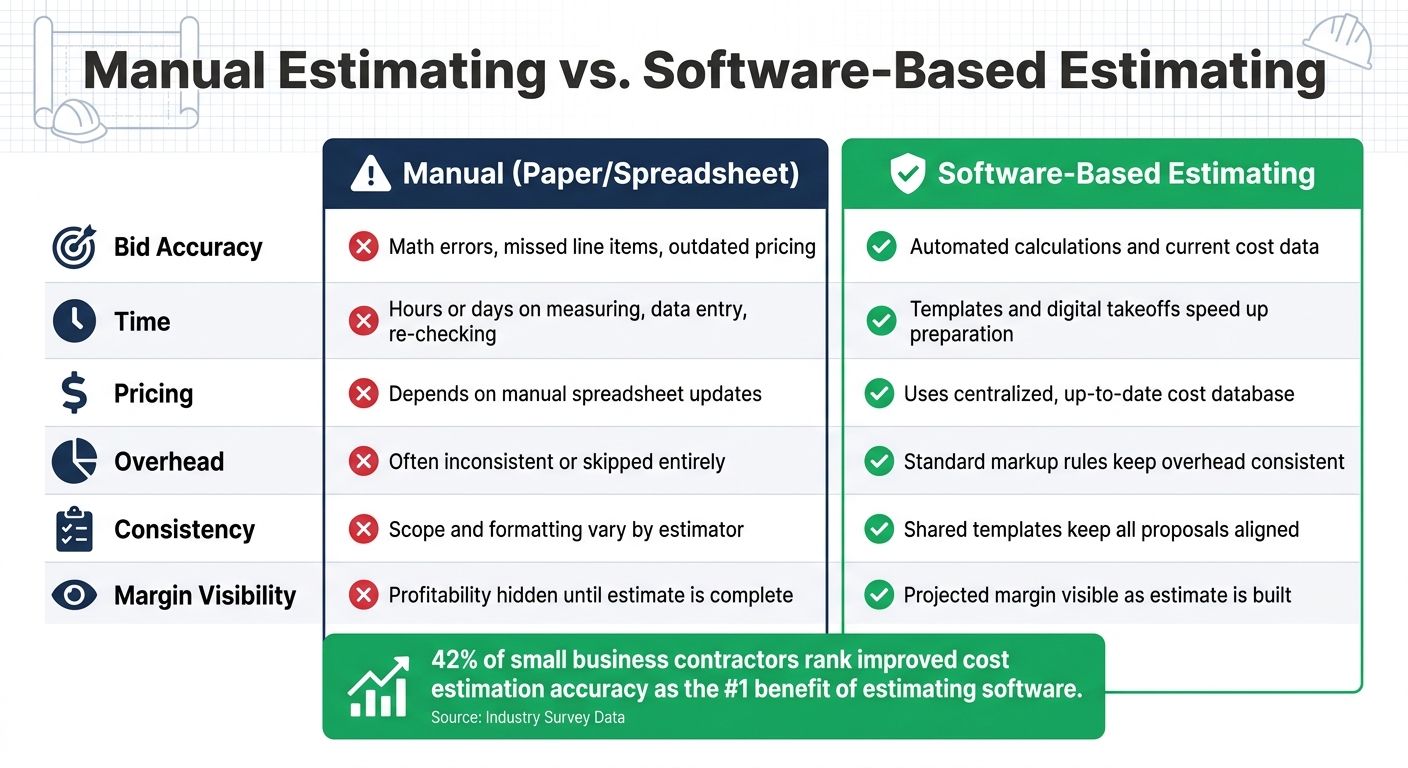
Manual Estimating vs. Software-Based Estimating: Key Differences
Manual and software-based estimating split apart in three big areas: accuracy, consistency, and margin control. With manual work, teams often lean on old spreadsheets, uneven overhead rules, and profit that stays hidden until the estimate is done. That’s how bids drift off course. Some come in too low. Some come in too high. And quotes can look different from one estimator to the next.
Here’s what that looks like in day-to-day bidding:
| Factor | Manual (Paper/Spreadsheet) | Software-Based Estimating |
|---|---|---|
| Bid Accuracy | Math errors, missed line items, and outdated pricing | Automated calculations and current cost data improve accuracy |
| Time | Hours or days on measuring, data entry, and re-checking | Templates and digital takeoffs speed up preparation |
| Pricing | Depends on spreadsheet updates | Uses centralized cost data |
| Overhead | Often inconsistent or skipped | Standard rules keep markups consistent |
| Consistency | Scope and formatting vary by estimator | Shared templates and cost data keep proposals aligned |
| Margin | Profitability is hard to see until the estimate is done | Projected margin is visible as the estimate is built |
That gap shows up in survey data too. A small business construction survey found that 42% of respondents ranked improved cost estimation accuracy as a top benefit of estimating software.
On multi-trade or phased projects, the edge gets bigger. If one number changes in a manual spreadsheet, someone has to chase that change through the rest of the estimate by hand. Software handles that far better. A change in one place updates the rest automatically, which helps keep the full estimate in sync.
That matters even more when revisions land in the middle of a bid.
How Contractor Foreman Helps Contractors Build More Accurate, Profitable Bids
After looking at manual estimating versus software-based estimating, the next step is simple: see how one platform handles it day to day.
Contractor Foreman links estimating with job costing, scheduling, time tracking, and accounting. That means the numbers in a bid don’t just sit on their own – they stay connected to what happens in the field. For contractors, that matters. It helps keep bids in line with actual job costs instead of turning into a guessing game.
Estimators can build bids from line items that keep quantity, cost, labor, and materials together in one place. They can also pull current cost items straight into bids, which helps keep pricing steady from job to job. On top of that, contractors can apply bulk markups or line-item markups across the estimate, while hidden markups help cover overhead and profit.
That same setup makes job costing easier once the bid is won. Cost codes connect the estimate to job costing, timecards, change orders, and QuickBooks, so contractors can check estimated costs against actual costs after the job is done – and use that data to fine-tune future bids.
When the estimate is ready, contractors can turn it into a client-ready proposal and send it out for e-signature approval. That keeps the proposal process fast, consistent, and easier to handle.
FAQs
How does estimating software reduce bid mistakes?
Estimating software cuts bid mistakes by replacing slow, error-prone manual work with automated digital workflows.
Digital takeoff tools help teams measure with more accuracy. Real-time cost data keeps material and labor pricing up to date. Reusable templates reduce typos, duplicate entry, and missed project costs. Built-in issue panels can also flag discrepancies before a bid is finalized.
What should be included in fully loaded labor costs?
Fully loaded labor costs go well beyond a worker’s base hourly wage. You need to account for the total labor burden, which often adds 30% to 50% on top of the base rate.
That total should include payroll taxes, workers’ compensation, unemployment insurance, employee benefits, and indirect costs like equipment, transportation, training, and a buffer for site-specific issues or productivity slowdowns.
How can I use job cost data to improve future bids?
Look at past job cost data to find patterns, benchmarks, and repeat trouble spots.
Compare actual labor hours and material costs against your original estimates so future projections are based on what happened on the job, not what you hoped would happen. That also helps you price work in line with conditions in the field.
Use your software to review past performance, flag problem areas, and make data-based changes before you send out new bids. Over time, that cuts down on guesswork, gives you a clearer picture of costs, and helps protect your profit margins.
Related Blog Posts
- How Residential Contractors Can Build Accurate Construction Estimates Every Time
- What Construction Takeoff Services Actually Do
- What Is a Construction Takeoff and Why Does It Matter?
- The Importance of Accurate Construction Takeoff Services







