
- Problem 1: Documents Are Hard to Access
- Problem 2: Version Control Issues and Outdated Files
- Problem 3: Disorganized Storage Makes Search Difficult
- Problem 4: Managing Large Numbers of Documents
- Problem 5: Limited Mobile and Remote Access
- Benefits of Better Document Search
- Conclusion
- FAQs
- Related Blog Posts
5.5 hours.
That’s the average amount of time wasted by contractors just tracking down documents in a week.
Those hours could have been used to finally schedule a dentist appointment, go on a date with someone you matched with three weeks ago, or you know, rest…but NO. Instead, that time is used opening the same email attachments and comparing files that all claim (confidently!) to be final.
Life is too short to be doing this kind of nonsense.
So…what to do?
Being super duper organized helps, but only up to a certain point.
The real formula for hassle-free document management is simple: good organization + the right tools.
Cloud-based platforms like Contractor Foreman centralize project documents, track versions automatically, and make everything accessible from anywhere—so less time is wasted searching, and more time goes back to actually living (or, at the very least, finishing work on time).
Common Document Search Problems and How Tools Fix Them:
- Hard-to-Access Documents: Files buried in emails or desktops delay decisions.
- Solution: Use cloud storage for instant access across devices.
- Version Control Issues: Teams unknowingly work with outdated files.
- Solution: Implement automatic version tracking and approval workflows.
- Disorganized Storage: Poor folder systems make searches frustrating.
- Solution: Standardize naming and folder structures.
- Overwhelming Volume: Thousands of documents slow manual searches.
- Solution: Use advanced indexing and tagging for quick filtering.
- Limited Mobile Access: Field teams can’t retrieve info on-site.
- Solution: Switch to mobile-friendly platforms with offline capabilities.
Bottom Line: Centralizing project documents saves time, reduces errors, and ensures everyone works with the latest info. Tools like Contractor Foreman offer affordable, user-friendly solutions to keep your projects on track.
Problem 1: Documents Are Hard to Access
Imagine this: drawings tucked away in binders, change orders buried deep in email threads, and invoices collecting dust on desktops. When documents are scattered like this, getting to them becomes a nightmare. Superintendents waste valuable time flipping through binders for updated plans, project managers sift through endless emails to find change orders, and accounting teams scramble through network folders searching for lien waivers. The result? Delayed decisions in the field, missed inspection windows, and stalled pay applications because the right paperwork just can’t be found.
This problem only gets worse as the number of projects and team members grows. Relying on physical paperwork makes managing documents across multiple projects a logistical headache. When the field crew and office staff are working off different versions of documents, it leads to miscommunication, errors, and costly rework.
Some of the most critical documents – like drawings, RFIs, change orders, contracts, permits, inspection reports, and invoices – are the ones most at risk of going missing. If field crews can’t quickly access up-to-date drawings or RFIs, they might stop work entirely or, worse, move forward based on assumptions. Either way, it’s a recipe for wasted time and money. Missing permits or inspection records can stall essential inspections, while misplaced invoices can delay payments and strain vendor relationships. This kind of disorganization slows down workflows and drives up project costs.
Solution: Use Cloud-Based Document Storage
The fix? Centralize all project documents in a cloud-based system that’s accessible from any device. With everything stored in one place, you eliminate the hassle of searching through binders, emails, or network folders. Plus, everyone – from the office to the jobsite – can access the same, up-to-date information in real time.
Cloud platforms make it easy. Superintendents can pull up the latest drawings, details, or RFIs on a tablet right at the jobsite. Project managers can quickly retrieve contracts or submittals to answer questions from subcontractors or owners. Meanwhile, office staff can standardize how documents like invoices and compliance paperwork are stored, ensuring they’re always easy to find. Tools like Contractor Foreman even go a step further by integrating document storage with project management, daily logs, and client portals. This means files are linked directly to specific projects and workflows, streamlining the entire process. With role-based permissions, you can control access to sensitive documents like contracts and financials, while still giving field teams the quick access they need to keep things moving.
Problem 2: Version Control Issues and Outdated Files
Picture this: a foreman shows up on-site with a flash drive containing the project plans, only to find out that the project manager has already released updated drawings. The crew unknowingly works off the outdated version, resulting in hours of wasted effort, costly rework, and delays.
Construction projects are in constant flux, with changes coming from design revisions, field adjustments, and change orders. When files are scattered across emails, USB drives, and network folders, it becomes nearly impossible to ensure everyone is working from the right version. This chaos leads to miscommunication, subcontractor misalignment, and errors that can grind progress to a halt.
The worst part? Teams often don’t realize they’re using outdated files until the damage is done. By the time someone catches the mistake, the crew has to stop, verify the correct version, and start over – wasting valuable time and resources. For critical documents like contracts, permits, or lien waivers, using the wrong version can also create compliance risks, potentially stalling inspections or delaying payments.
Manual systems only add to the confusion. Paper plans, spreadsheets, and email chains don’t track edits or provide an audit trail. There’s no way to tell who made changes, when they were made, or whether you’re even looking at the latest file. Updates often get lost in email threads or saved to personal folders, leaving the rest of the team in the dark. This is where an automated system can make all the difference.
Solution: Set Up Version Tracking and Approval Workflows
To avoid these pitfalls, use software that automatically tracks revisions and ensures everyone always accesses the latest version. With automatic version control, you’ll have timestamps, user logs, and a complete change history – so there’s no confusion about which file is current.
For example, Contractor Foreman centralizes all documents and tracks revisions automatically. When a drawing or change order is updated, the system logs the changes and syncs them across all devices. Field crews using tablets can instantly access the most up-to-date plans, while project managers can review the entire revision history if questions arise. This eliminates guesswork and prevents mistakes caused by outdated files.
Adding approval workflows further streamlines the process. Before any revised document is shared with the field, key stakeholders – such as the project manager, architect, or owner – can review and digitally approve it. This ensures that only authorized versions are circulated, keeping everyone aligned before work begins. For compliance-heavy documents like contracts or inspection reports, having a clear approval trail offers legal protection and helps keep projects on schedule.
Getting started is straightforward. Implement clear naming conventions for files, such as “Plan_v2.1_Approved_12132025”, so they’re easy to identify at a glance. With tools like Contractor Foreman, much of this process happens automatically, giving you confidence that your team is always working with the correct documents.
Problem 3: Disorganized Storage Makes Search Difficult
On top of challenges like access and version control, disorganized storage adds another layer of frustration when trying to locate documents. Imagine this: a project manager needs an inspection sign-off to release a payment. They dive into a shared drive only to encounter folders labeled “Job 104”, “Job 104 final”, and “Job 104 NEW” – none of which clearly indicate the master document. Meanwhile, a foreman might request the “latest” contract to be resent because he can’t find it on his phone. Sound familiar?
The core issue here is the absence of a structured system. Without a standardized filing method, every project manager or foreman creates their own logic. One might sort files by date, another by trade, and someone else by client name. File names are no better, with examples like “new_contract_v2_final_FINAL.pdf” offering little clarity on content or version. Over time, as projects multiply, this chaotic approach becomes unmanageable, leaving teams endlessly clicking through folders or sending emails to locate missing files.
The consequences for businesses are far-reaching. Teams may halt work to verify missing details, leading to delays in schedules. Billing slows down when invoices or supporting documents are misplaced, directly impacting cash flow. Worse, disputes can escalate when there’s no clear documentation trail showing what was issued and when. For smaller U.S. contractors with limited administrative staff, the reluctance to move away from “the way we’ve always done it” often persists until inefficiencies become impossible to ignore.
Solution: Create Standard Naming and Folder Systems
A consistent folder structure and naming convention can eliminate much of this chaos. Start by designing a project-focused folder tree that’s used across every job. For instance, folders could be organized as follows: 01_Contracts, 02_Drawings, 03_RFIs, 04_Submittals, 05_Change_Orders, 06_Financials, 07_Permits_Inspections, 08_Photos, and 09_Safety. To make things even clearer, name projects using a consistent format like “2025-014_Smith_Warehouse” instead of informal nicknames. Separate “Current” from “Superseded” folders, ensuring active versions are easy to find. This structure mirrors how people naturally search – by project, document type, and then date or discipline.
File naming should follow a similar logic and integrate with centralized systems like Contractor Foreman. For example, a drawing could be named “2025-014_A1.2_FloorPlan_Level2_Approved_03-15-2025.pdf.” This format includes the project ID, document type and sequence, a brief description, and a date or status tag. It allows teams to sort files by name, filter by project or type, and quickly identify a file’s status without opening it.
Contractor Foreman simplifies this process by offering customizable project folder templates that can be reused for every new job. Instead of starting from scratch, each project begins organized. The platform centralizes contracts, drawings, RFIs, photos, and financial documents in a single cloud-based system accessible via web and mobile. This way, files don’t get lost in email threads or scattered across individual devices. With advanced search and filtering tools, you can locate files by project, document type, status, or date in seconds. Plus, because it integrates daily logs, schedules, and financials, documents are directly tied to specific jobs, cost codes, or change orders – making retrieval faster and less confusing.
To roll out this system, start with one active project as a test case. Rebuild its folder structure and rename high-priority documents like contracts, current drawings, RFIs, and change orders to fit the new format. For older projects, focus on organizing current files and move outdated ones into a clearly marked “_LEGACY” folder. Going forward, enforce the standard for all new projects and uploads. Assign a project coordinator or document control lead to oversee compliance and address any questions. This approach not only streamlines file retrieval but also builds a foundation of organization across the entire project lifecycle.
Problem 4: Managing Large Numbers of Documents
Construction projects churn out an overwhelming number of documents – drawings, RFIs, change orders, contracts, inspection reports, photos, invoices, and more. For teams juggling multiple projects at once, the sheer volume can feel unmanageable. Without proper tools, hours are wasted sifting through email threads, shared drives, or paper binders just to locate a single file. And let’s face it, basic folder searches just don’t cut it when you’re buried under thousands of documents.
But the problem goes beyond wasted time. Relying on manual methods increases the risk of human error – misplacing files, using outdated versions, or losing critical information. For example, using an outdated drawing can lead to expensive mistakes, project delays, and strained relationships with clients or subcontractors. Plus, without a clear audit trail, resolving disputes or defending claims becomes a nightmare.
The core issue lies in sticking to traditional folder structures. As document counts grow, navigating nested folders or running vague keyword searches becomes impractical. Teams often resort to guesswork or repeatedly emailing coworkers to resend files that seem to have vanished. It’s clear that managing this level of complexity requires more advanced tools.
Solution: Use Advanced Indexing and Search Tools
The solution? Advanced indexing. This approach organizes documents by assigning structured metadata – like project name, phase, trade, cost code, location, date, document type, status, and responsible party – to each file. Instead of relying on folder names or paths, you can search, filter, and sort through thousands of documents with ease. Want all approved RFIs for a specific trade? No problem. Need to find pending change orders? Done in seconds.
Tagging is another game-changer. By applying descriptive labels such as “RFI”, “Approved”, or “Change Order – Pending”, files can be grouped and filtered instantly. For instance, superintendents can quickly pull up the latest drawings for a specific trade, while project managers can view every pending change order across a project. This system not only saves time but also reduces the risk of overlooking critical details.
Platforms like Contractor Foreman simplify document management by centralizing everything – plans, estimates, contracts, RFIs, daily logs, and photos – into one integrated system. With advanced indexing, tagging, and project-level organization, you can attach documents to specific jobs, workflows, or cost codes and retrieve them effortlessly. The platform offers multiple search options, including text searches for document-heavy files, attribute searches for plans with metadata, and relationship searches that link related items (like an RFI and its corresponding photos). This seamless integration ensures that all project information stays organized and accessible.
To make this system work long-term, establish a clear document taxonomy with standardized tags and metadata. Assign roles for uploading and tagging files, and train team members to follow consistent naming and filing practices. Consider appointing a project coordinator or document controller to audit compliance and fix any gaps in metadata. Start small – use a basic set of tags, pilot the system on a few projects, and involve field teams like superintendents and foremen in testing to ensure it fits real-world workflows.
Track the system’s success by measuring improvements in search times, error rates, and turnaround for RFIs and change orders. For instance, compare how long it takes to locate documents before and after implementation or monitor how often staff need help finding files. These metrics can provide clear insights into how well the solution is working.
sbb-itb-5eea312
Problem 5: Limited Mobile and Remote Access
Field crews spend most of their time out in the field, not in trailers or offices. When document systems are designed only for desktop use or rely on paper plans stored in job trailers, it creates constant delays. Picture this: a foreman needs to confirm an RFI (Request for Information) response but has to trek back to the trailer or call the office. Or imagine a superintendent spotting an issue during a walkthrough but being unable to access the inspection checklist on their phone. Often, crews work off printed drawings that are outdated as soon as new revisions are uploaded.
This challenge becomes even tougher on large sites spanning multiple acres or in remote areas with unreliable cell service. Without mobile access, field teams are left guessing, relying on outdated documents, or making multiple phone calls just to confirm details. This slows decision-making and increases the chances of rework due to outdated plans. It also makes it nearly impossible to document issues in real time. When safety documents, checklists, or daily log forms aren’t accessible on mobile devices, compliance drops, and accountability suffers. Desktop-only or paper-based systems simply don’t align with the fast-paced, dynamic nature of construction work. Field teams need instant access to drawings, specifications, RFIs, change orders, and photos wherever they are – even when the internet connection is spotty. Without this capability, on-site efficiency takes a hit, and the risks associated with traditional systems grow.
Solution: Switch to Mobile-Friendly Document Platforms
The answer lies in adopting a cloud-based platform with mobile apps tailored for on-site use. When documents are stored in the cloud and sync automatically, everyone – whether in the office or on-site – can access the most up-to-date version. Field crews can open drawings, search RFIs, review change orders, and capture photos directly from their smartphones or tablets, eliminating the need to return to the trailer or wait for email updates.
Offline access is a game-changer for sites with weak connectivity. Workers can download essential documents – like plans, specifications, and checklists – when they have a signal and continue viewing or updating them even when offline. Once reconnected, any offline changes sync automatically. These mobile tools work seamlessly with broader document management systems, ensuring efficiency across the board.
Look for platforms that include GPS-enabled features to link documents, photos, and daily logs to specific locations on large job sites. For multi-building projects, supervisors can filter documents by zone or floor, keeping their focus on what’s relevant to their area. Some systems even use QR codes posted throughout the site, allowing workers to scan and instantly access the latest drawings or safety documents for that specific location.
Contractor Foreman is one example of a mobile app that connects field and office teams through a centralized construction management platform. Crews can access project documents, daily logs, photos, and reports directly from their smartphones or tablets, whether they’re on-site or working remotely. Since it’s cloud-based, everyone always sees the latest files, reducing errors and miscommunication. The app supports on-site workflows like capturing daily logs, attaching photos, and accessing project details – all without needing to return to the office. With integrations for QuickBooks and Zapier, financial and project records stay aligned, cutting down on errors and delays.
To make the most of mobile tools, upload key project documents, train field leaders on using the app for quick access and updates, and ensure all new revisions are distributed exclusively through mobile platforms. Measure the impact by tracking faster search times, fewer calls to the office, and reduced rework caused by outdated plans.
Benefits of Better Document Search
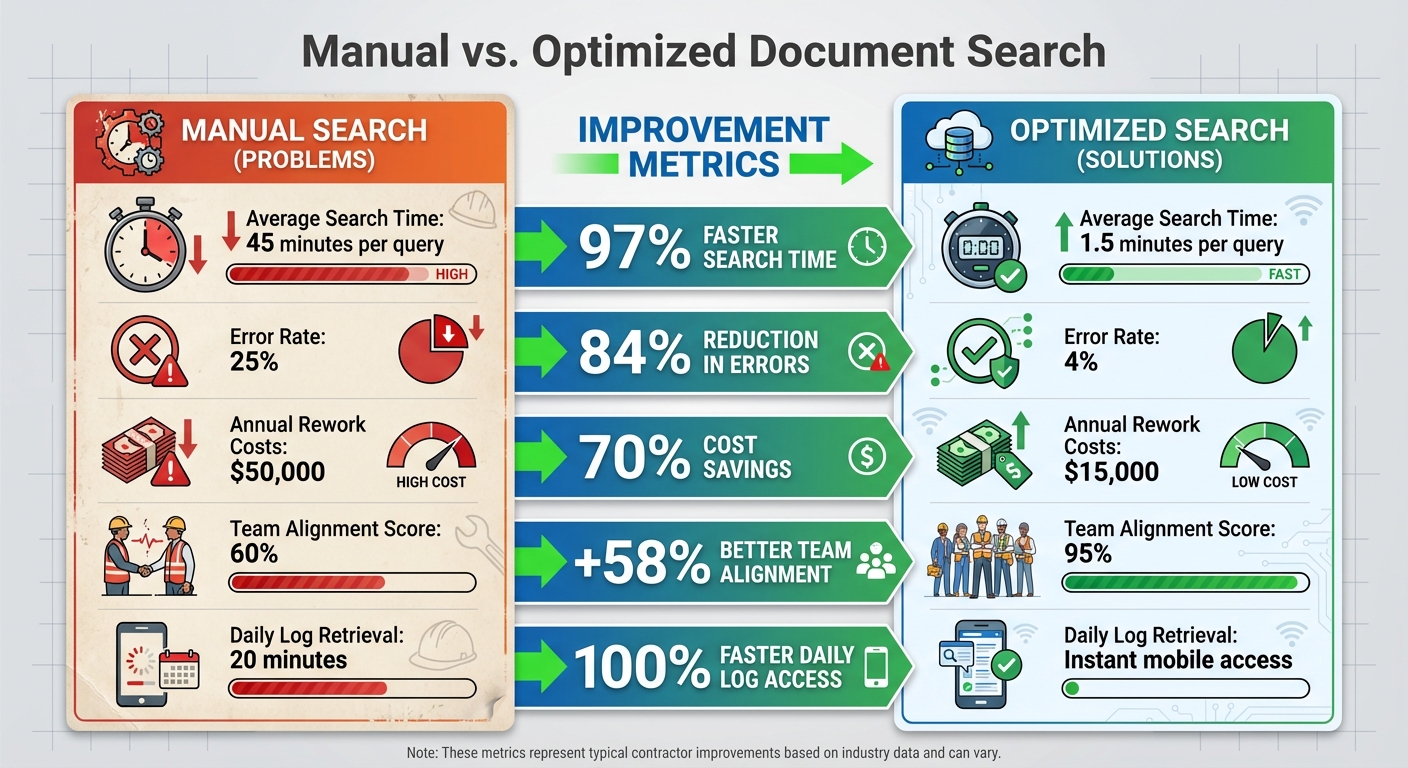
Manual vs Optimized Document Search: Time Savings and Cost Reduction for Construction Teams
Implementing streamlined document search solutions can transform how contractors manage their operations. The results? Teams experience immediate, tangible benefits that save time, reduce errors, and improve collaboration.
Time savings are one of the most noticeable advantages. Instead of spending 30 to 60 minutes digging through emails, binders, or folders to find a single document, centralized cloud systems with advanced indexing allow teams to locate what they need in under two minutes. This efficiency translates to hours saved each week across project teams. For project managers, who often spend 20–30% of their day searching for permits, plans, or invoices, this means more time to focus on keeping projects on schedule and within budget.
Fewer errors mean lower costs. When everyone works from the same up-to-date files, the chances of using outdated plans drop significantly. Error rates shrink from around 25% to just 4% with optimized systems. This reduction leads to less rework, fewer incorrect material orders, and fewer delays caused by miscommunication. In fact, rework costs can drop by as much as 70%.
Improved team alignment becomes possible when field crews, subcontractors, and office staff all access the same documents in real time through mobile apps and cloud platforms. Current, accurate revisions eliminate confusion and miscommunication. Many teams have seen alignment scores jump from 60% to 95% after adopting centralized systems. Mobile access ensures everyone stays on the same page without the need for constant back-and-forth emails or calls.
Scalability is also simplified as firms grow. Managing thousands of documents across multiple projects no longer requires a proportional increase in staff time. Advanced search and indexing tools handle the heavy lifting, enabling firms to scale without adding administrative overhead. Centralized platforms also streamline field modifications and approvals, preventing delays and wasted resources.
Comparison: Manual vs. Optimized Document Search
The table below highlights the stark differences between traditional manual searches and optimized systems like Contractor Foreman:
| Metric | Manual Search | Optimized Document Search | Improvement |
|---|---|---|---|
| Average Search Time | 45 minutes per query | 1.5 minutes per query | 97% faster |
| Error Rate | 25% | 4% | 84% reduction |
| Annual Rework Costs | $50,000 | $15,000 | 70% savings |
| Team Alignment Score | 60% | 95% | +58% |
| Daily Log Retrieval | 20 minutes | Instant mobile access | 100% faster |
Platforms like Contractor Foreman make these advancements possible. With features like cloud storage, version tracking, mobile apps, and advanced indexing, teams gain instant access to current documents from anywhere. Plus, with integrations for QuickBooks and support for unlimited projects, the platform keeps financial records aligned while scaling with growing operations – all starting at just $49 per month, including free training and support.
Conclusion
Struggling to find the right documents can derail project timelines, inflate budgets, and eat into profits.
When teams rely on outdated plans or waste hours searching for contracts and change orders, the likelihood of rework, disputes, and delays skyrockets. For U.S. contractors already navigating tight labor and material budgets, improving document search isn’t just about convenience – it’s a critical strategy for managing risks and boosting profitability.
The solutions discussed – cloud-based storage, version tracking, standardized naming, advanced search tools, and mobile access – work together to create a streamlined system for projects of any size. With these tools in place, teams benefit from a centralized “single source of truth”, accessible instantly from anywhere. This reduces costly errors and ensures everyone is working from the latest, approved files.
Platforms like Contractor Foreman bring all these features into one user-friendly solution.
Offering centralized cloud storage, well-organized project folders, mobile apps for on-the-go access, and integrations with tools like QuickBooks and Zapier, it turns documentation into a competitive advantage. Starting at just $49 per month, Contractor Foreman includes unlimited projects, free training, and responsive support with an average wait time of just 13 seconds – making it an affordable option for contractors of all sizes.
FAQs
How does using cloud-based document storage make projects more efficient?
Cloud-based document storage makes projects run smoother by giving team members instant access to files from anywhere. No more wasting time hunting down physical documents or dealing with outdated versions – everyone stays on the same page with the latest information at their fingertips.
It also improves teamwork with tools like real-time updates and version control, keeping everything organized and reducing mistakes caused by old files. With document management simplified, your team can direct their energy toward completing projects more efficiently.
Why is version control important for managing construction project documents?
Version control plays a key role in managing construction project documents by ensuring that everyone on the team is using the latest and most accurate information. This reduces the risk of errors, simplifies teamwork, and creates a clear record of changes, which improves overall accountability.
With a dependable document history in place, version control helps prevent expensive rework and keeps projects on track. It also guarantees that all project stakeholders have access to consistent and reliable data whenever they need it.
Why is mobile access important for construction field teams?
Mobile access plays a key role for construction field teams by allowing real-time communication and keeping everyone informed about project updates. With mobile tools, team members can instantly pull up important documents, share updates, and tackle on-site issues without unnecessary delays.
This access boosts efficiency and productivity, reduces downtime, and helps projects stay on track. Whether it’s reviewing plans, recording daily progress, or handling unexpected problems, mobile tools create a smooth connection between the field and the office.







