
67% of project managers say projects are getting so complex, it’s eating up at least a third of their time.
No doubt about that.
Construction projects these days involve more moving parts than ever — more subcontractors, tighter regulations, and job sites spread across multiple locations, all needing to stay perfectly in sync. And when updates, budgets, and financial tracking are scattered across different tools (or worse, spreadsheets), things get messy fast—even when teams are already paying for construction management software.
But here’s our hot take?
A lot of that complexity is self-inflicted.
Most teams are still tracking progress like it’s 1999!
Jurassic spreadsheets that haven’t evolved since the dial-up era, sticky notes clinging to monitors like desperate barnacles, and project updates delivered via carrier pigeon (or at least it feels that way).
The fix isn’t magic. It’s just smarter tools used the right way.
Here’s how smart teams stay on top of everything:
- Centralized Data: A single source of truth eliminates confusion and costly mistakes.
- Mobile Tools: Field teams can log hours, materials, and photos in real time—even offline.
- Dashboards & Gantt Charts: Offer high-level overviews and detailed task timelines for better decision-making.
- Automation: Daily logs, timecards, and financial tracking integrate seamlessly, reducing manual work.
None of these are groundbreaking on their own—but used together, they give construction teams the visibility and control they’ve been missing.
Creating a Single Source of Truth for Project Data
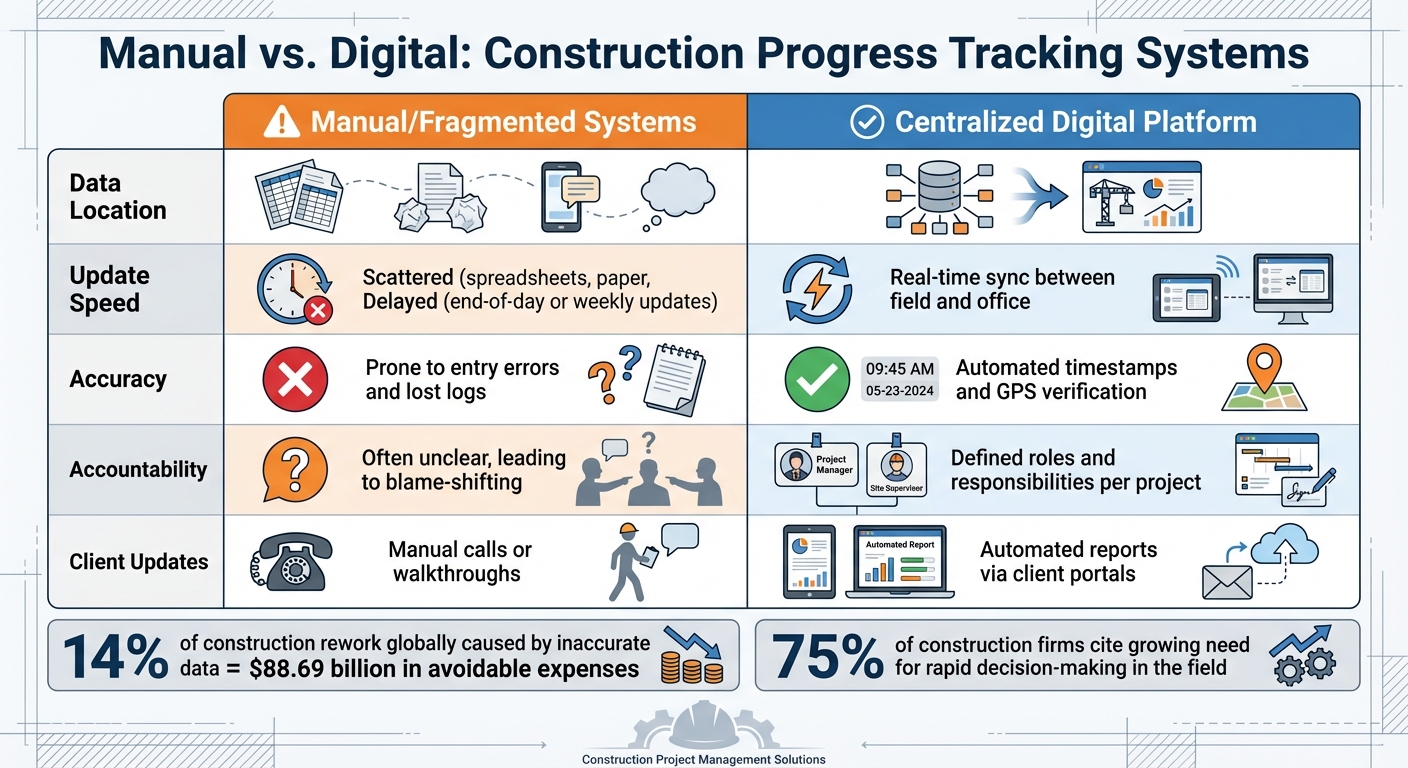
Manual vs Digital Construction Progress Tracking Systems Comparison
When your project details are scattered across spreadsheets, text messages, and paper logs, confusion and errors become almost inevitable. This fragmented approach can lead to costly mistakes.
In fact, inaccurate data and reporting are estimated to cause 14% of all construction rework globally, which adds up to a staggering $88.69 billion in avoidable expenses. The answer? Build a single source of truth – one centralized location where all project data is stored and updated in real time. With this system, everyone involved – field crews, office staff, and even clients – works with the same up-to-date information, eliminating outdated versions and the missteps they cause.
Benefits of Centralized Data Management
Centralizing project data brings immediate and measurable benefits. For starters, real-time visibility allows you to catch budget overruns or scheduling conflicts as they arise, rather than discovering them weeks later when the damage is already done.
With 75% of construction firms citing a growing need for rapid decision-making in the field, instant access to accurate data has become a key factor in staying competitive.
Another major advantage is improved collaboration.
When office teams and field crews can access and update the same data simultaneously, it breaks down the silos that often slow projects. Cloud-based platforms make this possible by letting team members pull up critical documents – like blueprints, contracts, or change orders – anytime and from anywhere. For example, a superintendent can review the latest plans on a tablet at the job site while the project manager checks the same details back at the office.
Centralized data also enhances financial transparency. Housing estimates, change orders, and invoices in one system ensures consistent financial tracking. This real-time integration protects profit margins by enabling accurate job costing. Plus, it reduces manual entry errors, saving time and avoiding the frustration of chasing down missing or incorrect information.
| Feature | Manual/Fragmented Systems | Centralized Digital Platform |
|---|---|---|
| Data Location | Scattered (spreadsheets, paper, texts, memory) | Unified in one dashboard |
| Update Speed | Delayed (end-of-day or weekly updates) | Real-time sync between field and office |
| Accuracy | Prone to entry errors and lost logs | Automated timestamps and GPS verification |
| Accountability | Often unclear, leading to blame-shifting | Defined roles and responsibilities per project |
| Client Updates | Manual calls or walkthroughs | Automated reports via client portals |
With these benefits in mind, adopting strategies to consolidate and secure your project data can make a huge difference.
Tips for Centralizing Your Data
To keep your centralized data accurate and efficient, focus on integrating your tools into one comprehensive platform. Consolidating project planning, financial controls, field management, and documentation under a single login eliminates the need for juggling multiple apps. This can save hours each week that would otherwise be spent switching between systems or reconciling conflicting information.
Sync your accounting software with your project management platform. A bi-directional connection between tools like QuickBooks and your central system ensures that invoices, payments, and job costs are consistent across both platforms. This reduces the risk of errors from manual data entry in multiple places.
Equip your field teams with mobile tools that feature GPS and offline capabilities. When crews can log daily reports, photos, and time cards directly from the job site, that data flows into your central system instantly. In areas without internet access, offline functionality ensures they can keep working, with data syncing automatically when they’re back online.
Standardize your documentation by using built-in templates for daily logs, RFIs, and submittals. This approach speeds up reviews and ensures consistency across all projects. When everyone follows the same format, it eliminates the confusion caused by varying reporting styles.
Lastly, set role-based permissions to streamline access. This ensures team members only see the data relevant to their roles, keeping sensitive information secure while avoiding information overload. For instance, your foreman doesn’t need access to accounting details, and your bookkeeper doesn’t need to sift through field photos. Both can work efficiently within the same system tailored to their needs.
sbb-itb-5eea312
Capturing Field Data with Mobile Tools
Paper timesheets and phone reports just don’t cut it anymore.
Over 60% of construction companies now rely on mobile apps for daily reporting in the field. These tools allow crews to log labor hours, production quantities, equipment usage, and even snap photos right when the work happens – not hours or days later.
This real-time sync between the field and the office gives project managers the ability to check actual progress against budgets the same day, helping them tackle issues before they spiral out of control. And for job sites with unreliable internet, offline functionality is a must for smooth, uninterrupted data capture.
The best mobile tools keep working even when there’s no cell service. For remote sites with patchy or nonexistent internet, crews can still log time, take photos, and document activities offline. Once a connection is restored, the data syncs automatically.
Features like GPS tracking and geofencing take accountability to the next level by confirming workers are physically on-site before clocking in – putting an end to buddy punching.
This is no small issue: buddy punching costs U.S. businesses over $373 million annually, with about 75% of companies affected. Take the example of a residential contractor who switched a 45-person crew from handwritten timesheets to a mobile GPS time-tracking app in early 2026. Within just one month, they cut payroll costs by 6%-7%, saving $3,800 by eliminating buddy punching.
Mobile tools also streamline administrative work. One regional general contractor used automated time tracking to slash weekly payroll prep time from 11 hours to less than 2 hours – a time savings of 85%. This efficiency allowed the company to handle a 30% increase in team size without adding more administrative staff. When field data flows directly into payroll and job costing systems, there’s no need for manual re-entry or chasing down missing details, which helps projects stay on track and within budget.
For these tools to succeed, they need to be easy to use. A simple, user-friendly interface is essential for field adoption and real-time tracking. Data entry should be quick and painless – think minutes, not hours. Look for mobile-first designs with features like built-in templates for daily logs, QR code access for instant retrieval of blueprints or safety forms, and minimal taps to complete tasks. When crews see their reports being actively used in planning meetings or payroll reviews instead of disappearing into a “black hole”, they’re far more likely to embrace the system.
Tracking Progress with Dashboards and Gantt Charts
Dashboards for Quick Project Updates
Construction projects generate a mountain of data every day. Dashboards take this scattered information and organize it into a single, real-time snapshot of the project’s overall health. This makes it easier for teams to spot issues as they arise and address them before they spiral out of control.
Dashboards are particularly useful for flagging problems automatically. For example, they can highlight overdue RFIs, submittals nearing their deadlines, or critical path tasks that are falling behind schedule. Many construction contracts require submittals to be processed within five to seven days. When turnaround times stretch beyond this, it’s a clear warning sign that productivity could be slipping.
“If submittals are falling behind and turnaround times are slipping, that’s one of the earliest signs productivity is at risk”- Alex Six, Solution Specialist at Procore Technologies.
In 2025, HITT Contracting adopted real-time dashboards to create a continuous feedback loop for both project teams and owners. Karl Sorensen, their Director of Project Solutions, described the approach:
“I call it instant data and real-time reporting. We gather data and metrics in real-time or near real-time to create a reporting structure that is a feedback loop to our project managers and our business unit leaders”.
This system gave stakeholders a centralized view of progress, helping them identify risks to schedules and budgets early on.
Dashboards also use visual tools like color-coded charts and progress maps to make it easy for both field teams and office staff to see where work is falling behind.
They provide insight into resource allocation, helping managers catch overworked or underutilized team members before delays occur. However, the quality of the dashboard depends entirely on the data feeding into it. To ensure accuracy, teams must standardize cost codes, naming conventions, and reporting schedules across the board.
While dashboards provide a broad overview of project health, Gantt charts dig deeper into the nitty-gritty of task timelines and dependencies.
Using Gantt Charts for Task and Timeline Management
Dashboards can tell you what’s wrong, but Gantt charts explain why it’s happening.
These horizontal bar charts are a visual way to map out task durations, dependencies, and milestones. Each bar represents a specific activity – like site preparation or pouring concrete – and shows how tasks are linked, such as finish-to-start or start-to-start dependencies.
The critical path is the backbone of any Gantt chart. This sequence of dependent tasks determines the project’s overall timeline. Since tasks on the critical path have zero float, even a small delay can push back the entire project’s completion date. Keeping a close eye on these tasks is key to staying on schedule. On the other hand, non-critical tasks with built-in slack provide some breathing room for minor delays without affecting the overall timeline.
Setting a baseline is another crucial step. By capturing the original project plan, teams can compare actual progress against the initial schedule in real time. Without this baseline, it’s nearly impossible to measure how far ahead or behind the project is. Gantt charts also benefit from features like color-coding tasks by trade or phase, which helps subcontractors quickly understand their responsibilities. Regular updates – such as adding actual start and finish dates – ensure the chart reflects what’s happening on-site.
| Feature | Dashboards | Gantt Charts |
|---|---|---|
| Primary Focus | High-level KPIs (Budget, Safety, RFIs) | Task sequences and timeline management |
| Visual Style | Graphs, charts, status indicators | Horizontal bars showing duration and overlap |
| Key Benefit | Instant identification of at-risk metrics | Visualization of dependencies and milestones |
| Problem Solving | Flags what’s wrong (e.g., budget overruns) | Shows how delays impact completion |
When used together, dashboards and Gantt charts provide a full picture of the project. Dashboards give a high-level overview, while Gantt charts dive into task-specific details. For example, task completion percentages and start/finish dates from Gantt charts can automatically update dashboard widgets, ensuring everyone stays on the same page.
Managing Daily Logs and Documentation
Daily logs are essential for tracking progress accurately. They provide a detailed timeline of on-site events, including labor hours, equipment usage, weather conditions, and material deliveries. These records act as a safeguard against disputes, protecting contractors from legal claims and unauthorized change orders. With the construction industry losing over $1.6 trillion annually due to poor communication and documentation, maintaining thorough records isn’t just a good habit – it’s a necessity.
Beyond dispute resolution, daily logs offer real-time insights into project health. They help managers spot inefficiencies, like idle equipment or misallocated crews, so resources can be adjusted promptly. Additionally, detailed documentation supports regulatory compliance, streamlining audits and reducing the risk of fines or liabilities. Considering that construction injuries led to $7.87 billion in workers’ compensation costs, proper record-keeping can have a significant financial impact.
However, manual logging has its drawbacks. It’s time-consuming and prone to errors, especially when field crews rely on memory to fill out paperwork at the end of the day. These challenges highlight the need for automated solutions to improve accuracy and efficiency.
Automating Daily Logs for Accuracy
Digital tools eliminate the hassle of paperwork by enabling field crews to log data instantly using mobile devices.
With 90.9% of construction workers already using smartphones for work, adopting mobile logging feels like a natural step. Instead of jotting down notes to transcribe later, workers can record details in real time – right after an inspection, delivery, or weather update.
Automation ensures reliable site records, much like how real-time dashboards simplify project management. By syncing with other systems, automated logs improve accuracy even further. For instance, employee time cards can automatically populate labor entries, and material receipts can be directly integrated into the log. Some platforms even use AI to suggest recurring activities based on past projects, speeding up the process with smart templates.
Take this example: In July 2025, a mid-size contractor replaced paper forms with a digital log system across five sites. Within two months, documentation errors dropped by 65%. These digital logs, enriched with photos and timestamps, provided the evidence needed to support three weather-related change orders, helping the company avoid $150,000 in potential losses.
“Having all our site logs in one place – searchable, timestamped, and backed by photos – provided unprecedented control.”
– Project Lead, BuildCore Solutions
| Feature | Manual/Paper Method | Digital/Automated Tool |
|---|---|---|
| Data Entry | End-of-day or weekly; memory gaps | Real-time via mobile; voice-to-text |
| Accuracy | Prone to errors and misfiling | GPS- and time-stamped for verification |
| Reporting | Time-intensive manual process | Instant PDF generation and syncing |
| Evidence | Limited to notes and separate photos | Integrated photos/videos linked to tasks |
| Compliance | Hard to track for audits | Automated checklists and audit trails |
Using standardized templates ensures every log captures critical details like weather, labor, equipment, materials, safety, and delays. This level of accuracy is vital for staying compliant and avoiding costly oversights.
Maintaining Compliance with Complete Documentation
Thorough records are a contractor’s best defense during audits, disputes, or inspections. When a project is under scrutiny, having searchable, cloud-stored logs makes it easy to pinpoint exactly what happened on any given day. Automated logs align with the “single source of truth” approach, ensuring records are secure and accessible for audits or legal challenges. This is especially crucial for safety compliance, where incomplete documentation can lead to fines or legal exposure.
Construction projects often operate on thin margins, with net profits averaging between 3% and 7%. A single unresolved dispute or cost overrun can wipe out those profits. Complete documentation protects contractors by providing clear evidence of site conditions, work quality, and decisions made. For example, daily logs that automatically track temperature and precipitation can justify weather-related delays, strengthening change order requests.
Adding visual proof enhances these efforts. Time-stamped photos or videos attached to daily logs give stakeholders a clear view of progress and challenges, even if they’re not on-site. With 97% of contractors citing material cost variations as a major concern, accurate material logs are critical for managing expenses and reducing waste. Digital tools simplify this process by tracking quantities, noting damaged goods, and flagging shortages in real time. When disputes or audits arise, having comprehensive records ensures contractors can back up their claims with confidence.
Using GPS and Photo Tagging for Accuracy
Location data plays a crucial role in making progress tracking reliable and transparent.
When paired with centralized data management, these tools offer a strong foundation for real-time tracking. Field teams using GPS-enabled tools can embed coordinates, timestamps, and directional data into photos and reports. This creates a secure, verifiable record of when and where work was completed, while also cutting down on manual errors. For managers juggling multiple sites, this means confirming work completion without spending hours driving between locations. To put it in perspective, 56% of construction company owners spend up to 11 hours a week traveling just to check on their crews.
The financial downside of poor location tracking is significant. Over 75% of companies lose money to “buddy punching”, where employees clock in for absent coworkers. This practice drains about 2.2% of gross payroll. GPS-enabled tracking eliminates this issue by providing indisputable proof of who was present and when. Below, we’ll explore how GPS tracking and photo tagging can improve data accuracy and streamline operations.
GPS Tracking for Field Teams
Geofencing creates virtual boundaries around job sites, ensuring employees can only clock in when physically present.
This digital safeguard prevents off-site clock-ins and ensures labor hours are accurately allocated. It also gives managers real-time insights into crew locations across large or multi-site projects. This not only addresses inefficiencies like buddy punching but also reduces the time managers spend verifying on-site work through GPS-tagged photos and map views.
Real-time location data also boosts quality control.
Managers can monitor the placement of critical elements – like utilities, safety systems, or structural components – ensuring they meet project standards without needing to be physically present. In cases of disputes over site conditions or delays, GPS metadata provides a clear record for quick resolution. Interestingly, a study of over 221 million online photos found that only 7.8% included latitude and longitude metadata, emphasizing the need for specialized construction apps to ensure accurate documentation.
While GPS confirms location, photo tagging adds another layer of verification by detailing task progress and quality.
Photo Tagging to Verify Work Progress
Photos backed by GPS data confirm not only the work completed but also its location. When photos embed GPS coordinates, elevation, and directional data into their metadata, they become reliable evidence for billing, compliance, and resolving disputes. This is critical given that 70% of construction disputes stem from missing or incomplete records, costing U.S. businesses an average of $42.8 million per case.
The 3-Photo Method is a practical way to provide full context:
- A wide-angle Context Shot to show location,
- A Mid-Range Shot to identify the subject, and
- A Detail Shot to highlight specific work or defects.
Including scale references like a tape measure or hard hat can further validate measurements. For consistent documentation, designate 1–5 permanent “photo points” on your site map and take daily photos from these locations to create a clear visual timeline of progress.
| Feature | Standard Phone Camera | GPS-Enabled Construction App |
|---|---|---|
| Location Data | Often missing or hidden in metadata | Stamped directly on photo/report |
| Organization | Manual folders/camera rolls | Automatically sorted by project/task |
| Verification | Easily manipulated | Tamper-proof GPS and timestamps |
| Reporting | Manual copy-paste into documents | One-click PDF/Excel export |
| Map Integration | None | Visualizes all photos on site map |
Real-time annotation tools allow crews to add notes, arrows, or circles directly to photos (e.g., marking “southern retaining wall settlement”).
This added context helps prevent confusion when reviewing large sets of images later. To avoid losing valuable documentation, it’s a good idea to sync photos to the cloud before crews leave the site – protecting against data loss from device damage or theft. With GPS and photo tagging in place, your records become a robust defense against the $1.85 trillion lost globally in 2020 due to poor data and inefficient documentation in the construction industry.
Using Contractor Foreman for Real-Time Tracking
Once GPS and photo tagging protocols are in place, the next step is to choose software that brings these tools together in one platform. Contractor Foreman does just that, combining daily logs, scheduling, mobile field access, and integrations into a single system to monitor project progress. Pricing starts at $49 per month and covers unlimited projects.
With the mobile app, field teams can upload photos, notes, and material receipts instantly, giving the office immediate visibility. Daily logs are auto-generated from time cards, ensuring accurate labor tracking. GPS-enabled timecards with geofencing guarantee on-site clock-ins, eliminating issues like buddy punching. This is especially important as 28% of construction firms in the UK cite a lack of on-site information as a major efficiency hurdle. Here’s a closer look at the key features that make Contractor Foreman a reliable tool for real-time tracking.
Key Features for Progress Tracking
The daily logs feature allows users to attach photos, track received materials, and cross-check incident reports in real time. Supervisors are prompted to create logs when clocking out, reducing the risk of missed documentation.
Gantt (CPM) scheduling offers a visual way to manage tasks and timelines. Teams can drag and drop items to update project status, and these updates sync with the Crew Schedule to ensure field assignments match the overall timeline. Automatic notifications via email or text keep everyone in the loop on schedule changes.
GPS-driven timecards with geofencing verify on-site attendance and record exact work hours. As Matthew S. from M. Smith Contracting shares:
“The time tracking software for my crew captures my crew’s hours, locations, and productivity metrics… where I can cross-reference their productivity on linear foot of wall and square foot of wall completed per hour.”
Contractor Foreman integrates with over 50 systems, including QuickBooks Online, Zapier, CompanyCam, and Gusto, for seamless data sharing. Chuck A. from Liercke Construction, LLC adds:
“The integration of the whole platform is very good, including externally with QuickBooks Online. Ability to do time sheets in the field without separate software.”
(Heads up: QuickBooks Desktop support ends on January 1, 2026.)
The platform also comes with over 800 pre-loaded safety meeting topics in both English and Spanish, helping teams stay compliant with documentation requirements. With an average support wait time of just 13 seconds and 95% of chats rated 5 stars, technical issues are resolved quickly. This level of real-time visibility and seamless integration simplifies decision-making at every project stage.
Pricing Plans for Progress Tracking
Contractor Foreman offers these features through tiered pricing plans based on the number of users, not the number or size of projects. All plans include unlimited projects and must-have tracking tools like daily logs, scheduling, and GPS timecards. A 30-day free trial and a 100-day money-back guarantee let contractors test features like offline mode, which allows field crews to sync data once they reconnect to the internet.
| Plan | Monthly Price (Annual Billing) | Users Allowed | Key Progress Tracking Features |
|---|---|---|---|
| Basic | $49 | 1 | Daily logs, scheduling, and GPS timecards |
| Standard | $79 | 3 | All Basic features plus a client portal and private training |
| Plus | $125 | 8 | Advanced features, integrations, and added support |
| Pro | $166 | 15 | Extensive progress tracking features and enhanced support |
| Unlimited | $249 | Unlimited | Comprehensive features with no user restrictions |
The Unlimited plan is ideal for larger teams, offering full access to all features with no user limits. As Lindsey-Leigh M. from JWH Construction Services, Inc. says:
“This software packs more punch than you would expect at its meager price point.”
Conclusion
Tracking progress in real time has become a necessity in an industry grappling with growing complexity and tighter deadlines. With over 14 hours per week lost to unproductive tasks, inefficiency is a cost no one can afford to overlook.
The strategies outlined here – centralizing data, leveraging mobile tools for field reporting, using GPS and photo verification, and automating daily logs – are powerful ways to tackle inefficiencies head-on. These methods not only address common challenges but also help prevent delays that could disrupt budgets and timelines. By precisely monitoring labor, materials, and equipment, contractors can significantly cut down on waste.
Improved transparency fosters stronger collaboration among stakeholders, while decisions backed by data replace guesswork with confidence. Studies reveal that frequent progress checks directly contribute to project success. Yet, despite this, only 50% of projects are completed on time, even as 87% of owners report facing greater scrutiny. For contractors, this disparity presents a clear chance to stand out by embracing real-time tracking systems.
Tools like GPS-enabled timecards, automated documentation, and visual dashboards take accountability to the next level. Industry professional Matthew S. highlights the impact of such systems:
“The time tracking software for my crew allows me to keep track of all my guys’ hours, where they are, and what they’re doing. This helps on renovations all the way up to high-production framing jobs, where I can cross-reference their productivity on linear foot of wall and square foot of wall completed per hour, etc.”
This level of insight not only motivates teams to hit milestones but also ensures compliance with safety and regulatory standards.
Adopting these tools isn’t just an option – it’s a critical step to meet the demands of today’s projects. An integrated platform lays the groundwork for reducing delays, improving collaboration, and keeping projects on time and within budget.
FAQs
What should I track in real time first?
Tracking daily work logs and key project milestones is essential for keeping projects on track. By recording daily activities and monitoring milestones, you can ensure accountability, stay aligned with schedules, and spot potential issues before they escalate. This approach offers a clear view of progress and equips you with the insights needed to make smart decisions as the project unfolds.
How can we ensure field data is accurate and consistent?
To ensure field data remains accurate and consistent, it’s important to establish clear processes and make smart use of technology. Start by organizing and labeling photos systematically – this avoids confusion later. Standardize how photos are captured to maintain consistency across the team. Additionally, digital tools like mobile apps and electronic forms can help reduce errors during data entry. Together, these steps simplify data collection, promote uniformity, and enhance project tracking and decision-making.
How can I prove work progress for disputes or change orders?
The most effective way to demonstrate work progress is by consistently documenting it in real time, backed by timestamped evidence. Take photos at key milestones, during critical installations, and before any concealed work is covered. Pair these visuals with detailed records to create a comprehensive trail of progress. Standardized daily reports, enriched with photos and videos, make it easier to explain scope changes and confirm what’s been accomplished. Leveraging digital tools like construction cameras and project management software ensures precise, reliable documentation, which can be invaluable for resolving disputes with clear, fact-based evidence.







