
Ah yes, the construction timeline.
That beautiful, optimistic document everyone believes in — while deep down knowing it’s basically a moving target.
Because the second problems show up — even the smallest ones, like a permit office having a bad day, a delivery truck stuck behind a parade, or a client who “just wants to tweak one itty-bitty thing” — that target moves again. And again. And again.
And you know what happens when one hour turns into two, then five?
They add up. To days. To weeks. Sometimes to months.
Here’s a stat every contractor should remember: nearly 7 in 10 projects run more than 10% late — yep, even the most organized ones.
And yet, somehow, we keep building timelines like they’re carved in stone.
Nope, the fix isn’t “beat deadlines no matter what” (that’s simply not realistic). It’s not “manage people better” either — sometimes it’s really not your fault, or your crew’s.
The realistic, sustainable approach is to stop chasing a perfect schedule and start building a flexible (but smart) one — with a timeline that can actually bend when the job does.
Here’s what that looks like:
- Start from a standard project schedule instead of building one from scratch
- Update tasks when change orders, weather, or late deliveries affect the job
- Track items with long lead times, like custom cabinets (10–16 weeks) and switchgear (12–24 weeks)
- Plan around permit and inspection delays, which may add 3 to 5 business days or more
- Reduce crew idle time and site conflicts with linked task dates
- Use percent-complete tracking and daily logs to support billing and delay records
- Keep office and field teams on the same page with mobile schedule updates.
This kind of timeline gives you better control over dates, labor, materials, inspections, costs, and documentation – without letting one delay throw off the entire job.
Common Scheduling Problems Contractors Face
Contract schedules usually slip for three main reasons: scope changes, resource bottlenecks, and poor communication.
Those are the pressure points any timeline template has to deal with.
Change Orders, Unrealistic Durations, and Shifting Critical Tasks
Construction change orders can throw a job off track fast.
Design revisions and added scope account for 7–10% of total project costs, and design changes contribute to delays in 35–40% of projects. It doesn’t take much, either. A small electrical revision can push drywall back, which then delays flooring and final inspections.
Bad duration estimates make the problem worse. A lot of schedules are built on best-case assumptions instead of past job data or actual production rates. Once those estimates miss the mark, the critical path can shift before anyone responds. The contractors who stay on top of jobs aren’t the ones who guess every date right. They’re the ones who spot slippage early and adjust.
Labor, Equipment, Materials, and Permit Bottlenecks
Labor and equipment conflicts are common.
Crews and machines often get booked across several jobs at the same time, which leaves no room when one project slips. A framing crew set for two sites on the same Monday can create idle time almost at once.
Materials are another major source of delay, especially long-lead items.
Accurate construction takeoff estimates should ideally identify long-lead material requirements before work begins. In the field, however, what’s equally important is acting on that information to keep the construction timeline on track.
Custom cabinets (10–16 weeks) and custom windows (8–16 weeks) need to be ordered at contract signing, not after framing is done. Miss that window, and finish-phase delays start piling up.
Permit and inspection timing adds another layer of uncertainty. Permit approvals can take anywhere from one day to more than a week, and re-inspections can stretch that even further. A lot of baseline schedules leave those windows out completely. When permit or inspection dates slide, the rest of the schedule slides with them.
| Material Item | Typical Lead Time |
|---|---|
| Custom Cabinets | 10–16 weeks |
| Custom Windows | 8–16 weeks |
| Structural Steel | 6–12 weeks |
| Electrical Switchgear (Commercial) | 12–24 weeks |
| Specialty HVAC Equipment | 6–14 weeks |
Communication Gaps That Cause Rework and Slow Decisions
If the schedule lives in one office file while the field gets updates by phone, people end up working off guesses. Subs arrive before the site is ready. Two trades get sent into the same area. Crews stand around waiting for an RFI answer.
| Communication Gap | Direct Impact on Field | Financial Consequence |
|---|---|---|
| Outdated schedule | Crews show up to a site that isn’t ready | Idle labor costs and remobilization fees |
| Unclear task ownership | Two trades attempt to work in the same space | Safety risks and productivity loss |
| Slow RFI response | Work stops on a specific critical activity | Missed milestones and liquidated damages |
| Verbal change orders | Rework required if the owner changes their mind | Unpaid extra work and budget overruns |
And the cost adds up fast. Daily delay costs range from $1,500 to $5,000 on residential projects and $10,000 to $50,000 on commercial work.
That’s why a timeline can’t be rigid. It needs to absorb changes without forcing the team to rebuild the whole schedule or lose track of task order and responsibility.
sbb-itb-5eea312
How Customizable Timeline Templates Address These Problems
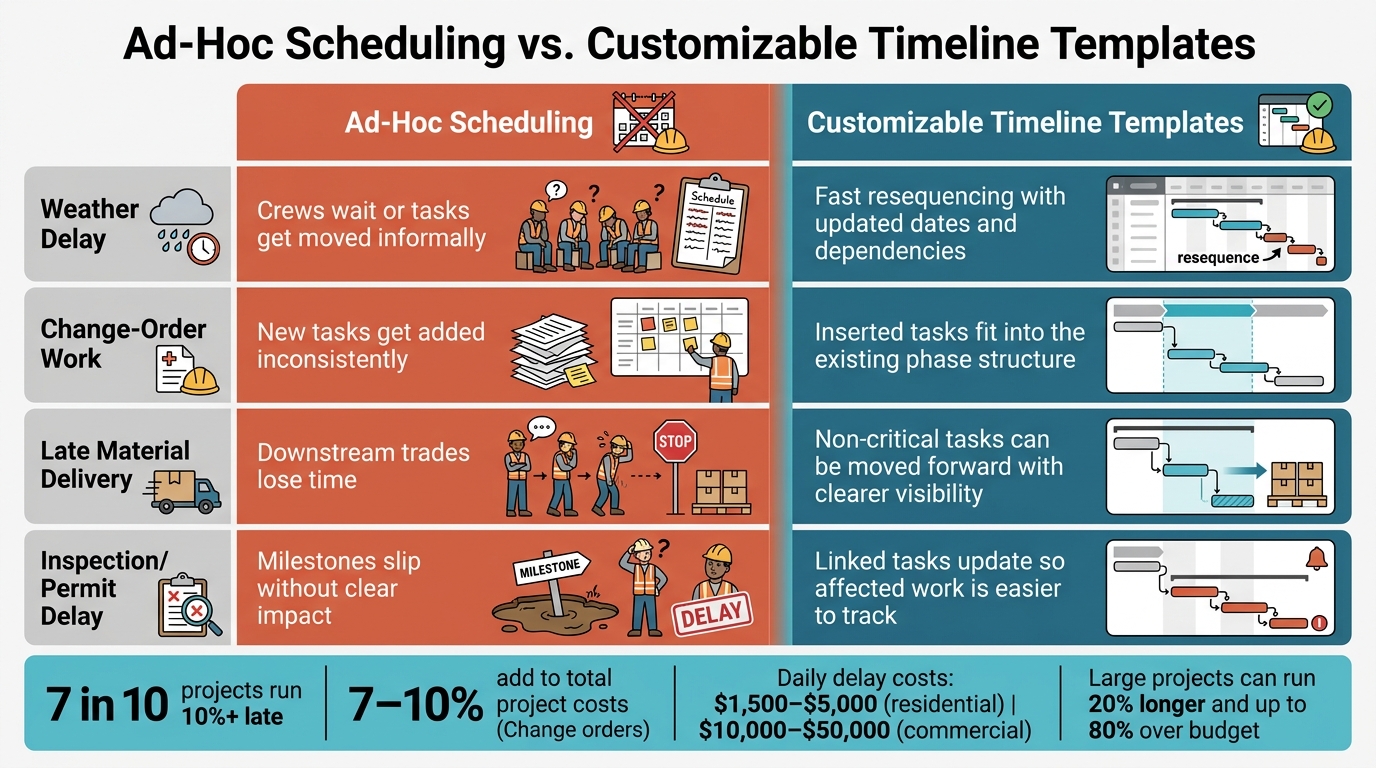
Ad-Hoc vs. Customizable Construction Scheduling: Key Differences
Rigid schedules break down when job conditions change. A customizable template gives you a starting point you can edit without rebuilding the whole plan. The answer isn’t more guesswork. It’s a schedule structure that can take a hit, shift, and still protect the critical path.
Start With a Standard Schedule, Then Adjust Tasks, Dates, and Dependencies
A prebuilt phase structure for a residential remodel or commercial build-out saves a lot of setup time. You don’t have to build every schedule from zero on each job. The core phases – site prep, rough-in, inspections, finishes – are already mapped out. What changes are the job details: task lengths, trade order, local inspection steps, and owner requirements.
That kind of standard template saves time and cuts mistakes because every job starts from the same planning framework. Then you tweak the parts that need tweaking. Editable linked Finish-to-Start dependencies also matter here. If one phase moves, the tasks after it update too instead of sitting on the wrong dates.
Use Custom Fields and Past Job Durations to Improve Planning Accuracy
Most schedule slip starts with poor estimates. If durations come from memory or wishful thinking instead of job history, the critical path is off before the first shovel hits the ground.
Templates with custom fields for resource allocation, risk management, and responsibility assignments let you tie job-specific details to each task. And when duration estimates come from prior jobs and historical data, the schedule reflects what is likely to happen, not what you hope will happen.
PERT (Program Evaluation and Review Technique) pushes this a step further with three-point estimates:
- optimistic
- pessimistic
- most likely
That range gives you a more honest view of where risk sits. Over time, each new schedule gets tighter because it’s built on what past jobs actually looked like.
Re-Sequence Work Quickly When Weather, Delays, or Changes Hit
Once the template is in place, the next upside is fast resequencing in the field.
When weather turns bad or materials show up late, the big question is simple: what else moves with it? A customizable template with linked dependencies answers that for you. In a drag-and-drop Gantt-style view, you can shift task blocks and add change-order work into the current phase plan without rebuilding the entire schedule.
Templates also make it easier to spot total float – the slack time a non-critical task has before it affects the completion date. That gives you room to pull some non-critical work forward while the critical path is stalled, so crews stay busy instead of standing around.
| Scheduling Problem | Ad-Hoc Scheduling Outcome | Customizable Template Benefit |
|---|---|---|
| Weather delay | Crews wait or tasks get moved informally | Fast resequencing with updated dates and dependencies |
| Change-order work | New tasks get added inconsistently | Inserted tasks fit into the existing phase structure |
| Late material delivery | Downstream trades lose time | Non-critical tasks can be moved forward with clearer visibility |
| Inspection/permit delay | Milestones slip without clear impact | Linked tasks update so affected work is easier to track |
What Contractors Gain From Customizable Construction Timelines
When a timeline can shift with the job, the upside shows up fast – on site and on the balance sheet.
More Predictable Completion Dates and Less Idle Time
When sequencing and dependencies stay in sync, crews show up when the work is ready. That cuts idle time and helps the job keep moving. In many cases, schedule problems show up first in simple, costly ways: crews arrive too early, too late, or in the wrong order.
A 2- to 6-week lookahead gives managers time to spot constraints early and line up labor and materials before bottlenecks take hold. Conflict checks also catch double-booked labor or equipment before those issues hit the field. The result is pretty straightforward: fewer idle crews, fewer site clashes, and fewer missed handoffs.
And those schedule wins don’t just help production. They also tighten up cost control.
Better Cost Control, Billing Timing, and Delay Documentation
The same flexible timeline used to adjust the work can also clean up billing workflows and strengthen delay records. Large projects can run 20% longer and up to 80% over budget when schedules fall off track. A customizable timeline built from actual job history – not optimistic guesses – gives contractors a better chance of keeping costs in line from day one.
Percent-complete tracking connects progress straight to billing. Clear milestones can speed up progress billing, while baseline tracking creates a record of planned versus actual timing. That same record can also back up delay claims by showing the original plan, the change, and the impact.
Using Contractor Foreman to Build and Manage Customizable Timelines
Reusable Schedules, Gantt-Style Views, and Task-Level Customization
Contractor Foreman uses reusable schedule templates, Gantt-style views, and task-level editing to make timeline setup faster. That matters on active jobs, where the same issues tend to show up again and again: change orders, late material deliveries, bad weather, and missed handoffs. Instead of rebuilding the whole plan each time, teams can fix those issues inside the software and keep moving.
Reusable schedule templates help with repeat-job setup by giving contractors a consistent starting point for each new project. Teams can create a baseline schedule, compare the original plan against actual percent-complete progress, and then adjust task durations and dependencies for the job at hand.
The Gantt chart view and Critical Path Method (CPM) keep the critical path visible, so the tasks that matter most stay easy to spot. The Quick Task Creator and drag-and-drop scheduling make it simple to re-sequence work or shift crews when jobsite conditions change. Contractors can also import existing schedules directly from Microsoft Project.
Once the schedule is in place, the next step is just as important: tying field updates back to cost and progress data.
Schedule Updates Tied to Daily Logs, Financial Tracking, and Mobile Access
Daily logs record weather, crew presence, materials, and productivity. That gives contractors a clear paper trail for schedule changes, delay documentation, and job costing in real time. Field crews can update percent complete and daily logs from mobile, while office staff sees schedule changes right away. GPS-based geofencing adds another check by confirming that crews are physically on-site before hours are logged.
| Contractor Foreman Feature | Scheduling Problem Addressed | Practical Project Benefit |
|---|---|---|
| Reusable schedules | Rebuilding timelines from scratch on repeat job types | Faster setup and more consistent planning |
| Task and dependency editing | Scope changes and shifting task order | Quicker schedule adjustments with less confusion |
| Daily logs | Poor visibility into field progress and delays | Better records for schedule updates and delay tracking |
| Financial tracking | Schedule drift affecting labor and cost control | Stronger connection between timing and job costs |
| Web and mobile access | Slow updates between office and field | Real-time schedule communication across teams |
Conclusion: Why Customizable Timelines Lead to Stronger Project Control
Static schedules fall apart because job conditions change. Change orders come in. Materials show up late. Weather pushes work back. Crews move between sites. If a schedule can’t change with the job, it stops helping and starts acting like a record of what was supposed to happen.
Customizable timeline templates give contractors a way to stay ahead of those disruptions. They can adjust task sequences, document delays, and keep labor and costs lined up with what’s happening in the field. When schedules, daily logs, and job costs stay connected, teams can respond faster and document delays with more clarity. That leads to tighter control over schedule, cost, and documentation.
FAQs
How is a customizable timeline different from a fixed schedule?
A fixed schedule is a static list of dates.
The problem? It can go stale fast when field conditions shift. It often misses delays, changing priorities, and resource conflicts.
A customizable timeline works more like a living system. It updates as conditions change and as the team adds input. Because it accounts for task dependencies and day-to-day shifts, it stays more accurate and more useful throughout the project.
When should long-lead materials be built into the schedule?
Long-lead materials need to be built into the schedule early. Procurement should shape the project timeline, not sit in the background as an afterthought.
Add each item’s lead time to the schedule and connect procurement milestones to the field work that depends on them. That gives you a timeline that matches what can actually happen on site, and it helps prevent crews from sitting around or work from stopping because materials haven’t arrived.
How do schedule updates help with billing and delay claims?
Regular schedule updates help keep billing accurate by tracking labor and resource use against the project timeline.
They also create real-time records of progress and delays, so it’s easier to confirm when setbacks happened and what caused them. That paper trail can support claims and speed up dispute resolution. Contractor Foreman can centralize this information, which helps keep records consistent and easy to find.







