
When was the last time you left the office early because you had NOTHING—absolutely nothing— left to catch up on?
Yep. Exactly.
Most builders aren’t buried by construction. They’re buried in admin work— Estimates. Schedules. Daily logs. Paperwork. Client updates. The list goes on and on.
The smart contractors?
Well…they’re already geeking out on how to use AI to chip away at all that repetitive work, saving hours every week and keeping more money in their pockets.
Here’s the thing: While AI can’t build for you—it can’t frame a wall or pour a foundation. But it is ridiculously good at repetitive office work—the stuff you do over and over on every single job.
The result? Less time hunting for RFIs, permits, and submittals. Cleaner homeowner updates. Fewer missed scope items.
In other words, less busywork.
Areas where AI helps the most:
| Area | What AI helps with | Reported result |
|---|---|---|
| Estimating | Pulls measurements, drafts line items, checks scope | 40%–60% less bid prep time |
| Scheduling | Spots trade conflicts and delay risk | Better look-ahead across jobs |
| Daily logs | Turns photos and voice notes into updates | About 3–7 minutes per report |
| Client communication | Drafts polished progress updates | Under 7 minutes in some cases |
| Document control | Finds permits, RFIs, and submittals fast | Less back-and-forth |
Takeaway: start small, track time saved, and keep a human check before sending estimates or schedule changes. That’s where the payoff shows up first for residential builders.
AI in Construction: Time & Cost Savings for Residential Builders
What AI Actually Solves in Residential Construction
AI helps with the stuff that slows residential construction down every week: late trade starts, slow bids, and project updates that never seem to stay current.
You see those problems most in estimating, scheduling, daily logs, and client communication.
And you’ve got two ways to deal with it: bolt AI onto your existing process yourself, or use software that’s already done the research, testing, and investment for you.
Contractor Foreman is one of the residential construction softwares that’s made the most of Large Language Model.
It has a feature called Ask the Foreman where users can click the button, and the AI uses a large language model trained on our knowledge base so users can query the platform using natural language.
Marcus Hantla, Contractor Foreman’s COO explains:
Let’s say someone wants to know how many invoices they have or what their outstanding balance is, it will query the database without you ever clicking through anything. No clicking from one field to the next in the user experience. We like to put the “cookies” on a lower shelf and let everyone be able to access their data. “
Want to know how else Contractor Foreman is scaling AI to streamline construction management?
Watch this podcast featuring our COO Marcus Hantla.
Scheduling Delays, Slow Estimating, and Poor Field Visibility
Trade sequencing gets messy fast when you’re managing it by hand, especially for residential general contractors managing several live jobs.
AI helps spot bottlenecks early and can flag when multiple projects will need the same specialty trade at the same time. That gives builders a chance to plan ahead instead of scrambling after the delay has already hit.
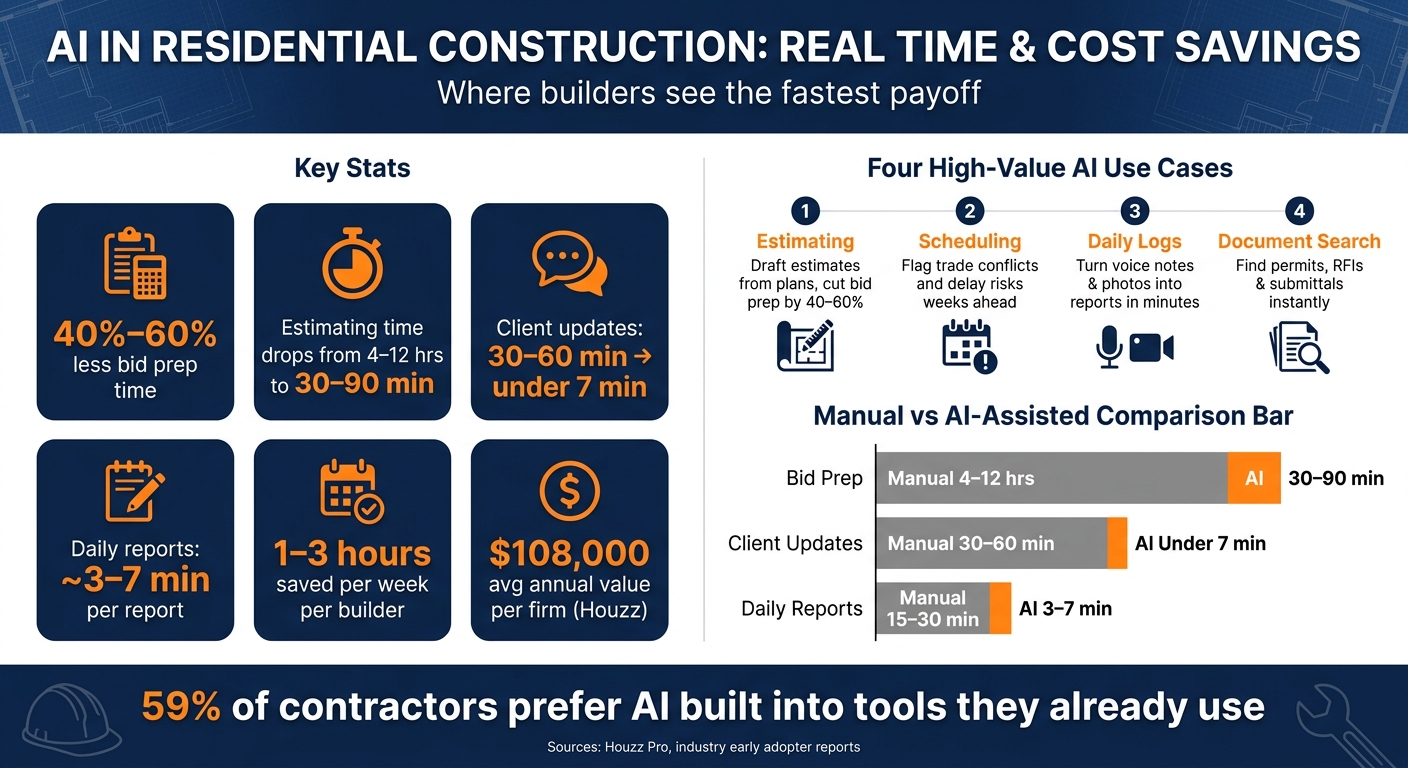
Estimating comes with a different kind of time drain. A detailed manual bid usually takes 4 to 12 hours of owner time. AI can bring that down to 30 to 90 minutes by pulling measurements from PDF plan sets and cutting bid prep time by 40% to 60%.
Daily reporting is often where schedule issues start to show. If updates depend on a superintendent sitting down at the end of a long day to type notes, small but costly details can slip through the cracks. AI tools that turn voice notes and photos into daily progress summaries can cut client update time from about an hour to under seven minutes.
Communication Gaps, Document Confusion, and Costly Errors
Texts, emails, and phone calls can scatter job decisions all over the place. AI can pull long email threads and conversations into one place, which helps teams keep track of decisions even when people are overloaded or someone leaves the company.
AI agents put together room-by-room finish schedules for painters and flagged weather-driven delays weeks in advance. That kind of coordination saves time and helps avoid rework, disputes, and missed handoffs.
Document mix-ups also cost money. AI can compare current bids against past project data and standard assemblies to catch missed scope items before the contract gets signed.
These are the parts of the workflow where AI tends to deliver the fastest day-to-day gains.
sbb-itb-5eea312
How AI Improves Core Residential Workflows
Those pain points start to look very different when AI is built into estimating, scheduling, field reporting, and document control. What used to eat up time in the office and create friction in the field can turn into gains you can track.
Faster Estimating and Tighter Budget Control
AI makes estimating more repeatable and helps keep pricing tied to current labor and material costs.
A sneaky problem in manual estimating is the markup vs. margin mistake.
A 20% markup does not create a 20% margin – it creates about 16.7%.
That sounds small, but it can chip away at profit across many bids. AI estimating tools apply the right formula on their own, which helps protect profit on every proposal. They can also connect line items to real-time local labor and material pricing instead of old averages, so bids stay closer to current costs.
| Factor | Manual Estimating | AI-Assisted Estimating |
|---|---|---|
| Accuracy | Prone to measurement and entry errors | Flags scope gaps and structural clashes |
| Cost Visibility | Relies on stale or national average data | Real-time, local labor and material pricing |
Once pricing gets tighter, scheduling is the next place where AI starts to pay off.
Better Scheduling, Timeline Forecasting, and Daily Reporting
Manual schedules tend to assume the job will go as planned. AI forecasting looks at past job data and actual trade performance patterns to build timelines that better match what happens in the field.
“Where before we were only able to look out a couple of weeks, we were now looking ahead several months. It was identifying bottlenecks that we were going to have.”- Adam Vellequette, Owner, KBF Design Gallery
That kind of visibility changes day-to-day planning. Instead of scrambling after delays hit, builders can spot labor conflicts and schedule issues weeks ahead.
Daily notes and site photos can also feed straight into the schedule, which gives the office a better shot at catching slippage early instead of hearing about it after the fact.
| Factor | Manual Reporting | AI-Supported Reporting |
|---|---|---|
| Data Collection | Paper logs and end-of-day memory | Real-time voice notes and photo tagging |
| Speed | 30–60 minutes per update | Under 7 minutes via automated summaries |
| Client Output | Inconsistent tone and formatting | Structured, professional, and photo-backed |
The same job data used to forecast delays can also help keep homeowners in the loop.
Clearer Client Communication and Faster Document Search
AI can turn live project data into homeowner updates inside a client portal, so questions, answers, and job status stay in one place.
“I wanted to be on the jobsite and use my phone… I wanted to talk to my schedule and my selections and my budget in the same manner.”- Milan Vladic, Executive Superintendent, Nash Build
AI search also makes document retrieval much easier. Teams can search by question for a permit, RFI, or submittal and pull it up right away. For builders juggling several active jobs, fast access to daily logs, submittals, and project records cuts down on back-and-forth and helps teams make decisions with less delay.
Where to Start: High-Value AI Opportunities for Small Builders
Start with the jobs that show up on every project: estimating, scheduling, daily logs, and document control. For small builders, those four areas tend to pay off first.
Begin with Estimating, Scheduling, Daily Logs, and Document Control
Estimating is the best first use case because it helps teams put bids out faster and protect margin.
Daily logs are another good place to start. With voice-based capture, field crews can log updates as work happens instead of waiting until the end of the day to type everything out. Document search also saves time. It gives builders fast access to permits, RFIs, and submittals across multiple active jobs, without the usual back-and-forth.
The goal is simple: take repetitive admin off the team’s plate so they can spend more time in the field and with clients.
One practical rule matters here: keep a human review step before sending any AI-generated estimate or schedule. Let AI draft the structure and line items, then use human judgment for final pricing and markups. Scheduling can also get easier when AI turns subcontractor emails into draft updates without manual retyping.
Connect AI Across Existing Workflows
Once those core tasks run faster, connect them. Updates should move from estimating to scheduling to billing without re-entry.
That’s where AI tends to do its best work: inside the tools your team already uses, not as one more thing to manage. 59% of contractors prefer AI features built into software they already use instead of separate tools. One project record should support every AI-assisted task.
Use an all-in-one construction management software that links estimating, scheduling, daily logs, client portals, document control, and accounting. That way, AI can use the same project data across each workflow.
Conclusion: Focus on Practical Gains, Not AI Hype
In residential work, the clearest wins show up in estimating, scheduling, daily reporting, client communication, and error reduction. Put simply, that means less admin work and tighter control over bids, timelines, and project details.
The time savings aren’t vague or hard to spot. AI-assisted estimating can cut bid prep time by 40% to 60%. Daily reports can drop from 15 minutes to about 3 minutes. And client updates can go from 30 to 60 minutes to under 7 minutes.
Those hours add up fast. Early AI adopters in residential construction report saving 1 to 3 hours per week, and Houzz says that can translate to an average of $108,000 in annual value per firm.
For most builders, the smart move is to start small. Pick one or two workflows, track the time and cost savings, then build from there. Residential teams are lean, so this kind of rollout tends to work best when it’s tied to clear workflow-level wins.
AI is a productivity tool, not a stand-in for experience. It does its best work when it takes repetitive tasks off your plate while your team handles judgment. That’s where the payoff shows up on residential jobs.
FAQs
What AI task should I start with first?
Start with an AI 101 mindset: use AI to automate repetitive administrative tasks that pull time away from project management and field work.
A good first step is routine documentation. Think checklists, punch lists, and sorting project communications. It’s a simple way to cut admin drag and keep your data in one place.
How much human review does AI still need?
AI works best as a support tool, not as a stand-in for professional judgment.
It can help with early drafts of estimates, summarize emails and messages, and keep project data organized. That said, it still can’t take over site assessments, homeowner negotiations, or supervision of trade partners. Those parts of the job still need a builder’s eyes, judgment, and experience.
For high-stakes work like bidding, treat AI output as a first draft. The final review, permissions, and sign-off should stay with the builder. That’s how you protect pricing, project margins, and the quality of the work.
Can small residential builders afford AI tools?
Yes. Small residential builders can often afford AI tools, and in many cases, they get a lot out of them – especially when a small team is juggling estimating, scheduling, and client communication.
The big win is time. AI can save hours of admin work, cut down on costly mistakes, and make day-to-day workflows run more smoothly. For a typical mid-sized contractor, AI-integrated software may cost about $800 per month. In many cases, the best option is a tool that’s already built into the management software the team uses every day.







