
- Quick Comparison
- Why Construction Firms Are Moving Away From Spreadsheets, Paper Forms, and Email Chains
- 1. Better Project Planning and Centralized Scheduling
- 2. Stronger Team Communication and Real-Time Collaboration
- 3. More Reliable Daily Documentation and Compliance With Digital Logs
- 4. Tighter Financial Tracking, Budget Control, and Change Order Management
- 5. Higher Overall Efficiency and the Ability to Scale
- How These Benefits Show Up in Day-to-Day Operations
- What to Look for in a Construction Management Platform
- Conclusion
- FAQs
- Related Blog Posts
It’s 8:47 PM and Mike is sitting in his truck in his own driveway, engine off, phone glowing in his lap.
He’s not ready to go inside his home yet.
He checks his phone.
Three texts from his crew asking questions on the things he already told them three times. A voicemail from the tile sub, who’s now saying he might not make it Thursday after all. And there it was — five missed calls from his wife, sent around 6:15, right about when he was supposed to be at his son’s Little League game.
He didn’t make the game.
He’d spent the afternoon trying to sort out a mess that started with two crew members giving him two different stories about who was supposed to do what.
And as everyone went home, he had to stay to review fourteen text threads, a Google Sheet nobody updates, a change order scribbled on a receipt.
This is what juggling four projects, six subs, and a family that needs him actually looks like.
Don’t be Mike.
How?
By using a construction management software.
Spreadsheets, Google Docs, Trello boards, WhatsApp, and 30 other apps means something always gets missed. Even the most organized general contractor can’t catch everything. Your crew doesn’t stand a chance.
Still need more convicing? Read up. This article shows you exactly why.
Here are the key benefits of using construction management software:
- Better planning and scheduling
- Clearer team communication
- Stronger daily records and compliance
- Tighter budget and change order control
- More output with less admin strain
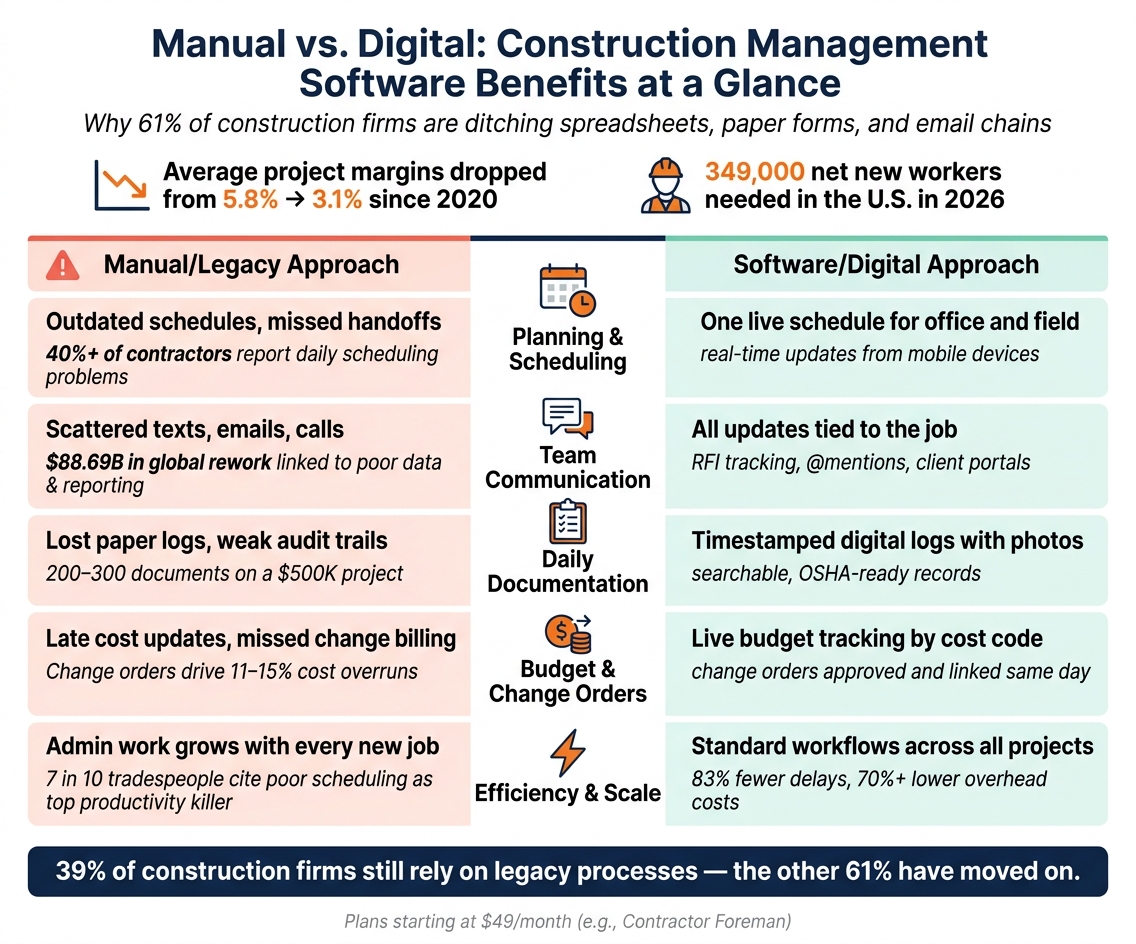
Manual vs. Digital: Construction Management Software Benefits at a Glance
Quick Comparison
| Area | Common manual issue | Software impact |
|---|---|---|
| Planning | Old schedules and missed handoffs | One live schedule for office and field |
| Communication | Scattered texts, calls, and emails | Project updates stay tied to the job |
| Documentation | Lost paper logs and weak audit trails | Timestamped digital records with photos |
| Financial tracking | Late cost updates and missed change billing | Live budget tracking by cost code |
| Efficiency | More admin work as job count grows | Standard workflows across more projects |
39% of construction firms still use legacy processes, and that often leads to version control issues, budget drift, missing records, and billing gaps. In contrast, digital tools help teams spot schedule slips, cost overruns, and approval delays while there is still time to act.
Contractor Foreman is one example of an all-in-one platform built for small and midsize contractors, with plans starting at $49/month. Its core functions line up with the five areas above: scheduling, communication, daily logs, budget tracking, change orders, and mobile access.
sbb-itb-5eea312
Why Construction Firms Are Moving Away From Spreadsheets, Paper Forms, and Email Chains
Construction teams are pulling back from spreadsheets, paper forms, and long email threads for a simple reason: disconnected tools can’t keep up with what happens on a busy jobsite.
The first crack usually shows up in version control. A project manager updates the schedule on 07/28/2026, but the superintendent in the field is still using a printed copy from 07/15/2026. Crews arrive on the wrong day. Material deliveries get timed wrong. Small mix-ups like that can snowball fast.
The same thing happens with change orders. When revisions move around as email attachments, it gets messy. People waste time asking which file has the final approved scope and price. And once that confusion hits change orders, it usually spills into job costs too.
Budget drift is another problem, and it hits hard. A project team may think there’s $25,000 left in contingency based on last week’s spreadsheet. Meanwhile, accounting’s latest file shows only $7,500 left because recent purchase orders still haven’t made it into the master file.
Paper gaps create another layer of trouble. Missing delivery tickets, daily logs, permits, and safety checklists can turn into invoice disputes and compliance risk fast, especially during an OSHA inspection. One missing document may not seem like a big deal at first, but across several projects, those holes start to hurt.
39% of construction companies are still relying on legacy processes – including pen, paper, and emailed documents. That’s why more firms are moving to connected software. The first payoff is cleaner planning and a single place for scheduling.
1. Better Project Planning and Centralized Scheduling
The Pain Point It Solves
Disconnected schedules lead to missed handoffs and delays that didn’t have to happen. More than 40% of contractors say scheduling problems affect their projects every day. One shared plan gives everyone the same view of the job, which makes updates faster across the whole project.
Core Features That Make It Work
Construction management software gives the office and the field one live schedule. The tools that matter most are task dependencies, live status updates, and progress tracking. When a superintendent updates progress from a mobile device on the jobsite, the office sees it right away – no waiting on email, and no hunting down the latest version of a file.
The Real-World Impact
When weather throws off the plan, teams can react before the day slips away. If rain delays a concrete pour on a Monday morning, the project manager can move the drywall crew’s start date, reschedule the material delivery, and shift the inspection window in the same system. Everyone involved sees the new plan at once.
That kind of live schedule change helps cut idle crews, overtime, and rework. It keeps labor, equipment, and materials lined up so people aren’t standing around waiting.
When the field and office update the same schedule every day, it stays useful in real time. It also makes team communication faster and clearer.
2. Stronger Team Communication and Real-Time Collaboration
The Pain Point It Solves
A live schedule helps, but it doesn’t fix scattered communication.
When updates are split across texts, emails, calls, and paper forms, people end up working from different versions of the same job. A subcontractor may use an old drawing. An RFI may sit in someone’s inbox. The field crew may not hear about a schedule change until they arrive at a site that isn’t ready.
According to industry data, 14% of all construction rework – roughly $88.69 billion globally – may be caused by inaccurate data and poor reporting. At that point, the issue isn’t just bad communication. It’s a visibility problem.
The Tools That Fix It
Construction management software pulls conversations, files, and decisions into one place connected to the project.
Project threads, @mentions, RFI tracking, submittal logs, and client portals keep every update tied to the job. Field crews can upload photos, log issues, and submit RFIs from a phone or tablet. That means fewer delays, fewer missed details, and less digging through inboxes to find out who said what.
Client portals add another layer. Owners can log in and check schedule progress, pending approvals, and open items. Everyone sees the same project picture, which cuts down on admin back-and-forth.
The Real-World Impact
Picture a drywall subcontractor spotting a mismatch between the latest drawing and the rough-in layout. Without one central platform, that can set off a messy chain reaction: phone calls, mixed messages, and maybe a full day of lost work.
With construction management software, the superintendent can post the issue, tag the right people, upload a marked-up photo, and log an RFI in minutes. The right people get notified on their mobile devices, the correct drawing version gets confirmed, and the crew can keep moving instead of standing around waiting.
That kind of speed has a direct effect on the job. Effective digital collaboration can raise productivity 14% to 15% and cut costs 4% to 6%. Faster decisions mean less idle labor and fewer mistakes tied to outdated documents. Those same records also support cleaner daily logs and faster issue resolution.
What This Means for Accountability
The biggest upside of centralizing communication isn’t just speed. It’s traceability.
When every decision, approval, and field note lives alongside the related plan or task, it’s much easier to see what happened and when. That makes it simpler to hold teams accountable and sort out disputes before they drag on. On more complicated jobs with several subcontractors, undocumented decisions often sit right at the center of claims and delays.
3. More Reliable Daily Documentation and Compliance With Digital Logs
The Pain Point It Solves
After communication is brought into one place, the next job is keeping a steady daily record of what happened in the field.
Paper reports break down fast. They get lost, show up late, and sometimes you can’t even read them. On a $500,000 residential project, it’s common to end up with 200 to 300 documents, and paper almost guarantees a few holes in the record.
The Tools That Fix It
Construction management software swaps loose paper logs for structured digital templates that crews fill out on a phone or tablet at the end of each shift. In one standard format, teams can log labor hours by cost code, equipment use, material deliveries, weather, safety notes, and incidents.
Each entry is automatically timestamped and linked to the project. That means the office can pull up a searchable record without waiting on end-of-day paperwork. It also gives the team a current view of progress, manpower, and site conditions while the job is still moving.
Photos, videos, and weather data can be attached right to the entry. So instead of piecing the story together later, the team has one record that shows what happened and when it happened.
Digital logs help answer the questions that always come up later:
- Who was onsite?
- What work got done?
- What materials showed up?
- What job conditions affected progress?
The Real-World Impact
This matters when a job gets tense. A contractor can use timestamped photos, weather data, and superintendent notes to show why delays happened, back up a time extension, and head off a billing dispute. That same record can also support a claim for added time and standby costs.
Because entries are made in real time and stored in one place, digital logs give the project team a stronger record to work from.
What This Means for Compliance and Visibility
Digital logs also leave a clear safety trail. Toolbox talks, PPE checks, near-miss reports, and hazard observations are all recorded in one system. If OSHA reviews the job, the team isn’t stuck digging through folders or trying to figure out what was documented before an incident.
The same logs can also help verify labor, equipment, and delay costs later.
4. Tighter Financial Tracking, Budget Control, and Change Order Management
Once daily logs and team communication are running well, the next place pressure builds is cost control.
The Pain Point It Solves
A job can look fine on the surface and still lose money in the background. When teams don’t track costs as they happen, budget problems often show up too late. By then, the work is almost done and the room to fix the issue is gone.
That usually starts with simple things: spreadsheets stop matching, paper change orders disappear, and labor costs keep climbing before anyone sees the overrun. Change orders are a major part of that problem. They often drive 11% to 15% cost overruns and 10% to 20% schedule overruns, so slow tracking can turn into lost margin fast.
The Tools That Fix It
Construction management software puts labor, materials, subcontracts, and purchase orders into one live budget. As crews log hours by cost code and field teams record deliveries, those numbers hit the budget right away. Project managers can check budget vs. actual costs, plus committed costs, without waiting on end-of-week timecards or month-end accounting reports.
Change orders move through the same system. If a scope change comes up in the field, the crew can log it in the app and send it through a formal approval workflow. Once it’s approved electronically, the software updates the contract value and connects that change to the correct cost codes.
The Real-World Impact
Here’s what that looks like on the job: a superintendent logs a scope change in the field, the PM prices it, the owner approves it, and the budget updates on the spot. The firm bills for the extra work instead of eating the cost.
That’s the point. Software helps stop change orders from turning into hidden margin loss. Each approved change stays linked to both the budget and the contract, so nothing slips into the shadows.
What This Means for Margin Protection
Real-time budget-versus-actual reporting helps project managers spot cost codes that are drifting off plan before those costs are locked in. And when margins are already thin, even a small overrun can wipe out profit in a hurry.
Tighter financial tracking gives teams a cleaner view across every project the company is running. When cost data stays current, managers spend less time chasing overruns and more time keeping work on track.
5. Higher Overall Efficiency and the Ability to Scale
The Pain Point It Solves
Every new project adds more admin work if your systems are scattered. Spreadsheets, paper forms, and long email threads might work for a while, but they start to drag once job volume picks up. When planning, communication, documentation, and financial tracking all live in one place, growth gets a lot easier to handle.
That matters because nearly 7 out of 10 tradespeople say poor schedule management is the main reason labor productivity drops. And when a company is juggling several jobs at the same time, that issue can snowball fast. Put schedules, logs, and budgets into one system, and the office can support more work with a lot less disorder.
The Tools That Fix It
Construction management software replaces a messy mix of separate tools with one centralized workspace. Contractors can use project-based permissions to assign employees to specific jobs without opening up the entire system. Standard templates help teams set up projects faster and keep workflows the same from one job to the next.
Mobile updates can also feed reports on their own, which means one office team can support more active projects without piling on extra admin work. Automated alerts call out delays, approvals, and other exceptions before they stall the job, so managers don’t have to chase every detail across every site.
The Real-World Impact
The payoff shows up in the numbers. One report found optimized users saw 83% fewer delays and more than 70% lower overhead and unforeseen costs. That means less time burned on reporting, coordination, and paperwork.
What This Means for Scaling
When admin work drops, firms can take on more jobs without growing office overhead at the same rate. Processes stay the same across projects, and that’s a big part of what lets a company scale without losing control.
Those gains tend to show up first in everyday field and office work.
How These Benefits Show Up in Day-to-Day Operations
You can see the impact most clearly in three common jobs: change orders, weather delays, and subcontractor coordination.
Take a $4,500 change order for added electrical work. In a manual setup, that request might sit in an email chain, get jotted down on a paper form, or end up in a spreadsheet later. By that point, the budget is already out of date. With software, that same change order can be logged, priced, sent out for approval, and tied to the project budget that same day.
Weather delays are another good example. If rain shuts down exterior work, a handwritten note or quick text can get lost fast. A digital daily log lets the superintendent record the delay from a phone, add photos, and timestamp the entry right from the jobsite. If the owner later pushes back on a schedule extension, or a dispute starts over lost time, that record is easy to pull up.
The same pattern shows up across daily work:
| Workflow | Manual | Digital | Result |
|---|---|---|---|
| Scheduling | Emailed spreadsheets and paper updates | Centralized calendar with live updates | Delays show up the same day |
| Communication | Separate texts and email threads | Shared platform with notifications | One update reaches all crews |
| Daily logs | Paper forms or memory-based notes | Timestamped digital entries with photos | Cleaner audit trail |
| Budget tracking | Manual checks, often at month-end | Live cost tracking tied to field activity | Overruns surface earlier |
That’s the big shift. Software helps teams spot problems while there’s still time to do something about them. And in construction, timing can make or break the day.
What to Look for in a Construction Management Platform
These gains only show up if the platform covers the basics well. When you’re comparing options, focus on the features that help stop schedule clashes, missed logs, slow signoffs, and late cost updates.
Start with centralized scheduling and mobile field reporting. That’s where a lot of day-to-day friction shows up. A solid platform lets managers build and adjust schedules in one place, while crews in the field update progress right from their phones. If updates have to wait until someone gets back to the office, you lose a big part of the upside. At a minimum, look for mobile apps that include daily logs, photo uploads, GPS-verified time cards, and offline access for jobsites with weak signal. That’s the starting point for any side-by-side comparison.
Client portals and digital approvals matter just as much, even though teams often gloss over them during the review process.
Look for:
- Client portal access
- E-signatures
- Structured approval workflows
- A full audit trail
On the money side, you want budget tracking tied to field activity, not just reports at the end of the month. The platform should handle job costing by cost code, track committed versus actual costs, and connect change orders straight to the project budget. For U.S. contractors, QuickBooks integration matters a lot. Check for two-way sync, how often that sync runs, and whether it includes invoices, bills, and payments, not just basic customer data.
Contractor Foreman includes scheduling, communication, daily logs, financials, and efficiency tools in one platform.
Use the checklist below to compare platforms against the five benefits in this article:
| Benefit | Capability to Verify |
|---|---|
| Better project planning | Gantt or calendar scheduling with dependencies |
| Stronger communication | In-app messaging and role-based access |
| Reliable documentation | Mobile daily logs with timestamps, photos, and signatures |
| Tighter financial tracking | Job costing by cost code and change-order workflows |
| Higher efficiency and scale | Unlimited projects and API/Zapier integrations |
Conclusion
These five benefits build on each other: better planning, faster communication, cleaner records, tighter cost control, and higher efficiency. On the job, they don’t show up as separate wins. They work together as one connected system.
For U.S. contractors, that hits the pain points head-on: schedule slip, surprise costs, and messy field-to-office communication. And that’s a big deal when crews, timelines, and budgets are all moving at the same time.
Contractor Foreman brings scheduling, daily logs, financials, communication, and client portals into one cloud-based platform. That keeps field and office teams working from the same information. When everyone is looking at the same picture, it gets a lot easier to protect margins and keep projects predictable.
FAQs
How hard is it to switch from spreadsheets and paper forms?
Switching from spreadsheets and paper forms is manageable when you use a standard process. At first, it can feel like a big shift. That said, construction software is built to be easy to use, which makes the learning curve less painful.
A smart way to start is small. Pilot the software on one or two normal projects, see how the team uses it, and then roll it out across the company.
Before you scale up, clean up the messy stuff:
- Remove duplicate records
- Standardize cost codes
- Use the same naming rules across jobs
- Enter data at the source with mobile apps
That last part matters more than people think. When crews log data from the field instead of handing in notes later, you cut down on delays, missing details, and double entry.
What features matter most for small construction teams?
Small construction teams get the most value from features that keep daily work simple, mobile, and easy to track.
The must-haves are:
- Centralized document storage
- Mobile-first access with offline mode
- Custom digital forms and checklists
- Role-based access control
It also helps when project management connects to QuickBooks. Add automated scheduling and real-time expense tracking, and you can cut down on admin work while keeping a close eye on job costs and cash flow.
Can construction management software help prevent missed change orders?
Yes. Construction management software can help stop missed change orders because it keeps requests and approvals in one digital place.
Client portals make this even simpler. Contractors can send change orders to owners for electronic signatures, and once those changes are approved, the software updates the contract amount, project budget, and cost reports automatically.
That means less manual data entry, fewer mistakes, and a much lower chance that a requested change slips through the cracks.
Related Blog Posts
- How Software Solves Construction Scheduling Problems
- Top Tools for Construction Timeline Management
- Ultimate Guide to Construction Collaboration Software
- Want Higher Profits? These Home Builder Software Features Matter Most







