
“Do we owe this sub yet?”
“Depends. What does the contract say?”
“…which contract— v3, or v3_final?”
“WHAT? Please tell me those are the same document.”
So the PM spends the next hour cross-referencing both — only to find out the real one was neither. It’s the one buried in an email from the client with the subject line “here you go.”
If you still track subcontracts in email, paper files, and spreadsheets, you’re leaving room for payment disputes, scope mix-ups, and expired insurance (and wasting a lot of precious time).
That matters because manual processes are the norm — 73% of general contractors still handle subcontractor payments manually — and the cracks show up fast: slow payments strain relationships and shrink your subcontractor pool (71% of subs reported being paid slowly in 2024), and 15% to 25% of active subs can have expired or near-expired insurance when COIs are tracked by hand.
The solution?
Subcontractor contract management software.
It fixes the contract mess by putting every contract, change order, COI, lien waiver, and pay record in one place — one current file, not a scavenger hunt through someone’s inbox. You can see what each subcontract actually requires, route approvals without a manhunt, and tie the paperwork to real job costs and field work.
What Matters Most:
- Keep all subcontract records in one place so the office and field see the same signed version
- Track key terms like scope, retainage, payment terms, insurance dates, lien waivers, and deadlines
- Use approval workflows instead of email chains so reviews don’t stall
- Keep version history and audit logs so I can see what changed, when, and who approved it
- Give field teams mobile access so superintendents can check scope and compliance on the jobsite
- Link contracts to RFIs, submittals, pay apps, budgets, and change orders so records stay tied to live project work
- Roll out in phases with setup, migration, permissions, workflow rules, and staff training
A simple way to test your system: if you CAN’T pull up the latest subcontract on your phone, confirm the COI is active, and match billing to contract terms, the process still has gaps.
This article covers storage, permissions, clause tracking, approvals, version control, field access, software connections, and rollout steps so contract management is seamless.
Store and Organize Subcontractor Contracts in One Place
Keep executed agreements, addenda, change orders, COIs, lien waivers, compliance documents, and closeout files in one repository. That gives office staff and field teams access to current records in real time. It also makes clause tracking and approval routing much easier later.
Organize Documents by Project, Subcontractor, Trade, and Status
A simple setup works best: organize records by project, then by subcontractor or trade, and then by document type. So an electrical subcontractor’s executed contract, COI, and lien waivers stay tied to the right job instead of disappearing across a mess of folders.
Status labels make the contract lifecycle easy to scan. Tags like Draft, Under Review, Sent, Approved, and Closed show exactly where each contract stands. Add tags and custom fields, and teams can filter records by trade, subcontractor, or document type without digging around.
The compliance piece matters just as much. Manual COI tracking often leaves 15% to 25% of active subcontractors with expired or soon-to-expire insurance at any given time. A structured system with automated alerts keeps that risk in plain sight before it turns into a jobsite issue.
Set Permissions for Viewing, Editing, Approving, and Sharing
Role-based permissions decide who can view, edit, approve, or share each record. Owners and finance teams may need full contract terms and financial details. Project managers usually need scope documents and change orders. Superintendents need to check current scope, insurance, and compliance files in the field. Controlled sharing also lets subcontractors see only their executed contract and COI requirements, which helps protect sensitive data.
Once access is set, teams can move into tracking obligations, approvals, and revisions inside each record.
sbb-itb-5eea312
Track Clauses, Obligations, Approvals, and Revisions
Once contracts are organized and access is set, the next job is tracking the terms that drive cost and compliance. Scope changes, payment terms, insurance renewals, and retainage updates all need active follow-up. Without a clear system, teams miss key obligations. That’s usually where disputes and cost overruns begin.
This is where contract software starts doing the heavy lifting. It turns each clause into something the team can track instead of something buried in a document.
Monitor Scope, Payment Terms, Retention, Insurance, and Deadlines
Good contract software tracks the terms that matter most: scope of work, payment terms, retainage percentages, indemnity clauses, insurance requirements, lien waiver requirements, milestone deadlines, and dispute provisions. Instead of digging through PDFs, teams can see open obligations in one place.
Retainage tracking is a strong example. The system calculates retainage automatically at the subcontractor level and adjusts balances if terms change in the middle of a project. That helps prevent overpayment and billing disputes. The same goes for COI expiration alerts. Insurance stays tied to the contract instead of getting lost in someone’s inbox.
| Clause / Obligation | What Software Tracks | Risk It Reduces |
|---|---|---|
| Scope of Work | Imported from bids/estimates | Scope creep and duplicate entry errors |
| Retainage | Automated balance calculations | Overpayment and billing disputes |
| Insurance (COI) | Expiration dates and alerts | Uninsured claims and compliance failures |
| Lien Waivers | Receipt confirmation before payment | Lien claims and financial exposure |
| Change Orders | Automatic contract amount updates | Budget overruns and unbilled work |
Route Approvals Across Project, Finance, and Leadership Teams
Draft contracts shouldn’t bounce around in email. A set approval workflow sends each review step to the right person – project manager, finance lead, or executive – with a due date and a clear status. When one reviewer finishes, the next person gets notified automatically.
Pipeline views make slowdowns easy to spot. If a contract sits too long in Draft, Sent, or Awaiting Signature, everyone can see it without chasing updates. Electronic signatures with timestamps and IP addresses create a secure, verifiable record of execution. Approved change orders then update the contract amount automatically.
That matters because the contract record doesn’t just sit in legal or finance. Once it’s current, the same file can feed field work, RFIs, pay apps, and compliance records.
Use Version Control, Audit Trails, and Change Order History
Every revision to a subcontract should leave a paper trail. Version control keeps prior drafts intact so teams can compare what changed from one round to the next. Side-by-side comparisons show exactly which clauses were added, removed, or changed, and by whom. If a subcontractor pushes back on a scope change later, that history can settle the issue fast.
Audit trails log every edit with a timestamp and user ID. Change orders connect straight to that history. When a change order is approved, the contract amount updates automatically, and the revision is logged in the same audit trail. That record helps teams sort out payment and scope disputes faster.
A complete audit trail lets contractors reconstruct what was agreed, when it was agreed, and who approved it. Once revisions are under control, teams can use the same contract record in both the office and the field.
Connect Contracts to Field Work and Project Records
Once version control is set, the next move is simple: make the contract usable in the field.
A contract only helps if teams can get to it when work is happening. The payoff shows up when the contract record ties straight to what’s going on in the job: the schedule, the budget, the RFIs, and the daily logs. That link gives office and field teams a way to manage subcontract duties as work moves forward instead of scrambling after issues show up.
Give Office and Field Teams Mobile Access to Current Contract Records
Superintendents and project managers usually don’t have time to head back to the office just to find one document. If a subcontractor pushes back on scope, or an insurance certificate needs to be checked before work starts, the answer has to come from the field – fast.
With mobile access to contract records, a superintendent can open the current subcontract, review insurance status, and confirm scope right from the jobsite.
That kind of speed is important. Old records slow work down and lead to rework. Real-time sync also means that when a change order gets approved in the office, the field team sees the updated contract right away.
That same access becomes just as useful when contracts tie into RFIs, pay apps, and daily logs.
Link Contracts to RFIs, Submittals, Pay Apps, Budgets, and Compliance Files
A subcontract doesn’t sit on its own. It touches almost every other record on the job. When those links are built into the software, the contract turns into a live document that reflects what’s happening on the project.
Here’s what that looks like:
| Record Type | How It Connects to the Contract | Why It Matters |
|---|---|---|
| RFIs / Submittals | Technical approvals and revisions tied to contract scope | Everyone works from the latest specs; no version confusion |
| Change Orders | Approved COs update contract totals automatically | No manual recalculation; original vs. revised budgets stay clear |
| Pay Applications | Invoices draw against contract line items with retainage applied | Prevents overpayment; keeps billing tied to agreed terms |
| Budget Line Items | Contract amounts stay aligned with budget totals | Real-time cost tracking against original estimates |
| Compliance Files | Insurance certs and lien waivers linked at the subcontractor level | Flags expired docs before they become a payment or claims issue |
When a change order is approved, the project budget updates automatically, so cost reports stay accurate without manual reconciliation.
There’s another layer here too: field logs and daily reports. Say a subcontractor says work was finished on a certain date. If the daily log with photos and timestamps sits right next to the contract record, the team can check the facts fast. That kind of backup can settle disputes before they turn into claims.
Where Contractor Foreman Fits for Contract-Related Workflows
A system that connects field access with project records is what makes this workable day to day.
Contractor Foreman puts subcontracts, scope, retainage, and billing in one place, so office and field teams work from the same set of records.
The platform supports mobile access on iOS and Android, which lets field teams review contracts, check insurance compliance, and update project status from the jobsite. It also connects with QuickBooks (Online and Desktop) for two-way sync on invoices, bills, and expenses, which keeps contract financials lined up with accounting records without double entry. Zapier support extends those connections to hundreds of other apps.
“I like that it has almost everything in one place from the client portal to schedules, to budgets, and so on.” – Shawn B., Avan Company LLC
Implementation Checklist and Key Takeaways
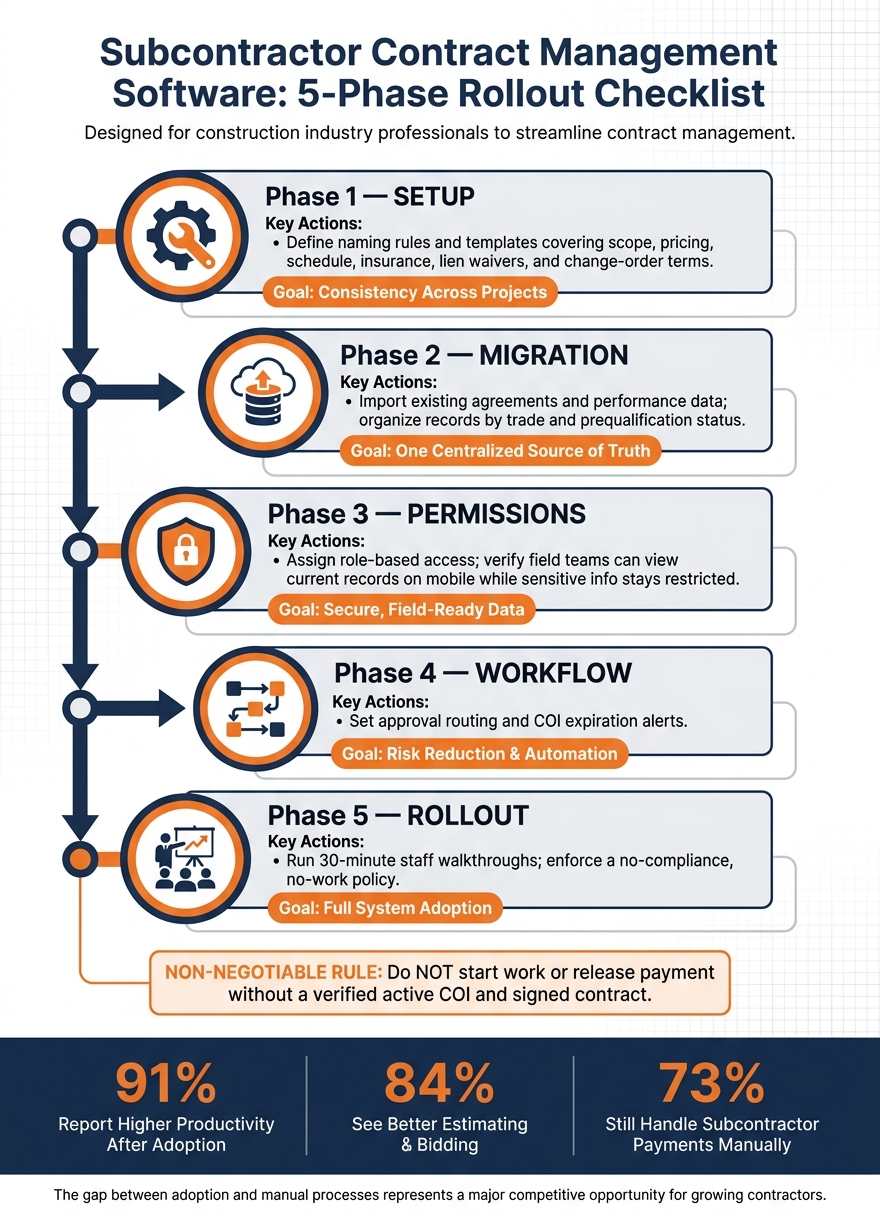
Subcontractor Contract Management Software: 5-Phase Rollout Checklist
Checklist for Setup, Migration, Permissions, and Workflow Rollout
Once contracts are stored, tracked, and tied to field records, the next step is rollout. Do it in phases so active jobs keep moving and teams don’t get jammed up.
Use this plan to go from setup to day-to-day use without slowing down live work.
| Phase | Key Actions | Goal |
|---|---|---|
| 1. Setup | Define naming rules and templates with scope, pricing, schedule, insurance, lien waivers, and change-order terms. | Consistency across projects |
| 2. Migration | Import existing agreements and performance data; organize records by trade and prequalification status. | One centralized source of truth |
| 3. Permissions | Assign role-based access; verify that field teams can view current records on mobile devices while sensitive information stays restricted. | Secure, field-ready data |
| 4. Workflow | Set approval routing and COI expiration alerts. | Risk reduction and automation |
| 5. Rollout | Run 30-minute staff walkthroughs and enforce a no-compliance, no-work policy. | Full system adoption |
One rule should stay non-negotiable: do not start work or release payment without a verified active COI and signed contract.
Key Points for Choosing Software That Fits Growing Contractors
After rollout, the software choice comes down to one thing: what the system enforces every day.
Pick software that keeps contracts in one place, tracks obligations, routes approvals, preserves version history, and gives field teams current records on mobile. The payoff can be big. 91% report higher productivity, and 84% see better estimating and bidding. At the same time, 73% still handle subcontractor payments manually. That gap tells you a lot. Many contractors have part of the process in place, but not the whole thing.
“Contractor Foreman is more intuitively understandable to me and our type of business. They use the same terminology as we do… they understand how we need to solve our problems.” – Brian T., Tower Interiors Group LLC
For contractors who want one platform for these workflows, Contractor Foreman keeps subcontracts, approvals, field access, and project records in one place.
FAQs
How does this software reduce payment disputes?
Contractor Foreman helps cut down on payment disputes by keeping contract terms, scope of work, and retainage tracking in one place. That makes it easier to keep payments lined up with the subcontract instead of relying on scattered notes, emails, or spreadsheets.
It also automates bill creation from subcontracts, which helps reduce manual entry mistakes. With QuickBooks integration, billing and payment data sync in real time, giving your team a shared audit trail and helping prevent duplicate payments, missed invoices, and mismatched records.
What should we migrate into the system first?
Start by putting your core documentation and prequalification data in one place. Bring in your subcontractor database first, including verified insurance certificates, safety records, and current trade licenses.
Next, add active project contracts, pending bid details, and estimate line items. That gives your team a strong starting point and makes it easier to work from the latest, most accurate records from day one.
Who should get mobile access to subcontract records?
Give mobile access to subcontract records only to team members who need it for their project work. Use role-based permissions to help protect sensitive information.
That usually means field supervisors, project managers, and safety officers. They often need access in the field to things like daily logs, quality inspections, submittals, budgets, and safety plans.







