
If you think AI = just ChatGPT, it’s no wonder you’re not using it for construction management.
Sure, ChatGPT can write emails. That’s useful. But AI — especially the kind built into construction software — can do a whole lot more than that.
Here’s the secret: every smart contractor you know is now using AI strategically.
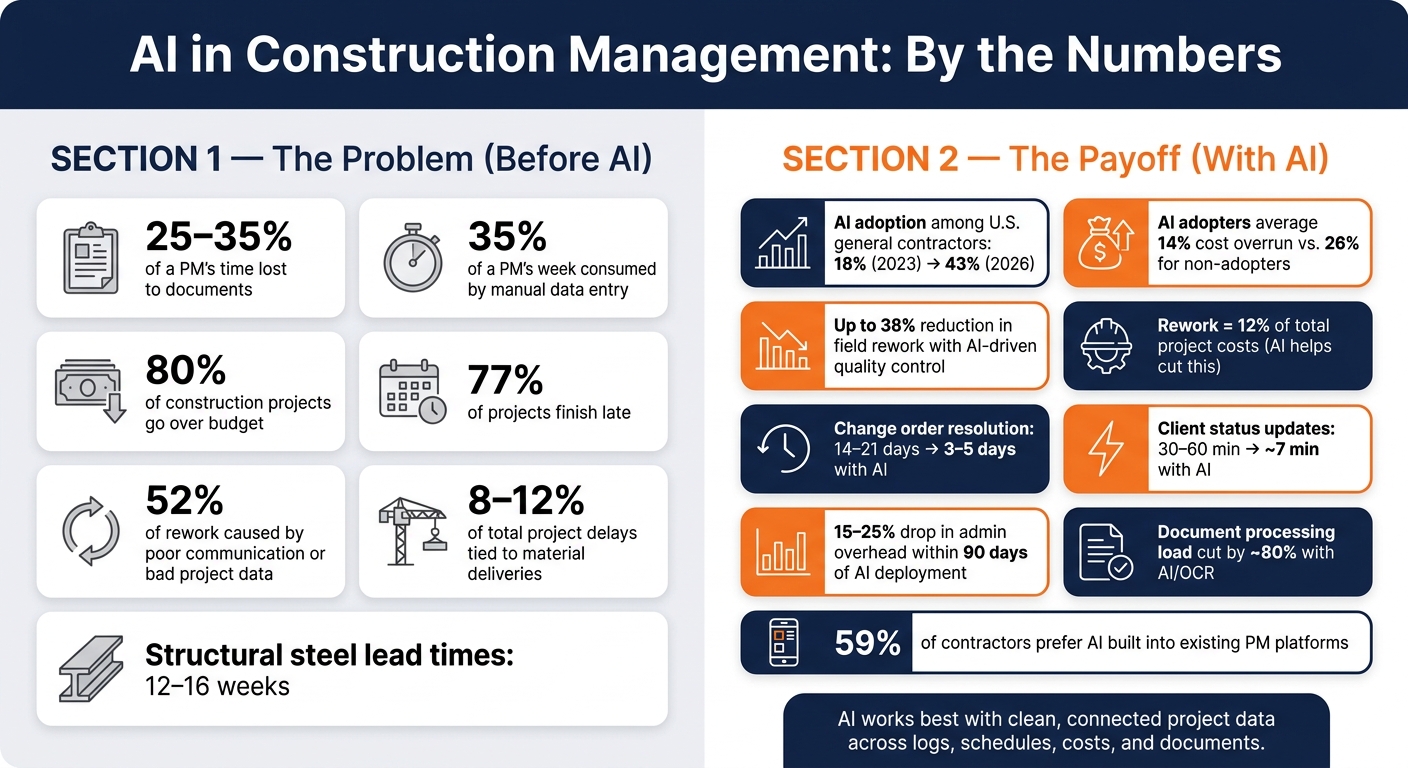
Before AI, project managers were losing 25–35% of their time chasing documents, and manual data entry was eating up another 35% of their week. That’s not a typo – that’s most of a work week gone before a single decision gets made.
Now? AI takes over the repetitive admin work that’s eating hours from your week. Instead of manually writing daily logs, organizing project documents, or pulling data from invoices, RFIs, and change orders – AI handles much of that for you.
Areas where AI is a game-changer in construction management:
- Building daily logs from voice notes, photos, and field updates
- Tracking cost drift before month-end reports catch it
- Pulling data from PDFs, timecards, and change orders automatically
- Shortening client updates and speeding up change order review
Of course, the important thing is to use it smartly. Otherwise, it can turn into just another tool that doubles your work instead of cutting it down.
But with a bit of training and the right setup, AI becomes exactly what it promised to be: your fastest path to more productivity — and a healthier bottom line.
The faster you learn to use AI smartly, the faster you’ll scale.
AI in Construction: Key Stats & Benefits for Contractors
The Main Problems AI Helps Contractors Fix
Admin Work That Eats Into Evenings and Weekends
AI built into construction management software can take a big chunk out of paperwork by automating daily logs, reports, and recordkeeping.
Construction workers spend roughly 90 hours per year on paperwork alone, and site supervisors can spend up to 4 hours a day manually checking field progress. On a busy jobsite, that kind of routine work can slow everything down.
With AI, teams can cut weekly admin time, speed up daily logs, reduce entry mistakes, and keep cleaner records for disputes. But there’s a catch: AI works best when crews already collect clean, consistent jobsite data.
Once that paperwork starts taking care of itself, the next win is seeing schedule and cost trouble sooner.
Schedule Drift, Cost Overruns, and Late Risk Visibility
Construction projects still miss budget and schedule targets far too often. 80% finish over budget and 77% finish late. Manual tracking often spots these problems after the damage is already done.
AI can flag cost drift weeks before it shows up in monthly reporting by reading timesheets, purchase orders, and equipment data. That matters because material deliveries account for 8% to 12% of total project delays.
AI agents can also track long-lead items like structural steel, which can come with a 12–16 week lead time. Contractors using AI also report an average 14% cost overrun, compared with 26% for non-adopters.
The same shared data can also tighten the link between field updates and client communication.
Disconnected Communication Between Field, Office, and Clients
When the field team, office staff, and client all work from the same record, updates stay current.
When RFIs, change orders, and status updates are scattered across email, text, phone calls, and paper notes, things fall out of sync fast. That’s a big deal, since 52% of all construction rework comes from poor communication and inaccurate project data.
When field inputs, change history, and client updates move through one connected system, change order resolution cycles can drop from 14–21 days to 3–5 days. Status reporting changes too. Instead of spending hours pulling updates together by hand, teams can check live dashboards.
sbb-itb-5eea312
Where AI Shows Up Inside Construction Management Software
These are the workflows where contractors tend to see the fastest payoff from AI.
Daily Logs, Documents, and Time Tracking With Less Manual Entry
AI helps speed up daily logs, timecards, and document capture.
A site manager can dictate notes during a walkthrough – crew counts, installed quantities, weather conditions, and site photos – and AI can turn that into a daily log entry. When logs and timecards are structured on their own, that same information can flow into schedules and forecasts.
Inside the software, GPS-based timecards help cut clock-in mistakes. AI can also use timestamps and location data to track progress and labor use. On the document side, AI can use OCR to pull key dates, dollar amounts, and clause language from PDFs like contracts, change orders, and submittals. That makes details easier to file and review, while cutting the processing load by about 80%.
Scheduling, Cost Forecasting, and Resource Planning With Better Data
Static Gantt charts show what was planned. AI-assisted scheduling helps teams see what’s likely to happen next by improving crew and trade sequencing across crew availability, equipment schedules, and material delivery windows.
Scheduling and financial tracking tools produce the up-to-date project data AI depends on.
If actual costs start drifting from the baseline, AI can flag budget variances as soon as they pass a set threshold, such as 3%. That kind of early warning gives teams more time to deal with margin issues. QuickBooks integration also keeps financial data in sync, so forecasts reflect current numbers. And when the numbers stay current, safety reviews and client reporting get stronger too.
Safety Checks, Risk Detection, and Consistent Client Updates
AI can spot patterns that are easy to miss when teams are juggling several jobs at once.
By reviewing incident records and daily logs over time, it can find recurring safety issues and turn them into toolbox talk notes before the next crew meeting. It can also use computer vision to detect missing PPE or machinery operating in exclusion zones.
For clients, AI can review project activity – schedules, logs, and photos – and draft a clear progress update tied to one shared record instead of scattered emails, texts, and paper notes. A 30–60 minute update can drop to about 7 minutes. That gives the field team, office staff, and clients one current record they can all check.
“AI is a tool that makes your people faster. It is not a replacement for your people.” – Ric Acevedo, ITech Plus
When AI sits inside the same system for logs, schedules, documents, and updates, daily project data becomes easier to use for faster decisions.
What Contractors Get From Using AI in Their Management Workflows
Once AI cuts down the daily admin load, the upside shows up where contractors care most: more control, better margins, and less rework.
Tighter Project Control and Faster Decisions
When AI gives managers a live view of job status, they can step in before a small problem turns into a delay. Budget use, schedule progress, and open issues are visible in real time, so teams can spot trouble early instead of finding it after it has already hit the job.
That kind of visibility matters on the money side too. If costs start drifting, teams have a chance to act while the issue is still small, instead of scrambling later when profit is already taking a hit.
Better Margins With Less Rework in the Field and Office
AI helps protect margin in a few direct ways.
- AI-driven quality control can reduce rework by up to 38%.
- Rework typically accounts for 12% of total project costs.
- Contractors report a 15% to 25% drop in administrative overhead within 90 days of deploying AI.
That saved admin time goes back into supervision and coordination – the work that keeps jobs moving. And when AI spots a cost variance early, teams can correct course before a minor drift turns into a much bigger overrun.
Cleaner data helps too. It makes AI simpler to use even on smaller jobs, where there’s less room for waste and less time to sort through messy records.
A Practical Fit for Small-to-Medium U.S. Contractors
For small-to-medium U.S. contractors, AI is starting to fit into day-to-day work without a big learning curve. Lower-friction, mobile-first tools make a big difference here. In fact, 59% of contractors prefer AI features built directly into their current project management platforms instead of adding separate tools.
That makes sense. If a supervisor can use AI from a phone, connect it to QuickBooks, and ask questions in plain language, adoption gets a lot easier. They don’t need an IT background or a long setup process. The workflow already feels familiar – AI just makes it faster and more accurate.
That’s why AI is moving into routine project management, not staying stuck as a reporting tool.
Conclusion: Why More Contractors Are Making AI Part of How They Run Jobs
AI use among U.S. general contractors went from 18% in 2023 to 43% in 2026 for a simple reason: it helps teams spend less time on admin, deal with fewer schedule surprises, keep a closer eye on costs, and move information between the field and office faster.
But that payoff doesn’t happen by magic. It depends on clean, connected project data. AI works best inside one connected system where daily logs, schedules, cost tracking, documents, and client updates all pull from the same source.
When that data is connected, AI tends to get better with steady use. And it’s not just about the software. Field and office teams both need to use it on a regular basis. As that happens, manual review starts to drop because the system learns the firm’s terms, workflows, and cost codes.
That’s why the smartest rollout starts with the jobs that eat up the most time. The contractors moving ahead are starting with daily logs, documents, and cost tracking, then building from there.
FAQs
How can a contractor start using AI without overhauling existing workflows?
Start with AI tools that are already part of your construction management software. That way, your team can keep working in the systems they know instead of bouncing between extra logins, manual exports, and copy-pasting data back and forth.
A smart way to begin is with one project or one task, like document processing. It helps you fix a clear day-to-day headache without making the rollout hard to manage.
What kind of project data does AI need to work well in construction management?
AI works best when project data is clean, consistent, and easy to sort through.
That usually means having things like:
- schedule data
- cost and labor data
- digitized, searchable documents
- daily reports, progress updates, photos, and equipment logs
If the data coming from the field or office is messy, incomplete, or all over the place, AI output gets weaker. And when that happens, accuracy takes a hit too.
Which AI features deliver the fastest ROI for contractors?
Document management and automated reporting often bring the fastest ROI.
When teams automate data extraction from RFIs, submittals, and daily logs, they can cut admin work by 22% to 40%. They can also shrink progress reporting time from up to 45 minutes to under 5 minutes.
The reason is pretty simple: these tools slide into workflows teams already use and replace manual, paper-heavy work. That means the time savings tend to show up within weeks, not months.
Cost estimating and predictive scheduling can also deliver strong value.







