
Construction takeoff is one of those tasks everyone agrees matters — until it’s 9pm and someone’s still counting doors with a highlighter.
We get why this happens.
Things get busy on the ground. Deadlines are fast approaching.
And manual takeoff? For all its faults, feels familiar. You know how to do it. You’ve just always done it kinda slow.
But here’s the actual problem: manual takeoff is not just slow. It’s slow AND risky.
Because a missed count doesn’t show up as a mistake. It shows up as a change order. Or a material shortage mid-job. Or a bid that looked competitive right up until the numbers stopped adding up.
If you’re nodding along, this one’s for you.
Digital takeoff software fixes all that slow, guess-and-pray math—it turns measuring, counting, and quantifying from a multi-hour guessing game into something closer to a formality.
Here’s what you need to know:
- Contractor Foreman: best when you’re a small-mid contractor and you want takeoff, estimating, and job cost tools in one place from $49/month.
- PlanSwift: best for repeatable assembly-based takeoffs, but it’s Windows-only and weaker for team work.
- Bluebeam Revu: best for PDF markup, overlay, and live plan review, but pricing still needs extra work.
- STACK: best for cloud estimating workflows where quantities feed pricing with less re-entry.
- On-Screen Takeoff: best for large commercial 2D plans and teams already using Quick Bid.
- Autodesk Takeoff: best for firms working from Revit or IFC models and Autodesk Construction Cloud.
The hard part isn’t measuring manually. It’s doing it accurately (and fast enough) that you win the bid — and, more importantly, that you won’t pay for the mistake later.
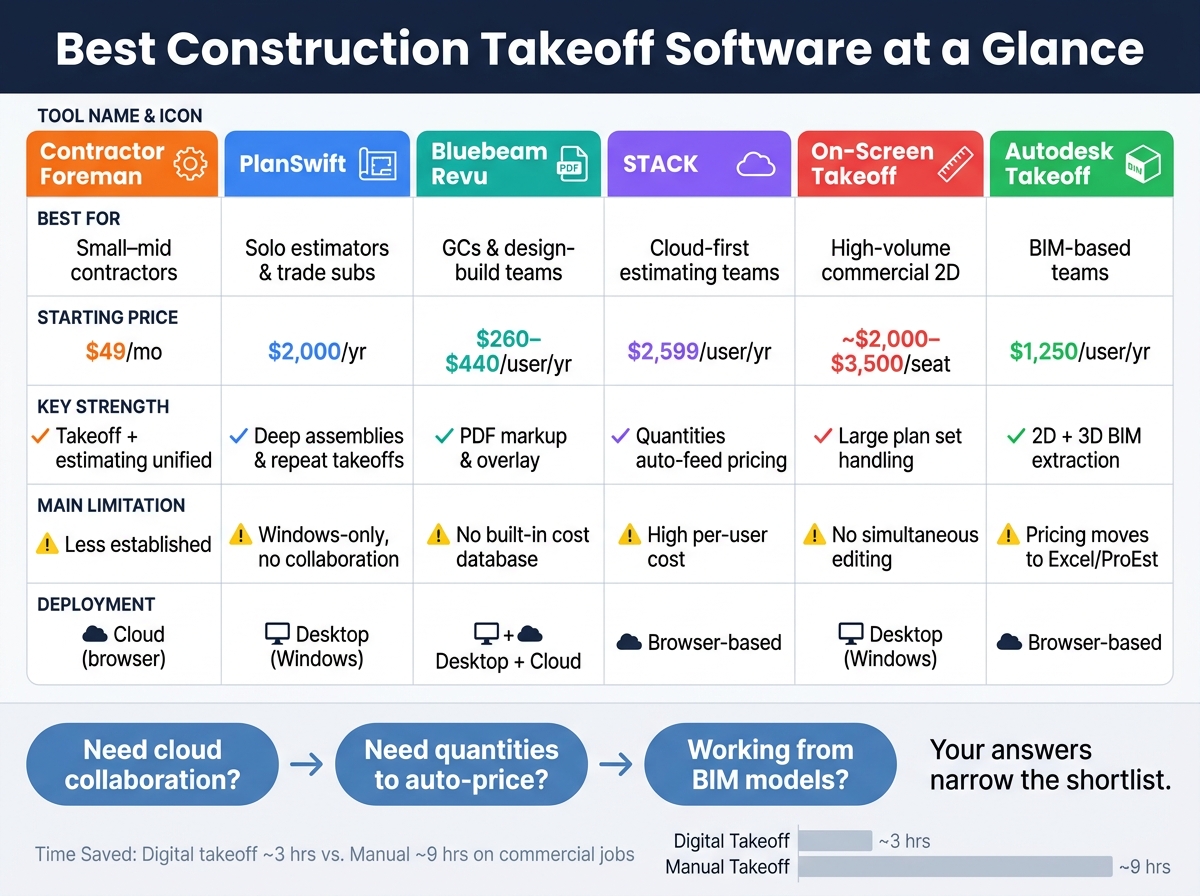
Best Construction Takeoff Software: Side-by-Side Comparison 2026
Quick Comparison
| Tool | Best For | Main Strength | Main Limitation | Starting Price |
|---|---|---|---|---|
| Contractor Foreman | Small to mid-sized contractors | Takeoff + estimating in one workflow | Less established than top takeoff-only tools | $49/month |
| PlanSwift | Solo estimators, trade subs | Deep assemblies and repeat takeoffs | No live collaboration; Windows-only | $2,000/year |
| Bluebeam Revu | GCs, design-build teams | PDF control, overlay, Studio Sessions | No built-in cost database | $260-$440/user/year |
| STACK | Cloud-first estimating teams | Takeoff tied to pricing | Higher per-user cost | $2,599/user/year |
| On-Screen Takeoff | High-volume commercial 2D work | Strong desktop takeoff on large plan sets | No simultaneous editing; Windows-only | About $2,000-$3,500/seat |
| Autodesk Takeoff | BIM-based teams | 2D + 3D quantity extraction | Pricing usually moves to Excel or ProEst | $1,250/user/year |
sbb-itb-5eea312
1. Contractor Foreman
Contractor Foreman is aimed at small- to mid-sized contractors who do their own estimating.
Our idea is simple: instead of splitting takeoff and estimating into two separate jobs, it keeps both in the same workflow.
Measurement Accuracy
Contractor Foreman’s Takeoff Studio works with PDFs up to 100 MB and measures area, linear feet, and count.
It also uses AI-powered computer vision to spot and count repeating items like doors, windows, and electrical outlets. Trade tags let you attach specs such as stud size, gauge, or slab thickness to each measurement.
There’s also an Issues Panel that flags problems before they slip into the estimate. That includes uncalibrated sheets, untagged markups, trade mismatches, and quantities that look off. In plain terms, it gives estimators a chance to catch mistakes early instead of fixing them later.
Assemblies and Estimate Transfer
When a measurement changes on the plan, the matching budget quantity updates on its own through formula-linked line items. That helps cut down on duplicate entry and keeps the estimate lined up with the takeoff.
Revision Control and Collaboration
The Issues Panel also helps with revision checks by flagging scale and quantity errors before they make it into the bid. Higher-tier plans support unlimited users and projects, along with a shared workspace for plan collaboration and subcontractor links.
That setup matters when a team needs everyone working from the same plan set without throwing the estimating process off track.
Workflow Fit and Integrations
Contractor Foreman connects with QuickBooks for accounting and 1build.com for cost data. It also links with its own PM and finance tools, including change orders, purchase orders, and AIA billing.
Pricing starts at $49/month, with higher tiers for larger teams and added user capacity. It’s browser-based and runs on Windows, Mac, and tablets. For teams that want estimating and project controls in one system, that setup keeps the workflow tight.
2. PlanSwift
PlanSwift is a Windows-based digital takeoff tool built for fast, detailed measurements and assembly-driven estimating. It works best when speed comes from reusable assemblies and repeatable takeoffs.
Measurement Accuracy
PlanSwift measures area, linear feet, counts, volume, and segments with high precision. You set the scale using a known reference dimension on the plan, which helps catch scaling mistakes before a bid goes out.
Assemblies and Estimate Transfer
One of PlanSwift’s main strengths is its drag-and-drop assemblies. A single measurement can turn into linked material, labor, and cost quantities without extra manual work.
Quantities and costs can be exported to Excel and also tie into QuickBid and Sage. PlanSwift’s plugin library includes thousands of pre-built, trade-specific assemblies for concrete, drywall, electrical, and other trades.
Revision Control and Collaboration
That speed comes with a tradeoff when plan sets keep changing. PlanSwift doesn’t include automated revision tracking or native real-time collaboration, so updates usually mean manual remeasurement and sharing files back and forth.
For a solo estimator, that may be fine. For a team, it can slow things down and add friction.
Workflow Fit and Integrations
Those limits shape where PlanSwift fits best. It’s a Windows-only desktop app, and it still runs with 32-bit memory limits, capped at 2 GB of RAM. On large, modern PDF plan sets, that can lead to lag, freezing, or crashes.
So where does it make the most sense? Usually with specialty subcontractors handling repetitive, high-volume takeoffs, especially when shared team workflows aren’t a top concern.
Pricing is $2,000 per year for the Professional subscription as of 2026, after PlanSwift ended its perpetual license model in 2025. Legacy users may also pay annual maintenance and support fees of $300 to $500. There’s also a 14-day free trial for firms that want to test it before signing up.
3. Bluebeam Revu
Bluebeam Revu is built around PDF markup and document control, with takeoff tools added on top. In plain terms, it shines when a team needs tight plan review, clean markups, and solid revision tracking more than assembly-based estimating.
Measurement Accuracy
Bluebeam’s linear, area, volume, and count tools are accurate, and “Snap to Geometry” locks measurements to architectural lines so you can trace exact drawing coordinates. That matters most when precise markups and revision control help protect the takeoff from plan mistakes. Users can also create custom columns in the Markups List to total quantities right inside the interface.
There’s one catch: Bluebeam does not know what a markup means until the user defines it. So every item still has to be set up by hand, including custom Tool Sets, before the estimate setup starts.
Assemblies and Estimate Transfer
Bluebeam does not include a native cost database or built-in assembly logic. Quantities stay inside the Markups List, which means they do not move into pricing models on their own. The “Quantity Link” feature, available only in the Complete tier, can connect PDF markups to Excel cells so totals update when dimensions change.
Without Quantity Link, estimators often end up copying quantities into Excel by hand. That slows estimate production and adds extra steps to the workflow.
Revision Control and Collaboration
Bluebeam is widely used for document control and live collaboration. Studio Sessions lets multiple team members mark up the same PDF at the same time, and Overlay/Compare highlights changes between drawing revisions so estimators can update only what changed. That helps cut down on missed changes and keeps quantity updates tied to the latest drawing set.
Workflow Fit and Integrations
Bluebeam is a strong fit for general contractors and design-build teams that spend most of their time in PDFs and care a lot about document control and team coordination. It connects with Procore, Autodesk Revit, and Fieldwire, and it runs on Windows, with Bluebeam Cloud for web and mobile access.
Pricing is about $260 per user per year for Basics, $330 for Core, and $440 for Complete. Most estimators will need the Complete tier because that’s where Quantity Link and the more advanced measurement tools live.
One timing detail is easy to miss but matters: Revu 20, the last perpetual license version, reaches End of Support on July 31, 2026, and End of Life on December 31, 2026. After that, it loses access to Studio Sessions.
Teams that want faster quantity assembly and smoother cost transfer will likely need a different setup.
4. STACK
STACK is a cloud-native takeoff and estimating platform built to keep measurement and pricing in the same workflow.
Measurement Accuracy
STACK starts with accurate measurement and carries that accuracy into the estimate. It supports linear, area, count, volume, arc, and pitched measurements, with results usually landing within 1%–2% of manual measurements when plans are calibrated the right way.
On the Premium tier, Auto-Count can find repeated items like doors and fixtures on its own. It also uses AI-assisted plan recognition for walls and structural symbols. That can save a lot of clicking on plan sets packed with repeat items.
Assemblies and Estimate Transfer
This is where STACK stands out most: it keeps takeoff and estimating connected. When you draw a measurement and tie it to an assembly, the material, labor, and equipment costs populate automatically.
In plain English, there’s no separate handoff between takeoff and pricing. You measure once, and the estimate updates from there.
Revision Control and Collaboration
STACK also handles plan changes well. Its Plan Overlay tool helps estimators compare revised plans with the original set so they can spot changes and update only the quantities that changed.
There’s also an audit trail that shows who changed what and when. Since it runs in the cloud, teams work from one live project file, which cuts down on version mix-ups. That’s a big deal when revisions hit close to bid day and every quantity change counts.
Workflow Fit and Integrations
STACK works well for teams that want live collaboration, mobile field checks, and direct estimate transfer. It connects with Procore, Buildertrend, Google Drive, OneDrive, and Dodge Construction Network. It also has a mobile app, so field teams can review takeoffs and verify quantities on-site.
There are tradeoffs. STACK costs more and takes longer to set up than simpler takeoff tools. The Standard plan runs about $2,599 per user per year, Premium is about $2,999 per user per year, and Grow/Enterprise starts at $5,499+ per year. The main downsides are the higher per-user price and the upfront work needed to build assemblies and cost databases.
Some users also mention lag with very large, high-resolution plan sets. And the free tier is pretty limited: 2 active projects, 10 takeoffs per project, and 7 days of access per project.
That makes STACK a strong pick for teams that want cloud-based estimating, while the next tool is more closely tied to desktop plan review and takeoff control.
5. On-Screen Takeoff
On-Screen Takeoff (OST) is a long-running Windows desktop tool made for high-accuracy measurement on complex commercial and civil plan sets. It’s built for desktop use, so teams that work on Macs or want browser access should weigh that early in the buying process.
Measurement Accuracy
OST uses Conditions to define each measurement type, such as linear, area, or count, and estimators apply those conditions by hand on digital drawings. That setup matters most on large sheets, where even a small scale mistake can throw off an entire set of quantities. In practice, accuracy comes down to careful scale calibration, which means every sheet should be checked before any measuring starts.
One of OST’s best-known features is the patented Multi-Condition Takeoff tool. It lets estimators apply more than one condition in a single pass, like different wall types or floor finishes across a full room. That can save a lot of clicking on busy plan sets. There is one catch: OST does not natively support curved area measurements.
Takeoff Boost helps with repetitive plan sets by auto-measuring areas, lengths, and counts in an initial pass. For teams working through similar sheets again and again, that can cut some of the grind out of early takeoff work.
Assemblies and Estimate Transfer
OST does not build assemblies directly on the takeoff canvas. Instead, it sends quantities to Quick Bid, where estimators add unit costs, labor rates, and markups. That handoff keeps measurement tied to estimating without forcing teams to re-enter quantities by hand. Put simply, the bid stays tied to what was measured on the plans.
OST does not publish list pricing, but industry reports place it at about $2,000–$3,500 per seat for a perpetual license. Annual maintenance and support usually add another 15%–20% of the original license cost.
Revision Control and Collaboration
OST handles plan revisions with a color-coded Overlay feature. Removed items appear in red, and added items appear in blue, which makes drawing changes easier to spot without re-measuring the whole set. That’s a big help when revisions start piling up.
OST also supports project sharing, but it does not support simultaneous editing. So yes, teams can pass work around, but they can’t all work in the same file at the same time.
Workflow Fit and Integrations
OST connects to Procore and Buildertrend through one-way export. It fits best with experienced estimators working on complex 2D commercial plans.
It’s less suited for teams that need:
- Cloud collaboration
- Mac support
- Model-based workflows
If your team wants cloud access and model-based workflows, Autodesk Takeoff is the stronger next option to review.
6. Autodesk Takeoff
For teams that have outgrown 2D-only takeoff, Autodesk Takeoff adds model-based quantity extraction. As of June 2026, Autodesk Takeoff is branded as Forma Takeoff inside Autodesk Construction Cloud. It combines 2D takeoff with 3D quantity extraction.
Measurement Accuracy
On the 2D side, Forma Takeoff supports linear, area, count, and volume measurements on PDF drawings. On the 3D side, its BIM takeoff pulls quantities straight from Revit (.RVT) or IFC models. That can cut manual re-entry by more than 50% on comparable projects.
Assemblies and Estimate Transfer
Forma Takeoff does not include native assemblies or a cost database. So the takeoff can move fast, but pricing still has to happen somewhere else. In most cases, teams export quantities to Excel or ProEst to finish the estimate.
Revision Control and Collaboration
ACC Docs tracks revisions and lets multiple estimators work in the same project without version conflicts. That matters more than it may sound at first. When several people are working from the same set of drawings and models, version mix-ups can turn into bad numbers in a hurry.
Workflow Fit and Integrations
Forma Takeoff makes the most sense for firms already deep in the Autodesk ecosystem. If your team already works in Autodesk Construction Cloud, Revit, and IFC-based workflows, the fit is pretty natural.
That said, there is no native connection to non-Autodesk systems such as QuickBooks or Sage. So even if takeoff happens inside Autodesk, pricing still tends to move through Excel or ProEst.
Pricing is about $1,250 per user per year for the standalone subscription, or around $3,795 per seat per year through the AEC Collection. For smaller teams that don’t get regular Revit or IFC input, that price can be a hard sell. A lot comes down to one simple point: how often your projects show up as Autodesk-based models.
Strengths and Tradeoffs: Side-by-Side Comparison
Each tool gives you a different mix of speed, control, teamwork, and cost. And in estimating, those tradeoffs matter.
Contractor Foreman stands out for combining takeoff with estimating and job costing in one system, so quantities don’t just sit in a file — they move straight into your workflow. The tradeoff? If you only need standalone takeoff with no other project management features, some of that extra functionality may go unused.
PlanSwift works well for repetitive 2D takeoffs and can feel very fast in day-to-day use. The catch? It’s desktop-only, can run into memory limits, and doesn’t do much for team collaboration.
Bluebeam Revu is a go-to option for PDF markup and document control. That said, it’s built around markup first, and it doesn’t offer native cost transfer.
STACK stands out for cloud-based team workflows. It’s a strong fit for shared access and live coordination, but the per-user price can get steep.
On-Screen Takeoff does a good job with large commercial plan sets and helps speed up repetitive takeoffs. But it’s still a desktop tool, and collaboration is limited.
Autodesk Takeoff fits best when your workflow runs through Revit and IFC models. If your team lives almost entirely in 2D PDFs, it may be less useful.
Here’s the side-by-side view for the main criteria: measurement accuracy, revision tracking, collaboration, and deployment.
| Tool | Measurement Accuracy | Revision Tracking | Collaboration | Deployment |
|---|---|---|---|---|
| PlanSwift | High for repeat assemblies | Basic | None | Desktop-only |
| Bluebeam Revu | Moderate; hand tracing | Excellent (overlay) | Strong (Studio Sessions) | Desktop + cloud |
| STACK | High; assemblies + auto-count | Moderate | Strong (real-time) | Browser-based |
| On-Screen Takeoff | High; multi-condition takeoff | Strong (overlay) | Limited | Desktop-only |
| Autodesk Takeoff | High; 2D + 3D BIM | Excellent (ACC Docs) | Strong (multi-user) | Browser-based |
The better choice usually comes down to how your team works, not just which tool has the longest feature list.
| Use Case | Best-Fit Tool | Key Reason |
|---|---|---|
| Solo estimator | PlanSwift | Fast local performance and deep custom assemblies |
| Small subcontractor | STACK | Cloud access and pre-built trade assemblies |
| Commercial GC/design-build team | Bluebeam Revu | Best-in-class document control and markup |
| High-volume commercial sub | On-Screen Takeoff | Handles massive plan sets and integrates with QuickBid |
| Model-based (BIM) team | Autodesk Takeoff | Native 2D and 3D quantity extraction from Revit and IFC |
Which Tool Should You Choose?
Use the comparison above to line up each tool with the way your team estimates.
Contractor Foreman is the strongest fit if you want takeoff, estimating, and job costing under one roof — no juggling between separate tools just to get from a measurement to a priced bid. It’s built for contractors who want everything connected, not stitched together.
The right pick comes down to workflow: how you measure, how you build pricing, and how you send plans around.
PlanSwift makes the most sense for solo estimators or trade-focused jobs like roofing, electrical, and concrete, where deep assembly libraries and desktop speed matter most. Bluebeam Revu is a strong fit for commercial teams that live in PDFs and spend a lot of time on markup and document review.
The tradeoff is simple: moving quantities into pricing still takes manual input, which can add time and leave room for mistakes.
If direct quantity-to-cost transfer is at the top of your list, STACK stands out.
It works well for teams that want measured quantities to move straight into priced line items without re-entering data by hand. Autodesk Takeoff fits teams that often get Revit or IFC models. On-Screen Takeoff is still a dependable workhorse for high-volume commercial bids with complex, multi-trade plan sets.
Pick the tool that cuts bid mistakes, matches the pace of your revisions, and fits neatly into your estimating process.
FAQs
How do I choose the right takeoff software for my team?
Choose takeoff software based on your project volume, team size, and day-to-day workflow. It should support the plan formats you use most, whether that’s multi-page PDFs or CAD files. It also helps to have tools like automated scale calibration and revision overlay, since they can save time and cut down on manual errors.
You’ll also want to put accuracy and collaboration near the top of the list. Look for clear measurement logs, traceable quantities, and cloud-based access if several people need to work on the same project without overwriting each other’s data.
What features improve estimate accuracy the most?
Focus on features that cut manual errors and keep takeoffs tied to estimating.
- Material and labor assemblies
- AI-assisted counting and auto-scale detection
- Revision tracking with plan overlays
- Integration between takeoff and estimating tools
These features make a big difference in day-to-day estimating work. Material and labor assemblies let you link one measurement to several line items at once, which saves time and cuts the chance of missing something. AI-assisted counting and auto-scale detection help speed up routine tasks and reduce small input mistakes that can throw off the whole estimate.
Revision tracking with plan overlays also helps teams spot changes fast instead of hunting through updated sheets by hand. And when takeoff tools connect directly with estimating tools, you can avoid manual re-entry, reduce recalculation errors, and keep your numbers in sync from start to finish.
Is cloud-based takeoff better than desktop software?
It comes down to how your team works and what kind of performance you need.
Cloud-based takeoff tools make more sense when your team needs to work together, access files in real time from different places, and stay on the same version. That shared access can save a lot of back-and-forth.
Desktop software often fits solo estimators better. You get local file control, strong speed, and the option to keep working even when you don’t have internet access.







