
- How Contractors Use AI to Predict Delays and Plan Work
- How AI Automates Jobsite Progress Tracking
- How AI Improves Safety Monitoring on Jobsites
- How AI Helps Contractors Manage Equipment and Field Operations
- The AI Use Case Contractors Avoid: Automated Design Decisions
- Conclusion: Using AI Wisely on the Jobsite
- FAQs
When most people hear “AI in construction,” they immediately tune out.
It just sounds so complicated. Like you need to block off an entire week, lock yourself in a room, and geek out about machine learning before you’re allowed to use anything.
Well…who’s got time for that? You’ll figure it out eventually. Maybe. Just not today…
And there’s another thing: what if it completely changes the way you work? You’ve already got a system that you know by heart. Why make life more complicated?
But here’s the funny thing: a lot of contractors are already using AI without really thinking about it. Not to build robots or to run the whole thing with it. Just to solve everyday problems that waste time, like digging through 47 text messages trying to figure out who approved the change order.
And honestly, it’s becoming one of the biggest differences between contractors who are constantly stressed and those who seem suspiciously relaxed all the time.
The technology has moved so fast over the last year that at this point, not using it is starting to feel like leaving money on the table. From scheduling and reporting to safety, communication, and project tracking, AI is changing how jobs get done.
Here’s how AI is being used effectively – and one area where contractors are still cautious:
- Predicting delays with analytics: AI analyzes schedules, resources, and external factors to flag risks weeks in advance, cutting overruns by up to 35%.
- Tracking progress: Automated tools like drones and cameras provide real-time updates, reducing errors and saving hours on reporting.
- Improving safety: AI-powered systems monitor jobsites 24/7, catching hazards and PPE violations, leading to fewer incidents.
- Managing equipment: Predictive maintenance reduces downtime and repair costs by identifying issues early.
- Avoiding automated design: Contractors steer clear of AI for design decisions due to accuracy, liability, and compliance concerns.
Key takeaway: AI works best when focused on specific tasks like planning, tracking, and safety. For critical decisions, human expertise remains essential.
How Contractors Use AI to Predict Delays and Plan Work
Delays in construction projects rarely happen out of nowhere.
They tend to snowball – a late material delivery disrupts the crew’s schedule, which delays inspections, and the ripple effect impacts the entire project timeline. Traditional project management tools are great at documenting what’s already happened, serving as a kind of historical record. But AI offers something different: a forward-looking approach that helps predict and address potential issues before they escalate.
“Traditional project management tools excel at documenting what happened yesterday, but they’re essentially rearview mirrors in an industry that desperately needs a windshield.” – Space AI Editorial Team
Modern predictive tools can identify potential schedule risks weeks in advance – ranging from 2 to 6 weeks, and sometimes up to 45 days. Companies using these tools have reported cutting schedule overruns by 25% to 35%, while also reducing project costs by an average of 23% by tackling problems early.
The Data Behind Predictive Analytics
AI-powered predictive tools rely on a variety of data sources to anticipate potential disruptions. These tools analyze both structured data, like task durations and crew assignments, and semi-structured inputs, such as superintendent notes and subcontractor communications. Here’s a breakdown of how these data types contribute to AI’s forecasting capabilities:
| Data Category | What AI Looks At | Why It Matters |
|---|---|---|
| Schedule Data | Task durations, milestones, progress actuals | Helps forecast completion dates and pinpoint risks to the critical path |
| Resource Data | Crew assignments, equipment usage, productivity | Predicts labor shortages and equipment conflicts |
| External Data | Weather forecasts, permit timelines, market data | Adjusts schedules for environmental and regulatory challenges |
| Document Data | RFIs, submittals, change orders, superintendent notes | Identifies communication bottlenecks and delays in approvals |
| Financial Data | Budgets, purchase orders, invoice timing | Connects schedule delays to potential cost overruns and margin risks |
Weather-related delays alone cost the U.S. construction industry about $4 billion every year. AI addresses this issue by using GPS-based site monitoring to track conditions like wind speed, precipitation, and temperature thresholds (e.g., below 28°F for concrete pours). By providing a 72-hour warning instead of the typical 24-hour notice, crews can adjust plans – rerouting deliveries or notifying subcontractors – before incurring extra mobilization costs. This level of precision helps teams make informed adjustments well ahead of time.
How AI-Driven Planning Improves Workflow
AI doesn’t just predict problems; it helps teams plan smarter.
One of its most useful features is scenario planning, which allows project managers to test potential solutions before making on-site changes. Instead of guessing how adjustments might play out, managers can model different recovery strategies and choose the one with the least risk.
Joe Mannon from Manhattan Construction Group explained the value of this early-warning capability:
“If you see a wreck coming and you have 500 feet instead of 50 feet to stop, you will be in better shape.”
This shift – from reacting to past issues to proactively addressing future risks – is where AI truly transforms construction planning. By focusing on leading indicators, project teams gain the time and tools to act before delays become costly problems.
sbb-itb-5eea312
How AI Automates Jobsite Progress Tracking
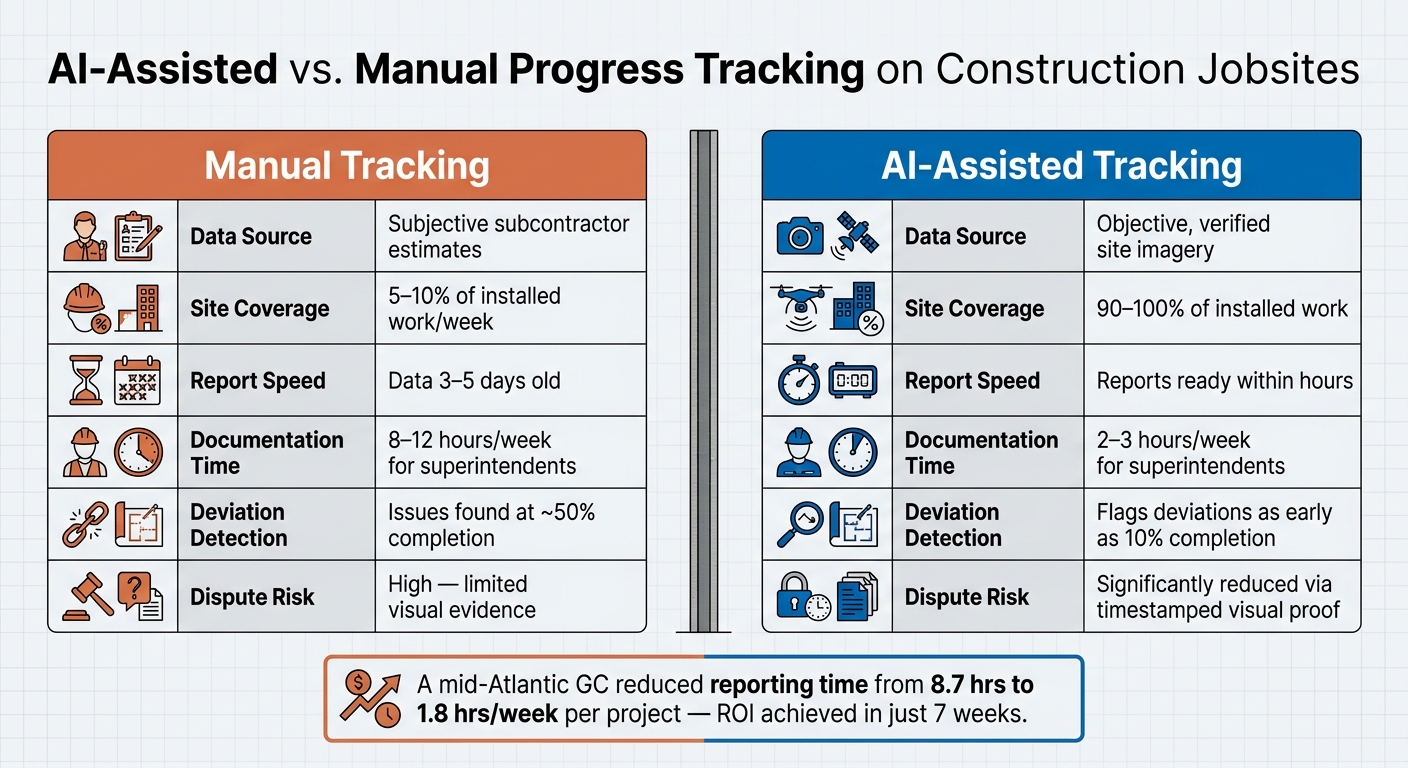
AI vs. Manual Tracking on Construction Jobsites: Key Metrics Compared
Tracking the actual progress of a construction project can be a tough nut to crack. The challenge? Traditional methods often rely on outdated or subjective estimates. AI changes the game by transforming routine site imagery into real-time, verified progress data.
Replacing Manual Tracking with AI Tools
AI doesn’t just predict delays anymore; it actively verifies progress in real time. Here’s how it works: drones and 360-degree cameras capture high-resolution images during site walkthroughs or flights. These images are then processed by AI, which identifies installed trades – like framing, MEP rough-ins, drywall, and flooring. Each image is automatically mapped to the correct spot on a floor plan or BIM model. The system compares the actual build to the original plans, calculates how much of the area is complete, and flags any deviations within hours.
Why does this matter? Manual tracking typically covers only 5–10% of work each week, while AI can achieve near-total coverage. That gap is where costly surprises hide. Rework caused by unnoticed deviations from plans can account for 4–6% of total project costs, but AI can identify these issues 2–4 weeks earlier than traditional methods.
Take PCL Construction, for example. In May 2026, the company expanded its partnership with DroneDeploy to standardize AI-driven reality capture and progress tracking across more than 1,000 active projects. The goal? To improve reporting accuracy on a massive scale. On a smaller scale, a mid-Atlantic general contractor with $7.2M in annual revenue implemented an automated reporting system using Buildertrend, CompanyCam, and US Tech Automations. Within just 90 days, the company saw project manager reporting time drop from 8.7 hours to 1.8 hours per week per project. Client status calls fell by 74%, and satisfaction scores jumped from 3.2/5 to 4.6/5. Even better, the investment paid for itself in just seven weeks.
“Traditional tracking data is less reliable and often leads to inaccuracies in the long run… AI-powered reporting uses site imagery to generate verified progress data.” – Deepthi Kamireddy, Track3D
This shift isn’t just about faster reporting – it’s about delivering more accurate and actionable insights.
Manual vs. AI Progress Tracking: A Comparison
The difference between manual and AI-assisted tracking isn’t just about speed. It’s about the reliability of the data that decision-makers rely on.
| Attribute | Manual Tracking | AI-Assisted Tracking |
|---|---|---|
| Data Source | Subjective subcontractor estimates | Objective, verified site imagery |
| Site Coverage | 5–10% of installed work per week | 90–100% of installed work |
| Report Speed | Data often 3–5 days old | Reports ready within hours of capture |
| Documentation Time | 8–12 hours/week for superintendents | 2–3 hours/week for superintendents |
| Deviation Detection | Issues often found at 50% completion | Flags deviations as early as 10% completion |
| Dispute Risk | High; limited visual evidence | Significantly reduced via timestamped visual proof |
One standout advantage of AI is its ability to create a permanent, visual record of concealed work – like in-wall MEP systems or underground utilities. This not only reduces disputes but also simplifies maintenance long after the project wraps up.
How AI Improves Safety Monitoring on Jobsites
Construction remains one of the most hazardous industries in the United States. In 2024 alone, there were 1,032 worker fatalities, with falls accounting for 370 of these deaths. Traditional safety walkthroughs often fail to catch 70–80% of hazardous moments as they happen. AI-powered monitoring is stepping in to fill this gap, providing continuous oversight across the entire jobsite. Just as AI has transformed planning and tracking, it’s now reshaping how risks are managed on-site.
AI-Powered Hazard Detection
AI safety systems rely on live video feeds from fixed cameras, drones, and body cameras to analyze jobsite conditions in real time. These systems use advanced computer vision models that can process video frames in under 50 milliseconds. They’re capable of detecting breaches in exclusion zones, crane swing radius violations, proximity risks between workers and heavy machinery, and fall-from-height incidents as they occur. Once a violation is identified, alerts are sent via SMS, radios, or dashboards in under 100 milliseconds.
The impact of these systems is striking. Turner Construction, for example, tested AI safety technology on 15 sites in 2024 and expanded its use to 80 sites by mid-2025. The results? A 62% drop in lost-time incidents and a 180% increase in near-miss reporting, meaning risks were identified and addressed before they caused harm.
Similarly, Skanska reported a 55% reduction in lost-time incidents and a 42% decrease in total incident rates after deploying AI safety tools across its U.S. operations for a year.
“AI doesn’t replace your HSE director. It gives them eyes on every corner of the site, simultaneously.” – Clarion.ai
Beyond spotting physical hazards, AI systems also ensure that critical safety protocols are followed.
Using AI to Monitor PPE Compliance
AI’s role extends to enforcing compliance with personal protective equipment (PPE) requirements. Computer vision platforms can identify whether workers are wearing hard hats, safety glasses, high-visibility vests, gloves, and harness tie-offs with up to 98% accuracy under standard lighting conditions. This is a significant improvement over manual checks, which depend on supervisors being in the right place at the right time.
Experienced teams recommend a practical strategy: run the system in “silent mode” for 60 days before activating live alerts. This initial phase helps fine-tune the system, reducing false positives to fewer than two per camera per shift, which minimizes alert fatigue and keeps supervisors focused on real risks. Alerts are typically routed to supervisors first, maintaining clear authority on-site. To address privacy concerns, modern platforms often use face-blurring technology, ensuring footage is strictly for safety purposes, not surveillance.
Considering that a single serious injury can cost between $45,000 and $85,000 in direct and indirect expenses, even a small reduction in incidents can make a compelling financial case for adopting these systems.
How AI Helps Contractors Manage Equipment and Field Operations
Equipment breakdowns and logistical hiccups are some of the costliest issues on a jobsite. Just unplanned downtime can rack up costs of $2,500 per hour for construction firms. And that doesn’t even include the ripple effects – idle workers, emergency rentals, or last-minute parts orders. AI is stepping in to help contractors tackle these challenges head-on.
Predicting Equipment Failures Before They Happen
AI leverages IoT sensors to track equipment health metrics like vibration, temperature, fluid pressure, and load cycles. By analyzing these data points, AI can detect subtle changes that signal potential failures 2–4 weeks before a human would notice.
Consider this: reactive maintenance costs around $125 per hour, while AI-driven predictive maintenance slashes that to $18 per hour. One Southeast contractor tested Samsara telematics on 50 machines over a year. The result? Emergency repair spending dropped by 62%, equipment availability jumped from 82% to 94%, and a $3,200 bearing replacement prevented a $45,000 pump failure.
“Emergency repairs cost 3–5x more than planned maintenance. Parts are rushed, technicians work overtime, and equipment rental fills the gap. Predictive maintenance converts emergencies into scheduled service.” – FieldFix
To maximize results, contractors should focus on their “Critical 20%” – the machines whose breakdowns would halt a project, like cranes or concrete pumps. AI systems require 4–8 weeks of baseline data collection to accurately identify anomalies.
Beyond preventing breakdowns, AI is reshaping how contractors manage field operations.
Using AI to Improve Field Logistics
AI optimizes the movement of people, materials, and equipment across jobsites. For instance, AI-powered dispatch systems dynamically update truck assignments based on fleet status, boosting daily loads by 12–18%. Route optimization tools, which take traffic, road closures, and weight limits into account, have reduced total miles driven by 12% and cut fuel expenses by 8%.
Workforce management also benefits from AI. Scheduling platforms match workers to tasks based on certifications and experience, preventing double-bookings and trimming overtime by 8–12%. When bad weather disrupts plans, automated notifications quickly reassign crews, saving supervisors from making countless early-morning phone calls.
“AI doesn’t replace judgment. It improves leaders’ ability to see what’s happening across projects, crews, costs, and risk in time to act.” – Nick J. Mortensen, Principal, Eide Bailly
These tools don’t just work in isolation – they enhance each other, creating smoother operations across the board.
AI Applications by Area: Equipment, Materials, and Workforce
| Area | AI Application | Specific Benefits |
|---|---|---|
| Equipment | Predictive Maintenance & Idle Tracking | Cuts unplanned downtime by 30–50%; reduces fuel waste by flagging excessive idling |
| Materials | Autonomous Flow & Mix Optimization | Matches invoices to delivery receipts in under 30 seconds; predicts shortages; minimizes returned concrete waste |
| Workforce | Role-Based AI Scheduling | Prevents double-bookings; ensures compliance with trade-specific certifications; reduces overtime by 8–12% |
The AI Use Case Contractors Avoid: Automated Design Decisions
AI has made strides in areas like scheduling, tracking, safety, and equipment management. But when it comes to design, contractors are far more cautious.
One thing is clear: experienced contractors are hesitant to let AI take the reins on generating or finalizing design decisions and blueprints. Let’s dive into why automated design is such a sticking point and how contractors are navigating these challenges with hybrid approaches.
Why Contractors Avoid Automated Design
AI might produce outputs that look convincing, but in construction, “convincing” isn’t the same as “correct.” And that difference can lead to serious problems.
“Buildings are not sequences of plausible words. They are precise, regulated, physically buildable… systems where a 2 cm mistake can mean a failed inspection, a lawsuit, or a collapsed slab.” – Valentin Noves, CEO, e-verse
Generative AI tools often prioritize aesthetics over whether something can actually be built. This leads to designs that look great on paper but are unworkable in reality. Even worse, AI can fabricate details like non-existent ASTM standards, creating risks that organizations like ASTM International have flagged.
The numbers paint a stark picture. Large language models (LLMs) analyzing construction drawings achieve only 40–55% accuracy on spatial detection tasks. And a tiny error – like a 3% miscalculation in concrete volume – could translate to $120,000 in financial exposure on a $4M project. Despite AI’s involvement, contractors remain legally responsible for all submitted documents, and AI-generated designs can’t carry the Professional Engineer stamp required for compliance.
“The moment we stop asking ‘Is this right?’ and start assuming the AI knows better than we do, we have created a liability that no algorithm can optimize away.” – William Thomas, Principal, Gausnell, O’Keefe & Thomas, LLC
What Contractors Use Instead
To avoid these pitfalls, contractors rely on hybrid workflows that combine AI’s efficiency with human expertise. This approach ensures that while AI handles repetitive, data-heavy tasks, humans oversee the critical design decisions. Tools like Autodesk Construction Cloud, Trimble Connect, PlanSwift, and Bluebeam help bridge the gap between automation and human judgment.
| Method | Speed | Accuracy | Accountability |
|---|---|---|---|
| AI Only | High | Variable | None |
| Manual Only | Low | High | Yes |
| Hybrid (AI + Human) | High | High | Yes |
The hybrid model stands out as the best option. It allows contractors to save time on routine tasks while ensuring that the most important decisions remain in the hands of skilled professionals. By blending AI’s strengths with human oversight, contractors can strike the right balance between efficiency and reliability.
Conclusion: Using AI Wisely on the Jobsite
AI shines when it comes to handling data-heavy tasks, but it’s no replacement for human judgment. Industry insights show that focusing AI on specific, well-defined tasks can significantly improve efficiency. On the flip side, trying to automate design work – where liability and accuracy concerns are high – is still a risky move. This highlights a key takeaway: using AI strategically can transform operations, but it should never replace critical human oversight.
From predictive analytics to real-time tracking and safety management, AI is solving some of the toughest challenges on jobsites. However, its role in design remains limited. Companies seeing the best results aren’t trying to automate everything. Instead, they zero in on specific problem areas – like different types of construction estimates that cause slow processes, inconsistent safety checks, or unplanned equipment downtime – and use AI where it’s proven to deliver a return on investment.
“Importantly, we don’t treat AI as a substitute for human judgment. It’s a supplement that helps us scale our attention and gain better visibility across complex, fast-moving jobsites.” – Jack Moran, Senior Construction Technology Director, Consigli Construction Co.
While AI continues to evolve, contractors are steering clear of using it for automated design decisions. The risks are clear: liability still falls on the contractor, accuracy isn’t where it needs to be, and the cost of errors can be sky-high. For now, the best approach is a hybrid one – combining AI’s efficiency with the expertise of skilled professionals.
The most practical approach? Start small. Pick one problem area, run a 90-day pilot program, measure the results, and expand on what works. AI won’t replace skilled crews or sound professional judgment, but when used wisely, it delivers actionable insights that can make a real difference.
FAQs
What data do I need to start using AI for delay prediction?
To make AI effective for predicting delays, gather all your project data into a single, unified system.
This should include structured data like schedules, progress reports, labor hours, equipment usage, and budgets. Don’t forget semi-structured data such as notes, RFIs, and meeting summaries. Incorporating real-time inputs like weather forecasts and material lead times adds another layer of insight, helping AI spot dependencies and potential risks. A well-organized and centralized dataset is the foundation for precise and reliable forecasts.
How do I roll out AI jobsite cameras without privacy backlash?
To ease privacy concerns, focus on positioning AI cameras as tools for safety and training rather than surveillance. Be upfront with your team about their purpose: these cameras are there to improve safety, highlight outstanding performance, and support professional development – not to micromanage or discipline.
When selecting a provider, prioritize those with strong data security measures and transparent policies about how data will be used. It’s also important to involve your team in the process. Show them how the insights from these cameras can help reduce risks and prevent accidents on the jobsite. This collaborative approach can build trust and demonstrate the practical benefits of using AI cameras.
What’s a safe first AI pilot for a small contractor?
For small contractors, it’s smart to begin with a straightforward, repetitive task. Think along the lines of setting up a standardized estimate template, drafting a service agreement, or creating a follow-up email sequence. By focusing on refining just one small process that can be improved in a few hours, you’ll get a practical introduction to AI’s capabilities. This approach helps tackle an everyday hassle while keeping risks low and allowing you to use your industry know-how to tweak the results effectively.







