
- Using Contractor Foreman Scheduling to Allocate Your Workforce
- Tracking Work Hours with GPS-Driven Timecards
- Using Daily Logs and Cross-Training to Increase Productivity
- Automating Routine Tasks with Project Management Tools
- Connecting Contractor Foreman with QuickBooks and Zapier
- Contractor Foreman Pricing Plans for Labor Management
- Managing Labor Shortages with the Right Software
- FAQs
“Sorry, chief. Jake called in sick again.”
Fantastic!
Just when you really NEED complete attendance! But if you’ve been in construction long enough, you know manpower can be even more unpredictable than the weather. One day you’re fully staffed. The next, you’re rearranging schedules, shifting crews around, and figuring out how to keep the project moving with fewer hands than planned.
Unfortunately, that’s becoming the norm. Labor shortages in the U.S. construction industry are a growing challenge. By 2031, 41% of the current workforce will retire or leave, and in 2026, the industry is projected to face a shortfall of 499,000 workers.
The goal isn’t to build a crew that’s immune to staffing problems—because they will happen.
People get sick.
Workers retire.
Family obligations come up.
LIFE happens!
And no amount of free pizza, employee appreciation lunches, or competitive pay can change that.
The contractors who stay on schedule aren’t the ones who never lose manpower. They’re the ones who have systems in place when they do.
Tactics for handling labor shortages:
- Technology is critical: Tools like Contractor Foreman improve scheduling, time tracking, and task management, helping smaller crews work more efficiently.
- GPS timecards: Ensure accurate attendance tracking, reduce payroll errors, and prevent time theft.
- Cross-training workers: Prepares crews to handle multiple tasks, reducing reliance on specialized hires.
- Automation: Saves time on repetitive tasks, improves communication, and optimizes resource allocation.
Investing in digital tools and strategies can help construction businesses mitigate the impact of labor shortages while maintaining profitability and project timelines.
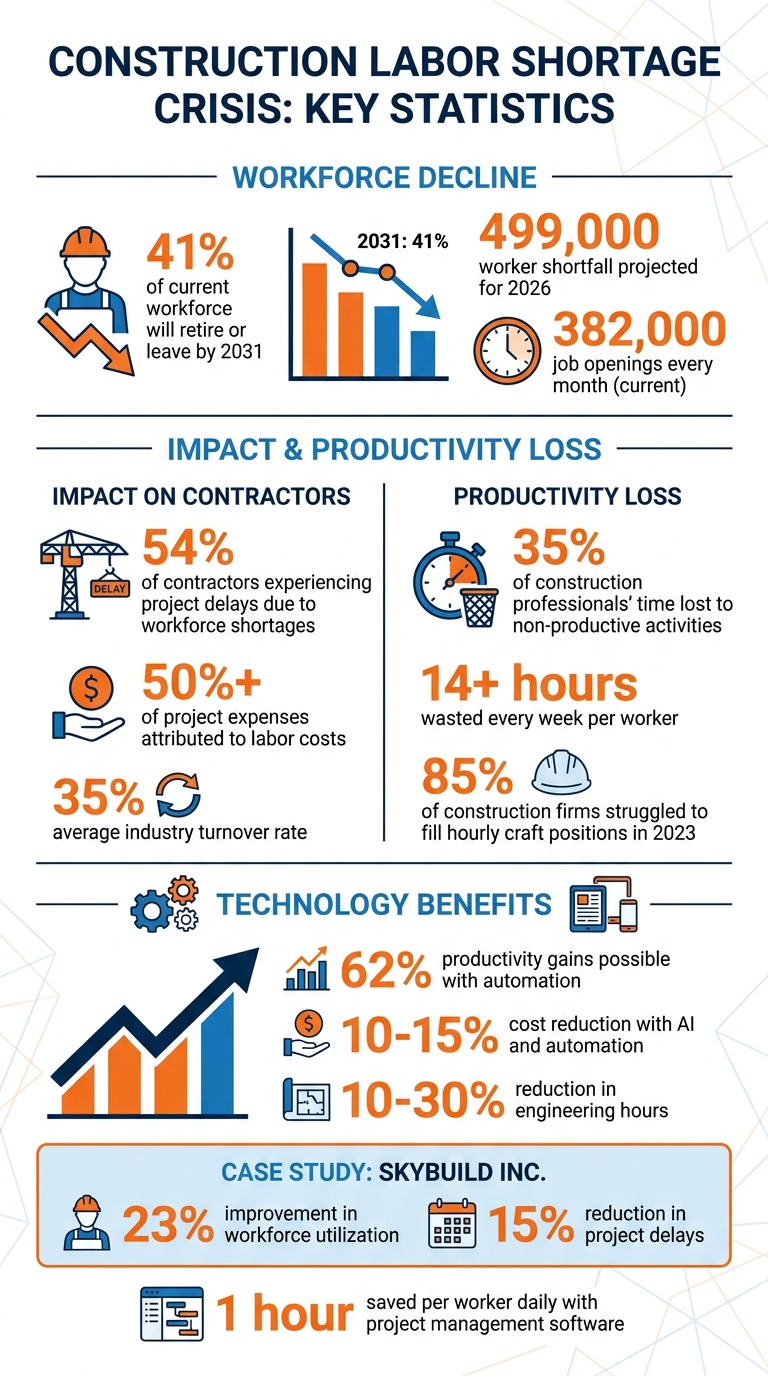
Construction Labor Shortage Statistics and Impact on U.S. Contractors
Using Contractor Foreman Scheduling to Allocate Your Workforce
Managing labor shortages in construction requires construction scheduling programs, and Contractor Foreman’s scheduling features are designed to make every hour count. These tools bring crew availability, skills, and workload gaps into one place using intuitive Gantt charts and color-coded schedules, cutting out the hassle of manual tracking.
Switching from static spreadsheets to real-time digital scheduling isn’t just about saving time – it transforms how projects are managed. Take SkyBuild Inc., for instance. In July 2025, this mid-sized commercial contractor began using a dynamic workforce scheduling module to oversee crew allocation across six active sites. By moving from spreadsheets to a digital dashboard that combined labor availability and mobile app access for site leads, they saw a 23% improvement in workforce utilization and cut project delays by 15% in just two months.
“Workforce scheduling in construction is no longer an administrative task – it’s a strategic driver.” – Lipsa Pati, Author, OConstruction
This example highlights how mobile integration paired with streamlined task assignment can make a huge difference. With mobile access, field supervisors can view and confirm daily tasks directly from their phones, eliminating the back-and-forth with the office. If unexpected issues arise – like weather delays or a worker calling in sick – you can reassign crews in real time, keeping projects on track and reducing costly downtime.
Assigning Workers to the Right Tasks
Getting the right person on the right job is key to maximizing efficiency. Categorize your workforce by certifications, skills, and availability, ensuring specialized workers are assigned to tasks where their expertise is most needed. For example, prioritize skilled electricians for complex hospital projects while assigning general laborers to simpler residential jobs. This approach ensures that expertise is used where it matters most.
Contractor Foreman’s scheduling tool allows you to filter workers by their qualifications, making it easy to assign tasks quickly and accurately. Time-off requests sync directly with the system, preventing scheduling conflicts. Plus, automated notifications for shift changes or urgent updates eliminate the need for manual follow-ups, keeping everyone on the same page.
By matching tasks to the right workers, you minimize idle time – a critical factor when resources are already stretched thin.
Preventing Downtime Between Jobs
Downtime is expensive, especially when you’re working with a small crew. Stagger crew assignments so workers can transition smoothly from one task to the next without unnecessary delays. Use the visual timeline to align material deliveries with labor schedules, ensuring crews have what they need as soon as they arrive on-site.
Instead of padding individual tasks with extra time, allocate shared contingency buffers for specialized roles like crane operators or HVAC technicians. This method absorbs minor delays without derailing the entire project. Regularly monitor utilization metrics through the dashboard to identify trends – if certain crews consistently finish early, adjust their schedules to keep them productive rather than idle. This kind of automated scheduling connects what happens in the field with the overall project plan, boosting efficiency across the board.
sbb-itb-5eea312
Tracking Work Hours with GPS-Driven Timecards
When labor is tight, every hour becomes incredibly important. Contractor Foreman’s GPS-driven timecards offer a way to keep a precise record of when and where work happens by capturing GPS coordinates and timestamps at every clock-in and clock-out. Considering that labor often makes up 50% of total project costs, having accurate tracking in place can help avoid unnecessary overtime and improve how resources are allocated.
This system also tackles issues like buddy punching by ensuring workers are physically present within a geofenced area before they can log their hours. Most GPS time clock apps offer accuracy within 5 to 20 meters under normal conditions, giving you reliable proof of on-site attendance and helping to resolve payroll disputes efficiently.
“The geolocation thing allows us to track exactly where they clocked in. We knew where they were. When I’m doing payroll, I can look over and go, ‘Hang on a minute, you’re 10 minutes away from where you should be.'” – Lee Hartley, Director of Operations, Active Education
The next sections explain how geofencing ensures attendance accuracy and how payroll integration simplifies processes.
Verifying On-Site Attendance
Geofencing creates virtual boundaries around job sites, making it possible to block or flag clock-ins that happen outside the designated area. You can customize the geofence radius depending on the size of the project – keeping it tight for smaller jobs and expanding it for larger ones. Instant notifications for out-of-bounds punches allow supervisors to address attendance issues immediately. Plus, GPS timecards can store offline data and sync it once service is restored, preventing disruptions to worksite tracking. This ensures that attendance records remain accurate, even in areas with spotty connectivity.
Connecting Timecards to Payroll
Accurate time tracking plays a major role in managing labor costs, especially when dealing with workforce shortages. By linking timecard data directly to payroll systems, companies can eliminate manual errors and save time on administrative tasks . With an industry turnover rate averaging 35%, clear and efficient payroll practices can also foster trust – workers who are paid accurately and on time are more likely to stay. Considering that replacing a mid-level employee can cost up to 1.5 times their annual salary, this approach not only saves money but also strengthens employee retention. Automated data syncing further simplifies the process by updating all relevant systems in real time, ensuring payroll accuracy and helping refine cost estimates for future projects in competitive environments.
Using Daily Logs and Cross-Training to Increase Productivity
Daily logs and cross-training can significantly improve on-site productivity, especially when labor shortages make every shift count. Contractor Foreman’s daily logs offer a clear view of tasks, progress, and potential bottlenecks, enhancing the effectiveness of digital scheduling and GPS timecards. These logs go beyond just tracking hours – they include on-site photos and real-time updates, helping uncover productivity issues that timecards might miss. This is crucial since 35% of construction professionals’ time is lost to non-productive activities, equating to over 14 hours wasted every week. Digital daily logs help identify and address these inefficiencies as they happen.
Cross-training your crew is another powerful way to maintain momentum during labor shortages. Teaching workers to handle multiple roles – like training equipment operators to use different machines – creates adaptable “swing teams” that can fill gaps across sites. This is especially important, as 54% of contractors cite workforce shortages as the main cause of project delays. Upskilling your team not only keeps projects on track but also builds loyalty, as employees who receive training are more likely to stay with your company.
Tracking Daily Progress with Logs
Switching from handwritten reports to digital daily logs simplifies progress tracking. Workers can document tasks, upload photos, and report obstacles directly from the field. These updates create a single source of truth that both field and office teams can access, reducing misunderstandings and cutting down on manual data entry. By comparing actual labor hours with budgeted hours by trade, you can quickly spot productivity gaps. Plus, using construction management software for daily reporting can save up to an hour per worker each day. Quick 10-minute huddles to review logs and address issues ensure resources are adjusted in real time.
Training Workers for Multiple Roles
Cross-training equips your team to handle a variety of tasks, reducing dependency on specialized hires. For instance, instead of delaying work while waiting for a specific operator, you can train existing staff to step into that role. This strategy is especially critical as hiring becomes more challenging. Mentorship programs help pass down skills faster, preserving valuable knowledge within your team. You might even uncover hidden potential – like a seasoned carpenter interested in site safety or estimating – that can fill key positions. Regular meetings that focus on employee well-being can also boost satisfaction by 16%, helping retain your trained workforce. Scheduling software further ensures that multi-skilled workers are deployed effectively across sites, adding flexibility when resources are tight.
These steps lay the groundwork for incorporating automation tools to streamline operations even further.
Automating Routine Tasks with Project Management Tools
Automation is a game-changer when it comes to boosting productivity, especially during labor shortages. By taking over repetitive administrative tasks, automation allows your team to focus on the work that truly drives projects forward. Industry data shows that embracing automation can lead to productivity gains of up to 62%. Additionally, AI and automation technologies can cut costs by 10–15% and reduce engineering hours by 10–30%. For example, a 10-person contracting team could see administrative time drop from 75 hours per month to just 9 hours – saving 66 hours.
“By offloading repetitive processes, skilled professionals can focus on complex decision-making, quality oversight, and specialized tasks that deliver greater value.” – ARKANCE US
Tools like Contractor Foreman make automation seamless. For instance, when you create a Work Order, the system automatically assigns it to the right person and sends a notification via email or text. If bad weather forces a schedule change, the Scheduling module lets you update timelines and notify all relevant parties instantly. Even routine tasks like scheduling follow-up visits are handled automatically through the “Next Appointment Scheduling” feature in the Service Tickets module. These small automations add up, helping to avoid delays that could otherwise reduce client conversion rates by as much as 30%.
Setting Up Automatic Task Assignments
Contractor Foreman’s Work Order and To-Do systems eliminate the hassle of manual task assignments. Assign a To-Do item, and the system notifies the team member in real-time. Once they complete the task, the Kanban board updates automatically, sorting tasks by status – Pending, In-Progress, or Completed – so you can easily identify bottlenecks. For recurring tasks, the automated Purchase Order generation pulls items directly from estimates or bid packages, cutting out tedious data entry. This is especially important considering 85% of construction firms struggled to fill hourly craft positions in 2023, making it critical for every worker to perform at their best.
AI-driven predictive scheduling takes automation a step further. It recalculates crew assignments within minutes when factors like weather or material availability change. These advanced systems can also detect cross-project resource conflicts that traditional spreadsheets might miss, ensuring your workforce isn’t overbooked or left idle. For contractors managing more than 25 field workers, this kind of real-time optimization delivers significant efficiency gains.
Cutting Down on Paperwork and Manual Updates
Automated workflows keep everything moving smoothly without constant manual input, allowing your team to focus on on-site productivity. Contractor Foreman’s Client Portal automatically shares project schedules and daily logs with clients. Construction daily logs even pull in local weather data automatically, saving supervisors from manually recording conditions. Plus, any updates made in the field or office sync instantly across devices, ensuring everyone works with the most current information.
The platform also integrates with tools like Zapier and Whippy AI to take automation even further. For example, you can set up automated SMS or WhatsApp sequences to keep teams coordinated or create workflows that handle recurring notifications without requiring manual effort. These features make it easier for contractors with smaller teams to maintain smooth communication and stay on top of tasks.
Connecting Contractor Foreman with QuickBooks and Zapier
Integrating your financial and operational tools can make a world of difference, especially when your team is stretched thin. Syncing Contractor Foreman with QuickBooks and Zapier helps eliminate unnecessary manual work by automating the flow of data between your field and office teams. This integration enables real-time updates for bills, invoices, expenses, and payments, allowing you to track committed costs – like purchase orders and subcontractor bids – against your budget instantly.
By cutting down on administrative tasks, your team can focus on what truly matters: the construction work itself.
“Accounting software can track the dollars, but it doesn’t always capture how and why those dollars move across a project.” – Anna Ghazaryan
Setting up Zapier is quick – most connections take under six minutes to establish. You can choose triggers in Contractor Foreman, like “Lead Created” or “New Time Entry”, and link them to actions in QuickBooks, such as “Create Invoice” or “Create Time Activity.” For instance, when a crew member logs their hours using the mobile timecard, Zapier automatically creates a matching time activity in QuickBooks, streamlining payroll while reducing errors. According to Zapier, 93% of its users report improved efficiency, and 87% of Forbes Cloud 100 companies relied on it in 2023. This integration doesn’t just simplify payroll – it sets the foundation for centralizing all your project data.
Keeping All Project Data in One Place
Centralized data is a game-changer when managing projects with limited resources. QuickBooks handles historical financial records, while Contractor Foreman provides real-time updates from the field. Together, they give your accounting team a clear financial picture and equip project managers with tools tailored for field operations. Automated syncing eliminates the need for tedious manual data transfers from spreadsheets or takeoff tools, which is especially helpful when administrative staff is overworked. It also reduces errors like double bookings of labor or equipment, a common issue with disconnected systems like Excel. Plus, linking job costs to specific tasks and schedules allows you to quickly measure how delays impact your budget. This kind of centralization improves communication between field teams and back-office operations, ensuring everyone stays on the same page.
Connecting Office and Field Teams
Miscommunication between office and field teams can lead to costly mistakes, frustration, and unhappy workers. Zapier helps bridge this gap by automating processes like ticket creation and routing, ensuring field teams receive the information they need without wasting time hunting it down. For example, files uploaded through Contractor Foreman can automatically attach to relevant records in QuickBooks, keeping both teams aligned with the latest updates. Even new employee or vendor records created in one system can be automatically synced with the other, simplifying the management of subcontractors and new hires.
“The days of manually exporting and importing data are over. With Zapier, you can send data where it needs to go, in the format you need it – so you can centralize your data and unlock more insights.” – Zapier
It’s worth noting that Contractor Foreman will discontinue its integration with QuickBooks Desktop after January 2026, focusing exclusively on QuickBooks Online. If you’re using both systems, now is the time to schedule an integration audit to ensure your records are correctly paired, avoiding duplicate entries or broken links.
Contractor Foreman Pricing Plans for Labor Management
Finding the right pricing plan is crucial for managing labor shortages efficiently. Contractor Foreman offers four pricing tiers: Standard, Plus, Pro, and Unlimited, with monthly costs ranging from $79 to $249. The main distinction between these plans lies in the user limit, starting with 3 users on the Standard plan and scaling up to unlimited users on the Unlimited plan. Regardless of the tier, each plan includes essential labor management tools like GPS timecards, crew scheduling, and daily logs – key features to help keep your workforce running smoothly.
One standout benefit is the Price Lock Guarantee, which ensures your subscription rate stays fixed after signing up. This is especially valuable when labor costs can account for over 50% of your project budget. With this structure, every dollar spent on labor management can go further, even in a challenging labor market.
Every plan comes with a 30-day free trial, and there’s no credit card required to get started. Additionally, the Plus, Pro, and Unlimited tiers offer a 100-day money-back guarantee. Free training and ongoing support are included across all plans, eliminating the hefty onboarding fees often seen with other platforms.
For teams of 10 or more, the Pro plan is tailored to meet your needs. If your team grows beyond 15 users, the Unlimited plan ensures you can scale seamlessly without worrying about user caps. These tiers are designed to align with the operational tools and efficiencies discussed earlier, making them a practical choice for tackling labor shortages.
| Plan | Monthly Cost | User Limit | Best Suited For | Key Labor Management Features |
|---|---|---|---|---|
| Standard | $79 | 3 users | Solo contractors / small teams (1–3 people) | Basic scheduling, daily logs, and time tracking |
| Plus | $125 | 8 users | Small crews (4–8 people) | Adds estimating, invoicing, and accounting and expense tracking |
| Pro | $166 | 15 users | Mid-sized teams (9–15 people) | Includes reporting, safety tools, and document management |
| Unlimited | $249 | Unlimited users | Large teams (15+ people) | Offers QuickBooks Desktop integration and advanced GPS tracking |
Managing Labor Shortages with the Right Software
The construction industry is grappling with a persistent workforce shortage, and waiting for the labor market to bounce back isn’t a viable strategy. Contractors need to focus on boosting the productivity of their current teams, and technology offers a practical way to make that happen.
Software solutions are transforming how construction teams operate. For example, GPS-enabled timecards reduce payroll errors and build trust among workers. Automated scheduling tools help balance crew rotations, cutting down on burnout. Daily logs eliminate the hassle of handwritten reports, and integrations with platforms like QuickBooks and Zapier remove the need for tedious manual data entry. Together, these tools can save up to one hour per worker every day, allowing smaller teams to tackle more work without feeling stretched thin.
The numbers back this up. John Meibers, VP & GM at Deltek ComputerEase, explains:
“Technology solutions… can be implemented to remove tasks, reduce inputting errors and the use of multiple spreadsheets, and provide a more environmentally conscious business”.
But the benefits go beyond just improving day-to-day operations. Modern software helps attract younger, tech-savvy workers who expect digital tools in the workplace. This is a big deal in a market where there are 382,000 job openings every month. The right technology doesn’t just solve today’s problems – it positions companies to build the workforce they need for the future.
Considering that labor costs make up over 50% of project budgets, investing in tools that improve efficiency isn’t just smart – it’s essential for staying profitable and keeping teams productive despite labor shortages.
FAQs
Which features should I set up first to get quick wins with a smaller crew?
To get results quickly with a lean team, focus on features that improve efficiency right away. Start by using project management and scheduling tools to assign tasks, monitor progress, and streamline your workflows. Incorporate resource allocation platforms to manage labor and materials more effectively. Lastly, adopt team collaboration software to improve communication and keep everyone on the same page, ensuring smoother coordination and higher productivity.
How do GPS timecards and geofencing handle spotty cell service on job sites?
GPS timecards and geofencing rely on GPS signals to monitor employee locations and track time effectively, even in areas with poor or no cell service. As long as the device maintains a clear connection to satellites, it can independently log data. Once cell service becomes available again, the system automatically syncs the stored data, ensuring precise time records and maintaining accountability regardless of connectivity challenges.
What’s a practical way to start cross-training without hurting production?
To integrate cross-training into your operations without impacting production, consider on-the-job strategies that allow employees to learn progressively. For example, you can schedule training sessions during slower periods or pair seasoned workers with those being cross-trained. This ensures the workflow remains steady while skills are being developed.
Using construction management software can also be a game-changer. It helps you plan and track training activities, making sure skill-building aligns perfectly with project needs. By adopting this approach, you enhance your team’s adaptability without losing productivity.







