
Key Takeaways:
- Hidden Costs: Onboarding, data migration, and annual price hikes (7-10%) add up fast.
- Unused Features: Many contractors pay for premium plans but don’t use most tools.
- Per-User Pricing Issues: Costs increase with every new hire, acting as a “growth tax.”
- Low ROI: If your team isn’t using the software effectively, you’re losing money.
To avoid these pitfalls, audit your software expenses.
Compare costs, assess feature usage, and calculate ROI. Look for tools with transparent pricing, no hidden fees, and plans that align with your business size – like Contractor Foreman, which offers a fixed monthly rate and lifetime price locks.
Signs You’re Paying Too Much
Paying for Features You Don’t Use
It’s common for contractors to feel forced into premium plans just to access one critical feature – like change orders or accounting and invoicing integrations – while leaving the rest of the tools in that tier untouched. Many software providers design their pricing this way, locking essential tools behind higher-cost plans, which often leaves you paying for features you’ll never use.
If your team is still relying on spreadsheets, texts, or personal logs for daily reports and schedules despite having specialized software, it’s a clear sign the platform isn’t meeting your needs. This could mean the software is either too complicated or doesn’t address your specific requirements. Low adoption rates make the problem worse. When field teams avoid using the software because it’s hard to navigate, you’re essentially paying for licenses that add little to no value. Some businesses even limit software access to a handful of “gatekeepers” to save on user fees, which can create communication bottlenecks and defeat the purpose of streamlining processes.
Unexpected Charges and Hidden Fees
Hidden costs can quickly inflate your software expenses. For instance, per-user pricing often acts as a “tax on collaboration.”
Per-user pricing creates a tax on collaboration. Every person who could benefit from the software becomes a line item on your budget.
This means every new employee increases your software bill, even if you’re not using additional features. For a 50-person team, the annual cost of per-seat construction software averages over $18,000 – and that’s before adding premium features or upgrades. On top of that, some vendors conduct year-end audits and retroactively charge for exceeding user or project limits, which can cause renewal costs to skyrocket by 200% to 300%.
Implementation and integration fees add even more to the total bill. Initial setup costs for legacy enterprise systems can range from $500 to over $100,000. Want to connect your software to tools like QuickBooks? That often comes with additional monthly fees or requires paid third-party connectors. Even data migration – bringing your old records into the new system – can cost between $500 and $5,000. Other hidden costs include storage overages, texting packages (ranging from $49 to $249 per month), and priority support tiers (from $50 to $200 per month).
Annual price hikes make things worse. For example, a 10% yearly increase on a $10,000 contract leads to a 61% overall cost increase over five years.
Poor Return on Investment
When unexpected costs stack up, it directly impacts your return on investment (ROI). Software that doesn’t simplify workflows or improve efficiency simply isn’t worth the expense. A big red flag is when your team continues to rely on manual methods – like sending text updates, maintaining “shadow” spreadsheets, or double-entering data because the software doesn’t sync properly. These inefficiencies are compounded when employees spend extra time correcting errors caused by outdated or inaccurate information.
The “gatekeeper” issue also drags down ROI. Limiting licenses to save on costs often means a few people are tasked with entering data for everyone, leading to delays and reduced productivity. Revenue-based pricing models can also discourage teams from using key features like daily reports or photo documentation to avoid triggering overage fees. In one example from December 2025, a general contractor in the Northwest managing 14 projects cut their annual software costs from over $100,000 to $10,000 by switching to a pricing model that didn’t penalize growth.
If your software requires constant training or expensive premium support to work effectively, the lost productivity can erase any potential savings. And when 94% of executives say outdated systems significantly hinder their business agility, it’s clear that the wrong software isn’t just a waste of money – it’s actively holding your business back.
Recognizing these ROI pitfalls is the first step toward auditing your software expenses and making smarter decisions.
sbb-itb-5eea312
How to Audit Your Software Costs
If you’ve noticed signs that you’re overpaying for software, it’s time to dig deeper with a detailed audit. You don’t need a finance degree to figure this out – just a clear understanding of what you’re paying for and whether it’s delivering value. The goal is simple: figure out if your investment aligns with your business needs or if you’re wasting money on features and fees that don’t contribute to your success.
Create a Cost and Features Comparison Table
Start by building a table that lists your software plan details, monthly fees, and all included features. Add a column to mark which features your team actively uses and which ones are untouched. Keep in mind, the actual cost of your software often exceeds the advertised price by 30–60% once you factor in additional fees like support upgrades or required add-ons.
Don’t forget to include one-time expenses like onboarding fees (which can range from $500 to over $2,000), data migration costs, mandatory training, and support tier upgrades. If you find that necessary tools require constant upgrades, it’s a sign the software might not be a good fit.
Also, calculate what’s often referred to as the “growth tax” – how your costs will increase if you add five more users or scale up your business operations. To stay ahead, take a screenshot of your vendor’s current public pricing page during this process. It can serve as leverage during negotiations, especially since many contracts include automatic price hikes of 7% to 10% annually.
This table will give you a clear picture of whether the software’s features justify its cost and help you spot any misalignments.
Match Your Business Needs to Software Features
Before deciding if you’re overpaying, you need to understand exactly what your business requires. Map out your workflow – from estimating and scheduling to dispatch and project closeout – to see where manual processes or spreadsheets are still being used despite having software. This can highlight areas where your current tools aren’t meeting expectations.
Create a list of must-have features (like mobile access, time tracking, and progress billing) and separate those from “nice-to-haves” that might look appealing during demos but rarely get used. For construction businesses, ensure the software can handle industry-specific needs like change order tracking, certified payroll, prevailing wage compliance, and job costing by phase or cost code. If you’re still manually re-entering data because the platform doesn’t integrate well between the field and the back office, that’s a clear red flag.
Involve your project managers and foremen in this review. If the field team finds the software clunky or hard to use, they’re less likely to adopt it, no matter how impressive the features seem. Lastly, double-check that you’re not paying for unused licenses or features, such as accounts for employees who no longer work with you or tools that were never implemented.
Once you’ve clarified your needs, you’ll be in a better position to calculate the software’s value through a detailed ROI analysis.
Calculate Your Return on Investment
To calculate ROI, use this formula: (Current Value of Investment – Cost of Investment) / Cost of Investment. While it sounds simple, getting accurate numbers requires careful evaluation of both the benefits and costs.
Start by estimating how much time the software saves your team. For example, employees might save about 1 hour per day (or 5 hours weekly), while project managers could save an additional 3–6 hours weekly. Use your team’s average salary to assign a dollar value to those saved hours. For instance, an annual salary of $99,500 translates to an hourly rate of $49.75. Multiply the saved hours by this rate to calculate the monthly or weekly value.
On the cost side, go beyond just the subscription fee. Include the Total Cost of Ownership (TCO), which factors in onboarding, training (typically $700 to $1,500 per person for instructor-led sessions), data migration, and integration fees (ranging from $50 to $500 per month). Analyze these costs over a three-year period, accounting for a 10% annual price increase and any “true-up” costs from exceeding usage limits. Ideally, the software should pay for itself within 12 to 18 months. If it doesn’t, it may be too costly for your business at its current scale.
“You’re only as good as the tools you use.” – ProjectTeam
Lastly, check for vendor lock-in. Ensure there aren’t hidden fees to export your data or proprietary formats that make switching to a new platform difficult. This step protects your flexibility for the future and ensures your investment remains adaptable as your business grows.
How Contractor Foreman Keeps Costs Down
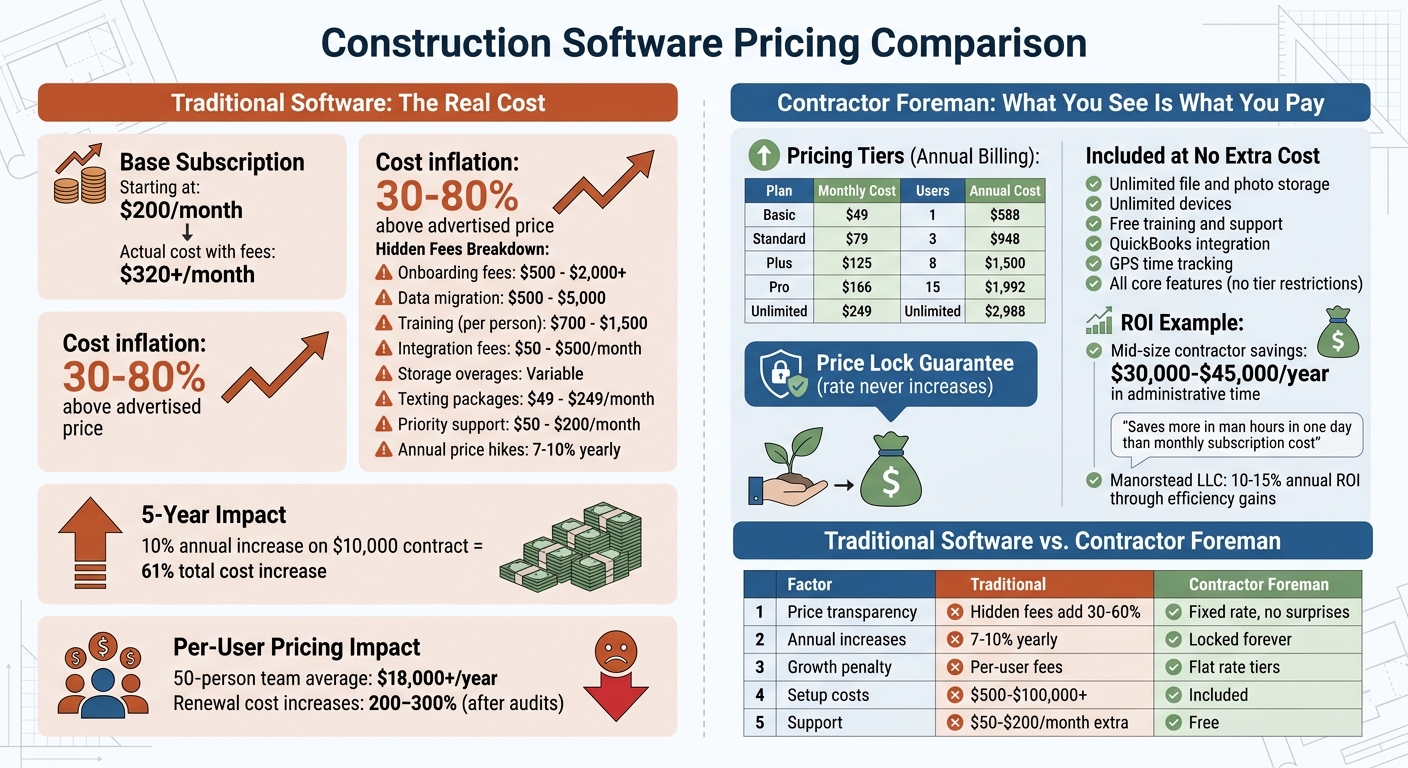
Construction Software Cost Comparison: Hidden Fees and Pricing Models
When you’re looking to manage software expenses more effectively, Contractor Foreman stands out with its transparent and predictable pricing model. This approach eliminates the hidden fees that can disrupt budgets, offering a clear path to sustainable growth.
Clear Pricing with No Hidden Costs
Contractor Foreman offers straightforward pricing, ranging from $49 to $249 per month when billed annually. What you see is what you get – no hidden fees or surprise charges. Subscriptions include unlimited file and photo storage, no restrictions on the number of devices, and free training and support.
One of the standout features is the Price Lock Guarantee. Once you sign up, your rate is locked in for life, meaning no unexpected price hikes – even if rates increase for new customers.
As StackVett highlights:
Contractor Foreman’s stated policy is that your rate never changes after signup. That makes the $49 starting price more valuable than it looks on paper.
Additionally, Contractor Foreman simplifies budgeting with a fixed monthly fee. This structure supports business growth without penalizing you as your operations expand, making it easier to plan long-term.
Plans That Grow with Your Team
Affordability is just the beginning. Contractor Foreman’s tiered plans are designed to grow alongside your team, ensuring you only pay for what you need. The platform offers five pricing tiers based on the number of users:
- The Basic plan at $49/month is perfect for solo contractors (1 user).
- The Standard plan at $79/month supports small teams of up to 3 users.
- The Plus plan at $125/month accommodates teams of up to 8 users.
- The Pro plan at $166/month works well for teams of up to 15 users.
- The Unlimited plan at $249/month removes all user restrictions.
Here’s a quick breakdown of the plans:
| Plan | Monthly Cost (Annually) | Users Included | Annual Cost |
|---|---|---|---|
| Basic | $49 | 1 | $588 |
| Standard | $79 | 3 | $948 |
| Plus | $125 | 8 | $1,500 |
| Pro | $166 | 15 | $1,992 |
| Unlimited | $249 | Unlimited | $2,988 |
This structure allows you to upgrade as your team grows, keeping everything centralized and efficient. Plus, with a free trial and a money-back guarantee, you can evaluate the platform risk-free.
Full Feature Set That Justifies the Cost
Contractor Foreman isn’t just about affordability – it’s about value. Every plan includes a full suite of project management tools designed to streamline operations and maximize efficiency. Features include:
- Project management
- Financial tracking
- Scheduling
- GPS time tracking
- Daily logs
- Document control
Other advanced tools, like GPS-stamped time cards, geofencing, and a library of over 800 pre-written safety meeting topics, come at no extra cost. Financial tools such as AIA-style invoicing, real-time job costing, and automated change orders help track every dollar and prevent budget overruns. Integration with QuickBooks further simplifies financial workflows.
The platform delivers measurable results. Danielle Hanenberg, Project Coordinator at Manorstead LLC, shared:
Overall, CF has provided a 10-15% return on investment annually through increased efficiency and cost control.
Another user emphasized the platform’s value:
Contractor Foreman saves us more money in man hours in one day than what we pay for a monthly subscription.
With over 800 reviews, Contractor Foreman holds a 4.5/5 rating on G2 and a 4.55/5 rating on Research.com. Forbes Advisor even recognized it as “Easiest to Use.” On top of that, the support team delivers exceptional service, with an average wait time of just 13 seconds and 95% of chats rated 5 stars.
Making Sure Your Software Investment Pays Off
To get the most out of your software investment, it’s essential to match its features with your team’s actual needs, track measurable savings, and steer clear of unexpected costs. If your team spends more time working around the software than using it effectively, you’re not gaining value – you’re paying for inefficiency.
Start by monitoring how much time your team spends on administrative tasks like estimating, invoicing, and daily logs. For mid-size contractors, implementing the right construction management software can save between $30,000 and $45,000 annually in administrative time alone. If you’re not seeing these kinds of savings, it could be a sign that inefficiencies are still lingering.
Next, evaluate how seamlessly the software fits into your daily operations. Field adoption is a key metric here. If superintendents and foremen avoid the mobile app and fall back on spreadsheets or paper, the software hasn’t been fully integrated. This is a red flag – especially when you consider that 83% of workers spend one to three hours each day fixing mistakes caused by inaccurate information. The goal of your software should be to eliminate wasted time, not add to it.
Another critical step is calculating the three-year Total Cost of Ownership. Add up subscription fees, implementation costs, training expenses, and any annual price increases. As highlighted in the cost audit, hidden fees can significantly inflate your overall spend. Be proactive and ask vendors about potential costs like storage fees, “true-up” adjustments, or whether essential features – like change orders – are locked behind higher-priced tiers, a common issue when comparing Procore alternatives.
Finally, assess whether the pricing model aligns with your growth plans. Per-user pricing can penalize growth since every new hire increases your costs. In contrast, flat-rate pricing offers more predictable budgeting and encourages full-team collaboration without penalizing expansion. Look for vendors that offer rate locks, as these can shield you from annual price hikes that might increase costs by over 60% in just five years.
FAQs
What costs should I include beyond the monthly subscription price?
When budgeting for a monthly subscription, it’s crucial to account for more than just the base price. Additional costs can include training fees, data migration expenses, storage overages, add-on features, and even true-up adjustments (which reconcile usage beyond your initial agreement). These hidden expenses can add up quickly and influence your total spend. Taking the time to evaluate these factors will give you a much better understanding of the actual cost.
How can I measure whether my team is actually using the software?
To find out if your team is actively using the construction software, start by reviewing usage analytics or activity logs. These tools can show who’s logging in, how frequently they’re using the platform, and what specific actions they’re performing.
You can also schedule regular check-ins or require team members to submit updates directly through the software. This not only promotes engagement but also ensures the platform becomes a central part of their daily tasks.
Be mindful of signs like delayed communication or missing documentation, as these could indicate the software isn’t being fully utilized. By taking these steps, you can confirm whether the software is effectively integrated into your team’s workflows.
How do I estimate my ROI and payback period for construction software?
To figure out ROI and the payback period, start by evaluating all costs involved – this includes things like subscriptions, training, and support. Then, weigh those against the benefits, such as improved efficiency or reduced labor expenses. Here’s a simple formula to calculate ROI:
ROI = [(Benefits – Costs) / Total Investment] × 100
The payback period, on the other hand, measures how long it will take for the benefits to equal the initial costs. This helps you decide if the software makes sense financially and aligns with your goals.







