
POOF!
That’s the sound of your $18,000 profit margin turning into $4,700.
And it’s usually not because of one massive mistake. It’s a bunch of tiny expensive decisions stacking on top of each other until your budget finally taps out.
Like:
- Wrong material order — minus $430
- Extra equipment rental days — minus $780
- Crew waiting on inspections — minus $1,200
- Underestimated labor hours — minus $2,100
- Unbilled client changes — minus $3,500
- “Small” supplier price increases — minus another $900
Individually, none of these feel business-ending.
And you know what? That’s EXACTLY why it’s dangerous!
Just like iced coffee, food delivery apps, or saying “I deserve a little treat” five times a week, the money disappears so gradually you barely notice it happening….until the project ends.
That’s why job cost tracking matters so much in construction. If you’re not tracking labor, materials, equipment, and overhead costs in real time, small problems pile up FAST — and by the time you notice them, the damage is already done.
Here’s why accurate job cost tracking matters :
- Prevent Budget Overruns: Real-time tracking helps spot cost issues early, avoiding surprises. For example, tracking labor hours daily can reveal overruns before they escalate.
- Increase Profit Margins: Labor often accounts for 40–50% of costs, but many fail to include taxes, insurance, and benefits, leading to underestimations by 20–35%.
- Improve Financial Reporting: Clean, accurate data supports better bids and forecasts, reducing the risk of repeating past mistakes.
Switching from manual methods to digital tools like Contractor Foreman can streamline cost tracking, reduce errors, and provide real-time insights into project finances. By tracking labor, materials, equipment, and overhead costs daily, contractors can protect profits and keep projects on track.
Want to save time and money?
Start with digital systems that integrate time tracking, purchase orders, and payroll for a unified, real-time view of your project budget.
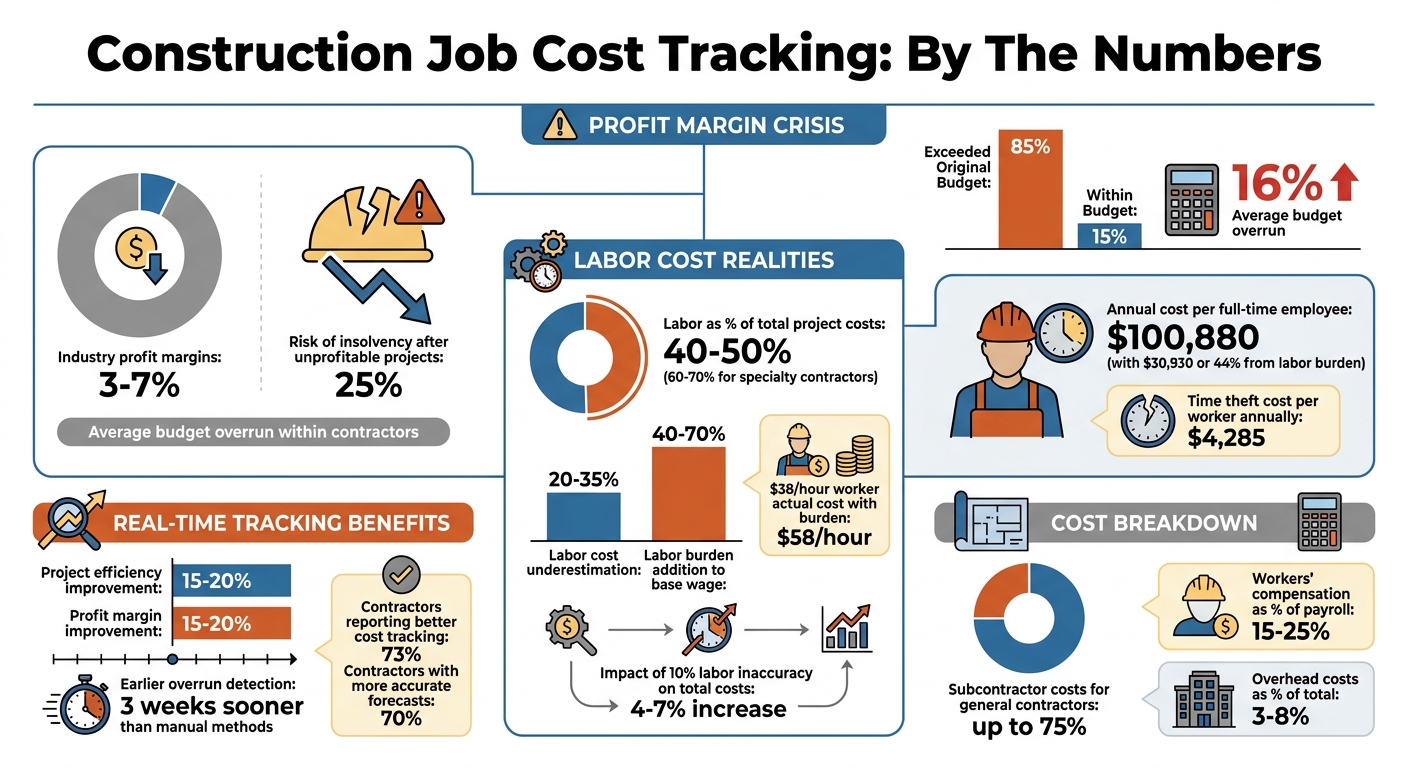
Construction Job Cost Tracking Statistics and Impact on Profit Margins
Why Job Cost Tracking Accuracy Matters
In an industry where profit margins hover between 3–7% and the risk of insolvency rises to 25% after a few unprofitable projects, tracking costs accurately isn’t just helpful – it’s essential.
Preventing Budget Overruns
Real-time cost tracking transforms how quickly you can respond to budget issues. Instead of waiting weeks for feedback, daily time logs provide updates within hours, exposing cost overruns almost immediately.
For example, if framing labor is running 22% over budget, you’ll know within days, not months.
Tracking committed costs – like purchase orders and subcontracts – also gives you a clear picture of financial obligations before invoices hit, reducing the risk of cash flow surprises. Early warnings, such as labor hours exceeding estimates by more than 10% while work completion lags behind at less than 75%, allow you to intervene before issues spiral out of control. Unfortunately, three out of four contractors only discover overruns when it’s too late to fix them. Granular cost codes, however, can spotlight trouble areas early enough to make adjustments, helping prevent overruns and protect profit margins.
Increasing Profit Margins
Labor is often the largest expense on a project, accounting for 40–50% of total costs. Yet, many contractors underestimate labor expenses by 20–35% because they fail to factor in the labor burden – taxes, insurance, and benefits that add 40% to 70% to a worker’s base hourly wage. On average, a full-time construction employee costs $100,880 annually, with $30,930 (44%) coming from labor burden. Overlooking these numbers can lead to absorbing unplanned costs.
Time theft and “time leakage” add another layer of expense, costing contractors an average of $4,285 per worker each year. Even a small 10% inaccuracy in labor reporting can inflate total project costs by 4–7%, a margin that can quickly erode profits. By adopting real-time cost tracking, contractors typically see project efficiency improve by 15–20%, as productivity issues and resource misallocations are addressed sooner.
“If your time data is wrong, your labor costs are wrong. And when labor represents 40–50% of total project costs, inaccurate labor data undermines every cost report, forecast, and dashboard that depends on it.” – Albert Bou Fadel
This level of accuracy also strengthens financial reporting and analysis.
Better Financial Reporting and Analysis
Accurate cost tracking doesn’t just help in the moment – it builds a database of historical cost data that improves future bidding. Considering that 85% of construction projects exceed their original budget by an average of 16%, clean, reliable data lets you avoid repeating past mistakes.
Modern systems with automatic cost-overrun alerts enable exception-based management, so you can focus on the areas that need attention most. These tools also integrate accurate Work-in-Progress (WIP) schedules into your general ledger, a key factor for bonding and banking purposes. After implementing real-time financial software, 73% of contractors report better cost tracking, and 70% see more accurate financial forecasts.
| Feature | Traditional Job Costing | Real-Time Job Costing |
|---|---|---|
| Data Entry | Weekly/bi-weekly manual entry | Daily field entry via mobile |
| Visibility | Backward-looking (weeks late) | Live dashboards |
| Accuracy | High risk of human error/memory fade | High (GPS/biometric verification) |
| Overrun Detection | Detected after the phase or project ends | Identified within days or hours |
Switching from monthly to weekly cost reviews can help identify profit leaks while there’s still time to correct them. Any cost code showing a variance over 10% should be investigated immediately. After all, you can only fix what you can see.
sbb-itb-5eea312
Main Cost Categories to Track
Organizing costs into clear categories is essential for effective job costing. By doing this, you can better compare projects, identify trends, and pinpoint areas where costs are slipping through the cracks. Here’s a breakdown of the key cost categories you should keep an eye on.
Labor Costs
Labor often makes up the largest share of project expenses, typically 40–50% of total project costs. For specialty contractors handling self-perform work, this can rise to 60–70%. However, many contractors only track base wages, underestimating labor costs by as much as 35–50%. For example, a worker earning $38 per hour actually costs closer to $58 per hour when you factor in payroll taxes, workers’ compensation, and benefits.
To stay on top of labor costs, track them daily by cost code. Use tools like biometric time clocks or facial verification to avoid issues like “buddy punching.” Workers’ compensation insurance alone can account for 15–25% of payroll in many trades, so tracking fully loaded rates – not just base wages – is crucial. Even small inaccuracies in tracking, such as rounding time or delays in logging hours, can inflate costs by 4–7%.
Material Expenses
Material costs include both direct items (like lumber, concrete, and rebar) and indirect items (like fasteners, safety gear, and consumables). To manage these properly, track expenses at the purchase order (PO) level, not just when invoices arrive. Recording committed costs as soon as a PO is issued gives you early visibility into expenses. Match delivery tickets to their respective POs and reconcile them against final invoices to catch pricing or quantity errors.
To avoid unassigned expenses, assign receipt photos to the job number and cost code on the same day. It’s also important to track material waste separately. Large discrepancies between estimated and actual material usage can signal issues that need further investigation.
Equipment Costs
Equipment expenses fall into two main categories: rented and owned. For rented equipment, directly code expenses from invoices. For owned equipment, assign an internal rate that covers depreciation, maintenance, fuel, and insurance. Use historical data or industry benchmarks to set fair internal rates, then monitor actual usage hours against what was budgeted. For instance, if a backhoe was budgeted for 40 hours but logged 58 hours, investigate whether the scope changed or if productivity lagged.
Overhead Allocations
Overhead costs can be divided into job-level and company-level expenses. Job-level overhead includes costs tied to specific projects, such as permits, temporary utilities, site trailers, and project management salaries. Company-level overhead covers broader expenses like office rent, administrative staff, general insurance, and accounting fees.
Allocating these indirect costs to individual jobs is essential to avoid overstating margins.
As Lorenzo Nourafchan, Founder & CEO of Northstar Financial, explains:
“A contractor who does not allocate G&A, shop overhead, and equipment ownership costs to individual jobs is systematically overstating job margins.”
Many contractors allocate overhead by applying a percentage of direct costs or direct labor hours across projects. Whatever method you choose, consistency is key. Proper allocation ensures that even indirect costs – which typically account for 3–8% of total project costs – are captured accurately. These cost categories lay the groundwork for real-time tracking strategies discussed in the next section.
How to Track Costs in Real Time
Real-time cost tracking takes the guesswork out of project management, helping you spot potential issues faster. By reducing review delays to just 24–48 hours, it allows teams to address labor overruns and other problems before they spiral out of control. In fact, contractors using real-time tracking typically catch budget overruns about three weeks earlier than those relying on manual methods. These tools integrate seamlessly with cost tracking systems, giving you better control over your project’s financial health.
Using Time Tracking Tools
Mobile time tracking apps are a game-changer, eliminating the errors that come with manual timesheets. Field teams can log their hours daily, ensuring labor costs are recorded in real time. Features like GPS geofencing and biometric verification add another layer of accuracy by confirming on-site presence and preventing time theft. Research highlights that nearly 50% of employees are affected by “buddy punching”, making these tools even more critical.
Additionally, automated systems can calculate fully burdened labor rates, which include all associated costs beyond base pay. This ensures you’re working with accurate labor cost data.
Recording Costs at the Job Site
Material costs should be captured as they arise. Field teams can take photos of receipts and link them to specific job numbers and cost codes on the same day. When ordering materials, issue purchase orders (POs) coded to the appropriate project and cost categories. This creates “committed costs” that are reflected in your budget even before invoices arrive.
For equipment, track usage directly at the job site using hourly or daily rates. This prevents equipment expenses from being buried in general overhead, where they can be harder to monitor. Many systems now use Optical Character Recognition (OCR) to extract data from vendor invoices automatically, cutting down on manual entry errors and speeding up the process.
Integrating Payroll and Procurement Data
Once on-site costs are accurately recorded, integrate your data systems to maintain a unified, real-time view of your budget. With integrated systems, budgets are updated as soon as timesheets or POs are submitted. Implement three-way matching to compare invoices against purchase orders and delivery receipts automatically. This process flags any discrepancies before payments are made, adding another layer of financial control.
Contractors who adopt real-time profitability tracking report profit margin improvements of 15% to 20%.
Using Software to Simplify Cost Tracking
Managing construction costs can be a headache, but construction management software streamlines the process by improving estimate accuracy and eliminating tedious manual data entry and reducing reliance on spreadsheets. Instead of juggling numbers across multiple systems, these platforms allow information to flow seamlessly from the field to your financial reports. A great example of this is Contractor Foreman, which offers an integrated approach to cost tracking.
Contractor Foreman Features for Cost Tracking
Contractor Foreman simplifies cost tracking by centralizing everything in one place. Its financial dashboard gives you a clear, high-level overview of your project’s financial health, while also letting you dive into specific details like labor, material, and equipment costs. Once a bid is awarded, the system can instantly convert it into a purchase order or subcontract, cutting out repetitive data entry.
The platform integrates with QuickBooks Online, syncing bills, invoices, and payments automatically. This ensures your accounting records align perfectly with your project data, without needing to input the same information twice. Field crews can also submit timecards and expenses through the mobile app, which then updates your daily logs and financial reports.
Chuck A. from Liercke Construction, LLC, shared his experience:
“The integration of the whole platform is very good, including externally with QuickBooks Online. Ability to do time sheets in the field without separate software. Cost codes and cost items that can be used for different jobs, this is huge for us”.
Another standout feature is the integration with 1build.com, which pulls up-to-date local material and labor prices directly into your estimates and change orders. This ensures your budgets reflect current market conditions, keeping you ahead of any surprises.
Automated Data Flow and Reporting
Automating workflows is another game-changer. When change orders are approved, the system updates your contract amount and revised budget automatically, so your job costing reports are always current. Purchase orders track both billed and delivered quantities, helping you spot material shortages or backorders early, before they disrupt your schedule.
The platform also handles AIA-style invoicing and progress billing, basing them on completion percentages or installed units. For time and material invoicing, it pulls in expenses, purchase orders, and timecards automatically. Payments processed online through Stripe or WePay (1% for ACH, 2.9% for credit cards) are synced directly to the relevant invoices, saving you time and avoiding errors. These automated reporting features ensure you can quickly identify and address any discrepancies by comparing budgeted and actual expenses.
Comparing Budget vs. Actual Costs
Real-time updates make it easy to compare your budget to actual costs, helping you spot potential issues before they escalate. Contractor Foreman allows you to track your original budget alongside a revised one that includes approved change orders, so you can quickly identify variances. By comparing budgeted amounts against actual expenses in real time, you can pinpoint areas where costs are running higher than expected. The platform’s Kanban view organizes financial items by status, making it simple to see which invoices or bills are pending and keep your cash flow steady.
Contractor Foreman is available starting at $49 per month and includes a 30-day free trial along with a 100-day money-back guarantee. With a 4.5/5 rating and an average customer support wait time of just 13 seconds, it’s a reliable choice for streamlining your construction cost tracking.
How to Set Up a Job Cost Tracking System
To create an effective job cost tracking system, focus on three main steps: identifying costs, establishing cost codes, and training your team. These steps provide the clarity you need to manage project finances and improve profitability.
Identifying Key Costs
Start by pinpointing the costs you need to monitor. In construction, expenses generally fall into five main categories: labor, materials, subcontractors, equipment, and overhead. Labor alone often accounts for 40% to 60% of total costs, while subcontractors can represent up to 75% of expenses for general contractors.
When tracking labor costs, don’t stop at base wages – factor in the full picture. This includes payroll taxes, workers’ compensation, and benefits, which typically add 35% to 50% on top of the hourly wage. For instance, a carpenter earning $25 per hour could cost your business closer to $34 to $38 per hour once these additional expenses are included.
For overhead, such as office rent or executive salaries, allocate these costs across projects using a consistent formula, like a percentage of direct costs. This approach helps you determine the true profitability of each project.
Once you’ve identified your costs, the next step is to organize them with a structured coding system.
Setting Up Cost Codes
Cost codes are essential for organizing and tracking expenses. They group your budget into categories that mirror the way work is performed on-site. A widely used system is the CSI MasterFormat, which divides work into sections like Division 03 for Concrete or Division 09 for Finishes.
Here’s a sample breakdown often used by contractors:
| Code Range | Category | Examples |
|---|---|---|
| 01-xxx | General Conditions | Supervision, cleanup, permits |
| 03-xxx | Concrete | Foundations, slabs |
| 06-xxx | Carpentry | Wood framing, cabinetry |
| 09-xxx | Finishes | Drywall, paint, flooring |
| 15-xxx | Mechanical | HVAC, plumbing |
| 16-xxx | Electrical | Wiring, fixtures |
The goal is balance. Using 20 to 40 cost codes typically provides enough detail without overwhelming your team. Too few codes can make it hard to track specific expenses, while too many can create confusion. Arrange the codes in the chronological order of construction, starting with permits and excavation and ending with interior finishes. This makes reports easier to interpret and act on.
It’s critical to align your original estimate with the same cost code framework. As Lorenzo Nourafchan, Founder & CEO of Northstar Financial, explains:
“The key discipline is consistency. Every estimator, project manager, and accounts payable clerk must code costs to the same structure”.
Without consistency, your “Budget vs. Actual” comparisons won’t provide meaningful insights.
Training Teams for Adoption
Your tracking system is only as good as the people using it.
Involve everyone who handles project costs – project managers, estimators, accounting staff, and superintendents – in the setup process. This ensures they understand the system and are more likely to use it correctly.
Training should go beyond teaching how to input data. Explain why accurate tracking matters. For example, digital tracking systems can identify budget overruns about three weeks earlier than manual methods, giving you a chance to correct course. Also, ensure your team understands the difference between markup and margin, as many contractors lose money by miscalculating profit margins.
Switch from weekly paper timesheets to daily digital entries. Mobile apps that allow field crews to log hours and expenses directly at the job site, ideally with GPS verification, improve accuracy. Superintendents should record daily crew sizes, hours by trade, and site conditions to clarify any discrepancies.
Regularly review cost reports and ensure approved change orders are entered within 48 hours. This keeps your budgets and contract values aligned in real time.
Finally, use data from completed projects to refine your bidding templates. When your team sees how their tracking efforts lead to better profitability and more precise bids, they’ll recognize the importance of the system. This approach not only enhances cost control but also supports long-term business growth.
Conclusion
Tracking job costs accurately isn’t just a nice-to-have – it’s what keeps your projects profitable.
In construction, where profit margins are often razor-thin, even a minor, untracked cost overrun can turn a successful project into a financial loss. The good news? Streamlining your cost-tracking process doesn’t require a complete overhaul.
The key lies in moving away from guesswork and embracing real-time data. Contractors who use digital job costing tools typically identify budget overruns about three weeks earlier than those relying on manual methods. This early detection can save you up to $25,000 by addressing problems before they spiral out of control. To stay on top of costs, record daily labor at fully burdened rates, upload material receipts through mobile tools immediately, and spend just 15–20 minutes each week comparing your budget to actual expenses.
Labor is often the biggest expense, making up nearly half of project costs. Failing to accurately account for taxes, insurance, and benefits can lead to a 5% error – enough to eat into your profit in a big way.
That’s where integrating these practices into a digital workflow becomes essential. Tools like Contractor Foreman bring everything together in one platform, eliminating the manual data entry that often leads to 1–4% errors and disrupts communication between the field and office. With features tailored for construction, you can automate everything from timecard data to invoicing, track budgets versus actuals in real time, and build a database to improve future construction estimates. It’s a smarter way to protect your bottom line.
FAQs
How do I choose the right number of cost codes?
To determine the ideal number of cost codes for a project, aim for a Work Breakdown Structure (WBS) that includes roughly 16 to 25 codes per job. This range strikes a good balance: it’s detailed enough to track expenses effectively but not so extensive that it becomes unmanageable for your team. Depending on how complex the project is and your team’s ability to handle data, you can adjust this range. The goal is to ensure precise budget tracking and make it easier to spot any discrepancies quickly.
What’s the easiest way to capture costs in the field daily?
The simplest way to keep tabs on costs daily is by implementing real-time job costing. This involves logging expenses – like labor, materials, equipment, and subcontractor costs – as they happen. Using construction management software makes this process much smoother. These tools let you instantly input and assign costs to specific projects and cost codes, keeping your tracking accurate and current. Plus, digital tools can reduce delays, improve precision, and help project managers spot potential cost overruns before they get out of hand.
How often should I review budget vs. actual costs?
Keeping a close eye on your budget compared to actual costs is crucial for managing project finances effectively. Regular reviews – whether weekly or even daily during busy phases – allow you to catch any cost overruns early. This proactive approach can help prevent small issues from turning into major financial setbacks.
Unfortunately, many contractors only realize they’ve gone over budget after the project wraps up, which often eats into profits. By consistently tracking expenses, you can maintain better control and avoid unpleasant surprises.







