
- 1. Automatic Data Backups and Archiving
- 2. Role-Based Access Controls
- 3. Data Encryption for Logs
- 4. Audit Trails and Activity Logging
- 5. User Authentication Methods
- 6. Compliance and Permission Settings
- 7. GPS and Location Verification
- 8. Integration Security with Third-Party Tools
- 9. Mobile Device Security Features
- 10. Export and Sharing Controls
- Conclusion
- FAQs
On a small residential site, a daily log passes through a lot of hands.
The foreman fills it out, the sub checks it, the office pulls it for billing…and somewhere in that chain, someone has access who probably SHOULDN’T.
Nobody thinks about that until they get burned. Until a subcontractor walks off with your client list, or a disgruntled employee spends their last Friday editing three months of entries with the satisfaction of someone who has nothing left to lose.
By then, it’s too late. The damage is done! And “we trusted them- we didn’t think it would happen to us” is a terrible thing to say to a client or lawyer.
Data breaches cost businesses an average of $4.45 million in 2023. For a residential contractor like you, it only takes one bad actor with the wrong access to unravel years of work — and walk you straight into bankruptcy.
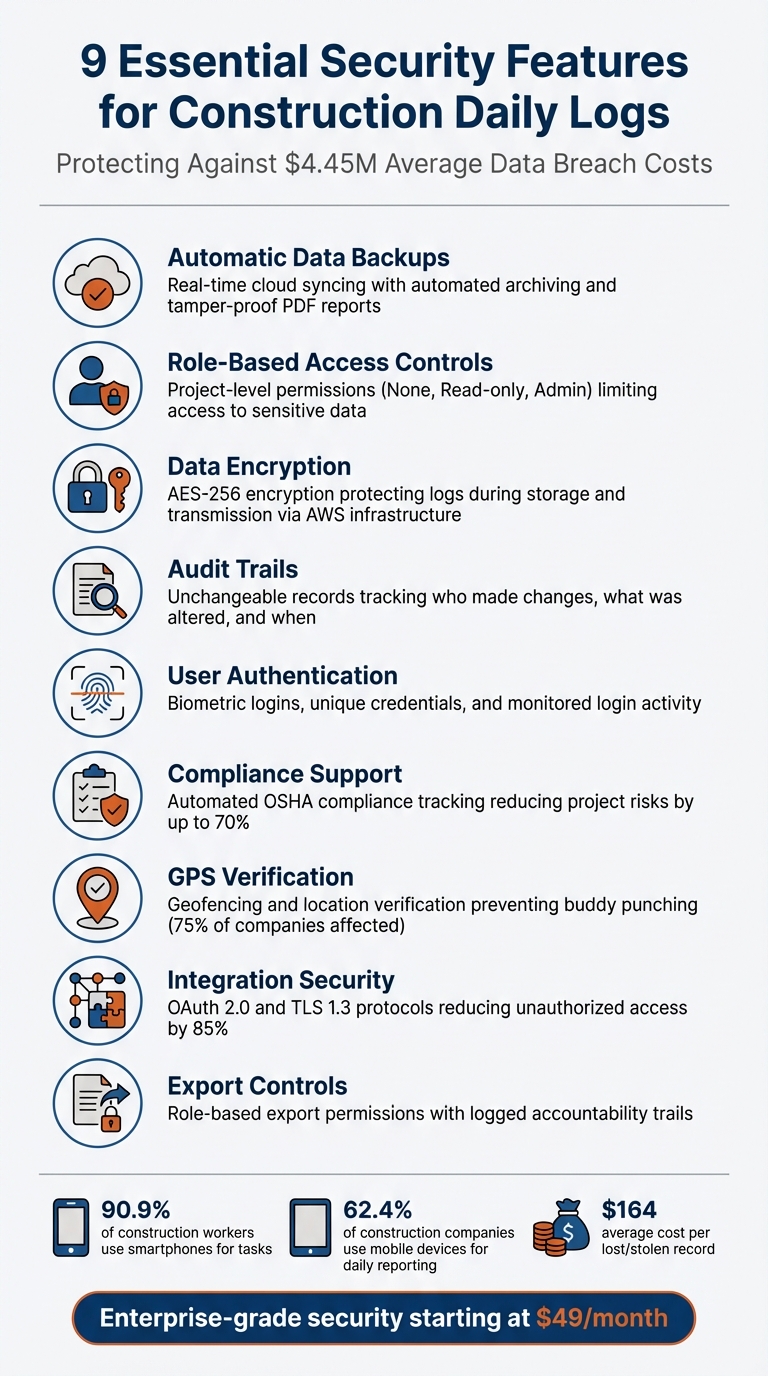
Here’s how modern tools safeguard your data:
- Automatic Backups: Cloud systems ensure your logs are always saved and accessible.
- Role-Based Access Controls: Limit who can view or edit sensitive information.
- Data Encryption: Protects your logs during storage and transmission.
- Audit Trails: Tracks every change for transparency and legal compliance.
- User Authentication: Biometric logins and GPS verification enhance security.
- Compliance Support: Helps meet OSHA and other regulations.
- Integration Security: Protects data when syncing with tools like QuickBooks.
- Mobile Security: Ensures smartphones used on-site are secure.
- Export Controls: Restricts data sharing to authorized personnel.
These features reduce risks, prevent tampering, and ensure your records hold up in audits or disputes. Tools like Contractor Foreman provide these protections starting at $49/month, making security accessible for all teams.
1. Automatic Data Backups and Archiving
Losing a daily log can mean losing key evidence that might protect you during disputes or audits.
Relying on manual records opens the door to physical damage, mechanical issues, or human error. Considering that 60% of project managers juggle between two and five projects at a time[2], the chances of misplaced or incomplete records grow exponentially. This is where cloud-based solutions step in, automatically safeguarding your data.
Data Protection Features
Cloud-based systems, with real-time syncing, effectively remove these risks.
For instance, when a foreman enters data using a smartphone – which 90.9% of workers rely on[2] – the information is instantly uploaded to secure cloud storage. Even if devices are lost or damaged, the records remain intact and accessible from anywhere. This level of redundancy is crucial, especially when the average global cost of a data breach hit $4.45 million in 2023[1].
These systems also create automated archives, converting logs into tamper-proof, timestamped PDF reports. This feature ensures a reliable audit trail for warranty issues and legal challenges. As one satisfied user shared:
“This software… offers so much in the way of construction management that it is almost unbelievable.” – Lindsey-Leigh M., JWH Construction Services, Inc[2]
Platforms like Contractor Foreman take it a step further, offering features like weather tracking. With access to data from over 15,000 global weather stations, they help document project delays[9].
Archived logs also serve as a treasure trove of insights for future projects. Long-term data storage allows contractors to refine bidding strategies and improve cost estimates[2]. This is especially critical since 97% of contractors report that fluctuating material costs heavily impact their operations[2]. Moreover, accurate records help reduce waste and address the $7.87 billion in workers’ compensation costs tied to construction-related injuries[2].
Shifting from physical files to secure cloud storage isn’t just about convenience – it ensures project continuity. Automated archiving keeps your records compliant with regulations and instantly accessible for audits or legal needs. It eliminates the chaos of scattered files across multiple systems[8][9]. These automated backups and archives form the backbone of secure, efficient log management.
2. Role-Based Access Controls
It’s crucial to limit team access to only the data they need. For example, a subcontractor focused on electrical systems doesn’t need to see profit margins, and field staff shouldn’t have the ability to accidentally edit financial reports. By controlling access to sensitive information, you can protect your project data and prevent unintended changes. This approach lays the groundwork for the detailed permission structures outlined below.
Access Control Mechanisms
Role-based access controls (RBAC) determine what each team member can view or modify. Administrators can create specific roles – like Foreman, Project Manager, or Subcontractor – with varying permission levels such as “None”, “Read-only”, or “Admin.” These permissions operate at the project level, ensuring that employees can only access daily logs and documents related to their assigned job sites[12][11].
With tools like Contractor Foreman, you can restrict access to specific parts of a project. For instance, financial details, internal notes, and sensitive files can be hidden from certain users, even if they have general access to the project[3].
The client portal feature adds another layer of control by allowing selective sharing. You can share photos, files, or log details with customers while keeping internal documentation – like cost breakdowns or crew notes – private[5]. This ensures transparency with clients without compromising sensitive internal data.
User Authentication Methods
Strong authentication processes are just as important as access controls. Features like monitoring login activity help detect irregularities, while new users receive secure credentials via email. Auto-logout functions also reduce the risk of unauthorized access from unattended devices[11]. Considering that the global average cost of a data breach hit $4.45 million in 2023[1], these authentication measures are a critical layer of protection for your project data.
3. Data Encryption for Logs
Data Protection Features
Encryption transforms daily logs into coded, unreadable data, ensuring protection both while stored and during transmission [13]. Considering the global average cost of a data breach hit $4.45 million in 2023, and each lost or stolen record costs construction companies an average of $164, encryption isn’t just smart – it’s essential [1]. This process works hand-in-hand with automated backups and strict access controls to create a secure documentation system.
Construction management software integrates advanced encryption to safeguard records at every stage – whether stored or in transit. For instance, Contractor Foreman utilizes AWS‘s secure infrastructure to encrypt and protect your data [1]. Your documents are encrypted and stored securely in the cloud, protecting them from unauthorized access.[1]
Beyond protecting data during transmission, switching from paper logs to encrypted digital systems reduces risks like theft, fire damage, or accidental loss. With 90.9% of construction workers now using smartphones for their tasks [2], combining mobile-friendly encryption with automated cloud backups ensures secure access and reliable data recovery [7][1].
When choosing log software, verify that the platform employs advanced encryption and operates on trusted hosting services like AWS [1]. By combining encryption with features like automated backups and role-based access controls, you can build a secure, tamper-resistant digital log system.
4. Audit Trails and Activity Logging
Data Protection Features
Audit trails keep a detailed record of your logs, capturing who made changes, what was altered, and when it happened [1]. This unchangeable record helps maintain data integrity and provides solid evidence for resolving disputes. It’s especially important for legal protection and handling insurance claims.
Automated version control works alongside audit trails by automatically recording every change. This ensures that records remain current and cannot be tampered with [1]. Such meticulous documentation is a game-changer during regulatory audits, like those required for OSHA compliance, where every safety measure must be documented and timestamped [2][7]. These detailed logs also encourage user accountability by leaving no room for ambiguity.
Access Control Mechanisms
Activity logging takes accountability to the next level by tying every action to a specific individual.
As dispute resolution consultant Bob Frisby puts it: daily reports are “a Living, Unimpeachable Witness.”
This level of transparency not only encourages team members to take ownership of their responsibilities but also helps resolve disputes over issues like miscalculated hours or unpaid overtime. When paired with role-based permissions, audit trails allow you to track changes in your logs while ensuring that only authorized personnel can access sensitive data, whether it’s financial or personal [1][3].
Adding digital sign-offs further strengthens this system by verifying the identity of the person submitting daily reports. This extra layer of verification helps protect against fraudulent entries [8]. Together with encryption and role-based access controls, audit trails form a secure, reliable chain of custody for your records.
5. User Authentication Methods
User authentication plays a vital role in maintaining log integrity, complementing encryption and role-based controls.
User Authentication Methods
A strong authentication system begins with unique user credentials. This approach ensures a clear audit trail whenever sensitive project or financial data is accessed.
With the widespread use of smartphones, biometric authentication methods – like fingerprint scanning or facial recognition – offer a reliable way to block unauthorized access[2]. Additionally, modern systems monitor login activity to detect unusual patterns, such as access attempts from unexpected locations. These systems can immediately disable accounts when employees leave, closing potential security loopholes[10].
Access Control Mechanisms
Advanced authentication methods do more than secure access – they also strengthen the tamper-proof systems already in place.
By linking user authentication to project-specific access, sensitive data is better protected[10]. Digital sign-offs serve as an additional layer of verification during report submissions, confirming the identity of the user. When paired with GPS verification (discussed in section 7), these measures ensure that the person logging in is not only authorized but also physically present at the job site.
For example, Contractor Foreman employs digital sign-offs and GPS verification to ensure that only on-site, authorized personnel can make entries[1].
6. Compliance and Permission Settings
Compliance settings play a crucial role in making daily logs legally defensible. They ensure that records align with OSHA and other regulatory requirements while safeguarding sensitive information.
Data Protection Features
Automated compliance tracking simplifies oversight by monitoring log submissions in real time. These systems track completion status and send alerts for unsubmitted logs, ensuring documentation is thorough and accurate[9]. For instance, encrypted cloud storage securely stores compliance records for every check-in, including health questions and certifications, which can be accessed for remote safety monitoring[18].
Contractor Foreman enhances regulatory compliance by providing detailed safety reports. These reports document hazards, incidents, and other safety-related matters, creating audit-ready records that offer legal protection.
While automation strengthens compliance, controlling access to these records is just as important.
Access Control Mechanisms
Role-based permissions allow only authorized personnel to review or modify critical compliance entries. For example, administrators can restrict subcontractors to viewing or editing only their own entries while maintaining overall oversight[9]. This level of control minimizes the risk of internal data breaches and keeps sensitive compliance data secure.
Research shows that effective daily reporting, paired with strong compliance settings, can reduce project risks by up to 70% by improving documentation control[17]. Centralized, permission-controlled logs also eliminate issues like lost paper forms and create reliable audit trails.
Integration Security
In addition to role-based restrictions, integration security ensures compliance when sharing data externally. Secure API connections enable safe data sharing with third-party tools like QuickBooks or Zapier.
Contractor Foreman’s integrations ensure that shared daily log data adheres to permission settings, preventing unauthorized access while meeting regulatory requirements. These secure connections allow smooth data synchronization without exposing entire datasets to external systems[15].
7. GPS and Location Verification
GPS and location verification ensure that workers are physically present on-site when submitting logs. This eliminates common forms of time theft and provides clear, undeniable proof of on-site activity.
Data Protection Features
Geofencing establishes a virtual boundary around project sites, ensuring employees can only clock in or submit logs when they are within the designated area [10]. Why does this matter? Over 75% of companies lose money due to “buddy punching“, where employees clock in for absent coworkers [19].
This practice costs businesses about 2.2% of their gross payroll, with employees stealing an average of 4.5 hours per week through fraudulent clock-ins [19]. Geofencing directly addresses this issue, offering a practical way to regain control over payroll accuracy.
GPS-verified logs take things a step further by recording the exact date, time, and location of each entry. This creates what construction professionals often refer to as a “project memory” [19][6]. These detailed records, complete with timestamps and locations, are securely stored for legal and compliance purposes [7].
User Authentication Methods
Combining GPS verification with QR code scanning ensures both the worker’s identity and physical presence during check-ins [19][7].
For example, Contractor Foreman uses GPS-enabled timecards and geofencing to require workers to be physically present before logging hours. Administrators can define specific geofence perimeters for each project, making it impossible to generate timecards or daily logs outside the designated area [10]. With 62.4% of construction companies now relying on mobile devices for field reporting [6], mobile-based verification not only strengthens log security but also reduces the workload for administrative teams.
Integration Security
GPS-verified data integrates seamlessly with third-party tools like QuickBooks, eliminating manual data entry errors and reducing the risk of payroll tampering [19]. By linking verified location data directly to project budgets, the software can flag potential labor overages before they happen [19]. Secure API connections further enhance this process, ensuring that shared daily log data complies with permission settings and maintains data integrity across all systems. This interconnected approach creates a secure and tamper-resistant ecosystem for managing daily logs.
8. Integration Security with Third-Party Tools
Building on established security measures, Contractor Foreman goes a step further by securing data exchanges with third-party tools through integration-specific protocols.
Integration Security
When syncing daily logs with tools like QuickBooks or Zapier, Contractor Foreman relies on secure protocols such as OAuth 2.0, HTTPS/TLS 1.3, certificate pinning, and mutual TLS. These measures safeguard login credentials and prevent man-in-the-middle attacks. For instance, OAuth significantly reduces unauthorized access incidents – by as much as 85% in cloud integrations [16][17].
This level of security is essential, especially when considering that the global average cost of a data breach climbed to $4.45 million in 2023, with construction companies facing an average loss of $164 per compromised record [1]. Additionally, automated API scans proactively identify vulnerabilities, protecting data integrity throughout integrations. These protocols work alongside existing security measures, creating a seamless and secure experience.
Data Protection Features
Contractor Foreman employs AES-256 encryption to safeguard labor costs and project financials during QuickBooks integrations [16]. This encryption secures data both in transit and at rest on servers hosted by AWS – the same infrastructure trusted by Amazon.com [1]. To further reduce risks, automated data masking hides sensitive financial information during transfers, cutting breach risks by up to 70% [17]. Secure API keys with token-based authentication ensure only verified systems can access daily log data. As Chuck A. from Liercke Construction, LLC highlights:
“The integration of the whole platform is very good, including externally with QuickBooks Online. Ability to do time sheets in the field without separate software” [3].
Access Control Mechanisms
Granular, role-based permissions are reviewed every 30 days to ensure third-party tools only access the data they need [15][17]. For example, an administrator can grant a scheduling app read-only access to task progress while allowing payroll systems write access for timecard data. These permission settings also let users control who can export data or share logs externally [11]. Even as the platform syncs data across more than 50 systems, it maintains strict boundaries to protect sensitive information, such as “Internal Notes”, during automated processes.
User Authentication Methods
Multi-factor authentication (MFA) ensures secure identity verification through SMS, authenticator apps, or biometrics, reducing integration-related breaches by 60% [15][17]. Single sign-on (SSO) simplifies secure access to multiple tools for field teams, while just-in-time access tokens minimize exposure by expiring immediately after use. The platform also enables secure external links, allowing collaborators to respond without creating separate accounts [5]. By combining secure integration protocols with robust authentication methods, Contractor Foreman ensures consistent protection across every connected platform.
9. Mobile Device Security Features
Securing mobile devices has become a non-negotiable in today’s fast-paced reporting environment. With 62.4% of construction companies using mobile devices for daily reporting [6], ensuring their security is just as important as protecting desktop and cloud systems. Why? Because even a single lost or stolen record can cost an average of $164 [1]. Mobile solutions now replicate the same high-level security protocols found on other platforms, creating a consistent and secure experience across devices.
Data Protection Features
Contractor Foreman employs AWS-driven encryption to safeguard mobile daily logs. This encryption works both during data transit and while it’s stored. Plus, the platform’s real-time cloud sync and automated backups ensure all records are tamper-proof and timestamped [1][5]. Even when working offline, the app encrypts logs automatically once the connection is restored, keeping your data secure no matter the circumstances [20].
Access Control Mechanisms
The mobile app gives administrators direct control over permissions from anywhere. With just a smartphone, managers can fine-tune role-based access, deciding who can view or edit sensitive data [1][5]. For example, they can limit financial data visibility to specific team members or restrict editing rights for certain daily log entries – all without needing to return to a desktop.
User Authentication Methods
Every mobile user has unique credentials, providing a clear accountability trail for any changes made on the app [13]. This is especially important as 90.9% of construction workers now rely on smartphones for their tasks [2]. Beyond basic authentication, the platform allows admins to manage access to features like the camera and GPS. This ensures that photos and location data are securely linked to the correct project module [13]. Together, these mobile-specific security measures strengthen the overall protection of project documentation, maintaining a secure and reliable digital chain of custody for your records.
10. Export and Sharing Controls
When it comes to safeguarding your logs, controlling how data is exported and shared is a critical layer of protection. Even with strong device and integration security, unrestricted exports can pose serious risks. A single unauthorized export could expose sensitive information, and with data breaches averaging $4.45 million in costs during 2023 [1], construction firms must have precise controls to manage how log data leaves their systems.
Access Control Mechanisms
Contractor Foreman employs role-based access controls to ensure only the right people can export daily logs. For example, administrators can assign “Read Only” access to field workers, while reserving export permissions for project managers or financial officers. This setup prevents unauthorized access to sensitive details like financial data or internal notes [10]. Moreover, every export action is meticulously logged, capturing details such as the user’s identity, the data exported, and the time of the action [1].
Data Protection Features
To protect exported data, the platform uses AES-256-GCM encryption and secure storage protocols [22][1]. It also allows for scheduled, automated exports to secure external locations, reducing the chances of human error. Additionally, tamper-evident logs track any modifications made to exported data, ensuring the integrity of the information [21].
User Authentication Methods
Every export requires users to authenticate with their unique credentials, creating a clear accountability trail. This process ensures that only authorized individuals can access specific project data. Permissions are verified for each project and data type before an export is approved. For integrations with third-party tools, API keys are tightly managed with limited lifetimes to reduce potential exposure [22][1].
Conclusion
The features outlined above work together to create a secure environment for managing your daily logs.
Protecting daily logs is critical for the success of your construction operations. Data breaches can result in significant financial losses, with each compromised record adding hundreds of dollars in costs. That’s why robust security measures are a must.
Tools like role-based access controls, encryption, audit trails, and GPS verification provide multiple layers of defense, ensuring that sensitive project data is only accessible to authorized individuals. Each of these features addresses specific vulnerabilities – whether it’s blocking unauthorized exports, verifying field entries from actual sites, or keeping a clear record of changes. This layered approach ensures that even if one safeguard falters, others remain in place to protect your data.
Contractor Foreman have implemented appropriate and reasonable technical and organizational security measures designed to protect the security of any personal information we process. You can see the details in our Privacy Policy.
These security measures aren’t just theoretical – they have real, practical benefits for daily operations. They help ensure your logs hold up as reliable evidence in legal disputes [2] and keep you aligned with industry regulations.
Contractor Foreman backs this up with 95% 5-star rated customer support [4]. Starting at just $49 per month [3], the platform delivers enterprise-grade security without the steep learning curve of traditional systems. With 90.9% of construction workers now relying on smartphones for their tasks [2], safeguarding your digital logs is as crucial as securing the job site trailer at the end of the day.
FAQs
What makes a daily log “tamper-proof”?
A daily log is deemed tamper-proof when it adheres to FMCSA standards, incorporates advanced telematics, and blocks unauthorized changes. This guarantees secure, dependable, and auditable compliance data for precise record-keeping.
How do role-based permissions work for subs and clients?
Role-based permissions in Contractor Foreman allow you to manage what subcontractors and clients can access by assigning them login accounts and specifying which projects they can view. By default, the “Viewable Projects” setting is set to “All”, but you can switch it to “Some” to restrict access to specific projects. This setup ensures tailored and secure access based on each user’s role.
What security should I verify before syncing logs to QuickBooks?
To prevent errors during integration, make sure your system is set up correctly. Double-check that data mapping is accurate and that there are no duplicate entries before syncing logs with QuickBooks. This approach helps keep your data accurate and ensures the integration process runs smoothly.







