
- What are Change Orders?
- Why do they matter?
- Key steps to manage change orders:
- Why Change Orders Happen
- Define Change Order Procedures in Your Contract
- Document Every Change Order
- Communicate Clearly With Homeowners
- Use Contractor Foreman to Manage Change Orders
- Create a Standard Approval Process
- Monitor Budget and Schedule Changes
- Conclusion
- FAQs
- Related Blog Posts
“Just move the door a little,” said the homeowner. “Of course”, you said. Anything to make the client happy.
Six weeks later: “Wait, so you rerouted the electrical, too?! And WHAT?! $14,000?! I never agreed to any of this!”
Well…they did. You just can’t prove it.
Change orders are tricky that way.
Every scope change — whether the client asked for it or the job just threw it at you — needs to be documented, priced, and signed off by both parties before anyone touches anything. The nitty-gritty details matter- from materials, labor, timeline adjustments. Everyone needs to be on the same page, in writing.
Even contractors who stay on top of it drop the ball sometimes. Miss a detail here, forget to follow up there, and suddenly you’re eating a cost or losing a client over a misunderstanding that a single document would have prevented.
That’s where Contractor Foreman comes in. It simplified change order management so you your business (and your relationships) remain intact.
What are Change Orders?
A change order is a formal amendment to the original construction contract, addressing changes in scope, cost, or timeline. They often arise from homeowner requests or unforeseen issues like hidden structural damage.
Why do they matter?
Poorly managed change orders can lead to scope creep, unpaid work, and disputes. Research shows they can increase project costs by 10–15% and reduce productivity by 30%.
Key steps to manage change orders:
- Set clear contract terms: Define how changes will be handled before construction begins. Include written approval requirements and pricing methods.
- Document everything: Every change must be detailed, including costs, materials, labor, and timeline impacts. Use photos and clear descriptions.
- Communicate clearly: Explain changes, their costs, and timeline impacts immediately. Use straightforward language and visual evidence.
- Use digital tools: Platforms like Contractor Foreman streamline documentation, approvals, and financial tracking, reducing delays and disputes.
- Prepare homeowners: Encourage a 10–20% contingency budget for unexpected changes and walk them through the process early.
Why Change Orders Happen
Change orders are a common part of construction projects, and understanding their causes can help contractors stay ahead of potential challenges. Broadly, these changes fall into two categories: voluntary changes (initiated by homeowners) and involuntary changes (arising from unforeseen issues or mandatory adjustments). Knowing this distinction is key to managing expectations and planning effectively.
Voluntary changes typically happen when homeowners decide to upgrade or enhance the project midstream. For instance, they might opt to replace laminate countertops with granite or decide to add features like recessed lighting or relocate a vanity. These decisions often stem from homeowners realizing the opportunity to improve the space beyond the original design.
Involuntary changes, on the other hand, occur when unexpected problems surface during construction. Examples include discovering water damage, rotted framing, outdated wiring, or plumbing issues hidden behind walls or underground. One real-world example from 2018 involved a contractor working on an ADU garage conversion who found a cracked main water line. The repair cost $3,000, which exceeded the homeowner’s additional budget of $1,800. By negotiating a solution where the homeowner provided labor, the project saved $1,200 and stayed on track financially.
Other factors that can trigger change orders include blueprint errors, omissions, structural constraints, fluctuating material prices, supply chain delays, subcontractor availability, and permitting challenges.
A common issue is that clients often budget for a standard renovation but expect results more akin to a remodel, leading to inevitable mid-project adjustments. Structural remodeling projects, in particular, are more likely to uncover hidden issues compared to surface-level renovations. To handle these surprises, contractors often recommend setting aside a contingency buffer of 10–20% of the base project estimate. This helps homeowners prepare for unexpected changes without undue financial strain.
sbb-itb-5eea312
Define Change Order Procedures in Your Contract
The best way to avoid change order disputes? Get ahead of them before construction starts. Many conflicts arise because the initial contract didn’t clearly define how changes would be handled. By setting clear expectations in the contract, you can reduce misunderstandings and unexpected costs.
When there’s no formal process, changes often lead to drawn-out disputes. Globally, construction disputes averaged $30.7 million in 2020, with resolution taking about 15 months on average.
“Change order disputes can profoundly impact a project, especially if you stop work while the parties dispute the change order. If they are not resolved in a timely manner, change order disputes often cascade into project delays and additional costs for both parties.” – Colin McCarthy, Principal, Lanak & Hanna
Here’s how to include specific provisions in your contract to handle change orders and protect everyone involved.
Add Change Order Clauses to Contracts
Your contract should spell out exactly how change orders will be handled. For starters, require written approval before any additional work begins. This ensures verbal agreements don’t turn into messy payment disputes later.
Be clear about pricing. Whether you use unit rates or time-and-materials, homeowners should understand costs and timeline changes upfront. This also shields you from penalties if the project schedule runs longer due to changes.
Make sure the contract specifies how changes will be documented. Every change order should detail what’s different from the original plan, including materials, labor, and design updates. To make it legally binding, tie each change order back to the original contract as an amendment.
“Requiring written change orders protects both contractors and owners from future disputes. Contractual provisions that require any change orders to be in writing are enforceable. Therefore, it’s a best practice for a contractor to include such provisions in their original contract.” – Robert Burford, Founding Partner, Burford Perry
Explain the Process to Homeowners
Having solid contract clauses is one thing, but homeowners also need to understand how the process works.
Walk them through the change order process early on. Start by clarifying the difference between renovating (cosmetic updates like paint or fixtures) and remodeling (structural work involving walls, plumbing, or electrical). Remodeling often reveals hidden problems that may require change orders.
Show them a sample change order so they can see what details are included. This makes the process less intimidating and shows that change orders are about transparency – not surprise charges.
Also, explain your stop work rule: if a change is requested, work in that area will pause until the change order is signed. This prevents confusion and ensures everyone is on the same page about scope and cost before moving forward. In states like California and New York, this isn’t just a good practice – it’s legally required. Verbal approvals for changes don’t hold up, and written change orders are a condition of contractor licensure.
“In order to avoid surprises and disputes, both owners and contractors should strive to communicate regularly and document all changes in writing, including how a change will affect the contract price and time for completion.” – Kevin Bonner, Litigation and Construction Specialist, Fennemore
Lastly, encourage homeowners to set aside a 15–20% contingency buffer based on the initial project estimate. By highlighting possible “unknowns” upfront – like old wiring or structural issues – you can help them be financially ready if a change order is needed.
Document Every Change Order
Once you’ve explained the change order process to homeowners, the next step is ensuring that every single modification is documented – no exceptions. Skipping this step invites misunderstandings, potential disputes, and a breakdown of trust between parties.
One major risk here is scope creep. When changes aren’t documented, unbilled labor and materials can quietly eat into your profits. Beyond financial losses, undocumented changes often lead to billing disagreements, further straining the client-contractor relationship.
Proper documentation also ensures your field crews and subcontractors are on the same page about the revised scope of work. This clarity reduces installation mistakes and prevents expensive rework. A signed change order isn’t just a formality – it’s a legally binding document that serves as a critical tool for resolving disputes.
By documenting every change, you create a clear, reliable record that guides the project and protects both parties.
Write Detailed Descriptions
Vague terms like “extra work in the kitchen” won’t cut it. A proper change order must clearly outline exactly what’s being altered compared to the original plan. Include specifics such as material details (brand names, model numbers, finishes), labor requirements (hours needed, specific trades involved), and any design updates (new drawings or specs).
Make sure to account for all impacts, including labor hours, subcontractor adjustments, overhead, markup, and any changes to the project timeline. On larger projects, change orders can represent 10% to 15% of the total contract value, and frequent changes can reduce productivity by 10% to 30%. Documenting timeline adjustments is especially important to shield yourself from penalties tied to late project completion when delays stem from client-requested changes.
Whenever possible, document changes immediately while onsite. Use your phone to snap photos, jot down notes with location details, and record measurements. This creates an objective record that helps avoid “he said, she said” conflicts later. For urgent safety or code-related changes, document the issue as soon as possible and notify the client, even if formal paperwork follows later.
Once you’ve written a detailed description, the next step is securing the homeowner’s formal approval.
Get Written Approval
Here’s the golden rule: Don’t start additional work without a signed change order. Verbal agreements or handshake deals leave you vulnerable to liability and non-payment risks. Even if a homeowner says, “Go ahead, we’ll sign later,” pause and get their signature first.
“Requiring written change orders protects both contractors and owners from future disputes. Contractual provisions that require any change orders to be in writing are enforceable.” – Robert Burford, Founding Partner, Burford Perry
Use a standardized template that includes the updated project scope, costs, timeline, and required signatures. Digital signatures are just as valid as physical ones and can often speed up the process. The key is creating a legally binding amendment to the original contract. When invoicing, list change orders as separate line items to keep everything transparent and minimize the chance of client objections.
Communicate Clearly With Homeowners
Clear communication goes hand in hand with thorough documentation in the change order process. While documentation lays out the facts, clear explanations build trust with homeowners. Did you know that around 35% of construction projects face major changes impacting the original scope or timeline? How you deliver this news can be just as important as the paperwork itself.
Stick to the facts and avoid emotional language. Use project records, photos, and measurements to explain the changes and how they will affect the homeowner’s budget and timeline. When clients understand the “why” behind a change, they’re far more likely to agree without conflict. Combining solid documentation with honest, straightforward communication strengthens your relationship with the homeowner.
Explain Cost and Timeline Changes
Start by differentiating between two types of changes: voluntary and involuntary. Voluntary changes are upgrades or modifications requested by the homeowner, while involuntary changes are necessary repairs or updates, such as addressing code compliance issues or dealing with hidden problems like water damage or outdated wiring.
Break down costs into clear, itemized components. Show how each change impacts the budget, including labor hours, material substitutions, subcontractor changes, and markups, all listed as separate line items. It’s also helpful to explain how even a small change can create a “ripple effect”, potentially delaying schedules or altering material delivery timelines.
Don’t delay delivering bad news. If unforeseen costs arise, share them immediately – waiting until the final bill can lead to sticker shock and damage trust. Use visual proof, such as photos or videos, to explain the issue and the necessary adjustments. Whenever possible, aim to provide pricing for change orders within hours of the homeowner’s request.
If budget constraints are a concern, offer alternative solutions. Suggest options that balance quality with cost, ensuring the project stays on track without compromising its integrity.
| Change Order Type | Description | Example |
|---|---|---|
| Voluntary | Changes requested by the homeowner and not essential to the project. | Adding a kitchen island after seeing the open space. |
| Involuntary | Necessary updates for safety or legal compliance. | Upgrading an electrical panel to meet building codes. |
| Hidden/Unseen | Problems discovered after work begins. | Finding mold, asbestos, or structural damage behind walls. |
Handle Disagreements Professionally
Even with clear communication and documentation, disagreements can happen. When they do, listening to the homeowner’s concerns is key. If a client requests a change that doesn’t align with the design or budget, ask them why they want it before sharing your professional opinion. The goal is to make them feel heard and understood.
Interior designer Jade McNeil highlights this approach:
“Typically, clients’ changes are valid and anything they bring to the table is seriously considered. We want our clients to feel heard and understood.”
To avoid miscommunication, consider adopting a “hard gate” policy, pausing work until a written change order is signed. This ensures both parties are on the same page and prevents unexpected costs from piling up. If a homeowner becomes indecisive or frequently requests changes, schedule a formal meeting to address the underlying issues.
Using standardized pricing logic – like predefined unit rates or consistent markups – can also help. When pricing feels systematic and fair, homeowners are more likely to accept it. In fact, contractors using construction management software for small businesses report that change orders are approved 33% faster. Relying on structured systems rather than personal negotiation can make the process smoother for everyone involved.
Use Contractor Foreman to Manage Change Orders
Handling change orders can be a logistical nightmare when done manually – think endless email threads, misplaced text messages, and stacks of paper forms. That’s where Contractor Foreman steps in, offering a centralized platform that simplifies and organizes the entire process. From initial documentation to final billing, everything happens in one place, making life easier for contractors and reducing project delays.
In the U.S., 48% of all rework on construction projects stems from poor communication and inadequate data, costing the industry a staggering $31.3 billion annually. With change orders often accounting for 10% to 15% of a project’s total contract value, a reliable system is essential to prevent costly project budgeting mistakes like undocumented changes or scope creep. Contractor Foreman solves these challenges by creating a digital paper trail, protecting both contractors and homeowners while keeping projects on track.
The platform starts at just $49 per month, with a 30-day free trial and a 100-day money-back guarantee. With a 4.5/5 star rating and 95% 5-star rated support chats, it’s clear why contractors are switching to this software. Let’s take a closer look at how its features can revolutionize your change order process.
Track Change Orders in One Place
Say goodbye to the chaos of scattered records. Contractor Foreman keeps all change orders in a single, searchable database. You can easily create, send, and track changes without worrying about lost emails or forgotten conversations. Each change order is linked directly to the relevant contract, schedule, and financials, giving you a complete picture at all times.
One standout feature is the real-time cost database, which helps you price changes based on up-to-date material and labor costs instead of rough estimates. This ensures accurate pricing, protects your profit margins, and avoids awkward pricing disputes with homeowners. For example, a mid-sized construction firm using Contractor Foreman reduced their average processing time for change orders from two weeks to just three days. This not only sped up project timelines but also boosted client satisfaction.
The platform also offers Kanban views and custom filters to help you visualize the status of change orders across multiple projects. This way, you can prioritize urgent requests while keeping track of pending approvals. Additionally, it serves as a central repository for all project documents, including schedules, drawings, and archived team conversations tied to specific changes.
Automate Communication and Approvals
Contractor Foreman doesn’t just organize change orders – it speeds up the entire process. Homeowners can review and approve changes instantly using their phone or tablet, thanks to the platform’s digital approval workflow. This feature includes security measures like IP tracking and timestamps, which create a legal audit trail to safeguard both parties.
Once a change is approved, the software automatically updates contract amounts and project statuses, seamlessly integrating the changes into your invoicing system. This eliminates “revenue leakage”, where contractors forget to bill for additional work, ensuring you get paid for every job.
The platform also uses a controlled team chat feature to keep everyone in the loop. Real-time notifications inform stakeholders the moment a change request is submitted. No more waiting on email replies or playing phone tag. One urban development company using Contractor Foreman reported a 25% reduction in budget overruns, thanks to its automated job costing and real-time financial tracking features.
“Requiring written change orders protects both contractors and owners from future disputes.” – Robert Burford, Founding Partner, Burford Perry
With Contractor Foreman, the protection Robert Burford highlights becomes automatic. What used to be a tedious, paper-heavy process now takes just minutes, streamlining your workflow and keeping projects on schedule.
Create a Standard Approval Process
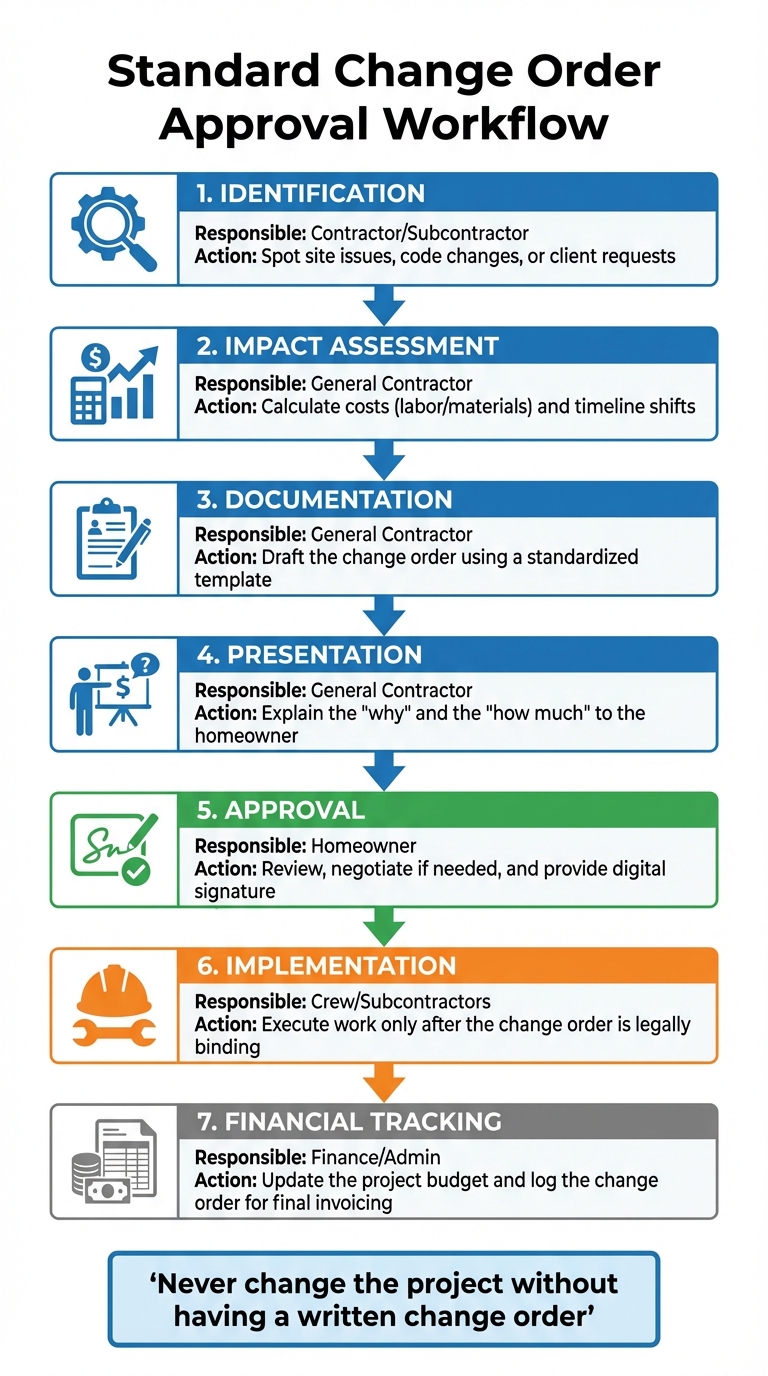
7-Step Change Order Approval Workflow for Construction Contractors
A clear workflow eliminates confusion. Without one, deadlines slip, misunderstandings arise, and disagreements over who approved what can derail a project. A standardized approval process ensures everyone follows the same steps for every change.
Considering that 35% or more of construction projects face major changes, having a reliable system is essential. Consistency in handling change orders not only ensures predictability but also builds trust among all parties involved.
A clear process doesn’t damage client relationships – it strengthens them.
Whether it’s a $500 fixture upgrade or a $15,000 structural change, every change order should follow the same steps. This approach aligns with earlier strategies and simplifies change order management throughout the project.
Define Each Step of the Workflow
An effective approval workflow has seven key stages, and skipping any of them can lead to higher costs. The process begins with identifying and capturing the change immediately – whether it’s a homeowner’s request or an unexpected site issue like rotted joists. Document the change before moving forward, even if it seems minor.
Next, quantify the full impact. Assess how the change affects labor, materials, subcontractors, permits, and your markup. It’s not just about the cost of the materials; you also need to account for additional labor or schedule disruptions.
Then, draft formal documentation using a standard template. This should detail the change, explain why it’s necessary, and outline how it affects the overall cost and timeline. Afterward, review and negotiate the change with the homeowner, either in person or via video call, to avoid surprises later.
Obtain written approval before starting any work. A signed change order – whether digital or physical – makes the agreement legally binding. Never proceed without it.
Once approved, update project master files by syncing the new change with your schedule, budget, and internal work orders. This ensures everyone on your team is aligned. Finally, log and track all modifications in a centralized change order log to monitor how changes affect profitability and deadlines.
| Workflow Step | Responsible Party | Key Action |
|---|---|---|
| 1. Identification | Contractor / Subcontractor | Spot site issues, code changes, or client requests. |
| 2. Impact Assessment | General Contractor | Calculate costs (labor/materials) and timeline shifts. |
| 3. Documentation | General Contractor | Draft the change order using a standardized template. |
| 4. Presentation | General Contractor | Explain the “why” and the “how much” to the homeowner. |
| 5. Approval | Homeowner | Review, negotiate if needed, and provide digital signature. |
| 6. Implementation | Crew / Subcontractors | Execute work only after the change order is legally binding. |
| 7. Financial Tracking | Finance / Admin | Update the project budget and log the change order for final invoicing. |
Avoid moving forward without a signed change order – even for seemingly small adjustments, as they can add up to unpaid labor and wasted time. Communicate unforeseen costs as they arise instead of waiting for the final invoice.
Use Templates for Consistency
Once you’ve established a clear process, templates help ensure that every change order follows the same structure. They act as a safeguard against forgotten details and disputes over payments. A good template includes five essential elements: a detailed description of the change, its cost impact, its effect on the timeline, signatures from both parties, and a reference to the original contract. Missing any of these can lead to legal headaches.
Templates replace verbal agreements with clear, written terms. They also serve as a checklist, helping you account for things like overhead, insurance adjustments, or permit fees. This professional approach reassures homeowners that your operation is organized and transparent.
Digital templates make approvals faster, allowing homeowners to sign electronically. For example, if material costs have risen since the original contract, your template can automatically adjust pricing to reflect the change.
Always include a “Reason for Change” field in your templates. Clearly stating whether the change is due to unforeseen conditions or a client request helps justify costs. Set up your template system to notify stakeholders – subcontractors, project managers, and owners – immediately after a change is approved.
| Template Component | Purpose | Impact on Accuracy/Efficiency |
|---|---|---|
| Detailed Description | Defines exactly what is being added or removed. | Prevents scope creep and confusion. |
| Cost Breakdown | Lists materials, labor, and markups. | Ensures all hidden costs are captured and billed. |
| Timeline Adjustment | Specifies the new completion date or added days. | Protects against penalties for late completion. |
| Digital Signature Line | Provides a legally binding agreement. | Speeds up approval and allows work to restart faster. |
| Original Contract Ref | Ties the change to the master agreement. | Ensures legal enforceability of the new terms. |
Templates also safeguard you legally. By linking every change order to the original contract, you protect yourself from payment disputes. This is especially important for large projects, where change orders typically account for 10% to 15% of the total contract value. Proper documentation ensures you’re covered for every dollar.
Monitor Budget and Schedule Changes
Once you’ve established a standardized approval process, it’s crucial to monitor how changes impact both your project’s costs and timeline. Data shows that unmanaged change orders can eat into profits by adding unforeseen labor and material expenses, often without securing corresponding payments. Even small adjustments can ripple through the project, affecting labor, materials, and task dependencies across the entire schedule.
In 2018, the construction industry spent over $177 billion dealing with mistakes and contract disputes caused by changes or delays. Real-time monitoring helps avoid these costly setbacks by ensuring your job cost reports always reflect the current scope of work. This eliminates unpleasant surprises when the final invoice arrives.
Tracking changes isn’t just about protecting your bottom line – it’s also about maintaining transparency with homeowners. By clearly documenting how each change impacts costs and timelines, you help clients understand what’s happening and why.
Update Budgets in Real-Time
Digital tools make it easy to keep budgets and timelines accurate and up-to-date. These tools link approved change orders directly to your master budget, automatically updating line items and totals.
Accurate tracking means evaluating the full impact of each change, including labor, materials, and overhead. For instance, one urban development firm used automated job costing to maintain real-time financial updates, cutting their budget overruns by 25%. Separating budget groups for each change ensures precise accounting and provides a clear view of how costs shift over time.
Contractor Foreman simplifies this process by syncing approved change orders with your master budget. It instantly updates project totals, markups, and job cost reports, reducing the chances of hidden costs or delayed invoicing that might lead to payment disputes. Additionally, the platform offers homeowners clear, itemized breakdowns of costs and schedule adjustments, supported by digital signatures with IP addresses and timestamps for a verifiable “paper trail”.
To avoid financial strain, encourage homeowners to set aside a contingency buffer of 15–20% of the base project estimate.
| Change Order Impact Area | Manual Management Risks | Digital Management Benefits |
|---|---|---|
| Budgeting | Missed hidden costs; delayed invoicing; payment disputes | Real-time pricing; automatic budget updates; seamless invoicing |
| Scheduling | Task oversights; missed deadlines; crew downtime | Kanban views for task tracking; instant schedule adjustments |
| Communication | Vague verbal agreements; lost email threads | Centralized team chat; digital paper trail; instant client sign-off |
Efficient schedule management is just as important as budget tracking to keep projects on track.
Adjust Project Schedules
Every change order should clearly state the “Extension of Time” or the exact number of days added to the schedule. This protects you from late completion penalties and helps homeowners adjust their plans accordingly. Once approved, update your schedule immediately to reflect its impact on subsequent tasks.
Changes often have a domino effect. For instance, moving a wall could require rescheduling electrical, plumbing, and flooring work. A mid-sized construction firm reduced its average change order processing time from two weeks to just three days by using digital tools, which sped up timelines and improved client satisfaction. This efficiency came from instantly updating task dependencies and notifying all stakeholders – subcontractors, project managers, and vendors – of the revised scope.
In a case study of a residential construction project, Contractor Foreman software reduced the project timeline from 12 months to 10.2 months (a 15% decrease). By streamlining digital approvals and managing budgets and schedules in real-time, the software avoided the typical 17% extension (to 14 months) caused by manual processes.
Contractor Foreman’s Kanban views and Gantt charts allow you to manage workflows in real-time. For example, if a framing completion date shifts by five days, the system automatically adjusts dependent tasks like insulation, drywall, and trim work. This prevents scheduling conflicts and ensures everyone – from your crew to subcontractors – works with the latest information, reducing the risk of errors. Keeping homeowners informed about timeline changes also strengthens trust.
Maintain a centralized change order log to track pending, accepted, and rejected changes. This log becomes your go-to resource during project meetings, showing how the project has evolved from its original scope. It can also help you identify recurring issues, like a supplier consistently delivering late materials or a design that generates excessive change requests.
Conclusion
Defining clear procedures, meticulous documentation, and open communication are key to safeguarding your profits and maintaining strong relationships with homeowners. A firm “No Writing, No Work” policy ensures no changes are executed without a signed change order from both parties. This step can prevent costly disputes, rework, and delays.
Set the tone early by discussing your change order process during the hiring phase and including a detailed policy in your contract. When changes come up, document every detail – explain the rationale, outline costs, and specify how the timeline will be affected. This level of transparency fosters trust. Kevin Bonner, Litigation and Construction Specialist at Fennemore, emphasizes:
“In order to avoid surprises and disputes, both owners and contractors should strive to communicate regularly and document all changes in writing, including how a change will affect the contract price and time for completion”.
Digital tools can make this process even smoother. Platforms like Contractor Foreman simplify change order management by consolidating documentation, automating approvals, and updating budgets in real time. For example, a mid-sized construction firm cut its average change order processing time from two weeks to just three days using Procore alternatives. This kind of efficiency not only keeps projects moving but also ensures homeowners are kept in the loop.
Additionally, encourage homeowners to set aside a contingency fund for unexpected issues – this is especially important in remodeling projects where surprises are common. When clients understand the process upfront and see every change documented professionally, they’re less likely to feel overcharged and more likely to value your organized, professional approach to safeguarding everyone’s interests.
FAQs
What should I do if a homeowner demands a change but won’t sign?
If a homeowner requests a change but won’t sign off on it, make sure to document everything thoroughly and professionally. Pause all work until the change order is put in writing and signed. Clearly explain that any changes to the project’s scope require a formal, signed agreement before moving forward. If they still refuse, record their refusal in writing and emphasize that work cannot proceed without a finalized agreement. This approach safeguards your business and helps prevent any potential disputes or confusion.
How do I price change orders fairly without starting a fight?
To handle price changes without disputes, it’s essential to follow a clear and open process. Start by re-scoping the work to clearly outline the changes involved. Then, calculate the direct costs, including labor, materials, and subcontractor fees, and add a reasonable overhead and profit margin. Consider any schedule adjustments, noting additional time required to complete the changes. Always document every detail thoroughly and secure the homeowner’s written approval before moving forward. This approach promotes transparency, fairness, and helps preserve trust.
When is it OK to proceed before a change order is approved?
It’s usually a good idea to hold off on starting work for a change order until you have formal approval. This step ensures that changes to the scope, costs, and schedule are properly documented. That said, there are times when immediate action is necessary to prevent delays. In such cases, contractors can move forward, but they should clearly communicate with the homeowner and make sure to document the work afterward. Keeping everything transparent and well-documented helps build trust and avoids potential disputes.
Related Blog Posts







