
The great contractors?
Of course they get the job done too — but with a lot less pain getting there. Nobody’s losing sleep, the budget stays on track, and everybody’s happy with the process (not just the outcome).
The gap between the two isn’t raw skill or god-given talent. And it’s definitely not luck.
It’s something anyone can do: habits.
The best contractors have the right systems in place and built around habits that they stick to to run projects smoothly start to finish.
Here’s a quick breakdown of what sets them apart:
- Centralized Project Data: Eliminate scattered spreadsheets and paper logs by using a single platform for plans, schedules, and records.
- Daily Logs: Use detailed, digital logs to track progress, document decisions, and resolve disputes with time-stamped evidence.
- Accountability: Assign clear roles for every task, ensuring nothing slips through the cracks.
- Effective Planning: Break projects into smaller tasks, involve all teams in scheduling, and account for risks upfront.
- Technology for Communication: Use real-time tools and client portals to keep everyone informed and working from the same data.
- Data-Driven Decisions: Monitor costs, progress, and risks in real time to avoid surprises and stay on budget.
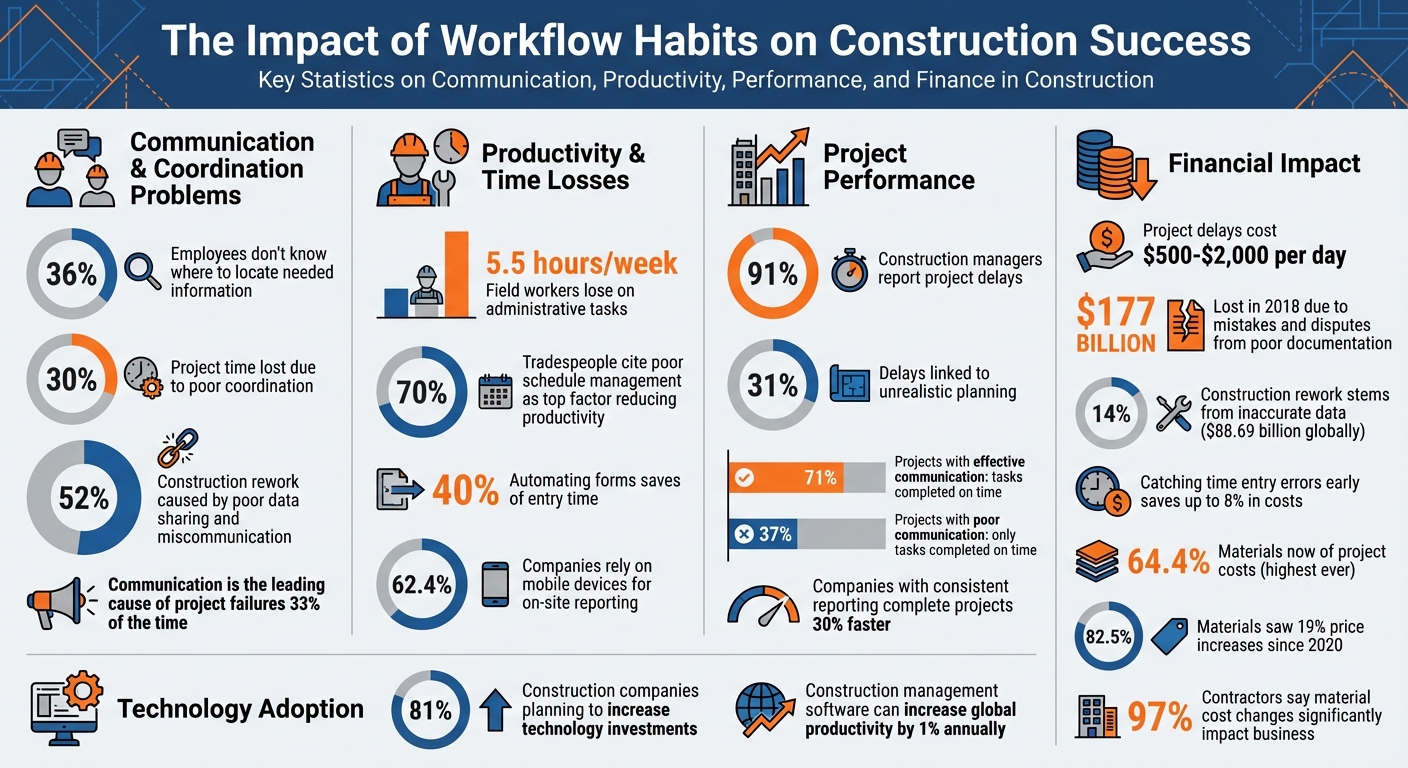
Key Statistics: How Workflow Habits Impact Construction Project Success
Centralizing Project Data in One Location
When project details are scattered across spreadsheets, text messages, and paper logs, it creates confusion and inefficiency.
In fact, 36% of employees report not knowing where to locate the information they need, leading to a 30% loss of project time due to poor coordination. The best contractors tackle this issue by creating a single, centralized system for all project data – housing plans, schedules, daily logs, and financial records in one accessible location.
By centralizing information, teams ensure that everyone – from on-site crews to office staff – operates with the same up-to-date data.
Real-time updates play a critical role here. For instance, if there’s a design change or a material delivery delay, crews are informed immediately, helping to avoid costly rework. Features like version control and automated timestamps ensure that the blueprint a foreman references on-site matches the one approved earlier that day by the project manager. This approach not only eliminates confusion but also strengthens accountability across the team.
Centralized data also gives leadership a clear view of project risks, trends, and forecasts as they happen, cutting down on unnecessary delays and inefficiencies.
Using Construction Management Software to Integrate Data
Construction management platforms such as Contractor Foreman, bring all project data into one cloud-based system that’s accessible from any device. This setup eliminates fragmented workflows by directly linking planning, commitments, progress tracking, and financial reporting. For example, when a foreman logs crew hours on-site, that data automatically integrates into payroll and budget tracking, removing the need for manual entry.
To maximize efficiency, it’s important to choose software that integrates with key tools like QuickBooks for accounting, calendar apps, and HR systems. This ensures data flows seamlessly across your business. Mobile access is also crucial – 62.4% of companies rely on mobile devices for on-site reporting. This allows foremen to document site conditions, track crew productivity, and complete safety checklists in real time, ensuring nothing gets overlooked.
Keeping Detailed Daily Logs
Daily logs are the backbone of any well-run project, capturing essential details like progress, productivity, weather conditions, and key decisions. When these logs are stored digitally in a centralized system, they become searchable, time-stamped records that can protect your business during disputes or audits while maintaining team accountability.
Field workers lose an average of 5.5 hours per week on administrative tasks unrelated to project progress. Automating repetitive fields – such as project addresses, supervisor names, and job numbers – can save up to 40% of form entry time while improving accuracy. Standardized templates that auto-fill routine details allow crews to focus on unique, project-specific information, like site conditions, challenges, and solutions. This level of detail sets leading contractors apart from the rest.
Detailed logs also prove invaluable when questions or disputes arise weeks or even months later. A time-stamped photo paired with notes on crew size, weather, and site conditions provides undeniable evidence. With nearly 70% of tradespeople citing poor schedule management as the top factor reducing labor productivity, maintaining comprehensive daily logs is essential for comparing actual progress to the project schedule and identifying areas for improvement.
sbb-itb-5eea312
Building Accountability and Ownership in Daily Work
When project data is centralized, accountability becomes the key to turning updates into actionable steps.
Clear ownership ensures that this data drives timely decisions, preventing tasks from slipping through the cracks. This is especially critical on construction sites where overlapping deadlines and multiple crews can create chaos. Poor coordination often results in delays, overtime, and extra costs. Contractors who avoid these pitfalls integrate accountability into their daily routines by assigning clear responsibility and documenting every decision – practices that not only streamline operations but also protect profit margins.
The challenge isn’t a lack of effort – it’s the absence of structure.
Smaller contractors often rely on informal methods that work for a single job but fail when managing multiple sites. Shared responsibility, while seemingly cooperative, often leads to no one taking charge. Successful contractors solve this by designating a single point person for each project. This individual is empowered to escalate issues, approve changes, and verify task completion, creating a unified source of truth for coordination.
Assigning Clear Roles and Responsibilities
Accountability starts with breaking down high-level schedules into specific, daily tasks. Every task must be assigned to an individual – not just a group. For example, a task like “install drywall” should also specify who will complete it, inspect it, and mark it as done. Digital tools, such as centralized punchlists and to-do lists, clarify priorities and track progress in real time. These tools also allow for mapping crew availability by role and location, ensuring the right people with the right skills are matched to the job.
Companies that implement consistent reporting practices see projects completed 30% faster and with fewer cost overruns. Standardized daily logs – where supervisors provide timely updates, activity summaries, and photos – create a detailed record of who did what and when. This not only keeps everyone accountable but also protects the business in case of disputes.
GPS-enabled time tracking offers another layer of oversight.
Mobile tools with GPS confirmation show where crews are and what they’re working on, eliminating the need for constant on-site supervision. These tools help reduce time theft and provide objective evidence of work progress. Requiring crews to upload photos of completed tasks to daily logs further minimizes disputes and ensures transparency.
Once roles are clearly defined, documenting any changes and decisions made on-site becomes equally essential.
Tracking Changes and Documenting Decisions
In 2018, the construction industry lost over $177 billion due to time spent correcting mistakes and resolving disputes caused by changes or delays.
The underlying issue?
Poor documentation. Without proper records, teams repeat conversations, second-guess decisions, and waste time searching for information that should be easily accessible.
A structured, digital change management process – covering identification, evaluation, approval, and review – ensures every decision is recorded and communicated clearly. Digital templates for RFIs, change orders, and safety reports promote consistency across jobsites, speeding up reviews and eliminating guesswork. This boosts accountability by creating clear workflows that leave no room for ambiguity.
Electronic approvals with digital signatures prevent unauthorized changes and help keep projects on track. Work order management systems that support these approvals create a digital archive of all conversations and decisions, closing communication gaps and providing evidence when questions arise later. With this level of documentation, contractors can resolve disputes with facts, not recollections, and ensure stakeholders are on the same page without delays.
Client portals add another layer of transparency by offering read-only access to progress updates and daily logs. This reduces the need for manual check-ins or midweek status calls, allowing teams to focus on the actual work. When everyone has access to the same information, accountability becomes second nature – there’s no room for missed details or excuses.
Planning and Scheduling Projects Effectively
After setting up accountability structures, the next step is creating schedules that are both practical and achievable. A common pitfall among contractors is planning too broadly, which allows small problems to snowball into major delays. For instance, 91% of construction managers have reported project delays, with 31% of those delays linked to unrealistic planning. When schedules are based on assumptions rather than a detailed breakdown of tasks, minor setbacks can escalate, costing anywhere from $500 to $2,000 per day in overtime and lost opportunities.
The best contractors approach planning as a collaborative and methodical effort. They divide projects into smaller, actionable tasks, involve the team members responsible for execution, and include buffers to account for unexpected challenges. This structured approach complements earlier efforts to centralize data and enforce accountability. It not only minimizes delays but also ensures all stakeholders have a clear understanding of the project timeline. As architect Frank Lloyd Wright said:
“You can use an eraser on the drafting table, or a sledgehammer on the construction site”.
By investing time upfront in detailed planning, contractors can avoid costly mid-project corrections. Breaking projects into manageable tasks is the foundation for building accurate and reliable schedules.
Creating Detailed Work Breakdown Structures
A Work Breakdown Structure (WBS) is a tool that organizes a project into smaller, manageable components, starting broad and gradually narrowing down to specific tasks. At the top level, you have the overall project – such as “New Office Building.” This is then divided into major phases like “Structural Systems” or “Interior Finishes.” From there, it drills down further into sub-deliverables like “Concrete Foundations”, and finally into specific work packages such as “Install Formwork” or “Pour Concrete”.
To ensure comprehensive planning, follow the 100% Rule, which means every task within the project scope must be accounted for without overlap. Each work package should be mutually exclusive to avoid double budgeting or scheduling conflicts. Additionally, the 80-Hour Rule recommends keeping tasks small enough to be completed within 80 hours of effort. This level of detail makes it easier to assign responsibilities, monitor progress, and identify potential issues early on.
Linking work packages to specific cost codes allows for real-time tracking of expenses, making it easier to detect budget overruns before they spiral out of control. A WBS Dictionary – a document that outlines the scope, resources, responsibilities, and dependencies for each task – ensures everyone interprets the plan the same way. Since projects evolve, the WBS isn’t static; it should be updated to reflect changes in design, site conditions, or client requests. Proactively researching codes during planning can prevent up to 60% of revisions typically required during permit reviews.
Involving Multiple Teams in Planning
Schedules created in isolation are rarely effective in practice. Beyond defining detailed work packages, successful contractors refine their schedules by incorporating input from all relevant teams. This includes project managers, field supervisors, subcontractors, and procurement specialists. For example, walking the site together before finalizing plans can help uncover potential issues like underground utilities or property line discrepancies that might disrupt the workflow. Structured design reviews – examining drawings room-by-room and system-by-system with architects and key trades – can resolve conflicts between elements like electrical, plumbing, HVAC, and structural systems before construction begins.
Involving subcontractors early in the planning process helps define dependencies and realistic production rates, ensuring the master schedule accurately reflects how delays in one area (e.g., foundation work) might impact others (e.g., framing). Similarly, bringing in procurement specialists ensures that long-lead items, such as custom windows (8–12 weeks) or cabinetry (10–16 weeks), are ordered immediately after permits are approved, avoiding delays later in the project. Poor coordination is responsible for roughly 30% of wasted project time, but collaborative planning can significantly reduce this by aligning expectations and responsibilities from the start.
Firm deadlines for client decisions and stakeholder approvals during the planning phase help prevent last-minute changes that can disrupt workflows. Weekly risk reviews are another critical tool, allowing teams to identify overlapping risks – such as shared equipment or competing labor demands across jobsites. This proactive approach ensures resources are allocated efficiently, bottlenecks are avoided, and the schedule reflects practical constraints. The result is a team that not only knows what needs to happen but also understands why and in what order.
Improving Team Communication with Technology
Poor communication can derail even the most carefully laid plans. In fact, it’s the leading cause of construction project failures one-third of the time. Even more striking, 52% of construction project rework happens because of poor data sharing and miscommunication. When outdated plans circulate or approvals get stuck in limbo, delays pile up fast. Clear and efficient communication, supported by centralized data and accountability, is critical for contractors to succeed. Often, what separates good contractors from great ones is how smoothly information flows among everyone involved.
Thankfully, technology has turned this challenge into an opportunity. Instead of juggling disconnected tools, top contractors are centralizing communication on platforms that create a single source of truth. This ensures that everyone – whether in the office or on-site – has access to real-time information.
Using Client Portals for Better Communication
Client portals take the hassle out of status update calls and approval bottlenecks by giving stakeholders direct access to the information they need. For example, with Contractor Foreman, clients can log into a secure portal to view live project schedules, approve change orders, review progress photos, and track financial summaries – all without waiting for someone to compile reports. This level of transparency not only builds trust but also allows project managers to focus on getting the job done.
The benefits to project timelines are undeniable. Projects that use effective communication tools see 71% of tasks completed on time, compared to just 37% for those with poor communication. Portals also speed up approvals, letting clients review and sign off on estimates, RFIs, and submittals directly within the system. Automated notifications and dashboards ensure that key items get addressed promptly, while version control keeps everyone working from the most up-to-date plans.
By improving communication with clients, contractors can also set the stage for smoother internal coordination.
Setting Up Real-Time Communication Systems
While client portals improve transparency externally, real-time communication systems are the backbone of on-site coordination. These tools eliminate delays and confusion by replacing scattered group texts and email chains with centralized, searchable chats. Platforms like Contractor Foreman allow field supervisors to upload issue photos, tag specific team members, and tie updates directly to tasks, schedules, or budgets.
To make these systems work effectively, clear protocols are a must. Organize chats by project and team, using separate channels for architects, engineers, and laborers. This ensures that the right information reaches the right people without overwhelming everyone else. Establish norms for checking the platform at the start and end of each shift, and reserve “urgent” flags for truly critical issues. Moderation by project managers and thorough onboarding help ensure everyone knows how to use features like @mentions, file sharing, and notifications.
Coordination challenges are a major productivity killer, with 60% of general contractors citing them as a primary issue. Tools like GPS-enabled timesheets and automated notifications can keep teams instantly updated, reducing disputes over work hours and cutting down on wasted time – potentially saving up to 30% of project time. These systems ensure that everyone stays on the same page, keeping projects running smoothly.
Making Better Decisions with Data
Smart decision-making in construction now revolves around real-time, actionable insights rather than gut instincts. Top contractors rely on up-to-the-minute data to address issues before they spiral out of control. With 75% of construction firms highlighting the growing need for rapid decision-making in the field, data-driven strategies have become essential for streamlining workflows. For instance, catching time entry errors early can save firms up to 8% in costs.
The cost of inaccurate data is staggering – 14% of construction rework stems from it, amounting to $88.69 billion globally. When managing multiple jobsites and countless moving parts, fragmented records and manual spreadsheets can lead to blind spots and expensive errors. Centralized dashboards solve this by ensuring that everyone, whether in the office or on-site, has access to the same up-to-date information.
Monitoring Performance Metrics in Real-Time
Tracking performance metrics in real time is pivotal for keeping projects on track. Construction management software allows teams to continuously monitor Budget vs. Actual expenses. Labor hours, material purchases, and subcontractor costs can be tagged as they happen, helping identify overages immediately. Automated alerts and digital logs ensure data is accurate and actionable. This is especially important as materials now make up 64.4% of project costs – the highest ever recorded. Pair that with the fact that 82.5% of construction materials have seen price hikes averaging 19% since 2020, and the need for precise cost tracking becomes clear.
Automated alerts can flag spikes in labor hours or material costs. Digital daily logs also provide real-time updates on site conditions, weather delays, and crew productivity, offering immediate insights to adjust schedules or reallocate resources. Tools equipped with GPS capabilities enable field crews to log time and share progress photos instantly.
Operational metrics like Work in Progress (WIP) status, labor hours by cost code, schedule variance, and equipment usage are also critical. Monitoring material waste by comparing actual usage against estimates helps contractors stay within a 10% waste buffer. Regular risk reviews across projects can identify bottlenecks in shared resources like crews or equipment early, preventing delays. After all, project delays can cost contractors between $500 and $2,000 per day in extra expenses.
Using Predictive Analytics to Prevent Problems
Predictive analytics go beyond monitoring by identifying patterns that signal potential problems before they arise. Instead of reacting to cost overruns or delays, leading contractors use past project data to anticipate risks. For example, predictive models analyze historical projects to uncover common bottlenecks, such as unreliable subcontractors or frequent supply chain disruptions, allowing teams to adjust schedules or line up alternatives ahead of time.
These tools also analyze spending trends and material cost fluctuations to flag financial risks early. With 97% of contractors stating that material cost changes significantly impact their business, predictive analytics help refine procurement strategies and build contingencies based on data rather than guesswork.
AI-powered tools can even assess job site conditions and worker behavior to spot patterns linked to accidents, improving scheduling and safety training. Weather forecasting integrations allow teams to adjust work schedules to avoid delays caused by extreme weather. Additionally, predictive analytics can analyze historical win rates and competitor trends to craft smarter, more competitive bids while protecting profit margins.
The shift in the construction industry from reactive, intuition-based decisions to proactive, data-driven planning is unmistakable. With 81% of construction companies planning to increase technology investments in the coming years, it’s clear that embracing real-time monitoring and predictive insights sets great contractors apart. This proactive approach not only keeps projects on schedule and within budget but also fosters a workflow that anticipates and prevents problems before they happen.
Conclusion
The difference between a good contractor and a great one often comes down to disciplined workflows. Centralizing project data eliminates scattered information and outdated plans, while clear accountability ensures every task has an owner and every decision is documented. Detailed planning with achievable baselines helps avoid surprises and keeps schedules on track. When these habits are paired with technology offering real-time insights, contractors gain the control they need to consistently deliver projects on time and within budget.
These practices set the stage for using advanced technology to improve efficiency. By integrating technology, contractors create a single source of truth that connects field operations, financial tracking, and decision-making into one unified system. In fact, construction management software has the potential to increase global productivity by about 1% annually through automation and streamlined processes.
Contractor Foreman brings these workflow habits together on one platform, offering centralized data management, real-time dashboards, digital daily logs, client portals, and integrated scheduling – all starting at $49/month, with a 30-day free trial.
FAQs
What should I centralize first?
Centralizing how you oversee projects can make a world of difference. By using construction management software or a unified dashboard, you can monitor multiple projects all in one place. This setup helps you stay on top of priorities, allocate resources more effectively, and keep an eye on progress. With everything in one view, it’s easier to avoid confusion, make quicker decisions, and keep your team aligned.
What belongs in a daily log?
A daily log serves as a vital record for construction projects, capturing essential details to ensure everything stays on track. It should include the date, weather conditions, and a summary of the work performed. Document the areas worked on, equipment used, and the labor on-site, broken down by trade or company.
Additionally, it’s important to note deliveries received, inspections or tests conducted, and any safety observations or incidents. Don’t forget to log delays, disruptions, or any unusual events that occur. These detailed records play a key role in tracking progress, documenting activities, and addressing risks throughout the project.
How do I get crews to actually use the system?
To encourage people to embrace a new system, focus on creating an environment where communication is open, training is accessible, and the benefits are clear. Show how the system can make everyday tasks easier – like handling forms, keeping track of progress, and simplifying workflows.
Start small by introducing it through manageable projects, and make sure the tools are mobile-friendly for convenience. Highlight quick wins and immediate advantages to build trust and consistency. The real key? Making the system a natural part of daily routines. This approach can lead to better efficiency and improved project results.







