
The framing is up. Finally, the build is starting to come together.
But then someone glances at the drawings and freezes. “Wait… that’s not right.”
Suddenly, everything stops.
A wall is framed in the wrong place, pipes are fighting wires, and for a moment, no one has any idea what universe they’re even in. Every copy of the plan tells a different story.
The project manager has 4A.
The architect has “FINAL.”
The electrician has “FINAL – USE THIS ONE.”
And the plumber just has “latest”
Everyone groans. Yeah, this is where the drama starts…and the costs start climbing.
Do you know that nearly 50% of rework in construction is caused by poor communication and outdated information?
This isn’t just frustrating—it’s a wallet-puncher eating up at least 10% of your costs.
Construction collaboration software solves this by providing a centralized platform that connects all stakeholders – project managers, contractors, architects, and field teams – ensuring real-time access to updated blueprints, schedules, and progress reports.
Key Takeaways:
- Improved Communication: Reduces miscommunication and errors by acting as a single source of truth.
- Real-Time Updates: Ensures field and office teams work with the latest data, avoiding rework.
- Task Accountability: Tracks responsibilities, deadlines, and progress automatically.
- Integrated Tools: Syncs with accounting software like QuickBooks to simplify budgeting and invoicing.
- Mobile Access: Field teams can update logs, mark up drawings, and respond to RFIs instantly.
Platforms like Contractor Foreman offer over 35 features, including construction scheduling programs, document management, client portals, and financial tracking, starting at just $49/month. These tools help contractors save time, reduce costs, and scale their operations efficiently.
If you’re still relying on spreadsheets and emails, it might be time to upgrade to a more effective system.
Construction collaboration software isn’t just about organization – it’s about ensuring your projects stay on schedule and within budget.
In this article, we’ll show you how to use construction collaboration software so you can actually get the most out of it and keep your projects under control.
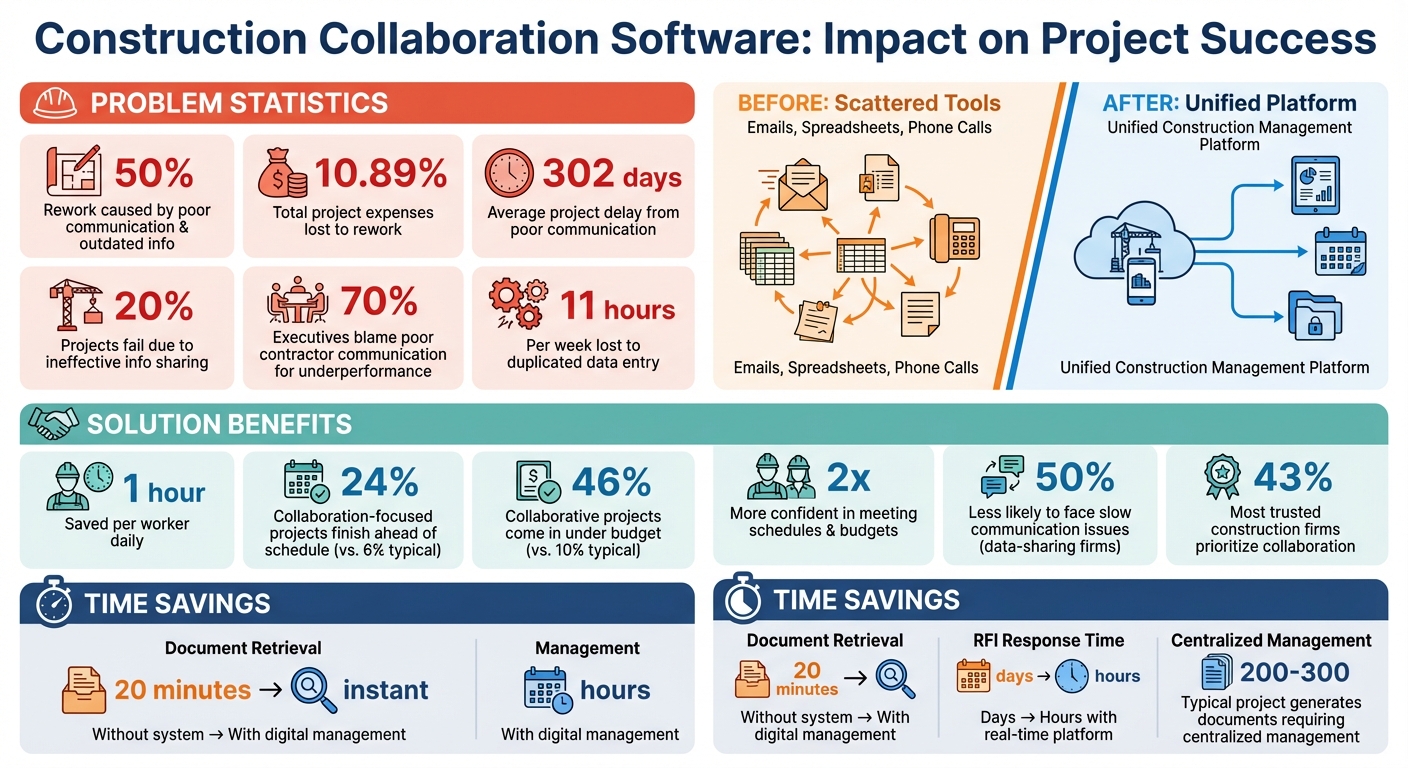
Construction Collaboration Software Benefits: Key Statistics and ROI
What is Construction Collaboration Software?
Construction collaboration software serves as a centralized digital hub, connecting everyone involved in a project – project managers, architects, engineers, contractors, and subcontractors – into a shared workspace.
Instead of juggling multiple communication tools and scattered updates, this platform consolidates everything: communication, blueprints, schedules, and progress reports. Whether you’re in the office or on-site, it keeps everyone on the same page.
This software functions as a “single source of truth”, allowing field teams to upload progress photos, annotate plans, and log daily updates in real time. Office teams can instantly access these updates without waiting for end-of-day summaries or chasing down information. General contractors can also invite subcontractors into specific project areas, assign tasks with deadlines, and receive notifications as work gets completed.
Let’s dive into the features that make this system so effective.
Main Features and Functions
At its core, construction collaboration software focuses on real-time communication and accountability.
Field teams can access up-to-date blueprints, add digital markups, and respond to RFIs (Requests for Information) directly from the platform – no need for back-and-forth emails or trips to the office. When architects or engineers update a drawing, the latest version is instantly available to everyone, reducing errors caused by outdated plans. This seamless version control is a game-changer for improving teamwork and productivity.
Many platforms also integrate with popular accounting tools like QuickBooks, Xero, and Sage. This ensures project costs, estimates, and invoices stay accurate without requiring manual data entry. Automated workflows simplify tasks such as time tracking, report generation, and notifications, cutting down on administrative overhead and avoiding unnecessary delays. Client portals provide an added layer of transparency, giving project owners 24/7 access to real-time photos and progress updates.
These features directly tackle common challenges like miscommunication and workflow bottlenecks.
Why Contractors Need This Software
By addressing these pain points, construction collaboration software helps prevent delays and reduce expensive rework. Miscommunication and scheduling conflicts are notorious for driving up costs and extending timelines.
As Will Blunt from the Association of Professional Builders explains:
“If you’re still relying on text messages and spreadsheets to manage communication, you’re not just risking project delays… you’re putting your business growth on hold”.
This highlights the importance of task accountability. With this software, managers can easily track responsibilities and deadlines without constant follow-ups.
For subcontractors, the benefits are just as clear.
They receive instant notifications for task assignments or schedule changes, have immediate access to updated blueprints, and can document completed work with photos and notes. This level of transparency fosters trust and keeps everyone aligned, ensuring projects stay on track and within budget.
sbb-itb-5eea312
Key Features of Construction Collaboration Software
When choosing collaboration software, contractors should prioritize features that directly enhance daily workflows.
The right tools can cut down on administrative delays, minimize errors, and ensure seamless communication across all stakeholders – from field crews to clients. These features work together to streamline every aspect of construction management.
Project Management and Scheduling
Scheduling tools are the backbone of project management, offering a clear, visual roadmap for every phase of construction.
Tools like Gantt charts allow teams to see timelines at a glance, helping identify potential delays before they become problems. Assigning tasks with clear deadlines and designated owners fosters accountability, ensuring everyone knows their role and timeline.
Mobile access takes this a step further, allowing field crews to update progress in real time. No more waiting for updates – on-site teams can instantly log changes, and push notifications alert everyone to schedule adjustments. This reduces miscommunication and unnecessary travel, keeping projects on track.
In addition to scheduling, features like document management and daily logs are essential for maintaining project accuracy and efficiency.
Document Management and Daily Logs
A single $500,000 construction project typically generates 200–300 documents, including permits, contracts, RFIs, and blueprints. Without a centralized system, locating a document – like a signed change order – can take up to 20 minutes.
Digital document management eliminates this hassle. Features like version control ensure that when architects update drawings, the latest version is instantly accessible to the entire team. Automatic timestamps help crews work with the most current specifications, reducing the risk of rework.
Daily logs are equally critical, serving as legal records of site activities, weather conditions, safety incidents, and crew attendance. Paper records often lack the detail and timestamps needed to defend your position if a dispute arises.
Mobile apps with offline capabilities allow crews to document progress, snap photos, and add notes even in areas with poor connectivity. Once reconnected, data syncs automatically with the office, keeping records up to date. This ensures accurate, real-time documentation that supports quicker decisions and reduces errors – key factors in effective project management.
Client Portals and Financial Tracking
Client portals revolutionize communication by giving project owners 24/7 access to updates.
These portals allow clients to view progress photos, schedules, and budget details, cutting down on administrative back-and-forth. This level of transparency not only builds trust but also reduces the workload for contractors.
Construction financial software integrated with accounting systems like QuickBooks streamline budget management. Estimates, change orders, and invoices sync instantly between the field and office, ensuring on-site approvals are reflected in project budgets without delay. By preventing budget surprises and speeding up payment cycles, these tools help improve cash flow and keep projects financially on track.
Benefits of Using Collaboration Software for Construction Teams
Better Communication and Coordination
Scattered communication through emails, phone calls, and spreadsheets can seriously hurt productivity. In fact, nearly 70% of industry executives blame poor contractor performance and communication for underperforming projects. Collaboration software changes the game by offering a single platform where architects, general contractors, and subcontractors can access real-time updates all at once.
With mobile-first access, field operations get a major boost. Crews can capture on-site observations, mark up drawings, and upload photos directly from their phones or tablets. These updates instantly notify office-based stakeholders, speeding up issue resolution and keeping everyone in sync.
Another pain point? Contractors lose an average of 11 hours per week to duplicated data entry across disconnected tools. Collaboration software eliminates that wasted time by automating tasks like daily progress reporting, time tracking, and RFI approvals. This not only saves time but also reduces errors, helping teams make faster, better decisions.
Fewer Errors and Faster Decisions
Outdated blueprints are a recipe for expensive rework. Using up-to-date plans helps teams avoid costly mistakes, especially since nearly 50% of rework in construction stems from poor communication and incomplete project information. With collaboration software, RFIs can be submitted instantly – complete with photos – allowing architects to resolve issues in real time and avoid delays.
Automated workflows also cut down on human error when it comes to tracking approvals and ensuring compliance. Real-time reports on budgets, fleet performance, and procurement give managers the insights they need to make quick, informed decisions. On average, construction management software saves teams up to 1 hour per worker every day. Companies that embrace collaboration are twice as confident in meeting their schedules and budgets compared to those that don’t. These efficiencies create a solid foundation for managing projects on a larger scale.
Support for Unlimited Projects
When communication improves and errors decrease, teams can handle more projects at once.
For growing contractors, software that limits the number of active projects can become a roadblock. Platforms that support unlimited projects remove this hurdle, letting firms scale without worrying about subscription caps or penalties. A centralized dashboard gives business owners a complete view of all active jobs, making it easier to allocate resources, monitor progress, and address potential problems before they grow.
Collaboration is a key factor for success: 43% of the most trusted construction firms prioritize it in their workflows. The results speak for themselves – 24% of collaboration-focused projects finish ahead of schedule, compared to just 6% of typical projects. Additionally, 46% of these projects come in under budget, while only 10% of non-collaborative projects achieve the same. Cloud-based platforms with unlimited storage ensure that as project volume grows, documentation like blueprints, photos, and daily logs stays organized and accessible across all job sites.
Overview and Features
Complete Feature Set for Contractors
Contractor Foreman tackles the communication and coordination challenges often faced by construction teams by offering a single platform with over 35 integrated features.
This eliminates the hassle of juggling multiple tools. The platform includes GPS-driven timecards to track crew locations automatically and resources for safety meetings covering more than 800 topics. Project managers can leverage tools like Gantt (CPM) scheduling, daily logs with automatic weather updates, work orders, inspections, punchlists, and a permit manager. Financial tasks are also streamlined with features for job costing, construction cost calculations, bid management, change orders, purchase orders, and AIA-style progress invoicing.
Document management is centralized, allowing teams to store files, mark up drawings, track RFIs, manage submittals, and create contracts or lien waivers using the built-in document generator. The client portal stands out with custom branding options and tailored communication tools. Clients can view project schedules, approve estimates and change orders, pay invoices through Stripe, and chat directly with contractors. Customization is a key feature, with options for custom fields, dashboards, and branding for reports and the client portal. To further simplify operations, the platform includes over 100 pre-built reports and more than 50 stock forms and checklists.
Contractor Foreman integrates seamlessly with tools like QuickBooks, Zapier, Google/Outlook Calendar, Gusto, CompanyCam, Angi Leads, and MS Project. However, QuickBooks Desktop integration will be discontinued starting January 1, 2026. These features are accessible on mobile devices and come with robust training and support.
Mobile Access and Training Support
The platform works smoothly on iOS/Android apps and major browsers like Chrome, Firefox, and Brave. Field crews can take photos, update daily logs, and clock in using GPS timecards – all in real time without manual syncing. Any updates made in the field or office sync instantly across all devices, ensuring everyone stays on the same page.
Every plan includes free training and support, with higher-tier plans offering private training sessions. The support team boasts an impressive 13-second average wait time, and 95% of support chats receive 5-star ratings.
“Contractor Foreman is more intuitively understandable to me and our type of business. They use the same terminology as we do and I feel like everyone that I have spoken with are actually contractors and not just a computer programmer”.
Brian T. from Tower Interiors Group LLC shared his experience. The platform also supports multi-language settings, allowing users to choose between English or Spanish, with PDFs available in multiple languages for clients.
With its mobile capabilities and comprehensive training resources, Contractor Foreman ensures teams can hit the ground running.
Pricing Plans
Contractor Foreman offers five pricing tiers, designed to accommodate teams of different sizes while supporting unlimited projects. This keeps costs predictable as your workload grows.
| Plan | Monthly Cost (Billed Annually) | User Limit | Private Training Sessions | Support Features |
|---|---|---|---|---|
| Basic | $49 | 1 | Group training only | Support tickets |
| Standard | $105 | 3 | 2 sessions | Live chat, phone support |
| Plus | $166 | 8 | 3 sessions | Implementation assistance |
| Pro | $221 | 15 | 4 sessions | Priority support |
| Unlimited | $332 | Unlimited | Unlimited sessions | Dedicated trainer, free implementation |
Every plan includes a 30-day free trial and a 100-day money-back guarantee for annual subscriptions. Additionally, users are guaranteed no price increases as long as their subscription remains active.
How to Implement Construction Collaboration Software
Onboarding and Team Training
Start by explaining why adopting this software is crucial. Poor communication can delay construction projects by as much as 302 days, and nearly 20% of projects fail due to ineffective information sharing. Highlighting these challenges can help your team understand the importance of making this shift.
Put together a change management team with clear roles, including a Project Manager, a Champion, an Executive Sponsor, and End Users. Create a practical timeline with milestones – like setting up logins by day five and migrating the first project by day 15 – so everyone knows what to expect.
Break training into smaller, manageable sessions to avoid overwhelming your team. For example, Contractor Foreman offers free training with every plan, making it easier to get started. You can also use incentives to encourage participation.
Test the software on a smaller project first, tracking metrics like labor hours saved and fewer RFI delays. Field management software can save up to one hour per worker daily. Once your team is trained, adjust your workflows to fit the digital platform.
Customizing Workflows and Processes
After onboarding, tailor the software to fit your team’s processes. Contractor Foreman offers customizable fields, dashboards, and branding options, making it easier to align the platform with your existing workflows. Start by auditing your current communication methods – texts, emails, and phone calls – to pinpoint where delays happen. Then, centralize these workflows into standardized digital forms and checklists.
Set up clear reporting procedures so everyone knows who to contact when issues arise. For example, field crews might report safety concerns to superintendents, who then escalate them to project managers as needed. This kind of structure ensures that important information doesn’t get lost. Kaitlin Frank, Superintendent at Dome Construction, highlights the value of linked workflows:
“It all boils down to workflow: the ability to review drawings quickly and easily, have the markups, have all of your RFIs and submittals, everything linked in”.
Use the platform’s stock templates for forms and checklists, customizing them as needed for specific projects. Set up automated alerts for changes like schedule updates or change orders, ensuring field teams are instantly notified when project details shift. The goal? Create a single, reliable source where everyone can access up-to-date drawings, specifications, and contracts – avoiding confusion from outdated information.
Using Mobile and Web Features Effectively
Contractor Foreman’s mobile apps for iOS and Android sync seamlessly with its web platform, ensuring field and office updates happen in real time. Field crews can use features like GPS timecards, photo capture, and log updates without hassle. This real-time reporting is essential, especially since 33% of contractors cite coordination issues as the main cause of quality problems.
To encourage adoption, establish simple habits. For instance, require team members to acknowledge critical messages on the platform to confirm they’ve seen important updates. Reviewing digital goals during morning meetings can also help keep everyone aligned on priorities. These small steps can lead to big productivity improvements.
The platform is accessible via major web browsers, giving office staff full access to dashboards, financial tracking, and reporting tools. Firms that prioritize collaboration and data-sharing are 50% less likely to face issues caused by slow communication. By integrating mobile and web functionalities, you bridge the gap between the office and the field, eliminating the need for fragmented communication through texts and emails. This centralized approach significantly reduces the chances of miscommunication and delays.
How Contractors Use Collaboration Software
Daily Logging and Progress Tracking
Field crews now rely on digital tools to document daily progress, replacing traditional paperwork. For example, Contractor Foreman creates daily logs directly from time card data, eliminating redundant entries and ensuring accurate labor tracking. This automated system allows superintendents to easily monitor how much time workers spend on specific tasks.
The ability to view updates in real time boosts efficiency. Instead of waiting for end-of-day reports, project managers can check progress as it happens through mobile apps. Teams can also attach photos or videos to daily logs, enabling immediate review by clients and managers. These logs help reconcile material deliveries with purchase orders, catching discrepancies early to prevent billing issues.
Safety incidents are logged alongside daily updates, creating a comprehensive legal record of the project. With 36% of employees reporting difficulty in accessing the information they need, centralizing updates on a single platform ensures vital details are always available. Contractors who adopt standardized digital templates for daily logs report faster reporting times and better quality control across their projects.
Beyond logging, managing multiple teams in real time is essential for keeping projects on track.
Scheduling Multiple Teams
A centralized, real-time schedule simplifies coordination among various subcontractor crews. With Contractor Foreman’s mobile capabilities, trades like electricians, plumbers, and framers receive instant schedule updates, reducing confusion caused by scattered communications like texts or emails.
Dynamic scheduling ensures efficient use of resources. For example, if a concrete pour is delayed, the software can automatically adjust the timeline for subsequent tasks, avoiding wasted trips or downtime. In fact, jobsite management solutions can save each user up to an hour daily.
Clear communication channels are equally important. If a plumbing crew discovers a conflict with existing ductwork, the platform directs them to the right contact – whether that’s the general superintendent, HVAC lead, or project manager. This structured approach is critical, as poor information flow has been shown to delay projects by as much as 302 days.
While internal coordination is vital, keeping clients in the loop is just as important.
Client Communication and Updates
Client portals offer owners direct access to project documents, schedules, and budgets, cutting down on unnecessary phone calls and emails. At any time, clients can log in to view progress photos, review construction change orders, or check budget updates and construction cost estimates – without disrupting on-site workflows.
Automated daily reports enhance transparency. Contractor Foreman generates reports that include photos, videos, and summaries of completed work, providing clients with a clear snapshot of daily activities. This visual documentation builds trust by offering a transparent view of the project’s progress. When clients need to approve submittals or respond to RFIs, the platform speeds up the process, reducing approval times from days to just hours.
Standardized digital checklists act as quality control tools that can be shared with clients. For instance, when a milestone like passing a rough inspection or completing foundation work is reached, the attached checklists and photos offer clear evidence of progress. Considering that one in five construction projects fails due to poor communication, having a single platform for all client interactions helps eliminate miscommunication, keeping schedules on track and relationships intact.
This streamlined communication not only keeps clients informed but also strengthens the connection between field updates and client oversight, ensuring smoother project execution overall.
Conclusion
In today’s fast-paced construction industry, collaboration software has become a necessity for contractors aiming to stay competitive.
Research shows that ineffective communication is a major factor in the failure of one in five construction projects. A centralized platform helps bridge the gap between field crews, office staff, and clients by streamlining access to blueprints, schedules, and change orders.
The benefits go beyond just better communication. Automating daily logs, reports, and scheduling can save contractors hours of administrative work every week. Real-time mobile access and automated task tracking eliminate unnecessary calls, clarify responsibilities, and connect teams seamlessly. Client portals, meanwhile, foster trust by offering transparency in communication and project updates.
These challenges highlight why adopting collaboration software makes both operational and financial sense. Contractor Foreman offers an all-in-one solution starting at just $49 per month. With over 35 features – including project management, financial tracking, mobile integration, and compatibility with tools like QuickBooks and Zapier – the platform is built to help contractors manage unlimited projects without adding to their headcount. Forbes Advisor even named it the “Easiest-To-Use” construction management software.
For contractors looking to eliminate miscommunication, reduce rework, and scale their operations, investing in a comprehensive collaboration platform isn’t just about adopting new technology – it’s about protecting profit margins, building stronger client relationships, and creating a streamlined business capable of handling growth without unnecessary complications. A unified platform like this can transform how contractors work, ensuring smoother operations and long-term success.
FAQs
How do I get my subs to actually use it?
To get subcontractors on board with using construction collaboration tools like Contractor Foreman, start by establishing clear communication guidelines that outline how the software will be used. Show them how it can streamline their work – think real-time updates, simplified document sharing, and improved coordination.
Offer training sessions to close any skill gaps and make sure they feel confident using the platform. Then, integrate the software into their everyday tasks, so it becomes a natural part of their workflow. Regular feedback and meetings can help reinforce its importance, ensuring it becomes a standard tool in daily operations.
What should I set up first after I buy it?
After getting Contractor Foreman, the first step is to dive into the training resources. These include introductory videos and free training sessions designed to help you get acquainted with the platform. Once you feel comfortable navigating the basics, move on to configuring your account settings, creating your first estimate, and setting up your workflow.
The platform’s knowledge base is packed with helpful guides and videos that walk you through each step. If you want a more hands-on approach, scheduling a training session can make sure you’re using the platform effectively from the start.
Will it work on my jobsite with no internet?
Yes, modern construction collaboration software can still be used without an internet connection. Many tools include offline functionality, enabling teams to continue working seamlessly in areas with poor or no connectivity. Features like data entry, filling out forms, and generating reports are typically accessible offline. Once the internet is restored, the software automatically syncs any updates, ensuring work remains uninterrupted – even on remote or hard-to-reach jobsites.







