
- What to Look for in Incident Reporting Software
- 1. Mobile Access
- 2. Real-Time Reporting and Alerts
- 3. Custom Incident Forms and Templates
- 4. Photo and Document Uploads
- 5. OSHA Compliance and Log Generation
- 6. Near-Miss and Hazard Tracking
- 7. Root Cause Analysis and Corrective Actions
- 8. Dashboards and Analytics
- 9. Offline Mode and System Integrations
- 10. Safety Meeting and Inspection Tools
- Conclusion
- FAQs
- Related Blog Posts
It was a fine day on site—clear weather, crews moving—when all of a sudden, there was an incident. A roofing crew was working when someone slipped and hit the deck. Everyone went quiet.
Then the scramble started. The foreman tried to report it, but there was no signal. Witnesses were there, but their info never got recorded. Another person said they’d write it up later…no one really knew when.
The injured crew member is now lying at the hospital while the rest of the site tries to reset, unsure of what’s supposed to happen next.
By the time the safety manager heard about it, hours had passed. Details were fuzzy and timelines didn’t line up. The report was already missing pieces, which made follow-up harder than it needed to be and left insurance asking questions no one had clean answers for.
This is where incident reporting in construction usually breaks down. It’s not because people are not organized or lazy, it’s because reporting is harder than it should be in the moment.
The solution?
An easy-to-use incident reporting software.
It makes it easier to capture what happened when it actually happened, notify the right people right away, and keep everything documented in one place – even when the internet is spotty.
Here’s what they offer:
- Mobile Access: Report incidents on-site using smartphones or tablets, even offline.
- Real-Time Alerts: Notify the right people instantly to enable quicker action.
- Custom Forms: Tailor forms to specific project needs for precise reporting.
- Photo & Document Uploads: Add visuals and supporting documents for detailed records.
- OSHA Compliance: Automate OSHA log creation and submission to meet regulatory requirements.
- Near-Miss Tracking: Log potential risks to prevent future incidents.
- Root Cause Analysis: Identify and address underlying issues to avoid recurrence.
- Dashboards: Visualize safety metrics and trends for better decision-making.
- Offline Mode: Log incidents in remote areas without internet access.
- Integrated Safety Tools: Link incident data with inspections, meetings, and other safety processes.
What to Look for in Incident Reporting Software
Whether this is your first time setting up incident reporting or you’re replacing a system that isn’t cutting it, the goal is the same: make reporting easier.
Not every tool works in real jobsite conditions, which is why knowing what actually matters can save you time, frustration, and a lot of backtracking.
These are the features worth paying attention to:
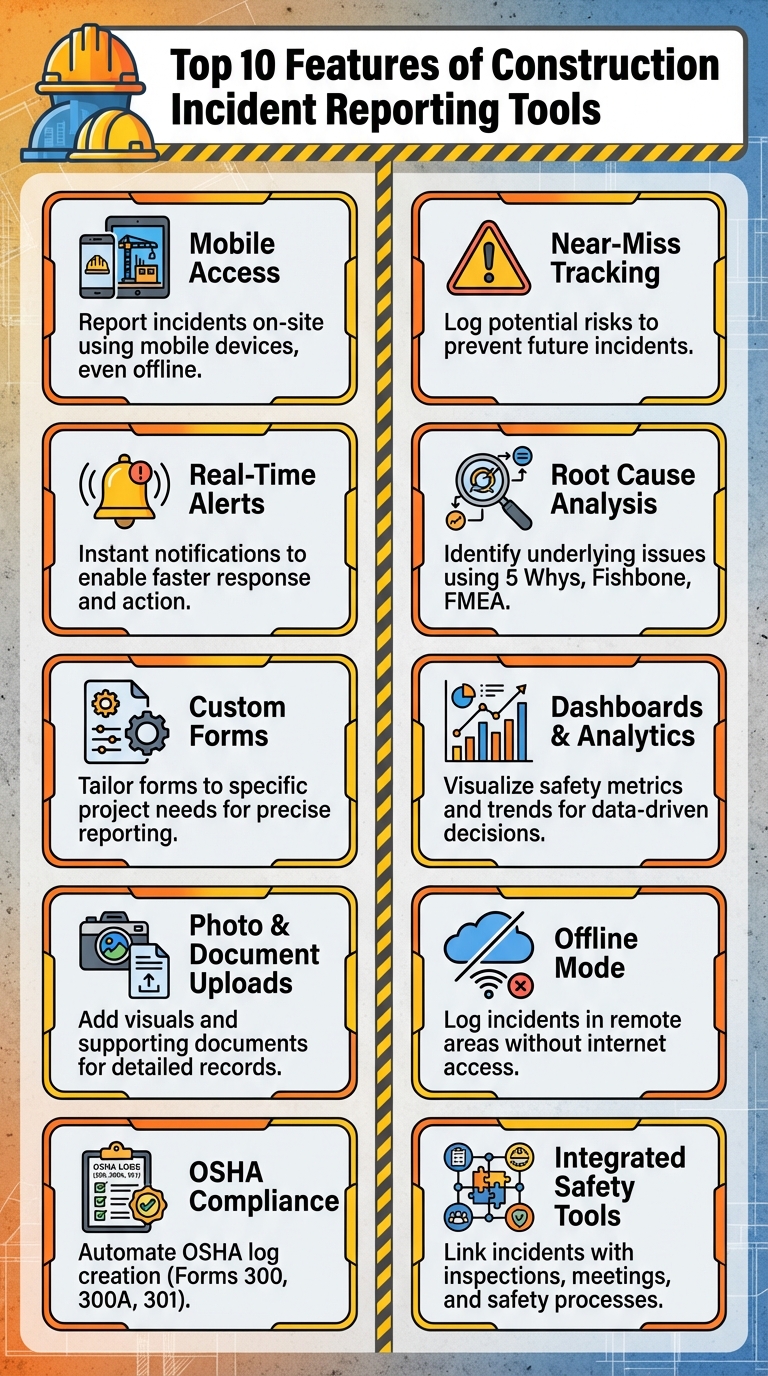
10 Essential Features of Construction Incident Reporting Tools
1. Mobile Access
Mobile access has transformed how incidents are reported, making it possible to document everything on-site with a smartphone or tablet. Instead of waiting to fill out paper forms back at the office, workers can now record incident details immediately. This includes capturing photos, voice notes, and even GPS coordinates – all of which help ensure accuracy while slashing reporting time from days to just minutes. Plus, this real-time data feeds directly into automated systems, allowing for faster responses.
Even in areas with no internet connection, mobile tools have offline capabilities. Workers can log incidents on the spot, and the data will automatically sync once they’re back online.
With its mobile-friendly design, Contractor Foreman simplifies incident reporting while maintaining a strong focus on safety compliance.
2. Real-Time Reporting and Alerts
On a construction site, time is everything when an incident occurs.
With real-time reporting and alerts, managers and safety officers are notified the instant an incident is documented. This eliminates the delays that come with paper-based systems or manual data entry, ensuring faster responses.
These notifications do more than just inform – they kick off immediate action. Configurable workflows are triggered automatically, creating follow-up tasks, sending emails, and setting deadlines for the right team members.
The system’s customizable alert levels add another layer of efficiency. For instance, minor incidents can be directed to site supervisors, while serious safety violations are escalated directly to senior management or safety officers. This tailored approach ensures that the most critical issues get the attention they need – fast.
Real-time visibility not only speeds up responses but also helps reduce risks and ensures compliance with safety regulations.
Contractor Foreman’s platform embraces this approach, keeping teams connected and ready to act when safety concerns arise on-site.
3. Custom Incident Forms and Templates
Custom forms take incident reporting to the next level by tailoring documentation to meet the specific challenges of each project.
Every project comes with its own set of safety concerns. With customizable forms, you can focus on collecting only the details that matter – whether you’re tracking injuries, near-misses, environmental incidents, or property damage. By cutting out irrelevant fields, these forms make reporting faster and more precise.
Dynamic forms go a step further by using conditional logic to display only the fields that are relevant to the situation. For example, if someone reports a fall, the form will automatically include questions about fall protection measures and the height involved. This makes the process smoother and ensures no critical information is missed.
Templates add another layer of consistency. They guide users to include all the essential details, such as the type of incident, people involved, location, date, time, description, injuries, environmental conditions, and potential causes. This standardized approach not only helps identify trends across incidents but also simplifies compliance with regulations. Pre-built OSHA forms (300, 300A, and 301) are integrated into templates, making it easy to submit directly to OSHA’s Injury Tracking Application system. Companies can adjust these templates to meet OSHA, MSHA, or their own internal safety standards.
Contractor Foreman’s Custom Form Builder allows teams to design reports that align perfectly with their workflows. Plus, the platform’s Incidents module was updated with a new user interface in January 2025, improving usability even further.
4. Photo and Document Uploads
Photos and videos add a layer of detail that written descriptions often can’t fully capture, giving a clearer picture of incidents as they happened on-site. These visuals can show damaged equipment, unsafe conditions, injuries, or hazards present at the time, serving as verified, time-stamped, and geotagged evidence. This kind of documentation not only bolsters the accuracy of incident reports but also helps reduce legal risks.
Beyond visual evidence, supporting documents play an equally important role by adding context and factual backing. Items like witness statements, doctor’s reports, and OSHA correspondence provide essential details that strengthen incident documentation.
When combined with earlier mobile data, these materials improve accountability and streamline safety management. Visual records, for example, can speed up claim resolutions, cut processing times, and even help reduce insurance costs by demonstrating strong safety measures. Linking photos directly to inspection findings adds another layer of accountability, aiding in both spotting issues and ensuring corrective actions are taken.
To make visuals even more effective, consider annotating photos with arrows, circles, or notes to highlight important details.
5. OSHA Compliance and Log Generation
Keeping up with federal reporting requirements doesn’t have to involve mountains of paperwork anymore. With modern incident reporting tools, generating OSHA logs has become a much simpler task. These tools automatically populate Forms 300, 300A, and 301 using incident data, significantly cutting down on manual work.
They also create OSHA-ready reports that can be downloaded and submitted directly to the OSHA Injury Tracking Application (ITA) portal. These systems assist in classifying work-related injuries, determining recordability, and ensuring all required details are captured within the seven-day window. This automation makes compliance much more manageable.
Some platforms are taking it a step further with AI-driven features, like auto-filled OSHA injury reports, making the process even more seamless.
In fact, tools continue to evolve to meet user needs. For example, in 2025, Contractor Foreman upgraded its “Incidents” module by introducing the “Incident & OSHA 300 Logs” feature. This update was designed to improve both stability and performance for its users.
Accurate OSHA logs don’t just help businesses avoid penalties – potentially as high as $10,000 per incident – but they can also serve as critical evidence to reduce or even overturn fines related to safety citations.
6. Near-Miss and Hazard Tracking
Near misses are like early warning signs – unplanned events that don’t cause harm but highlight potential dangers. Frank Bird’s Safety Triangle illustrates this perfectly: for every fatality or serious injury, there are 600 near misses – 600 chances to intervene before a serious incident happens. Many major accidents are preceded by these near misses, which is why documenting them is so crucial for prevention. Tracking these incidents proactively works hand-in-hand with digital reporting tools to address risks before they escalate.
With mobile-friendly tools, workers can quickly log near misses by attaching photos and location details. This helps uncover critical risk patterns, which is especially important since more than one in four workers tend to underreport injuries.
Advanced analytics take this a step further by identifying trends across different sites, crews, shifts, or time periods. Managers can use this data to pinpoint high-risk areas and track leading indicators, enabling them to take corrective actions that help prevent future incidents.
“We met metrics for the first time in our history of our company this year. We went below the DART, which I’m so proud of our team for. It was tracking incidents and actually being willing to put them down.” – Corporate Safety Officer, Quality Electric
The most effective systems make reporting near misses as easy as reporting actual injuries. This encourages a non-punitive culture where workers feel comfortable highlighting potential problems, knowing their input leads to real changes – like improved training or updated workflows. These insights allow teams to continuously improve their preventative measures.
sbb-itb-5eea312
7. Root Cause Analysis and Corrective Actions
Getting to the heart of what caused an incident is key to making sure it doesn’t happen again. Modern incident reporting tools now come with built-in root cause analysis (RCA) methods like 5 Whys, Fishbone diagrams, FMEA (Failure Modes and Effects Analysis), and Cause Mapping. These methods encourage investigators to dig deeper, moving past surface-level observations to uncover the real reasons behind an incident.
Today’s tools make this process easier by centralizing all the necessary data – photos, videos, voice recordings, interviews, shift logs, and maintenance reports – collected right from mobile devices. Investigators can piece together timelines and use visual tools to map out contributing factors. This approach doesn’t just look at technical failures; it also examines human actions, decision-making, organizational practices, and broader systemic issues. For instance, addressing root causes early can significantly reduce costs associated with workplace injuries, which average over $42,000 in direct expenses per incident.
What’s more, these tools don’t stop at identifying the problem – they help turn insights into action. Once the root causes are identified, they’re linked to corrective actions (CAPA), complete with features like task assignments, deadlines, and real-time notifications. This shifts safety management from simply reacting to incidents to actively preventing them. With dashboards and analytics, organizations can also spot recurring issues and high-risk trends, paving the way for smarter, long-term safety strategies.
8. Dashboards and Analytics
Dashboards bring all your incident data together in one place, giving project managers and safety teams a clear snapshot of what’s happening across various sites. Instead of combing through endless spreadsheets, you can instantly track incidents, compliance rates, and key safety metrics – all displayed visually through charts, graphs, and interactive tools. These visuals make it easier to dive into specific metrics, spot trends, and pinpoint high-risk areas before they become bigger problems.
One of the standout features is customization. Users can tailor dashboards to focus on what matters most to them. For example, Environmental Health and Safety (EHS) professionals might prioritize tracking incident types and compliance rates, while executives could focus on overall safety performance across multiple locations. Customizable dashboards not only simplify reporting but also support smarter, data-driven decisions.
Beyond providing a visual overview, analytics take the raw numbers and turn them into actionable strategies. By analyzing both leading indicators (like near-miss reports and safety inspections) and lagging indicators (such as injury rates), you get a complete picture of safety performance.
This level of detail helps managers shift from reacting to incidents after they occur to proactively preventing them, significantly reducing risk exposure.
Platforms like Contractor Foreman are a great example of how dashboards can transform safety management.
Our incident reporting tools consolidate critical safety metrics and offer customizable analytics. With a user-friendly interface and real-time updates, these platforms empower safety teams and project managers to make smarter, faster decisions based on solid data.
9. Offline Mode and System Integrations
Construction sites in remote locations or areas with unreliable internet often face connectivity challenges. To tackle this, offline mode enables workers to log incidents and complete inspections without needing an active internet connection. For example, in February 2025, Safety Reports launched the “OSHA 301 Export and Offline Mode!” feature, empowering teams to stay productive even in areas with limited connectivity.
When offline functionality is paired with system integrations, managing site safety becomes even more efficient. Integrations simplify workflows by linking incident reporting with tools for scheduling, project management, and financial tracking. This eliminates redundant data entry and reduces administrative burdens. For instance, Contractor Foreman demonstrates this concept by integrating with platforms like QuickBooks and Zapier, ensuring safety data seamlessly aligns with financial and project management systems.
The benefits are clear: less time spent on paperwork and more time focused on ensuring crew safety. With streamlined workflows and a unified flow of data, decision-making improves, and safety protocols remain accurate and up to date.
10. Safety Meeting and Inspection Tools
Integrating safety meetings and inspections with real-time reporting and mobile tools takes construction site safety to a whole new level. When these components are connected with incident reporting, they form a complete safety management system instead of a patchwork of separate processes. The data collected from incidents becomes a valuable resource for toolbox talks, training sessions, and preventive inspections. This ensures that lessons learned from past events directly shape future safety priorities, helping teams shift from reacting to issues to actively preventing them.
With digital incident reports, alerts are triggered instantly, corrective tasks are assigned with clear deadlines, and data-driven CAPAs (Corrective and Preventive Actions) are generated. Scheduled inspections then verify that these corrective actions are completed, closing the loop on safety management.
A great example of this integrated approach is Contractor Foreman, which combines Incident & OSHA 300 Logs, Safety Meetings, and Inspections into one platform. This software includes over 800 preloaded safety meeting topics in both English and Spanish, making it easier for diverse teams to stay informed. It also allows teams to link building inspections and permits directly to incident reports, creating a unified system that complements earlier reporting and analytics tools.
The real power of this integration lies in its analytics. By consolidating incident patterns, inspection results, and safety meeting records into a single system, dashboards can uncover recurring issues and highlight high-risk areas. This insight enables teams to refine their safety programs based on real site data, shifting the focus from reviewing past incidents to making proactive safety improvements.
Conclusion
Choosing the right construction incident reporting tool makes a real difference on site. The right software helps crews report incidents quickly, keeps details from getting lost, and gets the right people notified without slowing work down.
Good construction incident reporting isn’t just about compliance. It creates a clear record of what happened and what needs to change, so issues don’t repeat and responses happen faster. Mobile access, offline reporting, and connected safety tools matter because incidents rarely happen when conditions are perfect.
When comparing tools, look for something that fits your workflow and actually gets used. If reporting feels like extra work, it won’t stick.
Contractor Foreman brings it all together: Incident & OSHA 300 Logs, Safety Meetings, Inspections, mobile access, offline functionality, and integrations with tools like QuickBooks and Zapier. It’s a connected system designed to improve safety, ensure compliance, and keep your projects running smoothly.
FAQs
How do construction incident reporting tools enhance safety and compliance on job sites?
Construction incident reporting tools make safety compliance easier and more efficient by replacing traditional paper-based methods with quick, digital processes. With just a smartphone or tablet, workers can instantly log accidents, near-misses, or hazards. Each entry is automatically timestamped and securely stored in the cloud, ensuring accurate, real-time records without the risk of missing crucial details. This creates a reliable, centralized system that’s ready for audits or OSHA submissions.
These tools often come equipped with real-time dashboards and automated alerts, allowing managers to track safety trends, address potential risks promptly, and stay compliant with both federal and state regulations. By simplifying reporting and making data easily accessible, construction teams can create safer work environments while efficiently meeting regulatory obligations.
How does mobile access improve incident reporting on construction sites?
Mobile access lets construction teams document and report incidents directly from the field using smartphones or tablets. This means they can capture crucial details like photos and notes on-site and submit them immediately – even without an internet connection. Once back online, the data syncs automatically, ensuring accurate records, quicker responses, and adherence to safety regulations.
Equipping field crews with mobile tools streamlines incident reporting, cutting down on paperwork and enabling quicker decisions to help keep job sites safer.
Why is real-time alerting important for managing construction site incidents?
Real-time alerting plays a crucial role in ensuring that the right people are informed the moment an incident happens. This immediate notification helps eliminate delays, giving teams the chance to act swiftly to manage the situation and limit any potential harm or damage.
Instant updates provided by real-time alerts also make it easier to document incidents accurately, which is essential for staying compliant with safety regulations. Taking this proactive step doesn’t just mitigate the impact of incidents – it can also help reduce the overall number of incidents on construction sites.
Related Blog Posts







