
- What Construction Documentation Really Involves
- Why Paper-Based Systems Are Holding You Back
- The Real Cost of Bad Documentation
- How Construction Documentation Software Solves These Problems
- How To Transition From Paper Without Disrupting Projects
- What Features Actually Matter for Small Firms
- Final Word: Stop Losing Money to Paper Chaos
Stacks of paper on the passenger seat and handwritten notes taped to the dashboard. Yet when the office calls at 11 a.m. asking where the inspection report went, you don’t know. Then the plumber has a question, the electrician is running behind, and a client arrives in person to request changes. While you take notes on scraps of paper with good intentions, suddenly the day is slipping away. If that sounds familiar, you’re not alone.
Paper slows you down. It hides key details while wasting time, turning simple questions into frustrating delays. Projects stall when crews can’t find the latest plans, or vendors receive outdated specifications. The job doesn’t wait because someone left a folder at the office.
Over time, the impact accumulates, resulting in missed deadlines, rework, and lost profits. The more jobs you take, the harder it is to keep track of what’s signed, approved, or filed. Paper doesn’t scale. It burdens your team with administrative work and undermines efficiency on-site.
You don’t need to overhaul your entire business to make it better. Construction management software replaces those stacks of paperwork with organized, accessible files your team can trust. Fewer errors. Faster and easier access. Better margins.
Today, we’ll show you how small firms can take control of their documentation and stop letting paper dictate their processes.
What Construction Documentation Really Involves
A typical $500,000 residential project can generate upwards of 200-300 documents. These include everything from permits, contracts, and RFIs, to safety logs, timesheets, and daily field reports. Each of them plays a role in moving the project forward, tracking accountability, and tracking incidents to protect the firm from liability. All of them can become lost or misplaced.
Most small construction companies still handle these documents with clipboards, binders, inboxes, and spreadsheets. Information ends up scattered across trucks, offices, and phones. There’s rarely a single place where the latest version of a document lives.
Where one contractor may carry a drawing rolled up in the back seat, another relies on an older version printed last week.
A System That Works Until It Doesn’t
The more documents you generate, the more challenging it becomes to stay organized. One misfiled permit or unsigned change order can stall inspections, delay payments, or force rework. Field teams often work without knowing if they have the most current specs. Office staff waste hours every week tracking down missing paperwork or confirming approvals.
Construction paperwork isn’t just a formality. It touches every phase of the job, from bid to closeout. As projects overlap or scale up, the volume increases. Relying on paper doesn’t just slow down your crew—it increases exposure to errors, missed deadlines, and lost revenue.
 Why Paper-Based Systems Are Holding You Back
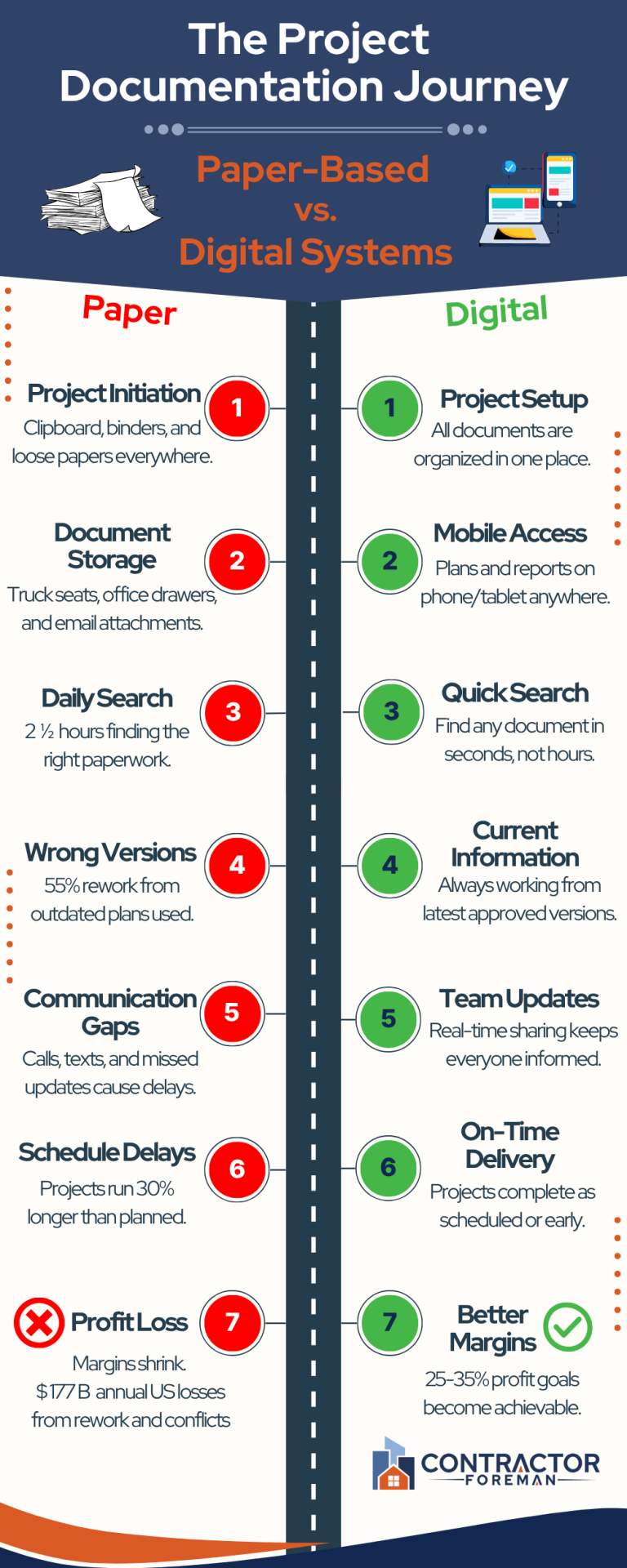 Why Paper-Based Systems Are Holding You Back
Paper-based project management slows down your team and opens the door to mistakes that cost time and money. For small construction firms, the impact hits harder because staff already juggle multiple roles, and there’s no extra capacity to clean up documentation messes.
Let’s start with document access. Field crews often rely on phone calls or text messages to obtain the necessary files. Office staff might have what’s needed—but it’s in a drawer, email inbox, or someone’s personal folder. While the team waits for someone to track it down, the work comes to a standstill.
Then come the version control issues. When documents are printed, copied, or emailed, no one knows which is the most recent version. This leads to jobs being built on outdated specifications, missed changes, or work that needs to be redone.
Lost documents are another silent drain. Paper gets damaged, thrown out, or misplaced all the time. Daily logs go missing. Safety reports never make it back to the office. You need a reliable system to prove compliance, track job progress, or respond during disputes.
Small construction firm challenges often include limited time, tight budgets, and lean teams. Paper creates more administrative work, increases the likelihood of errors, and requires more back-and-forth to confirm basic details. The result is longer timelines, strained relationships, and reduced profit.
There’s also the false sense of control. Paper feels “simple,” but it hides inefficiencies. Missed approvals. Incomplete logs. Delayed decisions. None of that shows up on a clipboard until it becomes a real problem.
What appears to be a minor delay today can become a significant schedule setback tomorrow, ultimately impacting your bottom line.
The Real Cost of Bad Documentation
Construction paperwork that’s hard to access or track slows things down while chipping away at your margins with every delay, mistake, and missing file.
Start With Lost Time
If a project manager spends 20 minutes searching for one signed change order, that time adds up. Multiply it across every document, every job, and every person on your team. Time that should be allocated to planning, coordination, or site visits gets consumed by administrative work.
Mistakes from outdated documents create rework. One missed revision in a drawing can mean tearing out finished work and redoing it. That means wasted labor, materials, and trust with the client. Sometimes, it also creates legal exposure if the finished work doesn’t match approved specs.
Project Delays Are Another Hidden Cost
Waiting for approvals, inspections, or managing subcontractors takes longer when everything is handled through physical files and phone calls. Delayed paperwork holds up progress and extends timelines. Every extra day on site increases costs and pushes back payment.
Then there’s the compliance risk. Missing safety forms, outdated inspections, or incomplete daily logs can trigger fines or prevent final payment. Paper records often lack the detail and timestamps needed to defend your position if a dispute arises.
Hidden Gaps Are Hidden Damage
Paper-based project management creates gaps that don’t appear until the damage is done. Small construction firms often accept these delays and errors as part of the job, but they’re not. These are fixable problems, and the cost of leaving them in place increases with every project.
The firms that move faster, win bids, and protect their profits aren’t doing it with paper. They’ve cut waste from their process and taken control of their documentation.
How Construction Documentation Software Solves These Problems
Construction documentation software addresses the issues that paper creates—scattered files, outdated information, and wasted time searching for documents. For small firms, switching to a digital system means tighter control over jobs without adding headcount or increasing workload.
Central Access and Version Control Eliminate Delays
The biggest shift comes from centralizing access. Paper-based project management often leaves teams digging through binders or waiting for email attachments to arrive.
A digital document system replaces those delays with quick, searchable access to everything. Field crews and office staff work from the same source, using the same version of every form, plan, or report. That alone reduces confusion and speeds up decision-making.
Version control becomes automatic. With paper, even one outdated drawing can result in costly rework. In a digital system, files are tracked and time-stamped. Older versions are stored on file but never replace the current ones. Your crew sees the right specs every time, whether they’re on-site or in the office.
Mobile Apps and Custom Forms Are Bid Differentiators
Field access can be a bid differentiator. Teams often lose time waiting for paperwork to catch up with the jobsite. Mobile apps enable workers to access documents, checklists, and reports directly from their phones, even offline. Your business can offer real-time updates and a bid that prioritizes keeping information accurate and clients in the loop.
Documentation software also allows smaller firms to offer the same level of transparency and organization as larger competitors. Daily logs, punch lists, and safety checklists can follow the same flow you’re used to—without the time lost to the paperwork pile.
Clients see the difference when every update, approval, and report is logged and time-stamped. You’re no longer chasing signatures or emailing PDFs after the fact. Instead, you’re offering excellent customer service with real-time visibility into project progress—something owners increasingly expect in competitive bids.
Reliable documentation helps deliver on timelines, reduce disputes, and demonstrate control. That’s the kind of edge that wins more work.
How To Transition From Paper Without Disrupting Projects
Switching to an online tool can be easy and pain-free with the right training and support. It doesn’t mean halting work or making changes all at once. For small construction firms, the shift works best when it begins with simple, focused steps that integrate seamlessly into daily operations.
Start with one project or one process at a time. Daily reports, safety checklists, or RFIs are good starting points for ensuring safety. These are high-frequency technical documents that teams already handle on a daily basis. Replacing just one with a digital version provides immediate feedback and allows crews to see the benefit without added complexity.
Assign one person to lead the rollout. This should be someone who understands how your current process works and can guide others as you test the new system. The goal is to create habits, not extra work.
Digitize what matters most. You don’t need to scan every old file. Start with current jobs and active documents. Focus on what you still need to access regularly, like permits, contracts, and site forms. The rest can stay archived.
Use mobile access early. Crews in the field will adopt digital faster if they can pull up documents without calling the office or driving to a printer. Offline access helps when the service is spotty. When the process makes their work easier, adoption happens faster.
Stick to tools built for small teams. You don’t need a system packed with features meant for national builders. Look for clean interfaces, simple workflows, and fast support. You want software that supports your process, not one that requires you to build a new one.
Track the results. Fewer mistakes, faster approvals, and reduced admin hours are all measurable. These wins build momentum and help bring the rest of the team on board.
What Features Actually Matter for Small Firms
Small construction firms don’t need a complicated system loaded with enterprise features. They need tools that make their work faster, cleaner, and easier to manage across the office and the field. The right construction management software focuses on the essentials.
Look for features that solve daily frustrations:
- Unlimited document storage: No more digging through file cabinets or making space on shared drives. Store everything by project, date, or category in one place.
- Mobile access with offline mode: Let your crew access plans, checklists, and forms from their phone or tablet—even without a cellular signal. Updates sync when they’re back online.
- Custom forms and checklists: Create digital versions of the documents you already use, such as daily logs, safety inspections, or punch lists. No more photocopies or lost paperwork.
- Version tracking and timestamps: Always know who uploaded what and when. See changes instantly and avoid costly mistakes from using the wrong version.
- Fast search and filtering: Find what you need in seconds—filter by project, file type, or keyword. No more flipping through binders or guessing filenames.
- Role-based access control: Share documents with subs, clients, or crews without giving them full system access. Everyone sees what they need—nothing more, nothing less.
Tools with these features remove the administrative burden without adding complexity, helping your team stay focused on building, not chasing documents.
Final Word: Stop Losing Money to Paper Chaos
You now have everything you need to manually clean up your construction documentation. But every missed update, lost file, or rework cycle chips away at your profits.
Paper-based systems aren’t just outdated—they’re holding your team back. Small firms that run lean can’t afford delays caused by bad paperwork. A digital system provides speed, accuracy, and control across every project, without requiring additional staff or stress.
The right tools replace stacks of paper with organized workflows your team can actually use. No more guessing, no more chasing files.
Want to see what that looks like in action? Start a free trial or request a demo to discover how simple, real-time documentation keeps your jobs moving and your margins intact.







