
- What Makes Multi-Project Management So Overwhelming
- Why Manual Systems Don’t Scale
- 1. Rank Projects by Priority, Not Noise
- 2. Centralize Project Oversight with One Dashboard
- 3. Schedule Crews and Equipment to Prevent Overlap
- 4. Set Up Reliable Field-to-Office Communication
- 5. Use Mobile Tools with GPS to Track Work in Real Time
- 6. Track Budgets and Costs for Each Job Separately
- 7. Standardize Project Forms and Checklists
- 8. Log and Review Daily Progress at Every Jobsite
- 9. Assign a Point Person for Each Project
- 10. Review Overlapping Project Risks Weekly
- 11. Keep Clients Updated Without Extra Work
- Conclusion: More Jobs Shouldn’t Mean More Chaos
Managing multiple construction jobs with spreadsheets, paper logs, and text threads can quickly wear down small teams. As project loads increase, paperwork piles up, calls go unanswered, and field crews waste time waiting for responses. Small contractors need better systems to avoid the need to hire additional staff.
Contractors lose time and money without the right systems. 30% of project time is lost because of poor coordination. Every delay can cost you $500 – $2,000 per day in overtime, expenses, and lost opportunity that comes straight out of your pocket. Contractors who grow past one or two jobs at a time do it with structure, not hustle.
What Makes Multi-Project Management So Overwhelming
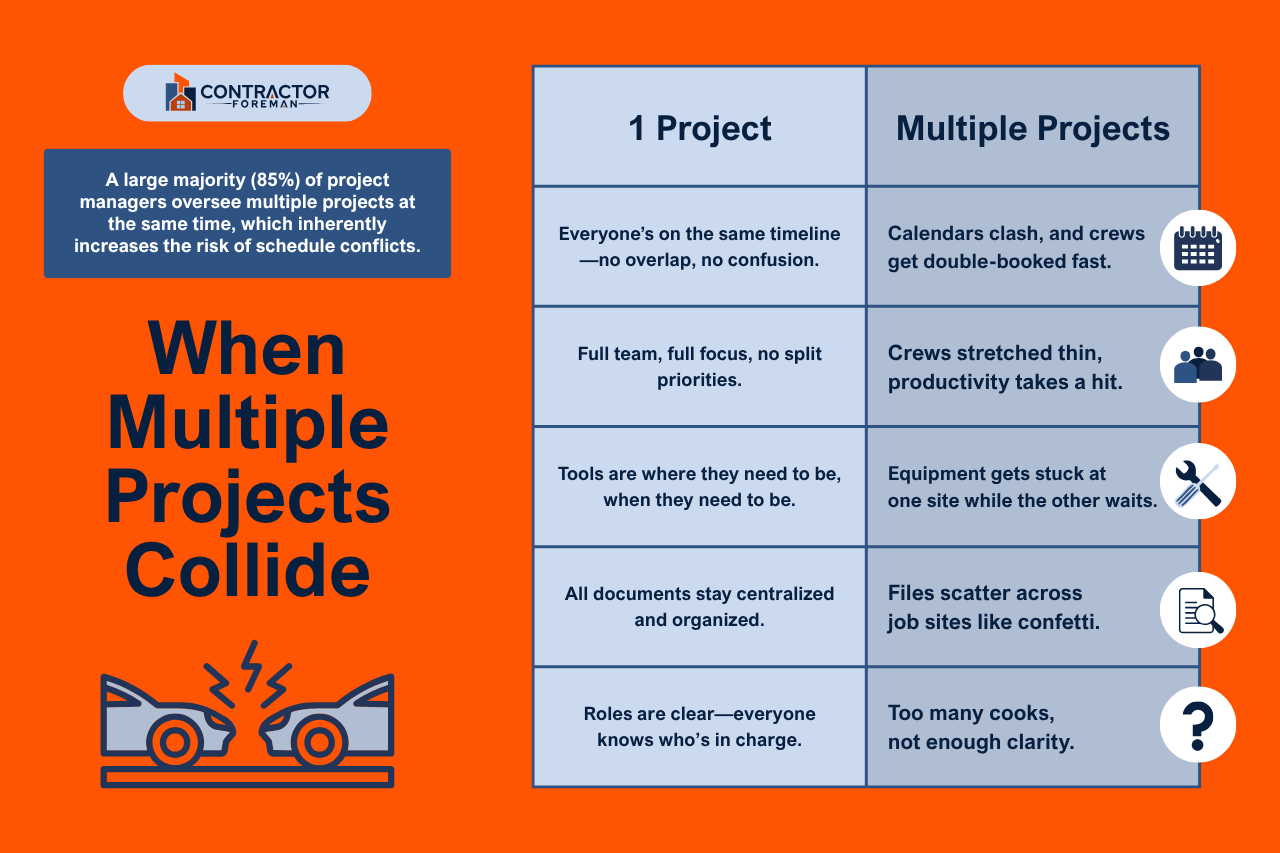
Running more than one project at a time exposes all the weak points in your system.
Small contractors face specific problems:
- Conflicting schedules
- Split crews
- Shared equipment
- Lost paperwork
- Unclear accountability
When every job requires something at once, and there’s no clear process for keeping track, even minor setbacks can create significant delays.
Most small teams begin with flexible, informal processes that feel manageable, but these systems break down quickly when overlapping deadlines collide.
Why Manual Systems Don’t Scale
Manual tools work fine when you’re in one place and wear all the hats. They break down the moment your crews, subcontractors, and materials are split across job sites. Spreadsheets can’t send reminders, and clipboards don’t notify the office when work finishes. A paper-based system doesn’t show you which job is about to miss a deadline, or why.
A centralized digital platform provides your team with a single location to view tasks, submit reports, review updates, and track progress, eliminating the need for back-and-forth communication.
Contractors who succeed with multiple projects stop relying on memory and scattered tools. They use structured systems to manage complexity without requiring additional staff. A shared digital environment provides the entire team with a clear view of what’s happening now, what’s coming next, and what needs attention.
These eleven contractor-tested methods will help any firm gain control of overlapping projects, avoid burnout, and improve delivery across the board.
1. Rank Projects by Priority, Not Noise
Contractors often give attention to whoever calls first or shouts loudest. That doesn’t work when running multiple jobs simultaneously. Each project must be scored against clear criteria:
- Timeline pressure
- Budget risk
- Dependencies
- Client visibility
Use that score to rank projects on a weekly basis and assign ownership for reviewing priorities every Monday.
Schedule daily huddles based on project rank, not gut feel. This prevents low-risk jobs from consuming time while high-impact ones slip through the cracks.
When every person on the team knows which job matters most that week, scheduling gets easier and decision-making gets faster. It also helps reduce burnout as crews don’t get pulled in multiple directions based on guesswork.
2. Centralize Project Oversight with One Dashboard
Construction teams lose track of details when plans, forms, and updates live in separate tools—or worse, on paper. One jobsite uses a clipboard, another uses text threads, and the office runs spreadsheets. That mix slows everything down and creates blind spots.
Mistakes multiply when schedules, RFIs, and updates live in different places. There’s no single source of truth, so crews rely on memory, old files, or guesswork to make decisions. Small issues get missed. Big ones show up too late.
Construction management software with real-time dashboards solves that. Everyone—from field crews to project managers to subcontractors—works from the same plans, logs, and schedules. Changes immediately appear; nothing gets buried in inboxes or lost in trucks.
Gantt charts, daily logs, and project tracking for contractors live in one system. Your team stops chasing updates and starts focusing on execution. Subcontractors get what they need without long email chains or extra meetings.
3. Schedule Crews and Equipment to Prevent Overlap
Project delays often come from overcommitted people and shared equipment that can’t be in two places at once. Running multiple jobs means construction job management across every aspect, including labor and equipment, like inventory.
Start by mapping crew availability by role and location. Use software with drag-and-drop Gantt chart scheduling to spot overlaps before they happen. Assign backup resources for high-risk gaps.
Schedule and track all active equipment in one place, including delivery and pickup dates. It will help prevent wasted time on-site due to missing tools or machines.
Some contractors have cut rescheduling time by half just by using digital calendars with crew and asset views. Less overlap means fewer late starts and fewer lost days.
4. Set Up Reliable Field-to-Office Communication
Too many updates happen through personal texts or side conversations because it’s the quickest route. Yet it leads to confusion, missed approvals, and wasted trips. Formal communication doesn’t need to be slow, as long as it’s structured.
Create channels for field teams to submit updates, questions, and photos from their phones. Daily reports, punch items, and safety checklists should be directly connected to projects and stored in a single system, allowing the office to respond quickly.
You don’t have to rely on texts when communication follows a simple format and lives in the same place as your job data. Your team won’t need to double-check which version of a form is current or who approved a request, because it’s all logged in one place.
5. Use Mobile Tools with GPS to Track Work in Real Time
Mobile access provides real-time oversight of jobs without requiring on-site presence. Crews can log time, complete forms, and upload photos directly from the field.
Use mobile apps with GPS check-ins so field teams can confirm their location and activity. This eliminates the need for calls or text updates, helping to prevent missed logs and late reporting.
Instead of waiting until the end of the day to hear what happened, teams submit updates from the jobsite. PMs see progress as it happens, adjust schedules more quickly, and identify issues earlier.
Site supervisors and PMs can’t be everywhere. GPS-enabled time tracking and mobile checklists provide visibility into what’s happening on each job, even when you’re not on-site. Crews log time, complete forms, and upload updates through mobile apps, which include GPS confirmation and photos documenting the completed work.
When paired with task lists or daily logs, you get a real snapshot of progress, not just a clock-in. This reduces delays, holds crews accountable, and provides PMs with the information they need to adjust schedules as the day unfolds. It also provides a time-stamped record that protects your firm in the event of disputes.
Mobile access also means that field updates occur in real-time. For remote jobsites or spread-out crews, this makes coordination far easier and eliminates wasted trips back to the office. Some contractors save hours per week simply by eliminating the need to scan or email daily forms, while others find that it improves accuracy on time cards and reduces time theft.
6. Track Budgets and Costs for Each Job Separately
Muddled budgets create billing errors and lost profits. Every active project should display actual versus estimated costs in real-time. That means labor hours, material purchases, sub costs, and change orders get tagged to the right job from the start.
Track budget items through the same platform used for schedules and reports, and set alerts for overages before they reach billing, not just at the end of the month.
Clear job-level tracking provides the numbers to make informed decisions quickly, preventing minor issues from escalating into write-offs. Some firms have reported recovering up to 8% in costs just by catching time entry errors within days instead of weeks.
When costs are organized by project, it’s easier to spot trends and course-correct early. For example, rising material costs on one job may call for changes in purchasing or scheduling to protect the margin.
7. Standardize Project Forms and Checklists
Contractors lose time when each job runs its own paperwork process. Use digital templates for RFIs, safety reports, change orders, and daily logs. Maintain consistency across projects, but allow for job-specific customization when necessary.
Consistency speeds up the review process, improves accuracy, and helps onboard new team members without confusion. Choose software that allows you to build custom forms that mirror your current process, then standardize them.
This consistency reduces errors and increases construction workflow optimization across different job sites. It also creates a repeatable process that can grow with your business.
Over time, standardized forms reduce training time for new hires and simplify compliance reporting. When everyone fills out the same forms in the same way, quality improves without extra oversight.
8. Log and Review Daily Progress at Every Jobsite
Skipping daily progress logs creates blind spots. A consistent log format shows what happened, who was on-site, what delays occurred, and what still needs attention.
Establish a team habit where supervisors or lead hands submit brief daily logs that include time, crew activity, and photo documentation. These logs reduce confusion, support dispute resolution, and keep everyone on the same page.
Even if nothing major happens, logging the day’s progress gives your team a searchable record to review later. It also helps highlight patterns over time, such as repeat delays with the same vendor or recurring safety issues, so you can take action before they escalate.
9. Assign a Point Person for Each Project
When no one owns the outcome, tasks fall through the cracks. Assign one lead per job with the authority to escalate issues and verify completion. This reduces confusion when multiple teams work on the same site.
Even if the same person oversees more than one project, having a designated lead avoids finger-pointing and improves accountability. You’ll spend less time chasing down answers and more time moving work forward.
The point person should act as the single source of truth for that job, coordinating schedules, updating documentation, and flagging risks before they become delays.
10. Review Overlapping Project Risks Weekly
Projects rarely stay isolated. Deliveries, crew moves, and permits often affect more than one site.
Develop a habit of reviewing cross-project risks on a weekly basis as part of your work order management system. Ask: What jobs may conflict? What schedules compete for the same trades?
Planning ahead makes it easier to avoid bottlenecks and maintain project timelines. It also helps you spot resource shortages before they affect progress. This makes it easier to spot conflicts and share them with your team during planning meetings. When everyone sees the risk, they can help prevent it.
11. Keep Clients Updated Without Extra Work
Clients want updates, but pulling info from scattered tools slows down the process. Use platforms that generate automated reports, share read-only views of progress, or create snapshots from daily logs in a dedicated client portal.
Set a schedule for client updates so they don’t chase your team midweek. Sharing progress builds trust and reduces the need for frequent check-ins. It also creates fewer surprises at the time of turnover.
Include visuals when possible—such as progress photos, completed checklists, or key milestones—so clients can see what’s been done without needing a walkthrough. Simple, consistent updates help manage expectations and keep your projects moving forward without added back-and-forth.
Conclusion: More Jobs Shouldn’t Mean More Chaos
Managing multiple construction projects simultaneously doesn’t have to mean constant stress. Small contractors scale faster when they replace manual tracking and scattered tools with reliable systems.
If you’re running multiple jobs with spreadsheets, sticky notes, or gut feeling, it’s time for a change. Try construction management software built for lean teams who need clarity, not clutter.
You can try Contractor Foreman for free for 30 days and stay in control, deliver faster, and protect your profit without adding more hours to your day.







