
- The core point is simple: growth fails when data, access, and process fall apart. A cloud platform helps keep those parts in line as crews, jobs, and paperwork increase.
- Why Scalability Matters When a Construction Business Grows
- 1. Add Users Without Rebuilding Your Tech Stack
- 2. Take On More Projects Without Hitting System Limits
- 3. Centralize Project and Financial Data in One Place
- 4. Keep Field and Office Teams Connected in Real Time
- 5. Keep Workflows Steady as Workload Changes
- Platform Features That Match These 5 Growth Needs
- What to Look for in Cloud Construction Software as You Grow
- Conclusion
- FAQs
- Related Blog Posts
Growth is supposed to feel like winning.
But for most contractors, it feels like drowning.
One job becomes three. Three becomes ten. The spreadsheet that used to take ten minutes now takes two hours.
Because here’s what growth actually looks like: a single $500,000 residential job can generate 200 to 300 documents on its own. Now multiply that across five active jobs!
And since you’ve got so many files, of course some of it’s outdated or missing. Or worse — not accurate. About 14% of construction rework comes down to bad data and reporting — a mistake that costs the industry $88.69 billion a year. Every job you add just stacks that risk higher.
Growth can only be possible if you hire another (obsessively detail-oriented) one just like you — or you fix the system with a construction management platform that scales with you instead.
That’s because a real construction management platform runs on the cloud, which means it can handle more jobs without the system failing. Add a job, add a crew, add a sub — everything stays stored in one place, updated in real time, no matter how big it gets.
The results speak for themselves. 67.5% of respondents in one study said real-time collaboration tools led to much better project results, and 77% of construction software users reported better efficiency, with about two-thirds of heavy software users saving 5+ hours per week.
Quick comparison
| Growth need | What matters most |
|---|---|
| Add users | Role-based access and simple account setup |
| Handle more projects | No hard caps on active jobs or storage |
| Keep data in one place | Shared records for budgets, documents, and job costs |
| Connect field and office | Mobile updates for logs, hours, photos, and RFIs |
| Keep workflows steady | Templates, reminders, approvals, and permissions |
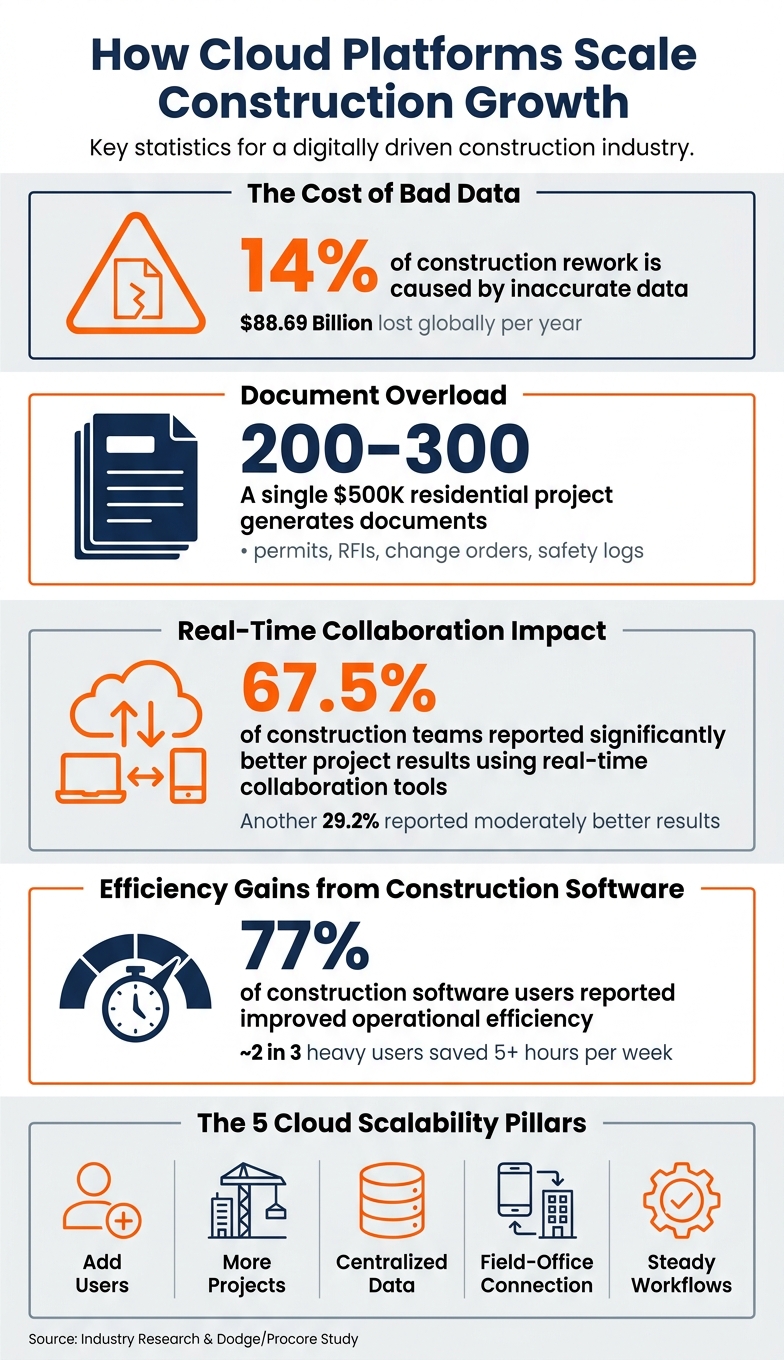
How Cloud Platforms Drive Construction Growth: Key Stats & Benefits
The core point is simple: growth fails when data, access, and process fall apart. A cloud platform helps keep those parts in line as crews, jobs, and paperwork increase.
sbb-itb-5eea312
Why Scalability Matters When a Construction Business Grows
As construction firms grow, the day-to-day workload changes fast. More users log in at once. More files move through the system. More invoices need review. More approvals stack up. Growth is not just about winning more bids. It changes what your operation has to carry at every level.
That’s where cracks start to show.
Manual reporting slows teams down. Disconnected tools create silos. People stop working from the same set of facts. Paper files – or even scattered digital systems – make it harder to keep everyone on the same page. Managers end up spending more time matching reports and fixing gaps than making calls that move jobs forward. Once job costs, billing, and retainage enter the mix, that strain gets even harder to manage.
Larger projects bring more billing complexity, more retainage tracking, and tighter job-cost reporting. And when the workload gets heavier, bad data gets more expensive. According to industry research, 14% of all construction rework – roughly $88.69 billion globally – may be caused by inaccurate data and reporting. If field crews and office staff are working from different versions of the same information, mistakes pile up in a hurry.
Scalability means your processes keep working as the business grows. You don’t lose visibility. You don’t lose accuracy. And you don’t lose control. That’s why the next five sections focus on the specific ways cloud platforms absorb that pressure.
1. Add Users Without Rebuilding Your Tech Stack
When a contractor lands several new projects and needs more staff, the office doesn’t want a system overhaul on top of everything else. With a cloud platform, adding people is an admin task, not a rebuild. An office manager can set up new logins, assign roles, and get everyone into the same system that day.
Role-based access control keeps things clean. Each person gets only the access they need. An estimator sees bid documents and cost data. A superintendent pulls up schedules and daily logs. A client checks progress through a portal.
Without one central place for access, permissions can drift. New hires end up waiting on files, chasing down logins, or asking the same questions over and over. A central setup keeps access steady as the team gets bigger.
Contractor Foreman handles this through its Unlimited plan, which removes the user cap. Admins can add accounts, assign roles, and get people working fast. Free training and support are included, so new hires don’t have to figure it all out alone.
Once the team is in place, the next pressure point is how many jobs the system can carry. That same flexibility matters as project volume grows.
2. Take On More Projects Without Hitting System Limits
After adding users, the next test is simple: can the platform handle more active jobs without slowing down?
When a firm jumps from a small batch of jobs to 15 or 20 at the same time, the cracks start to show. Spreadsheets get messy fast. Shared drives get crowded. Tracking budgets across several sites turns into a daily headache.
Cloud platforms are built to scale as project load grows. More jobs bring more documents, photos, schedules, and change orders. The system expands in the background, so teams can keep working without lag.
With a cloud-based setup, a contractor can move from a few active jobs to dozens more without major IT changes. Finished projects can be archived without losing past records. That keeps dashboards cleaner and system performance steady, even as the pipeline fills up. And as job volume rises, there are simply more moving parts to manage, so the platform needs to keep records current and easy to search.
Contractor Foreman supports unlimited projects with no project cap that forces a system change.
As project volume grows, putting project and financial data in one place becomes the next priority.
3. Centralize Project and Financial Data in One Place
As job volume goes up, paperwork piles up fast. More active projects mean more invoices, more documents, and more chances for something to slip through the cracks. A $500,000 residential project can produce 200 to 300 documents on its own, including permits, RFIs, safety logs, and change orders. Once that stuff gets spread across spreadsheets, email chains, and shared drives, growing firms can start to lose their grip.
A single cloud platform gives everyone one shared record for each project. That matters more than it may seem at first. When an approved change order updates the budget on its own, job-cost reports, billing, and forecasts stay in sync without extra data entry. On paper, finding a signed change order can eat up 20 minutes. In a centralized system, it can take just seconds.
The same setup also makes financial tracking much easier as the workload grows. When labor hours, invoices, and purchase orders all flow into the same system, teams can generate job-cost reports without having to match data from separate tools. Contractor Foreman puts project and financial tracking in one platform and connects with QuickBooks, which cuts duplicate entry across the field, office, and accounting. It also helps keep office updates and field activity lined up in real time.
As more projects come in, this kind of setup starts pulling even more weight. Standardized cost codes and templates make it easier to compare jobs, spot margin trends, and track performance from one dashboard. And when the office and the field both need the same numbers right away, that kind of consistency saves time and cuts confusion.
4. Keep Field and Office Teams Connected in Real Time
When project and financial data sit in one system, the next move is simple: get field updates into that same system as they happen.
If a superintendent updates a daily log, spots a jobsite issue, or changes the schedule because of weather, the office needs that info right away. Cloud platforms make that possible by sending field updates into one live system. That means office staff can act on new info without waiting for end-of-day summaries or typing the same data in again.
That kind of speed matters. A study on cloud-based real-time collaboration in construction found that 67.5% of respondents said projects using real-time collaboration tools performed significantly better than traditional methods, while another 29.2% reported moderately better results.
The updates that usually matter most include:
- Schedules
- Labor hours
- Photos
- RFIs
- Change orders
- Safety issues
- Punch lists
- Material deliveries
A cloud platform records these once in the field and shows them to the people who need them. Fewer handoffs. Fewer delays. Less confusion when jobs get busy.
Contractor Foreman supports this with mobile access, daily logs, GPS-verified timecards, and integrated scheduling. Field crews can log hours, upload photos, and flag issues on-site. At the same time, office staff can review progress and respond without waiting on manual reports. That steady stream of info helps workflows stay on track when demand goes up or plans change.
5. Keep Workflows Steady as Workload Changes
Real-time updates help. But growth also depends on repeatable workflows. The other part of the puzzle is keeping those workflows steady when workload goes up or down.
During busy stretches, approvals get missed, documents pile up in email threads, and crews start working around the process. When things slow down, teams often slide back to spreadsheets and paper forms. Over time, standard procedures start to fade. Then the next busy season hits, and everyone is back to ad hoc work.
Cloud platforms help stop that pattern by keeping the same workflow in place no matter how much work is on the board. Whether a contractor is running one project or several, the steps for submitting a daily log, routing a change order, or uploading inspection photos stay the same. That kind of consistency cuts rework. Research from a Dodge/Procore study found that 77% of construction software users reported improved operational efficiency, and about two-thirds of optimized users saved 5 or more hours per week compared to half or fewer among light users.
A few features do most of the heavy lifting:
- Standardized templates keep repeat tasks uniform.
- Automated reminders help prevent bottlenecks when managers are stretched thin.
- Approval routing keeps requests moving through the right path.
- Role-based permissions limit access and edits to the right people, which helps cut mistakes when the pace picks up.
Contractor Foreman puts those tools in one platform. Templates, project tracking solutions, financial tracking, and daily logs all follow the same structure across every project. So even when workload shifts, the process stays in place.
Platform Features That Match These 5 Growth Needs
The table below connects each growth need to the platform features built to support it.
| Growth Need | Key Platform Features |
|---|---|
| Adding Users | Role-based permissions, user license management, tiered pricing plans |
| Managing More Projects | Gantt-based scheduling, one-click bid-to-subcontract conversion |
| Centralizing Data | Two-way QuickBooks sync, Zapier integrations |
| Field/Office Connection | Mobile app access, GPS-verified time cards, Team Chat, Daily Logs and client communication tools |
| Stabilizing Workflows | 50+ pre-built forms and checklists, to-do lists, automated lead follow-ups |
Contractor Foreman brings these tools together in one web-and-mobile platform. That includes bid management, scheduling, financial tracking, and client portals.
Pricing starts at $49/month, and free training and support are included.
After you map these core features to your growth needs, the next move is simple: see if the platform lines up with your budget, team size, and day-to-day workflow.
What to Look for in Cloud Construction Software as You Grow
Once you’ve matched features to your growth needs, it’s time to compare platforms side by side before you sign anything.
A flashy demo can look good at first glance. But when your team grows, small limits turn into big headaches. That’s why this checklist matters.
User capacity: Check the pricing model, seat limits, and permission controls. Per-seat pricing can get expensive fast as you add people. Contractor Foreman’s Unlimited plan removes that limit with unlimited users and projects.
Project volume and storage limits: Make sure the platform doesn’t cap active jobs, storage, or large-file handling in a way that slows you down later. If you hit a limit right in the middle of growth, that’s bad timing and extra friction.
Centralized documents and financials: Don’t just take the vendor’s word for it. Ask them to show, in a live demo, that a field change order moves through to the job budget and accounting sync. If they can’t show that flow, treat it as a red flag.
Mobile access: Field crews don’t always have a strong signal. That makes offline mode and automatic sync a big deal. Check that both work from a phone or tablet, without forcing someone to drive back to the office just to update records.
Performance during peak periods: Ask about uptime figures, auto-scaling infrastructure, and what happens during heavy usage. A slow platform can cost more in lost hours than the monthly subscription.
Use this checklist to make sure the platform can keep up with your team, your jobs, and the pace of your work.
| Evaluation Criteria | Key Question to Ask |
|---|---|
| User capacity | How does pricing change from 5 to 25 to 100 users? |
| Project volume | Are there caps on active jobs, storage, or photos? |
| Centralized data | Can you show a change order flowing to the budget and accounting sync? |
| Mobile access | Does the app work offline and sync automatically? |
| Peak performance | What is your uptime SLA, and how do you handle peak usage? |
Conclusion
The main point is simple: growth puts weak systems under stress fast. In construction, growth is rarely neat or steady. You add more crews, take on more projects, and pretty soon the early setup that once felt fine starts to crack. A cloud platform helps carry that extra load without turning daily work into a mess.
These five capabilities are connected. If one lags, the others tend to feel it too. When a single platform handles them together, teams can stay focused on the job instead of fighting with software.
You see that in everyday work. As Vince Manzella said, Contractor Foreman proved to be the best overall fit for the company’s needs.
Choosing the right platform doesn’t just keep up with growth. It cuts the friction that gets in the way.
FAQs
How do I know if my current system can still scale?
Watch a few key signs: rework, missed deadlines, and how long it takes people to answer urgent messages.
Those numbers can tell you a lot, fast.
If your team keeps hunting for files, jumping between scattered data, or waiting for you to be on-site to make every call, that’s a clear sign your system isn’t scaling well.
You can test this, too. Add a few dummy projects and users, then see what happens. Does performance slow down? Does the interface start to feel cluttered? If it does, that’s a warning sign.
What should I check before choosing cloud construction software?
Before you pick a cloud construction platform, slow down and do a little homework. Check ratings, ask for a demo or free trial, and see if the software feels easy to use. It should also fit the way your team works and have room to grow as your business gets bigger.
It’s also smart to look closely at pricing. A low monthly rate can look good at first, but extra fees for setup, training, users, or add-ons can push the cost up fast. On top of that, confirm the security basics are in place, like encryption, backups, and role-based access.
Last, make sure the platform works with the tools you already use, especially systems like your accounting software. If it doesn’t connect well, even a good platform can turn into a headache.
Can a cloud platform reduce rework and reporting errors?
Yes. A cloud platform cuts down on rework and reporting mistakes by giving your team one place to work from. Project data, blueprints, contracts, and daily logs all live in the same system, so both field and office teams can use the latest version-controlled documents.
That matters more than it sounds. When crews are looking at old plans or someone has to retype notes by hand, errors slip in fast. Real-time sync, mobile data entry, and automated audit trails help reduce those problems. Teams can update information from the jobsite, office staff can see changes right away, and the system keeps a clear record of what changed and when.
Integrated communication helps too. Instead of issues getting buried in texts, calls, or email threads, teams can spot discrepancies early and deal with them before they turn into costly rework.
Related Blog Posts
- Best Tools for Task Management in Construction 2025
- Best Mobile Tools for Construction Teams 2025
- Ultimate Guide to Construction Collaboration Software
- How Cloud Sharing Improves Construction Collaboration







