
Nobody in construction loses sleep over “poor document sharing.” They lose sleep over what happens next!
Wrong drawing on site.
Right drawing, but wrong revision.
A file that was “sent” but was actually still sitting in drafts.
Document sharing sounds like it’s “just” an admin problem. Well…it’s not. It’s the thing sitting directly behind $2M in rework (outdated documents cause 52% of rework, costing the U.S. construction industry over $30 billion annually), 12-week delays, and disputes that drag through arbitration for years.
And here’s the brutal truth about construction: there is no “oops” defense. You can’t walk into a dispute and say “I didn’t see that email” or “I thought I had the right file.”
Those things don’t matter if the concrete is already poured, the steel is already up, and the subcontractor has already been paid for work that now has to come down.
By then, you’re not talking about a document problem anymore. You’re talking about who pays for the mistake — and it’s certainly not the client.
Here’s where document sharing actually breaks down (and what to do about it).
- Version Control Problems: Outdated plans lead to errors and rework. Use automated tools for real-time updates and centralized tracking.
- Scattered File Storage: Files spread across emails and devices create chaos. Centralized cloud storage ensures easy, mobile access.
- Slow Document Approvals: Manual processes delay projects. Digital workflows speed up approvals and improve transparency.
- Limited Field Team Access: Field crews waste time chasing updates. Mobile platforms provide instant access to current documents.
- Weak Security: Poor access control risks data breaches. Role-based permissions and secure sharing protect sensitive information.
The fix? Real-time sharing platforms like Contractor Foreman. These tools centralize documents, streamline approvals, and improve communication between office and field teams – all while enhancing security. Starting at $49/month, they help avoid costly mistakes and keep projects on track.
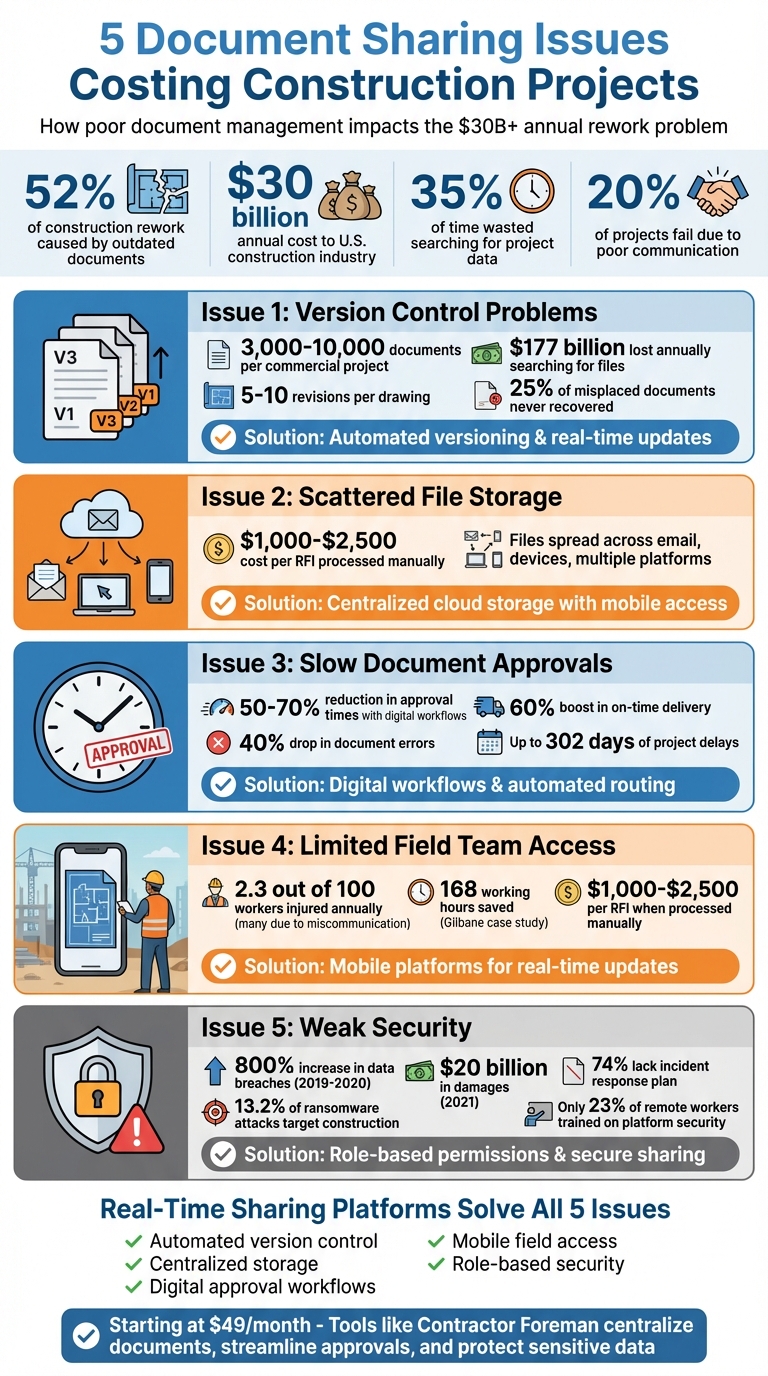
5 Document Sharing Issues in Construction: Costs and Solutions
Issue 1: Version Control Problems
Imagine this: your team is deep into framing a project when they realize they’ve been using blueprints labeled “Revision 3”, even though “Revision 5” was issued two weeks ago. Now, you’re stuck redoing work to align with the updated specs. Unfortunately, this kind of scenario is all too common.
In fact, 52% of all construction rework is caused by outdated documents or missing information. This inefficiency drains over $30 billion annually from the U.S. construction industry, with professionals wasting 35% of their time searching for project data or fixing errors caused by outdated files.
The main culprit? Disorganized document management. Plans often end up scattered across email threads, personal devices, WhatsApp chats, and random download folders. Without an automated system to track changes, teams rely on manual naming conventions – like “Proposal_v3_FINAL_FINAL.docx” – which only adds to the confusion. Considering that a typical commercial project produces 3,000 to 10,000 documents, with each drawing undergoing 5 to 10 revisions, manual tracking becomes a logistical nightmare. The result? The industry loses an estimated $177 billion annually to time wasted searching for or recreating files, and 25% of misplaced construction documents are never recovered.
“Version control continues to be a major pain point within the construction industry, contributing to an estimated $15 billion spent annually on rework.”- Construction Industry Institute (CII)
Disorganized version control creates chaos.
Inconsistent numbering schemes, failure to review revisions before distribution, and delays in updating physical plan rooms all contribute to accidental overwrites and deletions. Remote teams without a centralized system face even greater challenges, leading to costly errors, work stoppages, and disputes. Field crews often act on outdated information, blowing budgets and timelines. To avoid these headaches, an automated system is essential.
Solution: Automated Versioning and Real-Time Updates
The solution is simple: create a single, reliable source for real-time updates. Cloud-based platforms take the guesswork out of version control by automatically tracking changes and using check-in/check-out systems to prevent overwrites.
Adopt a consistent naming format, such as “Project–Trade–Revision–Date”, for every file upload. Maintain a master drawing register – a live log that tracks every sheet’s revision number, date, and status. When a document is updated, mark older versions as “superseded” and restrict access to ensure field teams don’t accidentally use outdated files.
“Project success depends on effective communication, including timely and appropriate distribution of information.” — Project Management Institute
Tools like Contractor Foreman’s document management system simplify this process. The platform automatically archives old versions, notifies the team of new updates, and makes the latest files accessible on mobile devices. Role-based permissions add another layer of control, ensuring only authorized users can edit, view, or delete files. This creates a complete audit trail, so you always know who made changes and when.
Digital workflows can also ensure accountability by requiring documents to be reviewed and approved before being released. When your entire team operates from a centralized platform – accessible via web and mobile – version conflicts become a thing of the past. Instead of wasting time searching for files, your team can focus on what really matters: getting the job done right.
sbb-itb-5eea312
Issue 2: Scattered File Storage
Scattered file storage is another major obstacle to efficient document sharing. When project files are spread across email threads, personal devices, and multiple storage platforms, it creates unnecessary chaos. This disorganization slows down workflows and introduces delays at every stage of a project.
The main issue arises when information becomes isolated. For instance, if a superintendent keeps a critical change order in their personal email and becomes unavailable, the entire team is left stranded. New hires joining mid-project may struggle to access important historical details, while field teams often waste time chasing updates through phone calls, texts, and emails. This increases the likelihood of missing vital changes, such as client requests or material updates.
Email, in particular, is a poor choice for managing construction documents. It has limitations like attachment size caps, no version control, and files that easily get lost in lengthy threads. The inefficiency adds up: processing a single Request for Information (RFI) can cost between $1,000 and $2,500 when factoring in the administrative effort across teams. These inefficiencies can be avoided with a centralized document system.
Solution: Centralized Storage with Mobile Access
A single cloud-based platform can solve the problem by consolidating all project documents into one location that’s accessible to both office and field teams. This ensures everyone operates with the most current information, creating a “single source of truth.”
Contractor Foreman offers centralized storage with mobile access, allowing on-site teams to retrieve contracts, drawings, permits, and daily logs directly from their phones or tablets. This eliminates the need to return to the office or wait for email responses. The platform integrates with tools like Zapier, QuickBooks, and Outlook 365, enabling seamless data sharing across your operation. With plans starting at $49 per month, it’s a practical option for contractors of all sizes.
To keep things organized, standardize folder structures using numbered prefixes (e.g., “01 – Contracts”, “02 – Design & Plans”) and adopt a consistent naming convention like [ProjectCode]-[DocType]-[Description]-[Date]-[Version] (e.g., SMITH-CO-01-KitchenDemo-02152026-v2.pdf). This makes searching for documents quick and straightforward.
Switching between multiple platforms and juggling several projects creates too much room for error. Finding a method that works for everyone ensures information doesn’t get lost in translation or missed altogether.
Role-based permissions enhance control and security. For example, clients can be granted view-only access, while project managers retain full editing rights. This setup protects sensitive data while ensuring field teams can access the documents they need. If a plumber requires updated specs, they can receive instant notifications via text or app, ensuring they only see relevant files and can get to work immediately. Centralized storage not only saves time but also reduces miscommunication, keeping projects on track and minimizing costly delays.
Issue 3: Slow Document Approvals
Manual approval processes can drag construction projects to a halt. When signatures rely on printed documents, physical meetings, or email exchanges, delays pile up. Things get worse when no one knows where a document is stuck – is it on the architect’s desk, buried in the client’s inbox, or lost entirely? This lack of transparency adds unnecessary friction to an already slow process.
The impact is significant. Studies show that poor communication causes delays so severe that 20% of projects fail outright. Consider how construction change orders requiring multiple approvals: a superintendent submits the request, but it must pass through project management, the client, and legal teams. Each step introduces potential delays, especially when unclear reporting structures leave team members guessing who to contact or when to escalate. Missed messages can snowball into major project setbacks.
Even email-based approvals come with their own set of problems. Feedback often gets lost in endless threads, conflicting comments create versioning headaches, and there’s no reliable audit trail to track who approved what and when. Without real-time updates, field teams are left waiting for answers, grinding progress to a standstill.
Solution: Digital Workflows and Clear Approval Chains
Digital workflows are a game-changer for tackling these bottlenecks. By automating approvals and offering real-time visibility, they eliminate manual delays and streamline the process. Organizations using structured digital workflows report a 50–70% reduction in approval times, a 40% drop in document-related errors, and a 60% boost in on-time delivery rates. Automated systems ensure documents move seamlessly from one reviewer to the next without relying on a single person to keep things moving.
Real-time tracking is just as critical. Tools like Contractor Foreman simplify approvals by integrating automated workflows and live status updates. Field teams can submit requests straight from their mobile devices, and the system routes documents to the right reviewers based on the document type. Project managers can easily monitor progress – whether a document is awaiting initial review, client sign-off, or ready for distribution. Decision-makers can even approve documents on-site using tablets or phones, avoiding delays when they’re in the field.
To get the most out of these systems, establish clear approval chains tailored to different document types. For example, standard reviews might have a 3–5 business day timeline, while expedited cases should be resolved within 24–48 hours. Aim for an average cycle time of under five days and an on-time review rate of over 90%. For shop drawings, approvals might involve an engineer, architect, and contractor before final sign-off by a licensed professional. Contract changes, on the other hand, may require legal review, project manager approval, and client confirmation.
When approvals stall, set up escalation paths to keep things moving. For instance, send automated reminders on Day 1, notify managers on Day 2, and escalate to project leadership by Day 3. This structured approach ensures documents don’t become roadblocks, keeping projects on track and on schedule.
Issue 4: Limited Field Team Access
Field teams relying on outdated paper files face a cascade of problems. When crews work with obsolete plans, they risk installing incorrect materials or following outdated specifications. This often results in costly rework and wasted resources. But the effects don’t stop there – delays in decision-making arise as field teams wait for updated instructions or approvals on change orders. These bottlenecks can stall projects for as long as 302 days. Additionally, poor coordination between office staff and field crews frequently leads to lost records and missed details.
Safety concerns also loom large. According to the Bureau of Labor Statistics, 2.3 out of every 100 full-time construction workers suffered a worksite injury in 2023, with many incidents stemming from miscommunications. Alarmingly, ineffective communication is a key factor in the failure of one in five construction projects.
The inefficiencies pile up daily. Field teams spend valuable time traveling to the office, making phone calls, or digging through email chains just to locate the latest documents. Processing a single Request for Information (RFI) can cost anywhere from $1,000 to $2,500 once you account for the time spent by everyone involved. These inefficiencies not only inflate budgets but also jeopardize project timelines. Clearly, there’s a pressing need for real-time digital tools to bridge these gaps.
Solution: Mobile Platforms for Real-Time Updates
Mobile platforms are changing the game by giving field teams instant access to updated project information, right where they need it. Tools like Contractor Foreman allow crews to view the latest plans, specifications, and updates directly on their smartphones or tablets. When a change order is approved or drawings are revised, everyone on-site sees the updates immediately.
The platform also simplifies daily reporting. With its daily logs feature, superintendents can document site conditions, weather impacts, and completed tasks directly from their phones. Photos are automatically linked to specific projects, ensuring that records are both accurate and organized. This seamless integration not only keeps documents current but also improves communication between the field and the office. Features like real-time markups and annotations make it easy for workers to flag issues directly on drawings or photos. Using tools like redlines, arrows, and comments, teams can highlight problem areas and share updates instantly, allowing project managers to address concerns without waiting for end-of-day summaries.
Take the example of Gilbane in 2023, where the company saved 168 working hours by reviewing 21 branch locations online:
“In a single four-hour online meeting, we designed and went through 21 branch locations using Matterport. That’s 21 times our team avoided a day of time lost to traveling to a physical location, which translates to 168 working hours saved.”
– Joel Vande Boom, Director of Strategic Projects, Midwest, Gilbane
Contractor Foreman also streamlines RFIs and submittals through its mobile app. Field teams can send RFIs directly from the job site, with responses automatically recorded, eliminating the need for time-consuming follow-ups.
By consolidating communication into one contractor-specific platform, the app replaces the chaotic mix of texts, WhatsApp messages, and emails that often disrupt construction workflows. Field crews can access everything they need – contracts, schedules, safety documents, and more – without relying on the office to send files or juggling multiple apps.
For teams working in remote areas with unreliable internet, offline capabilities are a lifesaver. Workers can view plans, make comments, and add updates even without connectivity. Once back online, their changes sync automatically, ensuring no time is wasted.
Starting at $49/month, Contractor Foreman makes high-quality document management accessible to contractors of any size. By combining document sharing, scheduling, budgeting, and client portals into one platform, it ensures field teams have the tools they need to stay efficient, informed, and safe, no matter where they are.
Issue 5: Weak Access Control and Security
Sharing construction documents without proper security measures can lead to serious risks. Weak access controls often leave sensitive documents vulnerable to breaches and malware. A common issue is over-privileging – when users are given more access than necessary. If one of these accounts gets compromised, the fallout can be catastrophic. Shockingly, only 23% of remote workers have received specific training on securing collaboration platforms.
The numbers paint a grim picture. Data breaches in the construction industry skyrocketed by 800% between 2019 and 2020. In 2021, construction ranked as the third most targeted industry for ransomware attacks in North America, accounting for 13.2% of all incidents. These attacks caused over $20 billion in damages that year alone, yet 74% of construction companies still lack an incident response plan.
The risks aren’t just external. Internal vulnerabilities – like human errors or failing to revoke access for former employees – can lead to sensitive information being exposed. Financial agreements, technical blueprints, and personal data are all at risk. For example, sending a file to the wrong email address or sharing documents without proper controls can result in accidental data leaks or open the door for cybercriminals. Beyond financial and reputational damage, inadequate access controls can also lead to non-compliance with safety regulations, building codes, and contract requirements.
Solution: Role-Based Permissions and Secure Sharing
A solution to these challenges lies in role-based access control, which ensures users only access the information they need. Instead of granting blanket permissions, access is tailored to specific roles. Sydney Paschall of ConstructConnect emphasizes this approach, asking, “What is the minimum access this person needs to do their job effectively?”
Secure sharing tools further protect sensitive project data. For instance, Contractor Foreman integrates security directly into its platform. With client portals, you can control exactly which files and photos external parties can see. A single click allows you to audit document visibility, minimizing the risk of internal data exposure. The platform also uses secure link-based submittals, enabling architects and engineers to interact with files without needing to create accounts or share passwords. This reduces credential-related security risks.
Additional features like custom fields allow users to store internal-only notes in RFIs and submittals, ensuring sensitive comments remain hidden from external contractors or clients. Automated folder structures help separate critical financial or legal documents from general project files, adding another layer of security. Real-time editing of Word and Excel files within the platform eliminates the need to download sensitive documents onto unsecured devices, and every action is logged to create a verifiable audit trail.
Even better, Contractor Foreman includes unlimited storage at every pricing tier, starting at $49/month. This ensures you have complete backups of all project files and security logs, even after a project wraps up. With these measures, access history can always be verified, providing peace of mind and compliance assurance.
Conclusion
Challenges like version control issues, scattered files, sluggish approval processes, limited access in the field, and inadequate security can severely disrupt construction projects. These communication breakdowns are a major factor in the failure of 20% of construction projects.
Real-time sharing platforms tackle these problems head-on by ensuring instant access to the latest information for everyone involved. Field crews can pull up updated blueprints on their mobile devices, managers can approve change orders in minutes, and teams can monitor progress with live photo uploads and logs. This streamlined coordination not only speeds up workflows but also minimizes miscommunication between teams. Plus, these platforms offer robust security measures to protect critical project data.
Security features like role-based permissions and audit trails ensure transparency by tracking who accesses what and when. For example, Contractor Foreman simplifies document management with tools like centralized storage, mobile access, automated workflows, secure file sharing, client portals, QuickBooks integration, and real-time editing—making it a powerful Procore alternative starting at $49/month.
These tools lead to fewer mistakes, quicker project completions, and increased team productivity. When field crews can verify specifications instantly and office staff can catch potential issues early, the entire team operates more effectively. By centralizing documents, communication, and approvals in real time, construction teams create a reliable “single source of truth” that prevents costly errors, rework, and project delays. This keeps everyone – from field workers to office staff – on the same page.
FAQs
How do I prevent crews from using superseded plans on site?
To ensure crews aren’t relying on outdated plans, set up a centralized platform that allows for real-time sharing and includes strong version control. This ensures that all team members can access only the most up-to-date plans. Make it a habit to communicate updates during meetings and emphasize the importance of working with the latest documents. By centralizing and consistently updating plans, you can reduce mistakes and avoid the extra work caused by outdated information.
What folder structure works best for keeping job documents easy to find?
The most efficient folder structure groups files based on project phases or categories such as contracts, permits, drawings, RFIs, change orders, and daily logs. For each project, set up dedicated folders for each document type.
To make navigation even easier, stick to clear and consistent naming conventions for your files and subfolders. This method minimizes confusion, makes searching faster, and helps team members quickly find the documents they need. Plus, it streamlines project management and supports seamless real-time sharing.
What security settings should I use when sharing files with subs and clients?
When sharing files, it’s crucial to use security settings that support both dynamic and secure sharing. These settings should allow you to control access and permissions, ensuring that only the right people can view or edit sensitive documents. Steer clear of consumer-grade file-sharing solutions – they often lack the robust safeguards needed to prevent data leaks.
Instead, focus on tools specifically built for professional construction workflows. These platforms are designed to handle the unique demands of the industry, offering features that help keep critical information safe and secure.







