
- Quick Comparison
- Why Contractors Need Software-Driven Workflows in 2026
- 1. Use Contractor Foreman Daily Logs and Real-Time Dashboards to Track Job Progress
- 2. Improve Client Communication and Approvals with Contractor Foreman Client Portal
- 3. Protect Margins and Plan Cash Flow with Contractor Foreman Financial Tracking
- Tables and Visual Breakdowns to Support the Three Strategies
- How the Three Strategies Work Together in One Connected System
- Matching Your Contractor Foreman Plan to Your Team Size and Workload
- Conclusion
- FAQs
The contractors winning in 2026 aren’t working harder. They’re working smarter — LITERALLY! By that we mean they’re using SMART tools.
For what? You may ask.
Well…for almost everything!
Chasing down a subcontractor’s daily update? There’s a tool for that!
Getting a client to sign off on a change order? Tool for that too!
Figuring out where your cash actually went on a job? Definitely a tool for that!
You see, these aren’t nice-to-haves anymore. They cover the three main things that you need to do to run a successful residential construciton business: progress tracking, client communication, and budget monitoring.
Here’s what that looks like in practice:
- Track job progress every day so small delays don’t turn into bigger schedule and cost problems.
- Move client communication and approvals into one place so change orders and decisions don’t sit in inboxes.
- Watch margin and cash flow weekly so overruns, missed billing, and cash gaps show up early.
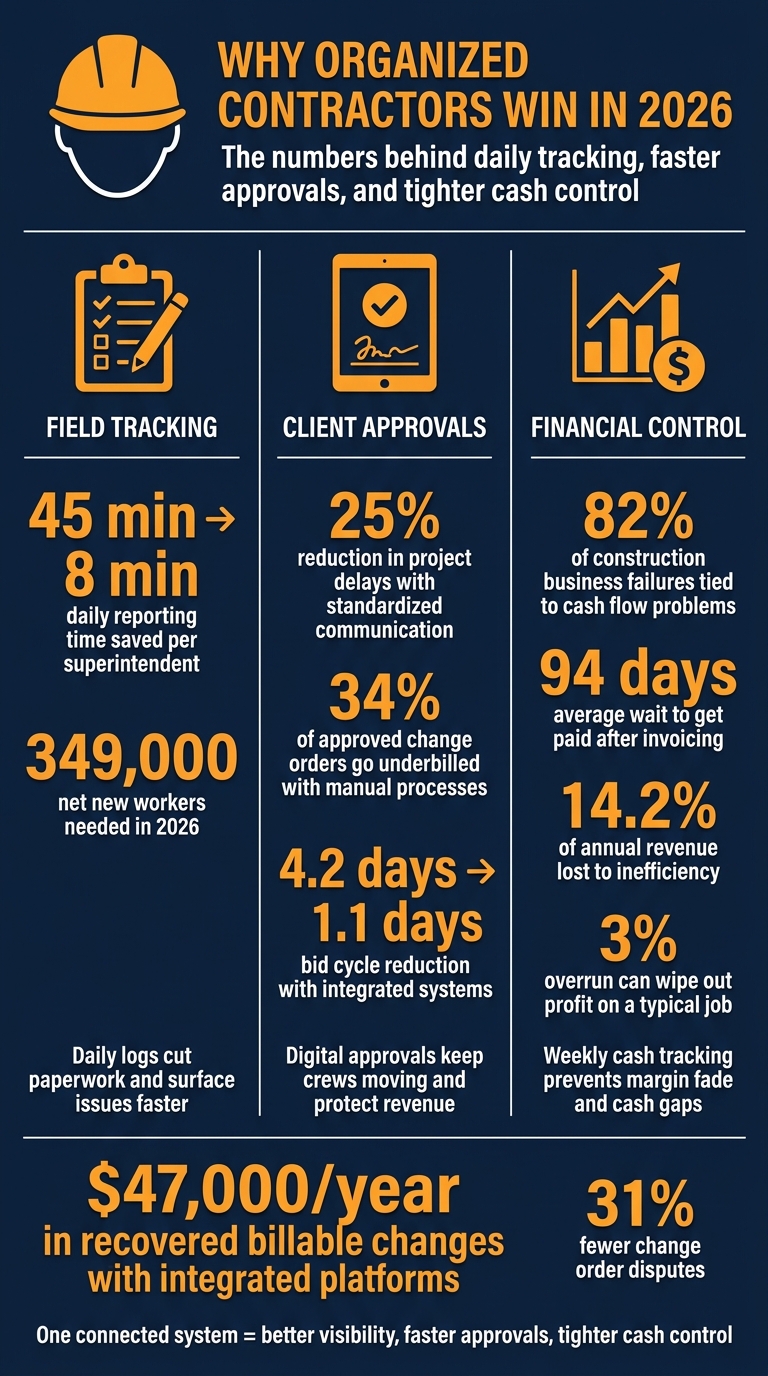
Key Contractor Stats: Why Organized Firms Win in 2026
Quick Comparison
| Focus Area | What top contractors do | What it helps prevent |
|---|---|---|
| Field tracking | Use daily logs and live dashboards | Late issue detection, labor drift, schedule slips |
| Client approvals | Use a client portal and digital approval flow | Delayed decisions, missing audit trails, stalled change orders |
| Financial control | Track job costs and use a 13-week cash flow forecast | Profit fade, underbilled work, cash shortfalls |
So the article’s point is simple: one connected system helps you see work sooner, approve work faster, and keep tighter control of profit and cash.
sbb-itb-5eea312
Why Contractors Need Software-Driven Workflows in 2026
Most contractors fall behind for a simple reason: their systems can’t keep up.
The ones gaining ground in 2026 are connecting field work, client communication, and financial data in one workflow. When field updates come in late, budgets live in spreadsheets, and change orders get buried, blind spots get expensive fast. At that point, you’re making calls based on old information.
Inefficiency costs the average contractor 14.2% of annual revenue, and disconnected systems make that problem worse.
Speed now gives contractors an edge. Integrated systems can cut bid cycles from 4.2 days to 1.1 days. That kind of pressure points to three clear fixes: daily field tracking, faster approvals, and tighter margin control.
Contractor Foreman puts those functions in one place.
It’s an all-in-one platform built for contractors, with 35+ modules that cover scheduling, daily logs, financial tracking, and client communication. It also supports unlimited projects as your workload grows, gives field crews mobile access, and connects with QuickBooks so job costs stay aligned.
| Feature | What It Replaces |
|---|---|
| 35+ Modules | Scattered apps for scheduling, budgets, and documents |
| Unlimited Projects | Spreadsheets that break down after 5–6 active jobs |
| Mobile Access | Paper logs and delayed field reporting |
| QuickBooks Integration | Manual data re-entry between job costing and accounting |
These three strategies turn that setup into better visibility, faster approvals, and tighter cash control. First, here’s how daily logs and real-time dashboards turn field activity into actionable job visibility.
1. Use Contractor Foreman Daily Logs and Real-Time Dashboards to Track Job Progress
Daily logs turn jobsite activity into data you can use. Dashboards turn that data into action.
Most job issues don’t start as disasters. They start small: a delay here, a missed update there, a crew that’s a little behind. When field data comes in late, teams usually spot those problems after they’ve already started to hurt the schedule.
Contractor Foreman’s daily logs help fix that. Crews can send updates straight from the jobsite using their phones, including task completion, labor hours, equipment usage, and site issues. The system also logs weather automatically, which cuts down on manual entry. That means fewer field updates slipping through the cracks between the site and the office, and more time spent fixing issues instead of tracking down missing information.
Automated daily reporting also cuts superintendent paperwork from 45 minutes to 8 minutes per report, giving them more time to supervise the work.
Once crews are logging work each day, dashboards are among the top project tracking solutions to see where attention is needed first.
Project managers get a live view across active jobs. They can track labor hours against productivity and installed quantities, check RFI and submittal status, and spot jobs that are starting to drift before that drift turns into a schedule slip. If a crew is short-staffed or a phase starts to fall behind, it shows up fast instead of waiting until the next weekly meeting. That kind of visibility helps teams catch slippage before it hits schedule and margin.
2. Improve Client Communication and Approvals with Contractor Foreman Client Portal
Slow approvals can bring a job to a crawl. That’s why the client portal matters. It’s not just a place to send updates. It becomes a central point for keeping work moving.
Poor communication causes most project failures. In 2026, speed and transparency matter just as much as craftsmanship. Contractor Foreman’s Client Portal gives owners one place to check project status, approve change orders, and review progress photos without digging through scattered calls and long email chains. Contractors can share schedule milestones, change orders, progress photos, and key project documents so clients can see where the job stands at any time.
When you pair the portal with daily logs and dashboards, owners stay tied to what’s happening in the field. That cuts down on back-and-forth and keeps everyone on the same page. Self-service portals reduce client questions and save project managers hours each week.
A simple rule helps here: require digital signatures before change-order work starts. That gives you a clean audit trail and can help protect your lien rights if a payment dispute comes up. Standardized communication protocols can also reduce project delays by 25%. Faster approvals keep crews moving and help avoid delays that didn’t need to happen in the first place.
Once approvals move faster, the next risk is whether the work is still protecting margin and following profitability strategies for construction businesses.
3. Protect Margins and Plan Cash Flow with Contractor Foreman Financial Tracking
Winning the job is one thing. Keeping the margin is what keeps the doors open. This requires precision in calculating building costs to ensure every expense is accounted for.
Even when approvals move faster, profit can still slip away if job costs and cash flow stay out of sight. Construction margins are thin in 2026, and a 3% overrun can wipe out profit on a typical job. Contractor Foreman updates labor, materials, equipment, and subcontractor costs as they happen, so you can catch budget gaps when a project is only 5% to 10% complete. That matters, because a small miss early on can turn into a much bigger problem later.
You can also set a profit-fade trigger – for example, 5% – that flags a project for review before losses stack up. And that’s a big deal in construction, where scope changes show up all the time. About 34% of approved change orders are either underbilled or dropped altogether when teams handle them with manual processes. Contractor Foreman pushes approved change orders into the budget and contract, so those scope changes don’t fall through the cracks and go unbilled.
Cash flow is a different issue from margin, but it can hurt just as fast. 82% of construction business failures are tied to cash flow problems, not poor work quality. On top of that, the average contractor waits 94 days to get paid after sending an invoice. Contractor Foreman gives you a weekly 13-week rolling cash flow forecast, so you can see expected collections and upcoming payments before a cash gap puts pressure on the business .
There’s also the risk of job borrow. That happens when one project’s cash quietly covers another project’s shortfall. It can keep things moving for a while, but it also hides trouble. Project-by-project tracking in Contractor Foreman helps bring that imbalance into view before it turns into a crisis.
That financial visibility becomes much easier to use when the numbers sit side by side.
Tables and Visual Breakdowns to Support the Three Strategies
These tables show how each strategy helps teams turn software data into faster decisions. The first one shows how daily logs move field notes out of a notebook and into action.
Daily log fields and the decisions they drive:
| Daily Log Field | Action Enabled | Why It Matters |
|---|---|---|
| Manpower/Crew Hours | Labor adjustments and crew performance review | Flags labor overruns and productivity gaps |
| Weather Conditions | Schedule changes and weather delay claims | Provides a verifiable audit trail for delay-related claims |
| Material Quantities | Material reorders and inventory management | Prevents work stoppages and supports accurate progress billing |
| Equipment Usage | Equipment assignment and rental decisions | Reduces idle equipment costs and informs rental extensions |
| Progress Photos | Client approvals and dispute support | Speeds up payment cycles and cuts down rework disputes |
| Safety/Quality Notes | Site safety protocols and quality control | Lowers the risk of OSHA citations and costly callbacks |
Of course, data only helps if the office sees it in time. That’s where dashboards come in.
Weekly spreadsheets vs. real-time dashboards:
| Feature | Weekly Spreadsheet | Real-Time Dashboard |
|---|---|---|
| Data Age | 10 to 15 days old | Updated within hours of field activity |
| Visibility | Gaps in labor and cash flow visibility | Connected view across field and office |
| Response Time | Reactive; problems surface late | Proactive; course-correct early |
| Cost Control | Margin leaks from unbilled change orders | Continuous reconciliation of committed vs. actual costs |
You can see the same pattern with approvals and construction job costing software. When work moves through email and handoff after handoff, things stall. When those steps live in one system, teams can act much sooner.
Email and manual process vs. client portal and integrated financials:
| Step | Email and manual process | Client portal and integrated financials |
|---|---|---|
| Change Order | Sits in an inbox for days; easy to miss | Notification sent; client views on mobile app |
| Approval | “Looks good” reply with no audit trail | Digital signature with automatic budget update |
| Cash Flow Tracking | Reactive; lag of days or weeks | Real-time WIP and 13-week rolling forecast |
| Admin Time | 5 to 8 hours per week on administrative tasks | Less admin time |
Manual processes eat up time and make issues harder to spot. Put these comparisons side by side, and the pattern is pretty clear: the best results come from one connected system.
How the Three Strategies Work Together in One Connected System
Daily logs, client approvals, and financial tracking get a lot stronger when they all feed the same system. Field logs update dashboards. Approvals change budgets. Financial tracking keeps costs current. When those parts work together, the office can spot trouble earlier and move on it faster.
Here’s a simple example from the field. A crew member logs hours tied to a specific cost code, and that data flows into the project dashboard so the project manager can compare construction cost estimates vs. actual labor in real time. If a scope change comes up onsite, the crew records it as a change order request. Using construction communication software, the owner reviews and approves it digitally, and approved changes update job costs automatically.
That kind of connected workflow helps contractors cut disputes and recover billable changes they might otherwise miss. Integrated platforms report 31% fewer change order disputes and an average of $47,000 per year in recovered billable changes.
Financial tracking ties the rest together. Approved scope changes and logged labor hours sync to accounting, including QuickBooks, so budgets stay current without manual re-entry. That live data also feeds a 13-week rolling cash flow forecast, which gives owners a forward-looking view of project health instead of a backward-looking spreadsheet. Once the workflow is connected, the next step is matching the plan to your team size and workload.
Matching Your Contractor Foreman Plan to Your Team Size and Workload
Pick your plan based on one simple thing: how many people need to use it every day.
Contractor Foreman’s annual plans start at $49/month for 1 user on Basic and go up to $249/month for unlimited users on Unlimited. The middle tiers are Standard at $79/month for 3 users, Plus at $125/month for 8 users, and Pro at $166/month for 15 users.
For solo operators or owner-operators under $1M in revenue, Basic is often enough to cover the main tools needed to move from informal estimating to documented project tracking, making it a powerful Procore alternative for smaller budgets. It’s a practical starting point if you want to tighten up daily logs, cost tracking, and job documentation before bringing more people into the system.
As revenue moves toward the $2M–$5M range, things usually get more demanding.
Work can’t stay stuck with one person. It has to be handed off. That’s where a mid-tier plan starts to make sense, especially when project managers and superintendents need their own access. And there’s a clear reason for that: 68% of contractors in that revenue band are already working 60+ hours a week because they lack operational systems.
For firms running 10 or more active jobs or bringing in over $5M a year, Unlimited is often the best match. At that stage, seat limits can become a headache. One person gets access, another person waits, and jobs start to slow down. 73% of contractors generating over $5M annually already use a dedicated project management platform, and Unlimited removes the user cap as the team grows.
Use the table below to line up each plan with your current team size and workload.
| Team Size / Workload | Recommended Plan | User Limit | Primary Need |
|---|---|---|---|
| Solo operator or owner-operator | Basic ($49/month, billed annually) | 1 user | Estimating, project tracking, and cost visibility |
| Small team | Standard ($79/month, billed annually) | 3 users | Simple collaboration and documentation |
| Growing team with PMs and superintendents | Plus ($125/month, billed annually) or Pro ($166/month, billed annually) | 8 or 15 users | Delegation and better job visibility |
| Larger firm with 10+ active jobs | Unlimited ($249/month, billed annually) | Unlimited users | Multi-project coordination and full team access |
Conclusion
In 2026, the contractors that stay competitive will do three things well: spot progress early, speed up approvals, and guard margins before small issues turn into expensive ones.
When daily logs, client approvals, and financial tracking all live in one system, teams can make faster calls with fewer surprises. That’s when software stops being just a place to store records and starts acting like the operating system for the job.
Connected workflows only help if teams use them the same way every day and make decisions based on current job data. For contractors using Contractor Foreman, the upside is simple: better visibility, faster approvals, and tighter control over cash and margins.
FAQs
How do daily logs improve job visibility?
Daily logs make job visibility much better because they create one central, real-time record of what’s happening on-site. Instead of piecing things together from scattered updates, contractors can check timestamps, labor hours, equipment usage, and progress photos in one place. That gives them a clear read on project performance without waiting for delayed reports.
For leadership, this means a much easier way to track productivity, compare actual progress against estimates, and catch schedule or budget problems early. Digital logs also replace messy manual notes and disconnected records with one reliable source of information that everyone involved can use.
Why use a client portal for approvals?
Using a client portal for approvals makes life easier on both sides. Instead of chasing updates through calls, texts, and scattered emails, your client gets one place to approve submittals, check RFI logs, and follow project milestones.
That kind of visibility cuts down on inbound questions, helps approvals move faster, and reduces mix-ups before they turn into bigger problems. It can also help protect project margins while improving client satisfaction and the odds of future referrals.
What is a 13-week cash flow forecast?
A 13-week cash flow forecast is a financial tool contractors use to project their cash position on a rolling basis and spot cash shortfalls before they hit.
It tracks money coming in and going out over the next three months. That gives contractors a clearer view of whether they’ll have enough cash for payroll, material costs, and other bills, even when payment cycles put pressure on day-to-day operations.







