
SO… you’re shopping for the best, worth-every-penny project management software for construction.
Here’s the mildly annoying answer: there isn’t one.
The best platform isn’t the one with the most features. It isn’t the one promising to “revolutionize your workflow” before you’ve even logged in. And it certainly isn’t the one with the slickest demo and the highest rating on Trustpilot.
But the good thing is—there’s a best one for YOU.
You can narrow it down based on two things: your biggest pain point and the size of your business.
So the best question to ask is which software solves YOUR biggest pain point?
There are usually four main culprits: client communication, cost control, field reporting, and compliance. Pick the one currently making you want to give up construction completely, then choose the software that’s best built to fix it.
Then, consider the size of your business. A small or midsized builder doesn’t need the same software as a huge commercial contractor. Why pay more just to overwhelm your team? And vice versa, a large builder would probably find software designed for smaller businesses too limiting.
To help you choose, here are the top construction PM software options in 2026 and what each one is actually good for.
Best Project Management Software at a Glance:
- Contractor Foreman: best low-cost all-in-one option for small and midsized builders
- Buildertrend: best for homeowner communication, selections, and allowances
- CoConstruct: legacy option only; no longer open to new customers
- Procore: best for large firms that need tight approval records and compliance tracking
- Houzz Pro: best for design-heavy, client-facing remodel and design-build work
- JobTread: best for close job-cost tracking and margin control
Quick Comparison
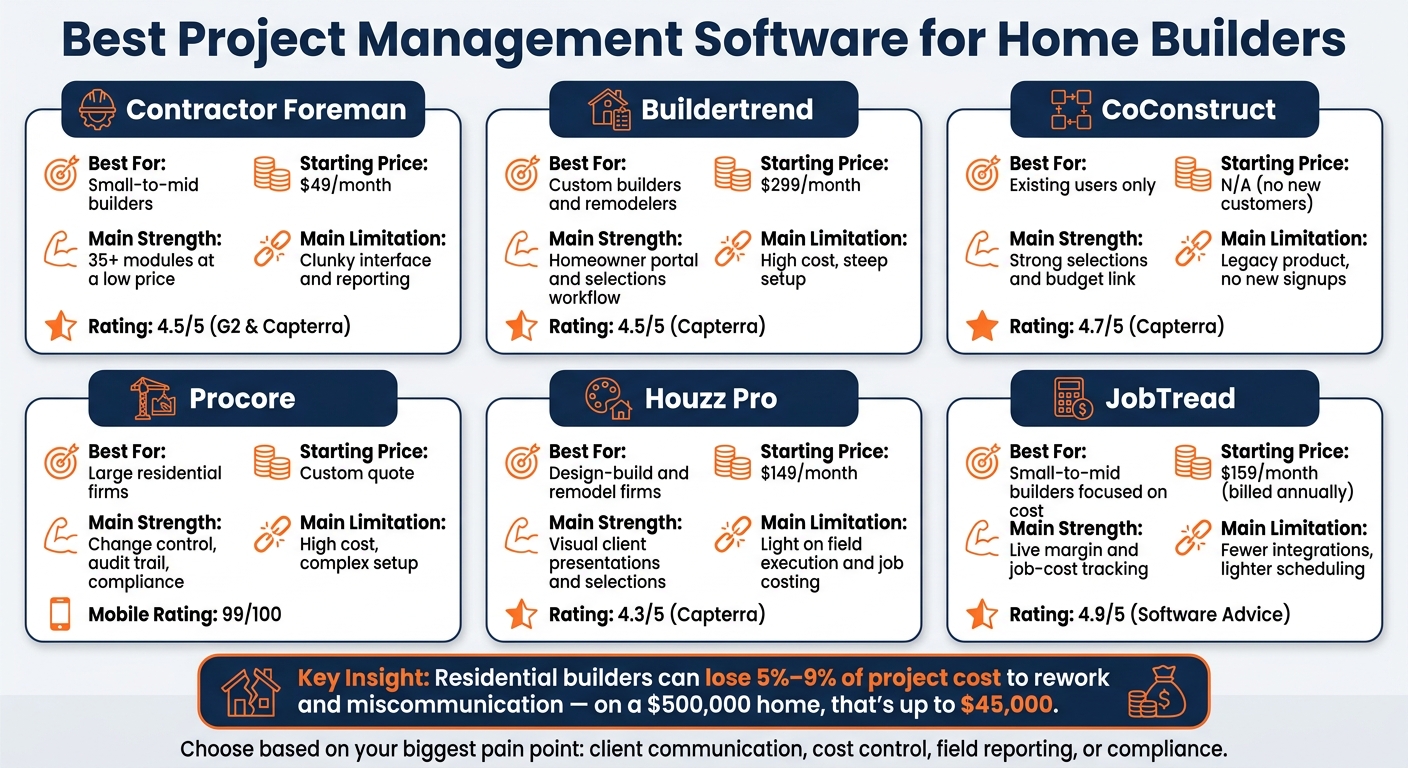
Best Project Management Software for Home Builders: Side-by-Side Comparison
| Software | Best For | Main Strength | Main Limitation | Starting Price |
|---|---|---|---|---|
| Contractor Foreman | Small-to-mid builders | Broad tool set at a low price | Interface and reporting can feel clunky | $49/month |
| Buildertrend | Custom builders and remodelers | Homeowner portal and selections workflow | Price can climb, and setup takes time | $299/month |
| CoConstruct | Current users only | Strong selections and budget link | No new customers | N/A |
| Procore | Large residential firms | Change control, audit trail, compliance | High cost and more process load | Custom quote |
| Houzz Pro | Design-build and remodel firms | Client presentations and selections | Lighter field and job-cost depth | $149/month |
| JobTread | Small-to-mid builders focused on cost | Live margin and job-cost tracking | Fewer integrations and lighter scheduling | $159/month billed annually |
To summarize:
For many small and midsized builders, Contractor Foreman offers the strongest overall value.
If homeowner communication is the priority, Buildertrend is the better fit.
For tighter job costing and margin control, JobTread stands out.
And for large firms with complex approval workflows and compliance requirements, Procore is the stronger choice.
Ultimately, choosing the best software is less about the brand name and more about where your business needs the most help.
sbb-itb-5eea312
1. Contractor Foreman
Contractor Foreman is an all-in-one construction management platform built for small and midsized contractors.
It comes with more than 35 modules, covering everything from estimating and scheduling to AIA billing and subcontractor compliance.
For home builders, the big test is simple: can one system keep field updates, client sign-offs, and job costs in sync?
Scheduling and Field Reporting
Scheduling and daily logs are available starting at the Plus tier. Field crews can send in daily reports through the mobile app, including photos and timestamps. GPS-verified time tracking helps confirm that crews were on-site when they said they were.
The platform also includes punch lists, inspection logs, and safety incident tracking, which helps teams keep quality control steady across jobsites.
Client Communication and Change Orders
The client portal gives homeowners a place to check project progress, view shared files, and pay invoices online.
Change orders move through a set workflow: costs are logged, priced, and then sent to the client for e-signature. Once the client approves, the system updates both the contract value and the project budget automatically.
Budgeting and Job Costing
Contractor Foreman tracks actual-versus-budget costs at the line-item level and produces project P&L reports along with A/R aging data. It also supports AIA G702/G703 billing, Time & Materials invoicing, and retainage tracking for both owners and subcontractors. AIA billing and retainage tracking start at the Standard tier. As of Jan. 1, 2026, the platform syncs only with QuickBooks Online and Xero.
Subcontractor Coordination
Subcontractor management includes a dedicated portal, purchase orders, task notices for assignment updates, and a submittal log with review cycles. Compliance tracking for insurance certificates and W-9s is built in, so teams can keep paperwork in order before a trade arrives on-site.
| Plan | Monthly Cost (Annual Billing) | Users | Key Features Unlocked |
|---|---|---|---|
| Basic | $49 | 1 | Estimating, invoicing |
| Standard | $105 | 3 | AIA billing, retainage tracking |
| Plus | $166 | 8 | Scheduling, daily logs, time cards |
| Pro | $221 | 15 | Client portal, takeoffs |
| Unlimited | $332 | Unlimited internal users | All features |
Prices reflect annual billing.
Contractor Foreman has a 4.5/5 rating on both G2 (304 reviews) and Capterra (825 reviews).
Users often point to the pricing, mobile workflow, and lifetime price lock as strong selling points. The most common complaints are extra clicks and limits around report customization.
2. Buildertrend
Buildertrend has been around since 2006 and is one of the better-known construction management platforms in residential construction. It follows a construction-first setup that ties together sales, scheduling, field updates, and client communication. That makes it a solid match for residential general contractors juggling several live jobs at the same time. It tends to work best for custom builders and remodelers who put a lot of weight on homeowner communication and selections management.
Scheduling and Field Reporting
Buildertrend’s scheduling tools include Gantt-style charts with drag-and-drop controls, critical-path scheduling, and resource assignment across multiple jobs. In the field, crews can log daily progress right from the mobile app. Photo Progress Reports let teams attach site photos to project milestones, which gives clients a clearer view of what’s happening on the job.
The mobile app is one of the stronger parts of the platform. It also includes a built-in mobile time clock that maps crew locations and creates payroll reports.
Client Communication and Change Orders
The homeowner portal gives clients 24/7 access to schedules, photos, budget updates, messages, and project documents. That kind of visibility can cut down on back-and-forth calls and “just checking in” texts.
Change orders can be built inside the platform and sent out for digital approval through the portal or mobile app. Buildertrend also includes a selections and allowances tool that updates the budget as homeowners make their choices.
Budgeting and Job Costing
Buildertrend supports real-time job costing and Work-in-Progress (WIP) reports. Those reports show billings, profit margins, and over/under billing by client. It also offers two-way sync with QuickBooks and Xero.
If budget tracking and purchase orders matter to your team, there’s a catch: those tools are part of the Advanced plan, not the Essential plan.
Subcontractor Coordination
Subcontractors get their own portal for bids, schedules, and payments. So instead of chasing details across texts, emails, and paper notes, teams can keep that trade-specific info in one place.
Its biggest strength is keeping homeowner-facing work organized.
Buildertrend has a 4.5/5 rating on Capterra. The most common complaints point to a steep learning curve and some friction when setting up QuickBooks. As of early 2026, some reports say Buildertrend has moved to custom quotes for established builders, with new quotes starting above $900/month in some cases.
| Plan | Monthly Cost | Key Features |
|---|---|---|
| Essential | $299 | Core scheduling, client portal, daily logs |
| Advanced | $499 | Budget tracking, purchase orders, subcontractor portal |
| Complete | $799 | Top-tier plan |
Pricing reflects published rates; some 2026 accounts may receive custom quotes instead.
3. CoConstruct
CoConstruct is now in maintenance-only mode. It no longer takes new customers and is being phased out after Buildertrend acquired it. So for most buyers, this isn’t an active buying choice. It’s more of a legacy product to compare against, especially if you already use it and need to think about moving to something else.
That’s why CoConstruct still comes up in the conversation. It matters less for new evaluation and more for current users figuring out their next step.
Scheduling and Field Reporting
One of CoConstruct’s best-known scheduling tools was its multi-project view. Builders could filter work across jobs by day, week, or month. It also synced through iCal with Google, Outlook, and Apple calendars, which made it easier to keep schedules lined up across teams.
In the field, crews used the mobile app for daily logs, photos, and punch lists. That said, some users said the app could load slowly on jobsites.
Client Communication and Change Orders
CoConstruct’s client portal gave homeowners 24/7 access to schedules, photos, selections, and budget updates. That alone made client communication a lot smoother.
Its biggest edge was the link between selections and budget. Homeowners could see the live cost impact of their choices before they approved them. Change orders also moved through digital sign-offs, and the budget updated automatically after approval. Industry analysts gave CoConstruct an 8.9/10 score for client collaboration.
Budgeting and Job Costing
A single entry could flow into estimates, specs, selections, and the project budget, which cut down on duplicate data entry. CoConstruct also supported both fixed-price and cost-plus jobs, with live cost updates as change orders were approved.
For accounting, it synced with QuickBooks and Xero to keep financial data current. That setup made CoConstruct a strong fit for builders dealing with lots of client selections and budget changes during a project.
Subcontractor Coordination
Trade partners could use a bidding portal to update bid status on their own. They could also view estimates or specs attached right to the bid.
CoConstruct holds a 4.7/5 rating on Capterra and a 94% user satisfaction rating based on 1,674 reviews.
| Feature | CoConstruct Capability |
|---|---|
| Scheduling | Multi-project views, Gantt charts, task dependencies, and iCal/Google/Outlook sync |
| Field Tools | Mobile daily logs, photo uploads, punch lists |
| Client Portal | Selection tracking, budget updates, and change order signatures |
| Accounting | Native two-way sync with QuickBooks and Xero |
| Status | Maintenance-only; no longer accepts new customers |
4. Procore
When the focus moves away from homeowner collaboration and toward tighter internal control, Procore starts to make more sense. It’s built as an enterprise platform for large, multi-trade projects. Home builders tend to use it when formal approvals, compliance, and audit trails matter more than customer-facing features.
Scheduling and Field Reporting
Procore’s mobile app is one of its biggest strengths. Industry analysts gave its mobile capabilities a 99 out of 100 rating. From the jobsite, crews can send in daily reports, log hours, upload photos, and track punch lists without much friction.
Its scheduling tools are more formal than lightweight builder apps. You get Gantt charts, task dependencies, crew assignments, and milestone tracking. That said, schedule management scored 69 out of 100, which is lower than several of Procore’s other core features.
Client Communication and Change Orders
Procore is built for formal change control, not homeowner selections. Change events tie scope changes to cost tracking and approvals, which gives teams a clean audit trail. That setup works well for builders who need tight records and approval history.
But if you want clients to browse finishes, pick fixtures, or manage allowances, Procore won’t be the right fit on its own.
Budgeting and Job Costing
This is one of Procore’s stronger areas. Its financial tools connect field activity to budget performance through live dashboards, with support for detailed cost codes and forecasting. For builders managing a lot of moving parts, that link between the field and the budget can save a lot of back-and-forth.
There is one catch for accounting setup. Procore does not include native integration with QuickBooks Online, so QBO users need a third-party connector. It does integrate with QuickBooks Desktop and Sage.
Subcontractor Coordination
Procore handles subcontractor workflows with clear ownership on RFIs and submittals, so each item has one person tied to it. It also supports compliance tracking for certificates of insurance, lien waivers, and prevailing wage certifications.
Another big plus: Procore’s unlimited user model. Builders can add field staff and subcontractors without paying per-user fees. On larger jobs, that can make adoption a lot easier across the whole team.
| Feature | Procore Rating/Capability |
|---|---|
| Mobile Field Tools | 99/100 – mobile capabilities |
| Project Tracking | 92/100 – project tracking |
| Schedule Management | 69/100 – schedule management |
| Change Management | Standout – scope changes tied to cost and approvals |
| Client Selections | Not available – no homeowner-facing selections module |
| QuickBooks Online | No native integration – requires third-party connector |
Pricing is custom-quoted based on Annual Construction Volume (ACV). In practice, Procore tends to fit best once a builder is well into the $20M–$30M ACV range, where the high implementation cost and added process load are easier to justify because of the control it gives.
Builders who want a lighter system with more homeowner-facing workflow should look at the next option.
5. Houzz Pro
Houzz Pro is built for client-facing residential work. That makes it a stronger match for remodelers, designers, and small design-build firms than for large custom-home builders. Its main focus is homeowner communication rather than heavy-duty field control.
Scheduling and Field Reporting
The scheduling view is easy to follow, but it’s still pretty basic and doesn’t go very deep on task dependencies. On the field side, Houzz Pro gives teams daily logs, photo capture, and a guest-access Subcontractor Dashboard that helps keep trade partners in the loop.
The mobile app covers task management, client messaging, time tracking, and even room scanning with LiDAR. That said, some users say it can bog down when loading large image files or detailed blueprints, especially in places with weak network coverage.
Client Communication and Change Orders
This is where Houzz Pro stands out most. Its 3D floor plans, photorealistic renders, and mood boards can cut down on confusion during selections. Clients can check progress, approve selections, and pay invoices from one dashboard. Selection boards also let teams group products by room or category so clients can review and approve them directly.
Change orders are handled digitally from start to finish. Teams can create them, send them out, collect e-signatures, and track status, with the budget updating automatically after approval.
Budgeting and Job Costing
Houzz Pro ties together estimates, purchase orders, and expenses so teams can see estimated versus actual costs in real time. It also includes cost catalogs, assemblies, and cost codes, which can make estimating easier on repeat project types.
Job costing is more limited. In most cases, it stops at estimate-to-invoice tracking and doesn’t get down to crew-level cost attribution. For that reason, it tends to fit smaller residential teams better than builders juggling a lot of active jobs at the same time.
Subcontractor Coordination
Houzz Pro includes bid management tools and lets users generate purchase orders straight from approved client selections. That creates a clean handoff from selection to purchasing.
Pricing starts at $149/month for the Essential plan and $249/month for the Pro plan. Most plans come with a 30-day free trial and require a 12-month annual commitment. Larger firms can request custom pricing.
Houzz Pro has a 4.3/5 rating on Software Advice and Capterra, based on 1,088 and 1,081 reviews. Users often like the client-facing features, but they also point to limited scheduling depth and the annual contract as downsides. Teams that want deeper estimating and tighter job-cost control should compare the next option.
6. JobTread
If your main goal is tighter cost control instead of polished client presentation, JobTread makes more sense. It’s built for small-to-mid-sized builders and remodelers, especially teams with 1–30 employees that want clear pricing and close control over job costs.
Scheduling and Field Reporting
JobTread uses Gantt charts and task assignments to manage timelines. It also connects estimating to scheduling, so a won bid can roll straight into a project schedule.
In the field, crews can use the native iOS and Android app to upload photos with project tags and submit daily reports with timestamps and attachments right from the job site.
Client Communication and Change Orders
Change orders run through e-signature approvals, with unit costs pulled over from the original estimate. Once a change order is approved, the contract value, project schedule, and budget update automatically.
Budgeting and Job Costing
This is where JobTread stands out most. It offers live margin tracking by project, phase, and line item, plus a cost catalog and bid request tools that help keep estimates in line.
It also includes built-in job costing with two-way QuickBooks Online sync, and it added integrated digital takeoff tools in 2026.
There is one catch. Updating a cost item in the catalog does not automatically update existing cost groups, so some manual edits may still be needed.
Subcontractor Coordination
JobTread includes free vendor and subcontractor portals. Subs and vendors can view project details and submit bids without adding to the builder’s subscription cost.
Pricing starts at $199/month or $159/month billed annually ($1,908 per year). That includes one internal user. Extra internal users start at $20/month each, with tiered discounts for 11–20 and 21–30 users.
JobTread has a 4.9/5 rating on Software Advice from 143 reviews, including a 5.0/5 score for subcontractor management. Users often point to its clear pricing and responsive support. Some also say the mobile app can feel less smooth when loading large files in weak network areas.
Next, compare the pros and cons of each option side by side.
Pros and Cons of Each Software Option for Home Builders
Use this summary to match each platform to the workflow that matters most to your business: client communication, budget control, field coordination, or compliance.
The table below cuts through the noise and shows the main trade-offs for residential builders.
| Software | Main Pros | Main Cons | Best Builder Type |
|---|---|---|---|
| Contractor Foreman | Broad feature set at a low price; 35+ modules including safety tools | Interface is less polished; support is thinner on lower plans | Small-to-mid GCs on a budget; best value for unlimited users |
| Buildertrend | Best for homeowner-facing workflows | Custom pricing; renewals can rise sharply | Residential builders when selections drive the workflow |
| CoConstruct | Strong spec and selection tracking for design-heavy builds | Legacy product; not a new-buy option | Existing CoConstruct users |
| Procore | Formal change control with a clean audit trail | Expensive; too complex for most home builders | Large GCs with compliance-heavy projects |
| Houzz Pro | Strong visual client presentations | Light on field execution | Best for sales and design, not jobsite control |
| JobTread | Best for live cost control | Fewer integrations; scheduling is less robust | Small-to-mid GCs focused on budget discipline |
This is the part that matters: the “best” software depends on where your team feels the most pain.
- If homeowners need constant updates and selection approvals, Buildertrend stands out.
- If keeping costs in line is the top issue, JobTread is the better fit.
- If you need a lot of tools without a big monthly bill, Contractor Foreman gives you more for less.
- If paperwork, audit trails, and process control drive the job, Procore fits larger, compliance-heavy teams.
- If your work leans hard into design presentation, Houzz Pro is stronger on the front-end client experience.
- If you’re already on CoConstruct, its selection and spec tracking can still work well for design-heavy homes.
Use these trade-offs to narrow your shortlist by company size, budget, and workflow priorities.
Which Project Management Software Is Right for Your Home Building Business?
Pick the tool that fits your team size, how you work with clients, and how closely you need to watch costs.
The comparisons above should help you narrow the field based on workflow, crew size, and budget control.
Owner-operators and small crews will usually line up best with Contractor Foreman. It gives small teams broad coverage without a big price tag. If the client side of the job matters more than all-in-one coverage, the next option makes more sense.
Custom home builders who care most about the homeowner experience should take a close look at Buildertrend. It fits high-end residential work well, especially for selections and allowances. If tight budget tracking matters more than homeowner-facing tools, JobTread is the better pick for precise job costing.
Design-build remodelers that want a polished client-facing layer should consider Houzz Pro. If you’re running more residential volume, Buildertrend is the stronger choice. And if your jobs call for tighter control and a clear approval record, move to the next option.
Large residential firms with formal compliance and approval needs should look at Procore. It’s built for deeper RFI, submittal, and compliance workflows, where audit trails and structured approvals shape the work.
Choose the platform that matches your team today, the way your jobs move, and the margin pressure you’re under.
FAQs
How do I choose the right software for my building business?
Choose software by lining it up with your biggest day-to-day bottlenecks, not just a long feature list.
The first step is simple: map your workflow from lead to final payment and look for the spots where information gets lost, entered twice, or becomes unclear.
From there, compare your options based on the kind of projects you take on, the size of your business, your plans for growth, and the tools you need it to connect with. Before you sign anything, bring in the people who’ll use it most and run a trial. That’s the best way to see if it feels intuitive and can act as a single source of truth for both office and field work.
Which features matter most for custom home builders?
For custom home builders, the most important features are the ones that keep clients in the loop, make selections easier to manage, and give everyone a clear view of the job.
A client portal does a lot of that heavy lifting. Homeowners can approve change orders, make selections, and check progress photos or schedules without the constant back-and-forth of calls, texts, and emails.
Builders also need integrated budget and allowance tracking, automated change order documentation with e-signatures, project scheduling, and a central place for documents so the office and field stay on the same page.
How hard is it to switch from my current system?
Switching systems is a big lift. It’s not just changing a login and moving on.
Most platforms come with a full setup process. That usually means rebuilding templates, schedules, cost codes, accounting syncs, and custom workflows.
To make the move smoother, export your current data early. That includes things like client records and project histories, ideally as structured CSV files. Then test the new platform in a sandbox with your actual team and day-to-day workflows before you fully commit.
Related Blog Posts
- Top 7 Client Portal Apps for Contractors
- Best Mobile Tools for Construction Teams 2025
- Ultimate Guide to Construction Collaboration Software
- Want Higher Profits? These Home Builder Software Features Matter Most







